
PXE Boot and TFTP: How Network Installs Actually Work
A machine with a completely blank disk powers on and prints a few terse lines about network boot. Some minutes later it is running a full operating system installer — no USB stick, no DVD, nobody touching it. If you have ever watched that happen and wondered how a computer with nothing on it can fetch an operating system, this article is the answer. The trick is called PXE, and one of its two load-bearing protocols is TFTP.
PXE matters beyond curiosity. It is how organizations image fleets of desktops, how servers get provisioned in racks, and how thin clients and lab machines boot every day. When it works, it feels like magic. When it breaks, the error messages are cryptic precisely because everything is happening before an operating system exists to explain itself. Understanding the chain turns those cryptic failures into five-minute fixes.
We will walk the whole chain in order — DHCP, TFTP, bootloader, and the heavier protocols that finish the job. Then we will map the classic failure points. We will end with a small lab exercise so you can watch a network boot happen packet by packet. This is part of our TFTP series. The protocol mechanics underneath are covered in how TFTP works.
What PXE Actually Is
PXE stands for Preboot eXecution Environment — "pixie" out loud. It is a small piece of firmware built into essentially every network card and motherboard. It exists to solve a chicken-and-egg problem. To load an operating system from the network, you need networking software. But networking software normally comes from the operating system. PXE breaks the loop by baking a truly minimal network stack into the machine's read-only firmware. It has a DHCP client to get an address, a TFTP client to fetch files, and just enough UDP/IP to carry them.
That firmware is tiny, and it has to be — which is exactly why TFTP is in the picture. As the protocol article explains, TFTP was designed to be implementable in a few kilobytes. It uses UDP instead of a full TCP stack, with a dead-simple lock-step transfer. It is the only file transfer protocol small enough to live in boot ROM, and PXE is its most visible home.
PXE's job description is deliberately short. It does not install operating systems, render menus, or partition disks. It does exactly three things: obtain network settings, download one file — called the NBP, the network bootstrap program — and jump into it. Everything impressive that happens afterward is the NBP's doing, not PXE's. Keeping that boundary straight is half of troubleshooting.
The Boot Chain at a Glance
The diagram below shows the whole journey, from blank machine to running installer. Each stage uses the lightest tool that can do its job, then hands off to something heavier. The file sizes on the right tell that story at a glance.
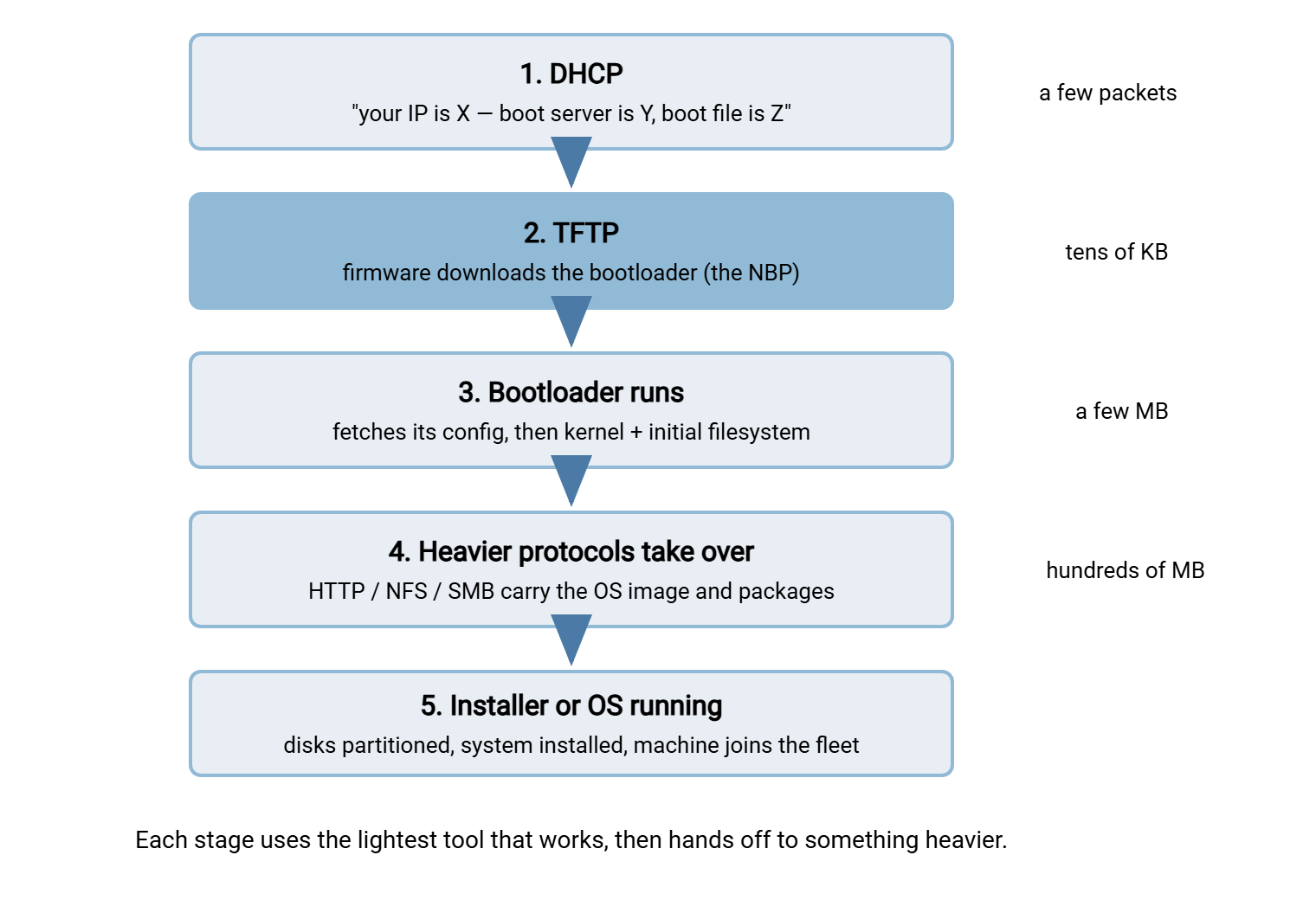
Now let's take the stages one at a time, because each has its own moving parts — and its own ways of breaking.
Step 1: DHCP Hands Out an Address — and Directions
DHCP (Dynamic Host Configuration Protocol) is the service that gives machines their network settings automatically. These include an IP address, a subnet mask, a gateway, and DNS servers. Every machine on a typical network uses it at startup. A PXE client uses it too — but it needs two extra pieces of information beyond the usual set:
- The boot server address — which machine holds the boot files. In DHCP terms this travels in the
next-serverfield of the reply (or as option 66, the "TFTP server name"). - The boot filename — which file to download first. This is the
filenamefield, or option 67.
So the PXE firmware broadcasts a DHCP request, flagging itself as a PXE client and stating its client architecture. That is whether it is an old-style BIOS machine or a modern UEFI one. The distinction decides which bootloader file it can run. The DHCP side answers with an address plus those two extra fields: "you are 192.168.10.57 — your boot server is 192.168.10.5, ask it for bootfile." That single reply converts a mute machine into a client with a mission.
One wrinkle you will meet in real buildings: sometimes the people who run DHCP and the people who run deployments are different teams. In that situation, the corporate DHCP server cannot be touched. The standard answer is proxyDHCP: a second service (deployment tools commonly include one) that answers the PXE client alongside the main DHCP server. The main server hands out the address; the proxy supplies only the boot server and filename. The PXE firmware is built to combine the two answers. It is a clever arrangement — and one more moving part to check when boots fail.
Remember: most PXE failures are DHCP failures. If a client never even attempts a TFTP transfer, stop staring at the TFTP server. In that case, the client either got no address, or got an address without boot information. Work the DHCP side first: scope options, next-server, relays between subnets, and whether the switch port comes up fast enough (more on that below).
Step 2: TFTP Delivers the Bootloader
Armed with a server address and a filename, the firmware opens a TFTP read request and downloads the NBP. This is the first real software this machine will run. NBPs are small, typically tens of kilobytes. Examples include the syslinux/PXELINUX family and GRUB on the Linux side. There is iPXE as a souped-up replacement firmware, and the boot manager that Windows deployment tooling serves. Small is the point: this file must squeeze through boot-ROM TFTP, so it contains just enough brains to fetch the next stage.
Two TFTP option extensions do quiet, useful work here. The tsize option tells the client the file's total size up front. And blksize negotiation raises the block size above the classic 512 bytes so the transfer takes fewer round trips. Both are described in the protocol article. The practical takeaway is that PXE relies on them, so a TFTP server chosen for PXE duty must support them properly. This is one of several server-side details covered in running a TFTP server properly.
The architecture question from step 1 lands here too. A BIOS machine handed a UEFI bootloader (or vice versa) will download it happily. TFTP neither knows nor cares what is in the file. The machine will then fail to execute it, often rebooting without a useful message. Deployment setups therefore serve different filenames to different client architectures, using the architecture identifier the client sent in its DHCP request. When one model of laptop boots fine and another loops forever, this mismatch is the first suspect.
Step 3: The Bootloader Takes Over
Once the NBP runs, PXE's job is done. But TFTP usually stays busy, because the bootloader's first act is to fetch its own configuration file over the same protocol. PXELINUX gives the clearest example of how flexible this stage can be. It requests a series of config filenames in a strict order. First comes one named after the machine's MAC address. Then come names derived from its IP address in hexadecimal, dropping one character at a time. Finally comes the file literally named default:
pxelinux.cfg/01-52-54-00-8a-2b-cc    <- this exact machine (MAC address)
pxelinux.cfg/C0A80A39                <- this exact IP (192.168.10.57 in hex)
pxelinux.cfg/C0A80A3                 <- widening groups of addresses...
pxelinux.cfg/C0A80A
   ...
pxelinux.cfg/C
pxelinux.cfg/default                 <- everyone else
Each miss comes back as a TFTP "file not found" error, and the loader simply tries the next name. This is worth knowing for two reasons. First, it is a free targeting mechanism: drop a file named for one MAC address and that one machine boots differently from the rest of the fleet. Second, it means a packet capture of a healthy PXE boot is full of file-not-found errors. They are probes, not problems, and many an administrator has burned an afternoon "fixing" them.
The config file tells the loader what to do: often show a menu (install, rescue, boot local disk). The loader then fetches a kernel — the operating system's core program — and an initial filesystem image. The image contains just enough tools to start the installer. These are a few megabytes each and typically still travel over TFTP. That is why block-size negotiation stops being a nicety and starts being the difference between seconds and minutes.
Step 4: Heavier Protocols Finish the Job
And then, decisively, TFTP leaves the stage. The numbers explain why. Lock-step TFTP moves one block per round trip, which is fine for a bootloader and tolerable for a kernel. But an operating system image runs to hundreds of megabytes or more. Pulling that through TFTP would turn every install into a coffee-break story. So the kernel and installer, now running with a real network stack, switch to real protocols. They use HTTP or HTTPS from a repository or deployment server (see our HTTP file transfer series for that protocol family). Some setups use NFS or SMB file shares. Each moves bulk data at wire speed.
Two refinements push TFTP even further toward the edges. iPXE, an open replacement for standard PXE firmware, speaks HTTP itself. A common pattern is to use plain PXE and TFTP to load nothing but iPXE. It then fetches everything else over HTTP. And modern UEFI firmware includes HTTP boot natively, retrieving even the first bootloader over HTTP with no TFTP at all. Both matter for large or distant deployments; both are also a reminder that TFTP's role in booting is a bootstrap wedge, not a preference.
Where PXE Setups Break
PXE problems cluster into a handful of families, and the stage where the boot stops tells you which family you are in. The table below is the fast map from symptom to suspect:
| Symptom on screen | Likely cause | First thing to check |
|---|---|---|
| No DHCP address; client gives up | No DHCP on that network segment, missing relay, or the switch port not forwarding yet | Does a normal machine get an address on the same port? Is the port set to come up immediately? |
| Gets an IP, then "no boot filename received" | DHCP answered without boot info; options 66/67 or next-server missing; proxyDHCP not answering |
Capture the DHCP reply and look for the boot server and filename fields |
| "TFTP open timeout" | Boot server down or unreachable; firewall dropping UDP 69 or the reply ports | Fetch the file with a TFTP client from another machine on the client's subnet |
| "File not found" | Filename or path wrong relative to the TFTP root; case mismatch | Compare option 67's value against the actual path under the TFTP root, character by character |
| Downloads the loader, then reboots or freezes instantly | Architecture mismatch — BIOS loader to a UEFI client or the reverse | Which filename was served to this client's architecture? Secure Boot settings too |
| Menu loads; kernel or config fetch fails | Paths inside the bootloader config wrong; files missing from the TFTP root | Read the config file the loader actually fetched; test each path it references |
| Everything works, but painfully slowly | No block-size negotiation, or big files still riding TFTP | Confirm the server honors blksize; move bulk files to HTTP where possible |
The switch-port detail in the first row deserves a sentence, because it is famously sneaky. Managed switches run a loop-prevention protocol (spanning tree) that can hold a freshly connected port silent for tens of seconds while it checks for loops. A human logging in never notices. PXE firmware, which fires its DHCP request immediately and gives up quickly, absolutely does. The request sails into a port that is not forwarding yet. The fix is enabling the setting that skips the wait on end-device ports — called PortFast or edge mode on most platforms. "PXE fails, but only sometimes, and only on some ports" is this bug's signature.
A Lab Exercise: Watch a Network Boot End to End
Reading about the chain is good; watching it is better. Here is a compact lab that shows every stage. It uses dnsmasq — a small service that conveniently speaks both DHCP and TFTP. It needs two machines (virtual machines are ideal) on an isolated network segment. Isolation is non-negotiable: a rogue DHCP server on a production network is a genuine incident. Package names and file paths vary a little by distribution; the shape stays the same.
# 1. On the server VM: install dnsmasq and the PXELINUX boot files
$ sudo apt install dnsmasq pxelinux syslinux-common

# 2. Build a TFTP root containing the bootloader and its helper module
$ sudo mkdir -p /srv/tftp/pxelinux.cfg
$ sudo cp /usr/lib/PXELINUX/pxelinux.0 /srv/tftp/
$ sudo cp /usr/lib/syslinux/modules/bios/ldlinux.c32 /srv/tftp/

# 3. Point dnsmasq at the lab interface (DHCP + TFTP in one config)
$ sudo tee /etc/dnsmasq.d/pxe-lab.conf <<'EOF'
interface=lab0
dhcp-range=192.168.77.50,192.168.77.99,1h
dhcp-boot=pxelinux.0
enable-tftp
tftp-root=/srv/tftp
EOF

# 4. Give the loader a config that proves success visibly
$ sudo tee /srv/tftp/pxelinux.cfg/default <<'EOF'
DEFAULT local
LABEL local
  MENU LABEL It worked - PXE chain complete
  LOCALBOOT 0
EOF

# 5. Start serving, and start watching the wire
$ sudo systemctl restart dnsmasq
$ sudo tcpdump -ni lab0 port 67 or port 68 or port 69 or udp
Now boot the second VM with network boot enabled and read the capture like a story. You will see the DHCP broadcast and the reply carrying pxelinux.0. Next come the read request to port 69 and the lock-step DATA/ACK stream answering from a fresh port. Then comes a burst of not-found probes as the loader walks its config search list (now you know to smile at those). You will see the fetch of default, and the message from step 4 on the client's screen. Every concept in this article, visible in one screenful of packets. From here, extending the lab into a real installer boot is only a matter of adding a kernel, an initial filesystem, and a menu entry that points at them.
The Chain to Remember
PXE is four handoffs, each to something bigger. DHCP tells a blank machine who it is and where its boot server and filename are. TFTP — the only protocol small enough for boot firmware — delivers the bootloader. The bootloader pulls its config and kernel. Full-size protocols like HTTP carry the operating system itself. Diagnose by asking which handoff never happened, and remember the two classic villains. They are DHCP answers missing their boot fields, and switch ports that wake up slower than the firmware's patience.
If you now want the underlying protocol cold, read how TFTP works. To build the serving side robustly — root directories, permissions, and the block-size support PXE leans on — continue to running a TFTP server properly. And because a boot server is a tempting target that speaks an unauthenticated protocol, TFTP security and containment belongs on your list before PXE goes anywhere near production.
Frequently Asked Questions
Does PXE always use TFTP?
What exactly are DHCP options 66 and 67?
Why do UEFI and BIOS machines need different boot files?
Is the whole operating system installed over TFTP?
Why does PXE fail on some switch ports when the network is fine?
Is PXE safe to leave enabled on a production network?
From the Sysax team: we build secure file transfer software for Windows. Sysax Multi Server is an FTP, FTPS, SFTP, and HTTPS server. Sysax FTP Automation handles scheduled, scripted transfers. Free trials are on the download page.