
How TFTP Works: The Tiny Protocol That Boots Your Network
Sooner or later, every network administrator meets TFTP. Maybe a switch manual tells you to "copy the new image from a TFTP server." Maybe a desktop flashes PXE: attempting network boot before the operating system loads. Either way, your first close look at the Trivial File Transfer Protocol is usually a small shock. There is no login prompt, no encryption, no way to even list the files on the server. By modern standards it looks broken on purpose.
It is minimal on purpose — and that minimalism is exactly why it survives. TFTP is small enough to fit inside a network card's boot firmware or a switch's recovery loader. A full protocol stack simply cannot go in those places. That is why switches still fetch firmware over it and IP phones still pull their configuration from it. Machines with blank disks still take their first breath through it.
This article is the complete mechanical explanation. It covers what rides on the wire, how the famous lock-step transfer works, and what the option extensions changed. It explains why the protocol persists everywhere. It is the foundation piece of our TFTP series — everything else builds on the mechanics explained here, and every term is defined as we go.
File Transfer Stripped to the Bone
TFTP does exactly one thing: it moves a single file between two machines, in either direction. You can read a file from a server, or write a file to a server. That is the entire feature list.
The clearest way to see how little that is: compare it with FTP, the classic File Transfer Protocol (covered in depth in our FTP protocol series). Despite the similar name, the two share almost nothing. FTP gives you usernames and passwords, directory listings, and the ability to rename and delete files. It offers resumable transfers and a long-running session where you navigate around. TFTP has none of it:
- No authentication. There is no username, no password, no concept of an account. Anyone who can reach the server can ask it for a file.
- No encryption. Every byte travels in cleartext, readable by anything on the path.
- No directory listing. You cannot ask "what files do you have?" You must already know the exact filename you want.
- No file management. No rename, no delete, no permissions commands, no folders to navigate.
- No resume. If a transfer dies at 90 percent, you start again from byte zero.
None of that is negligence. TFTP was designed to be implementable in a few kilobytes of code. That is small enough to burn into the read-only memory of a network card or the bootstrap loader of a router. Every feature costs code, and in a boot ROM there is no room to spend. A useful mental picture: FTP is a full postal counter with a clerk who checks your ID and helps you browse. TFTP is a mail slot in a door. You push a request through the slot, and packets either come back or they don't.
The missing security is the part with real operational consequences, and it deserves its own honest discussion. That is our companion article on TFTP security and containment. Here, just hold onto the design fact: the protocol has no security by design, because the places it runs cannot afford any.
UDP, Not TCP — and Why That Matters
Most file transfer protocols ride on TCP (Transmission Control Protocol), the transport layer that gives you a reliable connection. TCP numbers every byte, retransmits anything lost, and delivers data in order. Build on TCP and reliability comes free.
TFTP instead runs on UDP (User Datagram Protocol), TCP's bare-bones sibling. UDP offers exactly one service: it carries a single packet — a datagram — from one machine's port to another's. No connection, no ordering, no retransmission. If the packet is lost on the way, nobody is told. UDP is a postcard; TCP is a courier with a signature log.
Why would a file transfer protocol choose the postcard? The same reason as everything else in TFTP: code size. A proper TCP implementation is a substantial piece of software — connection state, sliding windows, congestion control. A UDP sender is nearly trivial: fill in a destination and fire. For a protocol that must fit in boot firmware, UDP is the only realistic choice. TFTP then rebuilds the minimum reliability it needs — and truly the minimum — on top, using block numbers, acknowledgments, and retransmission. That tiny homemade reliability layer is the lock-step mechanism we will walk through shortly.
The server listens on UDP port 69. That is the address every TFTP client has memorized, the same way FTP clients know TCP port 21 (our blog post What port is FTP? covers that side of the family). But there is a twist: port 69 is only used for the very first packet of a transfer. That detail has real firewall consequences that we will get to in the walkthrough.
The Five Packet Types
Everything TFTP does is expressed with five packet types, identified by an opcode. This is a small number in the packet's first two bytes that says what kind of packet this is. Five opcodes, and you have seen the whole protocol:
| Opcode | Name | Sent by | Meaning |
|---|---|---|---|
| 1 | RRQ — read request |
Client | "Send me this file." Carries the filename and transfer mode. |
| 2 | WRQ — write request |
Client | "I want to send you this file." Same layout as RRQ. |
| 3 | DATA |
Whoever sends the file | One numbered block of file content — classically up to 512 bytes. |
| 4 | ACK — acknowledgment |
Whoever receives the file | "Block N arrived." Nothing moves until the previous block is acknowledged. |
| 5 | ERROR |
Either side | "Something is wrong; the transfer is over." Carries a code and a text message. |
The ERROR codes are exactly the messages you will meet when troubleshooting. Code 1 is file not found. Code 2 is access violation (a permissions problem). Code 3 is disk full. Code 5 is unknown transfer ID — strange-sounding, but it will make sense once we cover ports. An ERROR packet is terminal: the transfer simply ends, and the client starts over if it wants to. Our server-side article maps each error to its usual real-world cause.
Two transfer modes: netascii and octet
The read and write requests carry one more field: the mode, which tells the server how to treat the file's bytes. Two modes matter. netascii is for plain text: it standardizes line endings in transit so a text file arrives with the conventions of the receiving system. octet (often called binary mode) transfers the file byte-for-byte, exactly as stored, no interpretation at all.
Remember: use octet mode for anything that is not plain text — firmware images, boot files, anything with a checksum. A firmware image "helpfully" line-ending-converted by netascii mode is corrupt, and a device flashed with a corrupt image may not boot again. Modern clients default to octet; older ones do not always, so it is worth checking.
A Download, Packet by Packet
Now the heart of the protocol: the lock-step transfer. TFTP moves a file as a sequence of numbered blocks, classically 512 bytes each. It enforces a strict rule — exactly one block is ever in flight. The sender transmits block 1 and then waits. Only when the acknowledgment for block 1 arrives does block 2 leave. Data, ACK, data, ACK, like two people carrying a ladder who must both step together. Here is a file download (a read request) from start to finish:
- The client sends an
RRQpacket to the server's UDP port 69, naming the file and the mode — "send mesw-backbone.cfg, octet." - The server does something surprising: it does not answer from port 69. It picks a fresh, unused port of its own — say 49152. It sends
DATAblock 1 from there, containing the first 512 bytes of the file. - The client sends
ACK1 back — addressed to port 49152, the port the data actually came from. Port 69's job ended after one packet. - The server sends
DATAblock 2. Then waits. The client sendsACK2. Then waits. This repeats, one block per exchange, for the entire file. - Eventually a
DATAblock arrives carrying fewer than 512 bytes. That short block is the end-of-file signal. The client writes it, sends the final ACK, and the transfer is complete. (If the file's size is an exact multiple of 512, the sender ends with a zero-byte DATA block. The shortness is the signal, not the content.)
An upload (write request) is the same dance with roles reversed. The client sends WRQ to port 69. The server acknowledges with ACK 0 from its fresh port. The client starts sending DATA blocks from block 1, each one acknowledged before the next departs.
The diagram below shows the download exchange. First comes the request to port 69, then the strict alternation of data and acknowledgment on the negotiated ports. The exchange ends with the short final block.
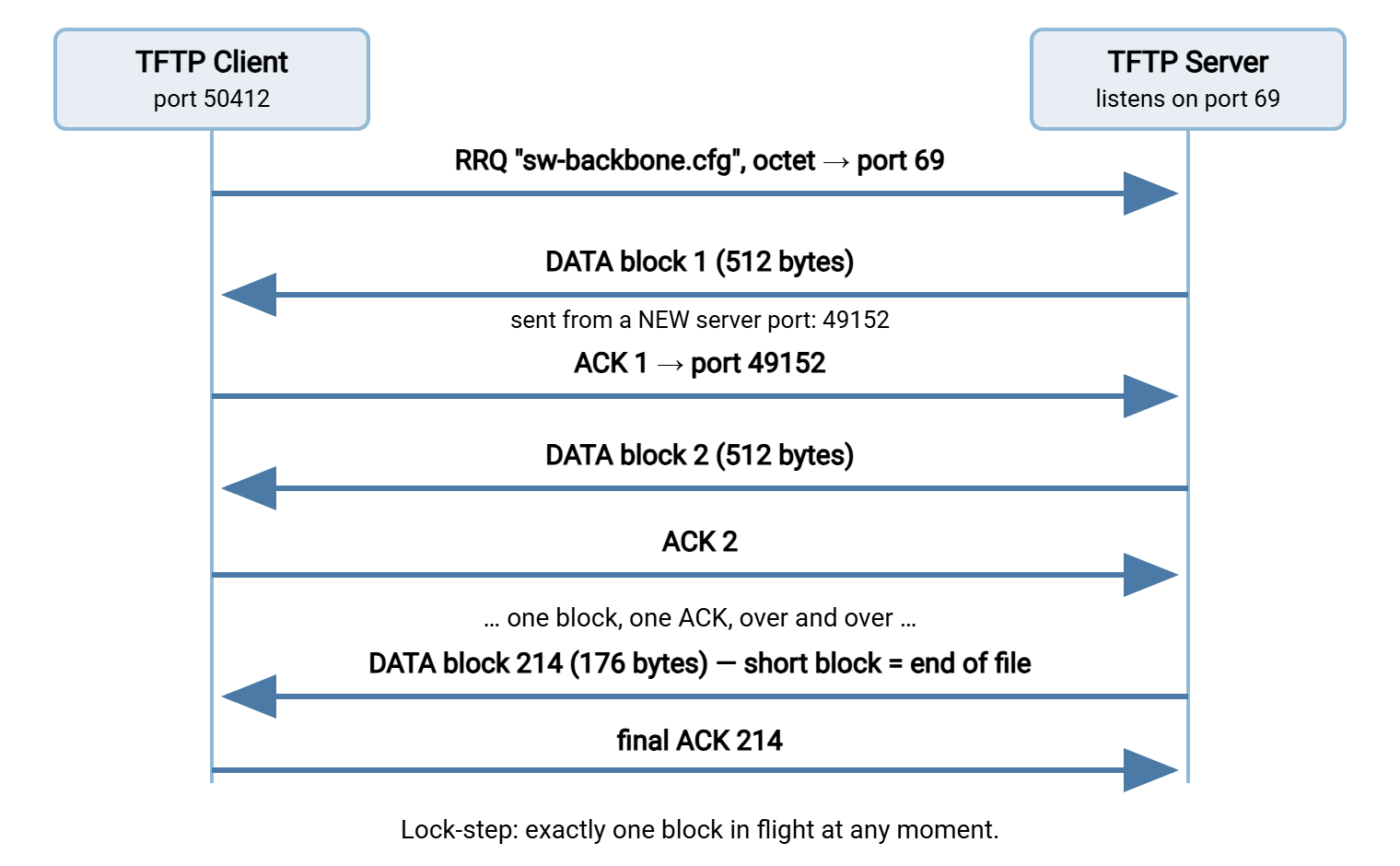
On the wire, the same transfer looks like this — a trace worth keeping next to you the first time you watch TFTP in a packet capture:
client:50412  ->  server:69     RRQ  "sw-backbone.cfg"  mode=octet
server:49152  ->  client:50412  DATA block=1   (512 bytes)
client:50412  ->  server:49152  ACK  block=1
server:49152  ->  client:50412  DATA block=2   (512 bytes)
client:50412  ->  server:49152  ACK  block=2
   ... 211 more DATA/ACK pairs ...
server:49152  ->  client:50412  DATA block=214 (176 bytes)   <- short block: end
client:50412  ->  server:49152  ACK  block=214
Transfer IDs: why port 69 disappears after one packet
That port switch in step 2 is not an implementation quirk — it is part of the protocol. The two ephemeral ports (50412 and 49152 above) are the transfer's TIDs, its transfer identifiers. Each concurrent transfer gets its own port pair, which is how one server can feed fifty booting machines at once. Every conversation is isolated by its ports. A packet arriving from an unexpected port is answered with that ERROR code 5, "unknown transfer ID."
Firewall gotcha: the server's replies come from a freshly chosen port — not port 69. A stateless firewall rule that only permits "UDP to and from port 69" will pass the request. Then it will silently drop the entire transfer that follows. The client sees a timeout, nothing more. Stateful firewalls usually track the exchange correctly, but strict ACLs need explicit care. This "reply comes from a different port than I contacted" problem may feel familiar. It is a cousin of FTP's data-connection trouble, explained in why firewalls block active FTP.
Lost Packets, Timeouts, and the One-Block Rule
Remember that UDP promises nothing. Any DATA or ACK packet can vanish. TFTP's recovery scheme is as plain as the rest of the protocol: every packet sent is a packet awaited. After sending a block, the sender starts a timer. If the matching ACK does not arrive in time, it sends the same block again. The receiver does the equivalent with its ACKs. Because block numbers ride in every packet, a duplicate is easy to recognize and ignore. Lose a packet and the worst case is a timeout and a resend — the transfer limps but survives.
One famous historical wrinkle is worth knowing, if only for the name: the Sorcerer's Apprentice Syndrome. Early implementations retransmitted a data block whenever they saw a duplicate ACK. So one delayed packet could snowball until every block was being sent twice. Modern implementations resend only on a timeout — but the story shows how subtle even a five-packet protocol can get.
The lock-step rule also explains TFTP's defining performance trait: it is slow in proportion to distance. One block per round trip is a hard ceiling. On a local network with sub-millisecond round trips, that ceiling is high enough not to notice. Across a WAN link with a 20-millisecond round trip, arithmetic takes over. Moving 512 bytes per 20 ms is about 25 KB per second. That is roughly 34 minutes for a 50 MB firmware image, on a link that could move it in seconds. The protocol is simply doing what it was built for: short hops on local networks. This slowness also explains the PXE boot process. It uses TFTP only for the first small files, then hands off to faster protocols. The full story is in PXE boot and TFTP.
Option Extensions: The Protocol Learns to Negotiate
The classic protocol has no knobs at all: 512-byte blocks, fixed behavior, take it or leave it. A later standardized extension added a graceful way for the two ends to negotiate a few parameters — graceful because it is fully backward compatible.
The mechanism: a client appends options — name and requested value pairs — to its RRQ or WRQ. A server that understands them replies with a sixth packet type, OACK (option acknowledgment, opcode 6), listing the values it accepts. The transfer then proceeds under those values. A server that predates options simply ignores the extra bytes and starts a classic transfer. Nothing breaks in either direction. Three options do nearly all the work:
- blksize — the block size, negotiable up to a theoretical 65,464 bytes. Bigger blocks mean fewer round trips: at 1,428 bytes per block instead of 512, the WAN transfer above speeds up nearly threefold. In practice, values are kept below the network's MTU. That is the largest packet the path can carry without splitting, commonly 1,500 bytes. Go above it and packets get fragmented, which some minimal boot-time network stacks handle badly. Tuning this well is a server-side topic, covered in running a TFTP server properly.
- tsize — transfer size. The sender announces the file's total size up front, so the receiver can check disk space, allocate memory, or draw an honest progress bar. PXE boot loaders lean on this one heavily.
- timeout — the retransmission interval in seconds, so both ends agree how patient to be before resending. Useful on slow or lossy links where the defaults give up too eagerly.
One more sizing fact belongs here, because it produces a genuinely mysterious failure. The block number is a 16-bit counter: it can only count to 65,535. With classic 512-byte blocks, 65,535 blocks is about 32 MB — and what happens at block 65,536 is not standardized. Some implementations roll the counter over to zero and carry on; some stop dead. When both ends agree on rollover, or a larger negotiated block size raises the ceiling, big files transfer fine. When they disagree, you get a transfer that fails at exactly the same byte count every single time. That is a signature worth recognizing, because nothing about the error message will mention size.
Why Such a Tiny Protocol Refuses to Die
Put the pieces together and TFTP looks like a protocol from another era — because it is. So why does every network closet still depend on it? Three reasons, all practical:
- It fits where nothing else does. Think of the firmware on a network card, the boot loader in a switch, or the recovery monitor in a router. These environments offer a few kilobytes for networking code, total. A TFTP client plus a minimal UDP stack fits. An SSH client with encryption libraries does not. As long as hardware needs to fetch files before an operating system exists, something TFTP-shaped will be doing it.
- It is universally present. Every network operating system ships a TFTP client; every vendor's documentation speaks it; every engineer's rescue toolkit includes it. For moving one file to one device on a closed network, it is the lowest common denominator that always works.
- It shines precisely in disasters. A switch may lose its operating system and boot into its bare recovery loader. The only tools that loader has are a console port and, almost always, TFTP. The protocol simple enough to fit in ROM is the one still standing when everything above ROM is gone.
Those strengths map to its real jobs today: backing up and restoring device configurations, and delivering firmware during upgrades and recoveries. Both are covered step-by-step in TFTP for device configs and firmware. TFTP also serves boot files to PXE clients and provisions simple devices like IP phones and wireless access points. Notice what is not on the list: anything crossing an untrusted network, anything containing secrets that matter, anything where an impostor server would be catastrophic. TFTP earns its keep only inside a fence — building that fence is the containment article's job.
The Version to Tell a Colleague
If you keep four facts, you have the protocol. TFTP moves single files over UDP with no login, no encryption, and no directory listing. It is tiny by design so it fits in boot firmware. The request goes to UDP port 69, but the reply comes from a fresh port, and the whole transfer continues on that port pair. Data moves in numbered blocks — classically 512 bytes — in strict lock-step. One block is in flight, each acknowledged before the next. A short final block marks the end. And option negotiation (block size, transfer size, timeout) modernizes the edges without changing the character.
From here, the natural next steps are practical. Read safe config and firmware procedures for the work you will actually do with TFTP. Read running a TFTP server properly for the serving side. Read security and containment for keeping a defenseless protocol out of trouble.
Frequently Asked Questions
Is TFTP just an older or simpler version of FTP?
What port does TFTP use?
Why does TFTP use UDP instead of TCP?
How large a file can TFTP transfer?
Can I list the files on a TFTP server?
Is TFTP encrypted or password-protected?
From the Sysax team: we build secure file transfer software for Windows. Sysax Multi Server is an FTP, FTPS, SFTP, and HTTPS server. Sysax FTP Automation handles scheduled, scripted transfers. Free trials are on the download page.