
TFTP Security: Why It Has None and How to Contain It
The vulnerability scan report lands in your inbox, and there it is again: "TFTP service detected. TFTP provides no authentication or encryption. Recommendation: disable." The scanner is not wrong about the facts. It is just unhelpful about the reality. That TFTP server is how your switches back up their configs, how your phones fetch firmware, and how bare machines boot. And "disable" is not a plan.
This article is the plan. It starts with the honest part: TFTP has no security, none can be bolted on, and pretending otherwise wastes everyone's time. Then it builds the practical part: four containment layers — isolation, ACLs, read-only content, and monitoring — that let a defenseless protocol operate safely. It is the same way a chemistry lab safely handles substances that would be dangerous in a hallway.
By the end you will be able to answer the scanner finding with something better than an excuse. You will have a documented containment posture that a security reviewer can read and accept. This is part of our TFTP series. The protocol mechanics that explain why it is defenseless are in how TFTP works.
"No Security" Is a Design Decision, Not a Bug
Let's inventory precisely what is missing, because each absence maps to a specific risk later:
- No authentication. There are no usernames, passwords, or keys anywhere in the protocol. Any machine that can send a packet to the server can request a file, and — if the server allows writes — push one.
- No encryption. Every file travels in cleartext. Anything on the network path can read it as it passes.
- No integrity protection. Nothing proves a file arrived unmodified or came from the server you meant to ask.
- No audit identity. Even a perfect log can only record an IP address — the protocol has no notion of who asked.
None of this is negligence, and it is worth internalizing why. TFTP was built to fit in a few kilobytes of boot ROM. There is no room for cryptography and nowhere safe to store a credential anyway. A device asking for its first file at power-on has no identity yet to authenticate with. The minimalism is the feature. That also means the absence cannot be patched away. There is no setting, plugin, or "secure TFTP" variant with meaningful adoption waiting to save you. The protocol will never defend itself.
Remember: you cannot fix TFTP — you can only fix the network around it. Every real TFTP security control is a network control: who can reach the service, what content it holds, and who is watching. That reframing is the whole article in one sentence.
What Can Actually Go Wrong
Threat modeling works better with specifics than with dread. Here is what an attacker with network reach to your TFTP service can actually do:
- Steal device configurations. This is the big one. A network device's config file contains password hashes to crack offline. It contains SNMP community strings that may grant read or write access to the device. It has VPN and routing details, and a complete ACL map. In other words, it is a labeled blueprint of your network and its defenses. And while TFTP has no directory listing, filenames are highly guessable. They are usually the device's hostname, and hostnames leak from DNS, monitoring tools, and shoulder surfing.
- Plant or replace files. If the server accepts writes, an attacker can replace the config or firmware a device will fetch on its next restore or upgrade. That turns your own provisioning workflow into their installation mechanism. A writable TFTP root also makes a handy anonymous stash for exfiltrated data or tooling.
- Impersonate the server. Nothing in the protocol lets a device verify who answered. An attacker may be on a network where they can intercept or race the real server, or answer DHCP first in a PXE environment. In that case, devices will cheerfully accept an attacker's file as gospel. For boot workflows this is the nightmare case: the machine runs whatever it is served. (More on the PXE corner below, and in PXE boot and TFTP.)
- Eavesdrop. Anyone positioned on the path sees every transferred byte. Config backups in transit are config theft waiting to happen.
Now the encouraging part, and the foundation of everything that follows: every one of those attacks requires network reachability. An attacker who cannot send packets to the server — and cannot sit on the path between server and devices — gets nothing. Reachability is the lever, and reachability is something you control completely.
Layer 1: Isolation — Put TFTP Where Only Management Lives
The first and strongest control is deciding which networks can reach the service at all. The standard pattern is a management network: a separate network segment that carries only administrative traffic. It is usually a dedicated VLAN, a virtual LAN carved out of your switches. Device management interfaces live there. So does the TFTP server. User desktops, guest Wi-Fi, and servers doing ordinary business have no route into it.
Done properly, the isolation answers the threat list at a stroke. The attacker on the office LAN cannot request configs, cannot push files, and cannot see transfers. Packets from their segment simply never arrive. Administrators reach the management network deliberately — through a jump host (a hardened machine that is the single doorway in) or a management VPN. This conveniently creates an audit point that TFTP itself could never provide.
The diagram below shows the shape: the TFTP server reachable from managed devices on the management VLAN, while the user LAN's path is blocked at the boundary.
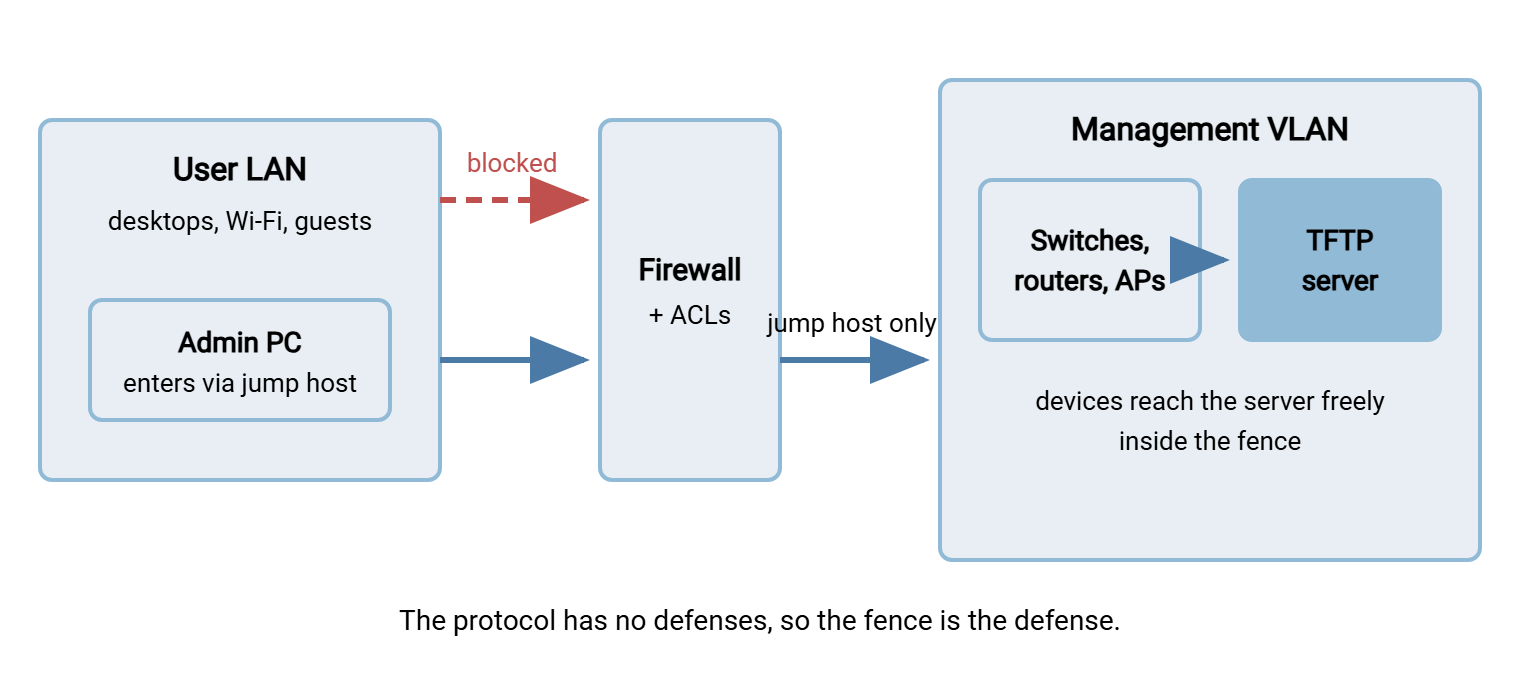
If your network has no management VLAN yet, TFTP is a fine reason to build one. Every other management protocol (SNMP, syslog, SSH to devices) benefits from the same fence.
Layer 2: ACLs — Allow Little, From Few, To One
Isolation sets the broad boundary; ACLs (access control lists — the ordered allow/deny rules on routers, switches, and host firewalls) sharpen it. The goal is to state exactly who may speak TFTP, and deny everyone else even inside the management segment. A reasonable policy reads like this: UDP to port 69 on the TFTP server, from the device subnets only; nothing else to that host; the TFTP server initiates nothing outbound.
There is one technical wrinkle you must know, or your ACLs will break transfers in a way that looks like gremlins. As explained in the protocol article, only the first packet of a transfer goes to port 69. The server replies from a freshly chosen high port, and the whole transfer continues on that port pair. A stateless rule that only permits "UDP port 69" therefore passes the request and kills everything after it. Stateful firewalls handle this if they understand TFTP. On Linux, that is the connection-tracking helper (nf_conntrack_tftp). It watches requests to port 69 and marks the follow-up exchange as related traffic. Load it, and rules like these behave correctly:
# Host firewall on the TFTP server (Linux/iptables shape).
# Management/device subnet: 10.20.30.0/24

# 1. Let the TFTP helper track transfers (once, at boot)
modprobe nf_conntrack_tftp

# 2. Allow new requests to port 69 from device subnets only
iptables -A INPUT -p udp -s 10.20.30.0/24 --dport 69 -j ACCEPT

# 3. Allow the lock-step replies for transfers the helper tracked
iptables -A INPUT -p udp -s 10.20.30.0/24 \
         -m conntrack --ctstate ESTABLISHED,RELATED -j ACCEPT

# 4. Nothing else reaches this host
iptables -A INPUT -m conntrack --ctstate ESTABLISHED,RELATED -j ACCEPT
iptables -A INPUT -i lo -j ACCEPT
iptables -P INPUT DROP
On network devices where ACLs are stateless, there are two honest options. Permit UDP both ways between the device subnet and the server's address (accepting that high-port traffic between those specific hosts is allowed). Or place the enforcement at a stateful firewall instead. Either is defensible when the segment is already isolated; pick one deliberately and write it down.
Layer 3: Read-Only Roots and a Boring Directory
The third layer assumes someone unauthorized eventually reaches the service anyway — defense in depth. It asks: what will they find, and what can they do to it? The answers should be "nothing interesting" and "nothing at all."
- Serve read-only by default. Most TFTP servers can refuse all writes. If no workflow uploads to this server, writes should be impossible, ending the planted-file threat outright. Boot and PXE servers virtually never need writes.
- If backups must arrive by TFTP, give writes a small fenced inbox — a single writable subdirectory, with the rest of the tree read-only. Add a sweep job that moves arrivals out within minutes. The window in which a stolen glance at the inbox finds anything should be short.
- Keep secrets out of the tree. Firmware images are usually public downloads — serving them is low drama. Device configs are the opposite: they are the crown jewels the whole threat model worries about. They should exist in the TFTP root only transiently, en route to an access-controlled archive behind an authenticated protocol such as SFTP. Our SFTP series covers that world. Nothing else — no password lists, no scripts with embedded credentials, no "temporary" copies of anything sensitive.
- Run the daemon like you distrust it. Unprivileged account, locked into its directory (the
--secure/chroot option), minimal filesystem permissions. Full server hardening detail lives in running a TFTP server properly.
A useful habit: read your TFTP root the way an attacker would, quarterly. Every file should be either a boot artifact, a current firmware image, or a backup less than a day from its sweep. Anything else is inventory shrinkage waiting to be reported.
Layer 4: Monitoring — Lighting the Blind Spot
The first three layers are walls. The fourth is the camera, and it matters because unauthenticated services are natural blind spots. There are no failed-login alarms, no lockouts, nothing that screams when probed. If you do not add eyes deliberately, TFTP activity is invisible by default.
- Log every request. Common TFTP daemons log each read and write request to syslog — filename, direction, and client IP. Turn the verbosity up and ship the logs to your central log system like any other security telemetry.
- Alert on the never-events. Watch for requests from addresses outside the expected device subnets. Watch for any write, anywhere, if your server is supposed to be read-only. Watch for requests for filenames that do not exist (someone is guessing), or a device fetching another device's config. On a properly contained server these are all near-zero-frequency events, which is exactly what makes them superb alerts.
- Watch the network for port 69 where it doesn't belong. Flow monitoring that sees UDP port 69 traffic anywhere outside the management segment has found either a misconfiguration or an intruder's toolkit. TFTP clients are a fixture of attack tooling because the protocol is so conveniently credential-free. Either answer is worth a ticket.
- Inventory the root on a schedule. A nightly job that hashes every file in the tree and diffs against yesterday answers the question logs cannot: did the content change? An unexplained new or modified file in a TFTP root is a genuine incident indicator.
The PXE Corner Case
Boot infrastructure deserves its own paragraph in the threat model, because the stakes invert. For config workflows, the fear is data leaving. For PXE, the fear is code arriving. A machine that network-boots will execute whatever bootloader it is handed. The handoff is arranged by DHCP — another unauthenticated protocol. An attacker who can answer DHCP on a boot segment can direct machines to their own TFTP server and own each one at a level below the operating system.
Containment translates directly. Keep network boot enabled only where it is used. Give deployment networks the same isolation treatment as the management VLAN. Enable DHCP snooping where your switches support it. This switch feature discards DHCP server replies from ports that are not supposed to host DHCP servers. Monitor for unexpected DHCP speakers. The full boot chain, and where it breaks, is in PXE boot and TFTP.
Shrink the Attack Surface by Shrinking the Job
The final control is strategic rather than technical: give TFTP less to do. Most modern network gear can back up configs and fetch firmware over SCP, SFTP, or HTTPS — protocols with real authentication and encryption. That leaves TFTP needed only for the ROM-level jobs no other protocol can reach: PXE, recovery loaders, and the oldest devices on the floor. Every workflow you migrate shrinks the sensitive content in the TFTP root, the list of clients the ACLs must permit, and the amount of cleartext on the wire. The migration path — what modern gear supports and how to move without breaking runbooks — is the subject of beyond TFTP.
The Containment Checklist
Everything above, compressed into the version you can paste into a runbook or hand to a security reviewer:
TFTP CONTAINMENT CHECKLIST
[ ] Server reachable only from management / device / boot segments
[ ] No route from user, guest, or general server networks
[ ] Admin access via jump host or management VPN only
[ ] ACLs permit UDP 69 to the server from device subnets only
[ ] Stateful tracking (TFTP helper) or documented high-port rule in place
[ ] Root directory read-only; writes disabled or fenced to one inbox
[ ] Inbox swept to authenticated storage on a short schedule
[ ] No configs, credentials, or secrets resident in the TFTP tree
[ ] Daemon runs unprivileged and locked (chroot/--secure) in its root
[ ] All requests logged to the central log system
[ ] Alerts: unexpected sources, any write, repeated file-not-found
[ ] Flow monitoring flags port 69 outside management segments
[ ] Nightly content inventory (hash + diff) of the root
[ ] DHCP snooping on segments where machines network-boot
[ ] Migration plan exists for workflows that could leave TFTP
The Honest Summary
TFTP will never authenticate a client, encrypt a byte, or notice an intruder. No update will change that, because the protocol's smallness is the reason it exists. What you can do is make reachability the gatekeeper the protocol never had. Isolate the service on a management segment. Sharpen the boundary with ACLs that respect the ephemeral-port behavior. Keep the served tree read-only and boring. Light the blind spot with logging, alerts, and content inventory. Do those four, and the scanner finding gets a response that reads like engineering instead of apology.
From here, running a TFTP server properly implements the host-level pieces of this posture. Our article beyond TFTP covers the strategic exit — moving every workflow that can leave onto protocols that defend themselves.
Frequently Asked Questions
Can I put a password on my TFTP server?
Is there a secure or encrypted version of TFTP?
How should I respond to a vulnerability scan flagging TFTP?
Is it OK to run a quick TFTP server on my laptop?
What should never be stored in a TFTP root?
Why did my firewall rules break TFTP transfers?
From the Sysax team: we build secure file transfer software for Windows. Sysax Multi Server is an FTP, FTPS, SFTP, and HTTPS server. Sysax FTP Automation handles scheduled, scripted transfers. Free trials are on the download page.