
The Partner Credential Lifecycle
Somewhere on your transfer server there is probably a partner account set up by someone who no longer works for you. The contact no longer works for the partner. The password has never changed and was originally delivered by email. Nobody planned that. It is simply what happens to partner credentials when they are treated as a one-time setup task instead of a managed lifecycle. They are the longest-lived credentials in most organizations, and the least watched.
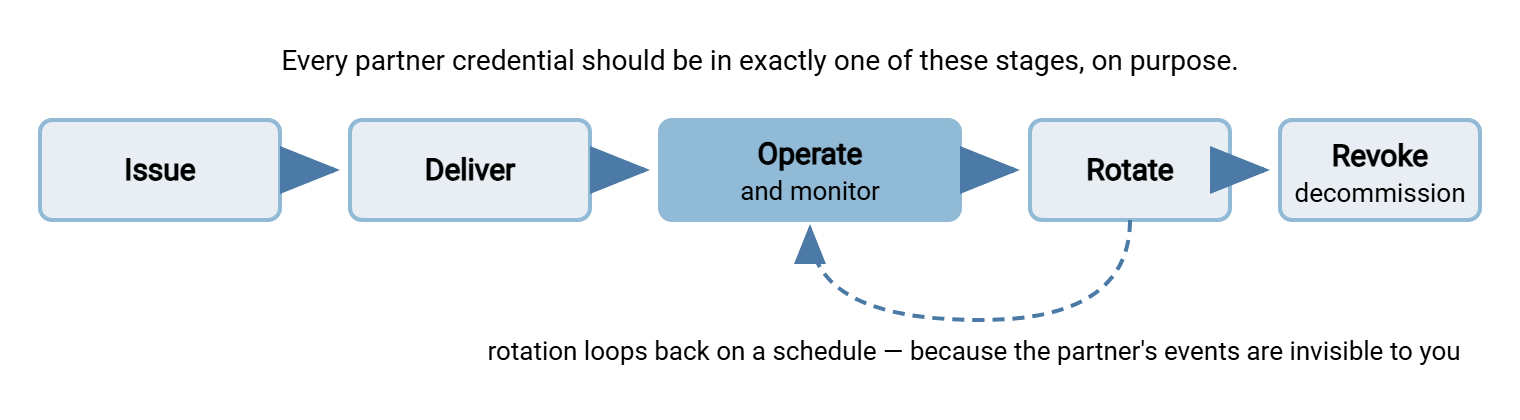
The fix is to treat every partner credential as having four deliberate stages: issue, deliver, rotate, and revoke. Underneath those stages, an inventory remembers what exists. A drill proves you can shut a credential off quickly when it matters. None of it is difficult. All of it is the kind of thing that only happens if it is written down as procedure.
This article — part of our Authentication on Transfer Endpoints series — walks the full lifecycle. It gives you communication templates to copy for each stage. It ends with an emergency revocation drill you can run twice a year to keep the whole system honest.
Why Partner Credentials Are Their Own Category
A partner credential is a service-account credential that lives in someone else's building, and that single fact changes everything about managing it.
- You control one end only. You choose the account's permissions and watch its logins. You have no visibility into how the credential is stored at the partner. You cannot see who can read it, or how many systems it has been copied into.
- The events are invisible. When your own admin leaves, you close their accounts the same day. When the partner's integration engineer leaves — the one who knows your password — nobody emails you. The events that should trigger rotation happen routinely and silently on the far side of the company boundary.
- They live the longest. Partner flows are business-critical and scary to touch, so their credentials survive migrations, staff turnover, and re-platformings on both sides. "It works, don't touch it" is how a credential reaches its tenth year unchanged.
- They face the internet. Partner logins usually arrive from outside your network, over the endpoint you expose to the world — the same endpoint every opportunistic attacker can also reach.
The lifecycle below is the answer to that combination. It calls for deliberate issue and delivery because the handoff crosses a trust boundary. It calls for scheduled rotation because the rotation triggers are invisible. And it calls for practiced revocation. When a partner calls to say "we think we've been breached," the clock is already running. The diagram shows the stages and the loop at the center of them.
If your partner exchange runs over AS2 with certificates rather than passwords or keys, the same lifecycle applies with different mechanics. The B2B-specific setup is covered in trading partner onboarding.
Stage 1: Issue
Everything downstream is easier or harder depending on decisions made in the first ten minutes. Four rules at issue time:
- One account per partner per flow. Acme's inbound orders and Acme's outbound invoices are two accounts, not one. Separate accounts mean separate blast radius, separate log attribution, and the ability to retire one flow without touching the other. That is the same logic as service account hygiene, applied across the company boundary. Name accounts so the log reads well:
acme-orders-in,acme-invoices-out. - Least privilege from the start. Scope the account to its own directory, in one direction — write-only for a partner that drops files, read-only for one that collects. The account should be unable to see that other partners exist.
- Choose the strongest method the partner can operate. An SSH key or client certificate beats a password: nothing guessable is exposed. And — as you will see in delivery — nothing secret ever has to cross the boundary at all. The comparison is in authentication methods compared. When the partner can only manage a password, generate it yourself: long, random, unique, per password policy for transfer accounts. Never let "whatever the partner's last provider used" leak into your server.
- Create the inventory record now. Account name, flow, partner contact, method, scope, rotation schedule, decommission trigger. A record written at issue time takes two minutes; reconstructing it years later takes an afternoon of archaeology, if it is possible at all.
Stage 2: Deliver Securely
The delivery moment is the exposure moment. A credential that travels carelessly is compromised on day one, and everything you do afterward protects a secret that is already loose. The rules:
- Never send the username and password together in one channel. An email containing both is a complete login kit sitting forever in two companies' mailboxes, backups, and any inbox an attacker later compromises.
- Split the channels. Send the username and endpoint details by email. Convey the password by a different path. Read it aloud on a phone call to a verified contact, or use a one-time-view link that expires after being read once. If your organization has a secure file-share or password-sharing facility, use it; the principle is simply that no single interception yields the whole kit.
- Verify the human. Deliver credentials only to the named technical contact from the onboarding paperwork, reached at a number or address you already had. Do not deliver them to whoever replied most recently on the email thread. Impersonating "the new person handling the integration" is a standard social-engineering pattern precisely because it works during handoffs.
- Prefer deliveries where nothing secret travels. This is the quiet superpower of key-based authentication. The partner generates their own keypair, keeps the private half, and sends you the public key — which is not a secret. You install it on their account and nothing confidential ever crossed the boundary in either direction. Certificates work the same way at issue time.
- Close the loop. Delivery is complete when the partner's first real login appears in your log — not when the email is sent. Watch for it, confirm it, and note the date in the inventory record.
The Templates
Most lifecycle failures are communication failures — the partner did not know a rotation was coming, or the revocation notice sat unread. These three templates cover the standard moments; adjust the bracketed fields and keep them beside your runbook. Notice what the templates never contain: the credential itself.
TEMPLATE 1 - NEW CREDENTIAL ISSUANCE
Subject: New file transfer credentials for [flow name]
To: [named technical contact]
We have created the account for [flow description, e.g. daily order
files]. Connection details:
  Host: [hostname]   Protocol: [SFTP/FTPS]   Port: [port]
  Username: [account name]   Directory: [path]
The password/key exchange will follow separately via [phone call /
one-time link / your public key], per our credential handling policy.
Please confirm receipt and complete a test login by [date]. We will
verify the first login in our logs and confirm back to you.

TEMPLATE 2 - SCHEDULED ROTATION NOTICE
Subject: Scheduled credential rotation for [flow name] - action needed
To: [named technical contact]
As part of routine credential rotation, new credentials for
[account name] will be issued on [date]. Both old and new credentials
will work during an overlap window ending [date+window]. Please switch
your systems to the new credentials during the window and reply to
confirm. After the window closes, the old credentials stop working.
The new secret arrives separately via [channel].

TEMPLATE 3 - EMERGENCY REVOCATION NOTICE
Subject: URGENT - credentials for [flow name] disabled
To: [named technical contact]  (also call: [phone])
The credentials for [account name] were disabled at [time, timezone]
due to [suspected compromise / your report / contract change].
Transfers on this flow are paused. No action is needed on the old
credentials; they no longer work. Replacement credentials will be
issued via our standard delivery process [today / by date]. Contact
[name/desk] with any questions. We will confirm when the flow is live.
Stage 3: Rotate on Schedule
Elsewhere in this series we are blunt that calendar-driven password rotation for humans is mostly theater — rotate on events, not birthdays. Partner credentials are the honest exception, for a reason worth restating precisely. Event-driven rotation requires seeing the events, and the events happen inside the partner, where you cannot see them. The engineer who knew the password moves on; the credential gets copied into a system you have never heard of; a contractor's laptop is lost. No notification will ever reach you. A rotation schedule — commonly annual, or quarterly for sensitive flows — is the event you fire on the partner's behalf. The real one never arrives. And since these credentials are machine-held random strings, rotation carries none of the "humans pick weaker increments" cost that discredited calendar rotation for people.
The operational risk is breaking a production flow mid-rotation, and the answer is the overlap window. This is a period when old and new credentials both work, so the partner's cutover is unhurried and reversible.
- Announce with the rotation template, far enough ahead for the partner's change process — two weeks is a common courtesy.
- Provision the new credential alongside the old: a second password or account, an additional authorized public key, or a renewed certificate, depending on method.
- Deliver the new secret by the same secure delivery rules as issuance.
- Watch the logs for the partner's first login with the new credential — that is your confirmation, more reliable than their reply.
- Close the window on the announced date: disable the old credential, then verify by attempting a login with it and seeing the refusal in the log.
- Update the inventory record: rotation date, next due date, any contact changes discovered along the way. Rotations are excellent at flushing out the fact that your named contact left last spring.
Key and certificate flows rotate the same way with different verbs. Add the new public key, then remove the old one after cutover. Issue the renewed certificate before expiry, then stop trusting the old one after. Certificates at least force the issue by expiring — the renewal rhythms are covered in our certificate management series.
Remember: you will never receive the email that says "the person who knew your password left our company." The rotation schedule is that email, sent by your calendar instead of theirs.
Stage 4: Revoke Fast
Revocation is the stage you hope not to use and must be fastest at. The triggers are roughly in this order of urgency. First, the partner reports a compromise on their side. Next, your own monitoring flags the account doing something it never does. Then, the contract ends or the flow is migrated. Last, the partner reports a staff departure and asks for rotation (the rare, welcome case of an event you actually get told about).
What revocation means depends on method: disable the account or its password; remove the authorized public key; stop trusting the certificate. In every case it is an action on your server, requiring nothing from the partner — which is the point. On a Windows server such as Sysax Multi Server, the drill below touches exactly two things. One is the user account entry, to disable the credential. The other is the activity log, to see what that credential did recently.
Two follow-ups turn a disablement into a complete revocation. First, verify: attempt a login with the revoked credential and confirm the refusal. Assumptions about what "disabled" means have embarrassed better teams than yours. Second, review the history: pull the account's recent activity and look for logins at odd hours, from new addresses, or touching unusual files. If the credential was compromised, the log tells you what the attacker saw. That is the difference between "we cut it off" and "we know what happened". The deeper practice is in transfer logging and audit.
The Emergency Revocation Drill
When a real compromise call comes, the question is not whether you can revoke a credential — of course you can. It is how many minutes it takes while you hunt for the account name, the admin password, and the partner's phone number. A drill answers that with a stopwatch instead of an estimate. Run it twice a year against a dedicated drill account (or a real one inside a maintenance window), and record the times.
EMERGENCY REVOCATION DRILL
Scenario, announced without warning to the on-call admin:
"Partner [X] just called - they believe the credentials for
[flow] are compromised. Go."

Step                                            Target    Actual
1. Locate the flow's inventory record,
   identify account name + method               5 min     ____
2. Disable the credential on the server
   (account / key / certificate trust)          10 min    ____
3. Verify: attempt login with revoked
   credential, confirm refusal in the log       15 min    ____
4. Pull the account's recent activity
   (last 30 days): sources, times, files        30 min    ____
5. Notify partner contact using Template 3,
   by email AND phone from the record           45 min    ____
6. Begin replacement issuance via the
   standard delivery process                    same day  ____
7. Write up: timeline, findings, anything
   that slowed you down                         next day  ____

Each step tests a different asset: 1 tests the inventory, 2 tests
access and admin readiness, 3 tests your assumptions, 4 tests
logging, 5 tests contact data, 6 tests the issuance process.
A step that overruns its target is a finding, not a failure --
fix the asset it tests and re-run next cycle.
The first run is always humbling — a missing inventory record here, a partner contact who left there. That is the drill working. The second run is faster, and the real incident, when it comes, is a procedure instead of a scramble.
The Inventory That Holds It All Together
Every stage above leaned on the same artifact: a current record per credential. Reuse the service-account documentation template from service account hygiene with the partner-specific fields emphasized. Include the named technical contact and an escalation phone number. Include the contract or agreement the flow belongs to, and the rotation schedule with last-done and next-due dates. Include the decommission trigger — usually "contract ends" — that prevents the account from becoming immortal.
Keep the review cadence tied to something that already happens, such as contract renewals or your twice-yearly account audit. Confirm the contact is still employed, the flow still runs, the rotation is not overdue, and the scope still matches reality. Ten minutes per partner per cycle is the entire cost of never again discovering a live credential for a partnership that ended years ago.
The Short Version, and Where to Go Next
Issue narrow: one account per partner per flow, strongest method the partner can operate, inventory record written the same day. Deliver split: secrets never travel with usernames, humans verified, key-based flows preferred because nothing secret travels at all. Rotate on schedule with an overlap window, because the partner's departures and exposures are invisible to you. Revoke on your server, verify the refusal, read the history — and drill it, twice a year, with a stopwatch.
From here: service account hygiene covers the internal twin of these accounts and the documentation template this article borrows. The article on reading auth failures and designing lockouts shows what partner credential trouble looks like in the logs. It includes how not to lock out the partners you just onboarded. The article on trading partner onboarding covers the certificate-based B2B version of the handshake.
Frequently Asked Questions
How often should partner credentials rotate?
What is the right way to send a partner their password?
What if a partner refuses to rotate or drags their feet?
Should a partner get one account, or one per flow?
What is the fastest way to cut off a compromised partner credential?
From the Sysax team: we build secure file transfer software for Windows — Sysax Multi Server, an FTP, FTPS, SFTP, and HTTPS server, and Sysax FTP Automation for scheduled, scripted transfers. Free trials are on the download page.