
Service Account Hygiene for Automated Transfers
A service account is an account used by software instead of a person. It might be the login a scheduled job uses to push the nightly export. It might be the credential a partner's system presents at 3 a.m. Or it might be the account inside a script somebody wrote years ago and everybody is now afraid to touch. On most transfer servers, service accounts outnumber human accounts — and they do the majority of the logging in, because automation never sleeps.
They are also where authentication hygiene quietly rots. A human account has a person attached who notices strangeness, changes their password, and eventually leaves so the account gets closed. A service account has none of that. Nobody notices, nobody rotates, nobody leaves. The account simply runs, accumulating copies of its credential and permissions it never needed, until an auditor or an attacker finds it first.
This article — part of our Authentication on Transfer Endpoints series — lays out the hygiene rules that keep automated accounts clean. It covers one account per job or partner, least privilege, and credentials out of script text. It covers rotation that doesn't break the job. It provides a documentation template that survives the departure of everyone who currently understands your automation.
Why Service Accounts Rot Differently
Every weakness of service accounts traces back to one fact: no human is attached to the credential. Walk through what that removes.
- No one notices anomalies. A person whose account behaves oddly notices — a rejected password, an unfamiliar prompt. A script notices nothing. If its credential is stolen and used in parallel, the job keeps succeeding and no one is the wiser.
- No departure event. Human accounts get closed when the human leaves. A service account's "owner" is a job, and jobs rarely announce their own retirement. Accounts for automation that stopped running years ago routinely remain live and reachable.
- Credentials multiply silently. The credential must be written down somewhere for the job to use. From there it gets copied: into version control, into backups, into a colleague's notes, into the replacement script's config. Every copy is an exposure that no one is tracking.
- Born over-privileged. Service accounts are typically created under deadline pressure, and "give it access to everything so it works" is the path of least resistance. Unlike a human, the account will never complain about having too much power — so nobody revisits it.
- Knowledge evaporates. The one person who knows what
xferuser2is for changes jobs. The account becomes permanent infrastructure by default: too mysterious to delete, too entrenched to change.
The hygiene rules that follow are each a direct answer to one of those failures. None of them require new tooling — just decisions made at creation time and a little discipline afterward.
One Account per Job or Partner
The single highest-payoff rule in this article: every automated job, and every external partner, gets its own account. Not one shared ftpuser that four scripts and two partners all present. One each.
The reasoning is worth internalizing, because you will be asked to defend it — sharing always looks cheaper at creation time. Three properties depend on separation:
- Blast radius. When a credential leaks — and hygiene planning assumes leaks happen — a per-job account exposes one flow, one directory, one partner relationship. A shared account exposes everything it touched. The difference between an incident and a crisis is usually decided years earlier, at account creation.
- Attribution. Your activity log records the account name. If every flow authenticates as
ftpuser, the log can tell you that something uploaded a file, but never which job or partner did. With per-job accounts, the log reads like a story:acme-orderslogged in,payroll-pushlogged in. When something goes wrong at 3 a.m., that difference is everything. - Surgical revocation. When one partner contract ends, or one job is retired, you disable one account and nothing else wobbles. With a shared credential, revoking one user of it means re-issuing to all the others. That is why shared credentials in practice never get revoked at all.
The diagram below shows the two structures side by side. A shared account funnels every flow through one credential and one log identity. Per-job accounts keep flows separate from login to log line.
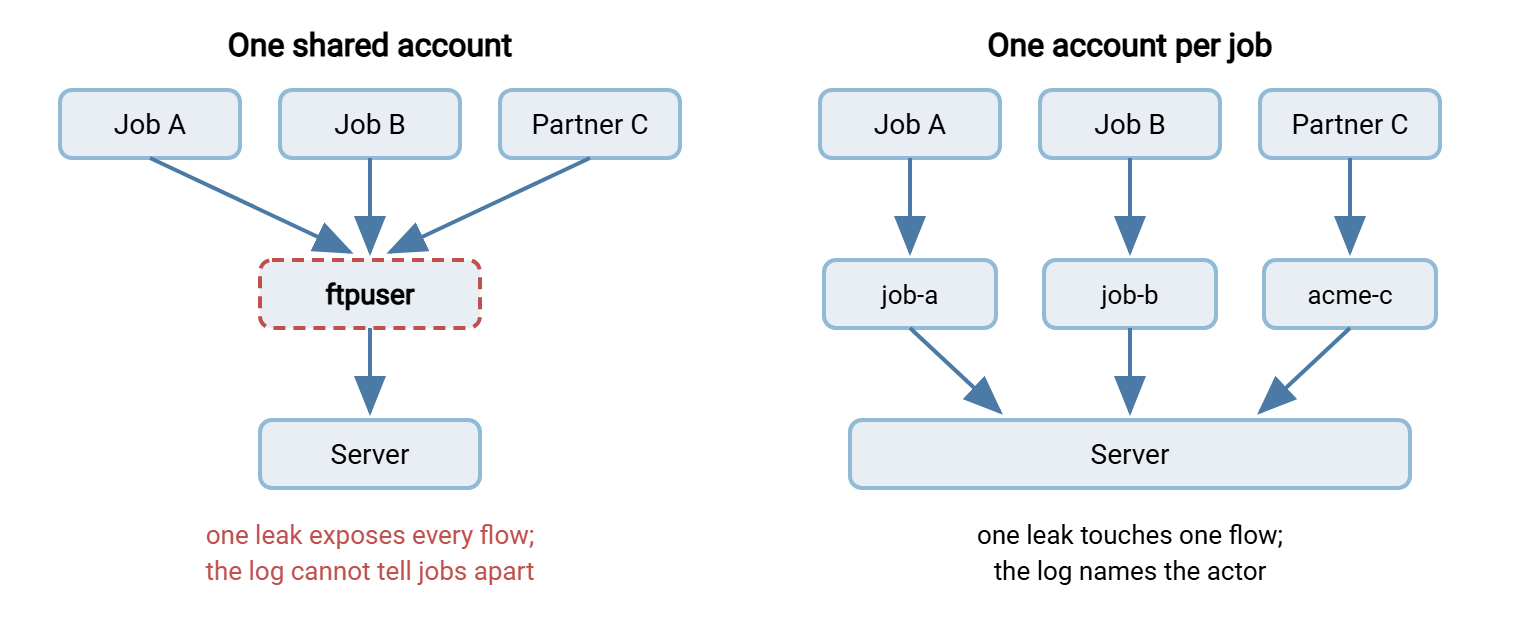
Name the accounts so the log reads well: acme-orders, payroll-push, erp-invoices-in — the partner or job in the name, a consistent scheme throughout. The account-structure side of this idea, including how home directories and shared drop areas hang together, is covered in FTP account models.
Least Privilege: Scope the Account to Its Job
Least privilege means the account can do what its job requires and nothing else. The guiding question at creation time is not "what access might be handy" but "what is the minimum that makes this job succeed." For transfer accounts, the levers are concrete:
- One directory. Confine the account to its own folder. Its home directory becomes its whole visible world, and files belonging to other jobs and partners simply do not exist for it. On SSH-based setups this confinement is often called a chroot ("change root" — the account's root directory is remapped to its folder). Most Windows transfer servers achieve the same thing by rooting each account at its assigned folder.
- One direction. A job that only uploads gets write access without read (a drop-box); a job that only collects gets read without write. A stolen upload-only credential cannot exfiltrate history; a stolen download-only credential cannot plant files.
- One protocol. If the job speaks SFTP, the account should not also be valid for FTP. Every extra protocol an account can use is an extra door to defend.
- No interactive extras. On systems where accounts can imply shell access, transfer service accounts should be transfer-only — no shell, no remote commands. A file-moving credential must not be a system-administration credential in disguise.
- One source. Automation logs in from known machines, so restrict the account to those source IP addresses where your server or firewall supports it. This single restriction removes the entire internet from the account's attack surface; the technique is covered in depth in our brute force protection series.
Privilege review is not one-and-done: jobs change, and permissions granted for a migration weekend have a way of becoming permanent. Fold a "does this account still need what it has" check into the audit pass described below.
Keeping Credentials Out of Scripts
The classic failure looks like this: a batch file or shell script with the password sitting in plain text on a line anyone can read. From there the credential travels into version control when someone commits the script. It travels into backups, onto the shared drive, and into the copy a contractor took home. Years later the password has a dozen resting places, all outside your control, and rotating it means finding them all.
The rule: the script may reference a credential; it must never contain one. Where the credential actually lives, from worst to best:
| Where the credential lives | Protection | Verdict |
|---|---|---|
| In the script text itself | None — travels with every copy of the script | Never. This is the failure mode to eliminate |
| Separate config file, tightly permissioned | File system permissions limit reading to the job's own account | Acceptable minimum — keep the file out of version control and backups of shared areas |
| Operating system credential store | Encrypted by the OS, tied to the machine or account | Good — built in and audited |
| Automation tool's connection profile | Stored by the tool, entered once, out of script text | Good — scripts name the profile, not the secret |
| Central secrets vault | Encrypted, access-controlled, access-logged, rotation-friendly | Best at scale — worth it once service accounts number in the dozens |
The connection-profile pattern deserves a word because it is the most accessible upgrade for small teams. A scheduling tool such as Sysax FTP Automation stores each connection — host, protocol, account, credential — as a named profile. It is entered once in the tool rather than written into every script that uses it. Scripts and scheduled tasks then reference the profile by name, and rotation means updating one stored entry instead of hunting through script text.
Better still, where the protocol allows it, replace the password with an SSH key. Keys never appear in prompts, never get typed, and suit unattended jobs natively. A key file needs the same file-permission care as a config file — the private key is the credential. It also needs the generation and inventory discipline of our SSH key management series. How keys plug into SFTP specifically is covered in SFTP authentication.
Rotation Without Breaking the Job
Service credentials get scheduled rotation. The reasoning is laid out fully in password policy for transfer accounts, but here is the short form. Event-driven rotation assumes you can see the events, and for unattended credentials you cannot. The engineer who knew the password moves on without telling you; copies accumulate in places nobody tracks. A calendar entry is the stand-in for the departure notice that will never arrive. Since machines do not memorize, each rotation is a fresh full-strength random string. It has none of the human weaknesses that discredited calendar rotation elsewhere.
The operational fear is real, though: rotate carelessly and the nightly job fails at 2 a.m. The fix is sequencing, not skipping:
- Generate the new credential and stage it wherever the job reads credentials from — profile, config, vault.
- Update the server and the job in one maintenance window. Or, if your server allows a second credential or a parallel account, run an overlap window. With both old and new valid, switch the job, then retire the old. Overlap turns a cliff-edge cutover into a reversible step.
- Trigger a test run immediately — do not wait for the schedule to find out. A manual run of the job proves the new credential end to end.
- Verify the old credential is dead by attempting a login with it and confirming the refusal appears in the log.
- Record the rotation date in the account's documentation (next section), which is also how you know when the next one is due.
One prerequisite makes all of this safe: the job must alert on failure. A job that fails silently turns a botched rotation into a month of missing files; a job that pages someone turns it into a ten-minute fix. If your jobs cannot yet tell you they failed, fix that before touching rotation.
Documentation That Survives Staff Turnover
Every rule above eventually collides with the same enemy: the day the person who built the job is gone. Documentation is what makes service accounts survivable infrastructure instead of tribal knowledge. The test of good documentation is brutal and specific. Could a competent admin who has never seen this system decide, from the record alone, whether this account can be safely disabled?
Here is a template that passes that test. Keep one record per service account, in your operations wiki or runbook store — never in the same place as the secrets themselves. The record points to the credential's storage location; it never contains the credential.
SERVICE ACCOUNT RECORD
======================
Account name:        acme-orders
Purpose:             Receives nightly order files from Acme Corp ERP
Type:                External partner automation
Owner (role):        Integration team lead  [role, not just a name]
Partner contact:     EDI support desk at Acme (see partner contact sheet)

Endpoint:            sftp.example.com, SFTP only
Source restriction:  Acme gateway addresses only (firewall rule FW-1182)
Home directory:      /partners/acme/orders-in
Permissions:         Write-only into /orders-in; no read, no delete
Credential type:     SSH key (no password auth)
Credential location: Public key on server; private key held by Acme.
                     Our copy of nothing -- partner-generated keypair.
Rotation schedule:   Partner re-issues key on our request cycle;
                     last rotated: [date]   next due: [date]

Depends on it:       Warehouse import job WH-04 (reads /orders-in)
Breaks if disabled:  Acme order intake; warehouse picks by 06:00
Log review:          Included in weekly transfer log review
Decommission when:   Acme contract ends or flow moves to AS2
Record last verified: [date] by [name]
Two fields do the most work. Owner as a role means the record outlives individuals. "Integration team lead" still resolves to a person after three reorganizations, while a bare name becomes a dead pointer. Decommission when is the field almost everyone omits and the one that prevents immortal accounts. It names, at creation time, the condition under which this account should die.
Remember: the documentation record points to where the credential is stored — it never contains the credential. A wiki page with passwords in it is not documentation; it is a breach with a table of contents.
The Audit: Finding the Accounts You Forgot
Hygiene decays, so schedule a recurring service-account audit — twice a year is a sustainable rhythm for a small team. The pass is mechanical:
- List every account on the transfer server and match each against a documentation record. An account with no record is your first finding; a record with no account is your second.
- Check last login per account. Your server's activity log answers this directly. In Sysax Multi Server, the activity log shows per-account logins across every protocol it serves. So an account that has not authenticated in months identifies itself. Silence is the signature of a dead job or a forgotten partner.
- Disable before deleting. For any suspected-dead account, disable it and wait a full business cycle — month-end jobs run monthly, and quarter-end surprises are real. If nothing breaks and nobody calls, delete it and close the record. Disable-then-delete converts "are we sure?" from a debate into an experiment with an undo button.
- Re-check privileges against the record's stated purpose: direction, directory, protocol, source restriction. Trim anything the job no longer uses.
- Confirm rotation dates are not overdue, and that the credential's storage location matches what the record claims.
Between audits, one standing alert earns its keep. A service account authenticating from an unexpected source, or showing up in an interactive session, is a human using a machine's credential. Sometimes it is an admin taking a shortcut, sometimes worse. Either way you want to know. Wiring that kind of alert is part of transfer logging and audit.
The Short Version, and Where to Go Next
Service accounts rot because nothing human is attached to them — so attach structure instead. One account per job or partner, named so the log tells the story. Least privilege at creation: one directory, one direction, one protocol, known sources. Credentials referenced by scripts, never contained in them, and preferably keys where the protocol allows. Scheduled rotation with a test run and an alert-on-failure safety net. A documentation record per account with an owner-as-role and a decommission condition. And an audit twice a year that matches accounts to records and lets last-login data confess which accounts are already dead.
The partner-facing variant of these problems — issuing, delivering, rotating, and revoking credentials across a company boundary — gets its own treatment in the partner credential lifecycle. The question every auditor eventually asks about these accounts — "why is there no MFA on them?" — has an honest structural answer in MFA and file transfer. And the strength rules for the passwords these accounts still use live in password policy for transfer accounts.
Frequently Asked Questions
What exactly counts as a service account?
Why not reuse one service account for several jobs? It seems simpler.
Where should a scheduled job's password actually live?
How often should service account credentials rotate?
Can a service account use MFA?
From the Sysax team: we build secure file transfer software for Windows — Sysax Multi Server, an FTP, FTPS, SFTP, and HTTPS server, and Sysax FTP Automation for scheduled, scripted transfers. Free trials are on the download page.