
Authentication Methods for Transfer Endpoints, Compared
Every file transfer service has a front door. Before a single byte moves, the other side must prove who it is. Everything that follows — every permission check, every log line, every audit answer — rests on that proof being real. Most real-world compromises of transfer servers do not begin with a clever exploit against the software. They begin at the front door, with a password that was guessed, stolen, reused from another breached site, or never taken back from someone who left.
There are four families of authentication you will meet on transfer endpoints: passwords, SSH keys, certificates, and multi-factor authentication. They are not interchangeable. Each one proves something different, fails in a different way, and works with some protocols but not others. This article — part of our Authentication on Transfer Endpoints series — walks through all four in plain language. It compares what each protocol actually supports. It ends with a decision table you can apply to any account you are about to create. That might be a human user, administrator, internal job, external partner, or stubborn legacy device.
What Authentication Proves — and What It Doesn't
Authentication is the act of proving an identity claim: "I am the account called acme-orders, and here is my evidence." It answers the question who is this. Its sibling, authorization, answers the next question — what may they do. That means which folders that identity can read or write once it is inside. The two are easy to blur, but they are separate controls that fail separately. A perfectly authenticated account can still be dangerously over-permissioned, and tight permissions cannot save you if anyone can log in as anyone.
Security people sort authentication evidence into three categories, called factors. The first is something you know (a password). The second is something you have (a key file, a phone, a hardware token). The third is something you are (a fingerprint). The categories matter because they fail differently. A secret you know can be guessed at a distance or coaxed out of you. A thing you have must be physically or digitally stolen from where it lives. Combining two different categories is what makes multi-factor authentication (MFA) powerful: the attacker has to pull off two unrelated thefts at the same time. Machines, note, can only ever offer the first two categories — software has no fingerprint.
One framing makes everything else in this article easier: the method you choose decides what an attacker must steal. Passwords make the target a short string that a person chose and may have typed into other websites. Keys make the target a file that never crosses the network. Certificates make it a file plus a signed identity that expires on its own. MFA makes it two unrelated things at once. Strength, protocol fit, and operational cost all flow from that one design choice.
Passwords: Universal, Convenient, Attacked Daily
Password authentication is the default everywhere and the mechanics are familiar. The client sends an account name and a secret. The server checks the secret against what it has on file. A well-built server never stores the password itself. It stores a hash — a one-way mathematical fingerprint of the password — and compares fingerprints. That way, even a stolen server database does not directly reveal the secrets. On the encrypted protocols (SFTP, FTPS, HTTPS) the password travels inside the encrypted tunnel. On plain FTP it crosses the network readable by anything in the path. That is one of the standing reasons to retire plain FTP.
The strengths are real and worth stating honestly. Every protocol, every client, every appliance, and every partner on earth supports passwords. They cost nothing to issue, need no client-side setup, and any human can use one without training. For an interactive login by a person, a strong password behind sensible throttling is a legitimate control, not an embarrassment.
The weaknesses are equally real, and they all come from the same root. The credential is a small secret that a human chose and can repeat. That makes it exposed to four attack patterns you should be able to recognize:
- Online guessing — an attacker simply tries passwords against your login prompt, either hammering one account (brute force) or trying one common password across many accounts. Internet-facing transfer servers receive this constantly; our brute force protection series covers the defenses.
- Credential stuffing — trying username and password pairs leaked from breaches of other services, betting that people reuse passwords. They do.
- Phishing — tricking the human into typing the password somewhere the attacker controls. The password's portability is exactly what makes this work.
- Sharing and sprawl — passwords get emailed to teammates, pasted into scripts, and written on onboarding documents, because nothing physically stops a secret-you-know from being handed around.
Password quality rules — length, screening, rotation that isn't theater — deserve their own article, and they have one: password policy for transfer accounts.
SSH Keys: Strong by Construction
An SSH key is a pair of mathematically linked files. The private key stays with its owner and is never sent anywhere. The public key — shareable freely, secret to no one — is installed on the server next to the account it should unlock. At login time the server issues a random challenge. The client answers it using the private key. The server verifies the answer using the public key. The crucial property: nothing secret ever crosses the wire. There is no password to overhear, replay, or phish in the ordinary sense.
The diagram below puts the two flows side by side. A password login sends the secret itself to be checked. A key login sends only a signed answer to a one-time challenge.
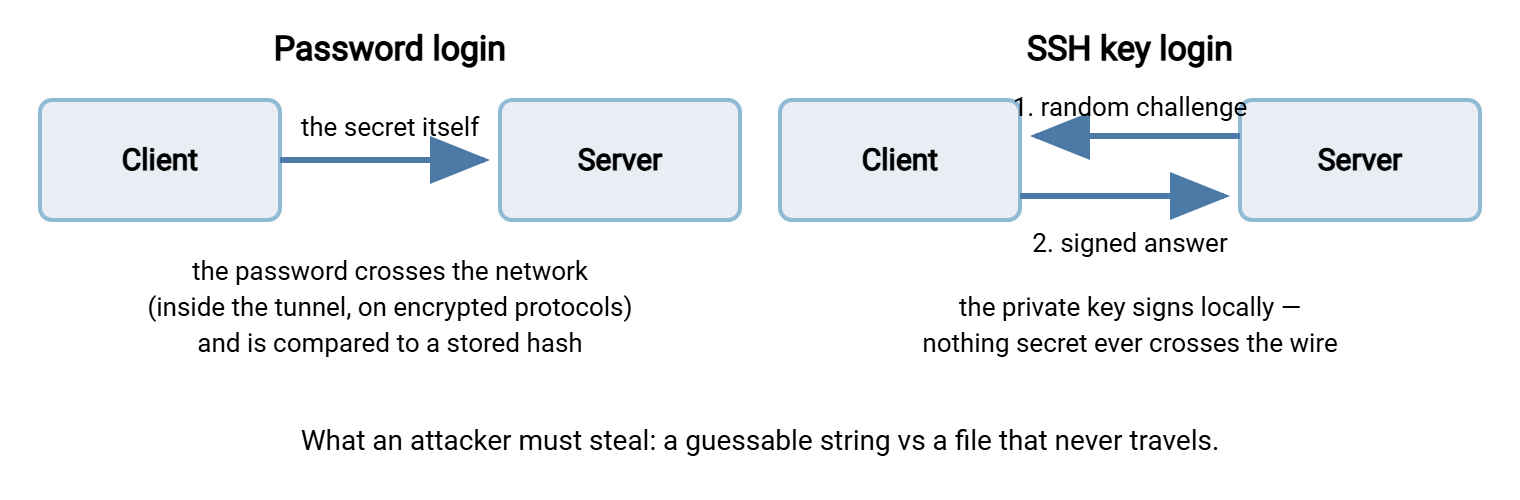
The strengths follow directly. A key cannot be guessed — the space of possible keys is so astronomically large that guessing is not a strategy. That takes the entire online-guessing attack family off the table. There is no prompt to answer, which makes keys the natural credential for unattended automation. A scheduled job can authenticate at 3 a.m. with no human awake. And because each job or person can hold its own key, the server can record exactly which key logged in. That is gold for audit trails.
The weaknesses are operational rather than cryptographic. Keys do not expire: a public key authorized on a server keeps working until someone remembers to remove it. And "someone remembers" is not a control. The private key file is the credential — anyone who copies the file owns the access, so file permissions and careful storage matter enormously. Human-held keys can be protected with a passphrase (a local password that encrypts the key file on disk). But keys used by unattended jobs usually cannot, or the job would stall waiting for input. Generation, distribution, inventory, and retirement of keys is a genuine discipline, and our SSH key management series covers it end to end.
The protocol constraint is simple: SSH keys are an SSH-family method. They work with SFTP and SCP because both run over SSH. FTPS and HTTPS cannot use them — their equivalent is the client certificate, next. For the SFTP-specific mechanics, see SFTP authentication: passwords, keys, and beyond.
Client Certificates: Keys with Paperwork Attached
A certificate is a public key with paperwork stapled to it. That paperwork includes the owner's name and a validity period with a built-in expiry date. It also includes the digital signature of a certificate authority (CA) — an organization both sides have agreed to trust. A bare SSH key asserts only "whoever holds the matching private key." A certificate asserts "the holder of this key is Acme Corp. This is valid until the printed date, and here is the CA that vouches for it."
You meet certificates in two roles on transfer endpoints. In the familiar role, the server presents a certificate so clients know they reached the right machine. That is standard TLS, the encryption layer under FTPS and HTTPS. In the role that concerns this article, the client presents one too. The server demands a certificate before allowing login, a pattern called mutual TLS. FTPS and HTTPS both support it. The AS2 protocol used for EDI in retail and logistics goes further still. Partner identity, payload signing, and payload encryption are all certificate-based. Swapping certificates is a core step of trading partner onboarding.
The strengths: the same cryptographic muscle as SSH keys, plus a lifecycle built into the credential itself. Expiry means a forgotten certificate eventually turns itself off — a forgotten SSH key never does. Revocation is a defined mechanism rather than an ad-hoc cleanup. And the identity written into the certificate makes B2B relationships auditable: you can read who a credential belongs to from the credential.
The weaknesses are all operational weight. Certificates demand the most infrastructure of any method here. Someone must handle issuance, renewal before expiry, secure distribution, and decisions about which CAs to trust. Troubleshooting a failed certificate login — chains, trust stores, clock skew — is a skill of its own. For most teams, certificates earn their keep on B2B and compliance-driven flows and are overkill for a lone internal job. The full discipline lives in our certificate management series.
Multi-Factor: Adding "Is a Human Actually There?"
MFA layers a second, different-category factor on top of a password. This could be a six-digit code from an authenticator app (called TOTP — a time-based one-time password that changes every thirty seconds). Or it could be a push approval on a phone, or a hardware token that must be touched. Two passwords do not make MFA — both are things you know, stolen the same way. The categories must differ.
What MFA buys is blunt and valuable: a stolen password stops being enough. Phished, guessed, stuffed from a breach — none of it completes a login without the second factor. For accounts where a human is present at login time, it is the single biggest upgrade available for the money, which for many setups is zero.
The structural limit matters just as much: MFA assumes someone is there to answer the challenge. Interactive human sessions and administrator consoles, yes. A scheduled transfer job firing at 3 a.m., no — there is no fingertip to touch the token. Storing the second factor on the same machine as the first quietly collapses both factors into one theft. Where the line falls, and what compensates on the far side of it, is the subject of MFA and file transfer: where it fits and where it can't.
What Each Protocol Actually Supports
Method choice is constrained by protocol before preference enters into it. This table is the compatibility reality check — it is worth a bookmark. A surprising number of "which protocol should we use" debates are really authentication debates in disguise.
| Protocol | Password | SSH key | Client certificate | MFA |
|---|---|---|---|---|
| FTP (plain) | Yes — sent in cleartext | No | No | No practical hook |
| FTPS | Yes — inside TLS | No | Yes (mutual TLS) | No practical hook |
| SFTP (SSH) | Yes — inside SSH | Yes — the native strength | No (SSH keys instead) | Possible for interactive humans, server-dependent |
| HTTPS / web portal | Yes | No | Yes (mutual TLS) | Yes — the natural home for it |
| AS2 | Sometimes, at the HTTP layer | No | Yes — certificates are the identity | No — unattended by design |
Read the table backwards and it explains a lot of protocol migration pressure. If you want key-based automation, that is an argument for SFTP. If a partner or regulator demands certificate-based identity, that points at FTPS, HTTPS, or AS2. Authentication needs drive protocol choice at least as often as the reverse.
The Decision Table: Method per Account Type
Now the practical core. Most authentication decisions are not abstract — they arrive as "I am creating an account for X, what should it use?" Find the row that matches, and treat "first choice" as the goal when you control enough of both ends to reach it.
| Account type | First choice | Acceptable fallback | Avoid |
|---|---|---|---|
| Interactive human user (uploads, downloads, web portal) | Strong password plus MFA where the interface supports it | Strong password alone, behind throttling and lockout rules | Shared logins; passwords reused from other systems |
| Administrator / management console | Password plus MFA, reachable only from admin networks | Strong unique password plus source IP restrictions | Password-only admin login exposed to the internet |
| Internal service account (scheduled jobs, scripts) | SSH key over SFTP, one key per job | Long random machine password, stored outside the script | One credential shared across many jobs; secrets pasted into scripts |
| External partner automation | SSH key or client certificate, one per partner per flow | Long random password with scheduled rotation and IP allowlisting | Credentials delivered by plain email; accounts shared between partners |
| Legacy device that only speaks FTP | Unique password plus network containment on an isolated segment | Same, with a documented risk acceptance | Reachable from the internet; sharing credentials with real users |
Two principles hide inside that table and deserve to be said out loud. First: one account per person, job, or partner — never shared. Attribution in the logs, clean revocation, and contained blast radius all depend on it. The reasoning is expanded in service account hygiene, and the account-structure side of it in FTP account models. Second: partner credentials get scheduled rotation even though calendar rotation is out of fashion elsewhere. You cannot see staff turnover inside a partner company. The schedule substitutes for the departure event you will never be told about.
Remember: the method decides what an attacker must steal. That could be a string they can guess or phish (password), or a file they must exfiltrate from a protected machine (key). It could be a file plus a signed, expiring identity (certificate), or two unrelated things at once (MFA). When you are unsure, choose the method that makes the theft hardest for the account's exposure level.
No Method Stands Alone
Whichever row of the table you land on, the method is one layer, not the whole defense. Three companions apply to every account type. Source restrictions: an IP allowlist is a rule admitting login attempts only from listed addresses. It turns "anyone on the internet can try" into "only our partner's gateway can try," and costs one firewall or server rule. It features heavily in our brute force protection series. Throttling and lockouts slow guessing to uselessness without stranding legitimate users — designing those thresholds well is covered in reading auth failures and designing lockouts. And logging: every attempt, success and failure, recorded and reviewed, because you cannot respond to a pattern you never see.
Enforcement lives server-side. On a Windows transfer server such as Sysax Multi Server, one user account list authenticates across FTP, FTPS, SFTP, and HTTPS. The built-in activity logging records each login attempt per account. That is exactly the raw material the monitoring layer needs. Whatever software you run, confirm it can tell you, per account, who logged in, from where, and when it last happened. The broader practice belongs to transfer logging and audit.
Where to Go Next
Here is the compressed version of this whole comparison. Passwords are universal but carry every weakness of a human-chosen secret. SSH keys are strong by construction and the natural credential for automation over SFTP. Certificates are keys with identity and expiry attached, at their best on B2B flows. MFA is a decisive upgrade wherever a human is present and structurally unavailable where one is not. Match the method to the account in front of you, then layer allowlisting, lockouts, and logging around whatever you chose.
From here, one natural next read is password policy for transfer accounts — because passwords will remain part of your estate no matter how many keys you deploy. Read MFA and file transfer for the honest map of where the second factor fits. If SFTP is your main protocol, SFTP authentication turns this article's concepts into concrete configuration.
Frequently Asked Questions
Are SSH keys always better than passwords?
Can one account require both a key and a password?
What is the difference between an SSH key and a certificate?
Why does plain FTP only support passwords?
What should a partner's automated transfer job authenticate with?
From the Sysax team: we build secure file transfer software for Windows — Sysax Multi Server, an FTP, FTPS, SFTP, and HTTPS server, and Sysax FTP Automation for scheduled, scripted transfers. Free trials are on the download page.