
Secure Deletion: When Files Are Really Gone
"That file we deleted. Is it really gone?" The person asking is leaning into your office with a contract in one hand, and the honest answer is going to take longer than they hoped. Maybe the contract requires destruction of partner data. Maybe a privacy request demands erasure of one person's records. Maybe a decommissioned server is headed out the door. "Delete" is not one action. It is a spectrum that runs from removing a name in an index all the way to shredding physical platters. Each level makes a different promise.
This article gives you the layers without folklore in either direction. Ordinary deletion is not a lie; for routine operations on a server you control, it is usually exactly right. But it is also not what most people picture, and the gap between the picture and the mechanism is where compliance answers go wrong. By the end you will know what happens on the disk when a file is deleted and which copies survive it. You will know when overwriting genuinely helps and when modern storage makes it theater. You will know what crypto-erase is, and what you can honestly write when someone asks for proof of destruction. (The word "forever" will not appear in that answer. Its absence is the point.)
This is part of our Retention & Deletion series. The previous article built automated purge jobs. This one is about what those deletions actually accomplish — and what more is needed on the rare occasions "gone" has to mean more.
What Delete Actually Does
A filesystem is two things. An index records names, timestamps, and where each file's content lives. The data blocks hold the content itself. Think of a library: a card catalog, and shelves of books. When you delete a file, the filesystem edits the catalog. It marks the file's index entry as free and marks its blocks as available for reuse. It does not walk to the shelf and pulp the book. The bytes sit exactly where they were, unlisted, until some future write happens to claim those blocks and put new content on top of them. Nothing has been pulped. The library has simply agreed to forget it owns the book.
This is not laziness; it is a sensible engineering trade. Wiping content on every delete would make deletion slow and would wear storage for no everyday benefit. So deletion is an act of forgetting, not destroying — the system forgets where the file was, and the space becomes eligible for recycling. Forgetting is fast. Destroying is work.
The diagram below shows the before and after. Note what the delete changes — and what it leaves.
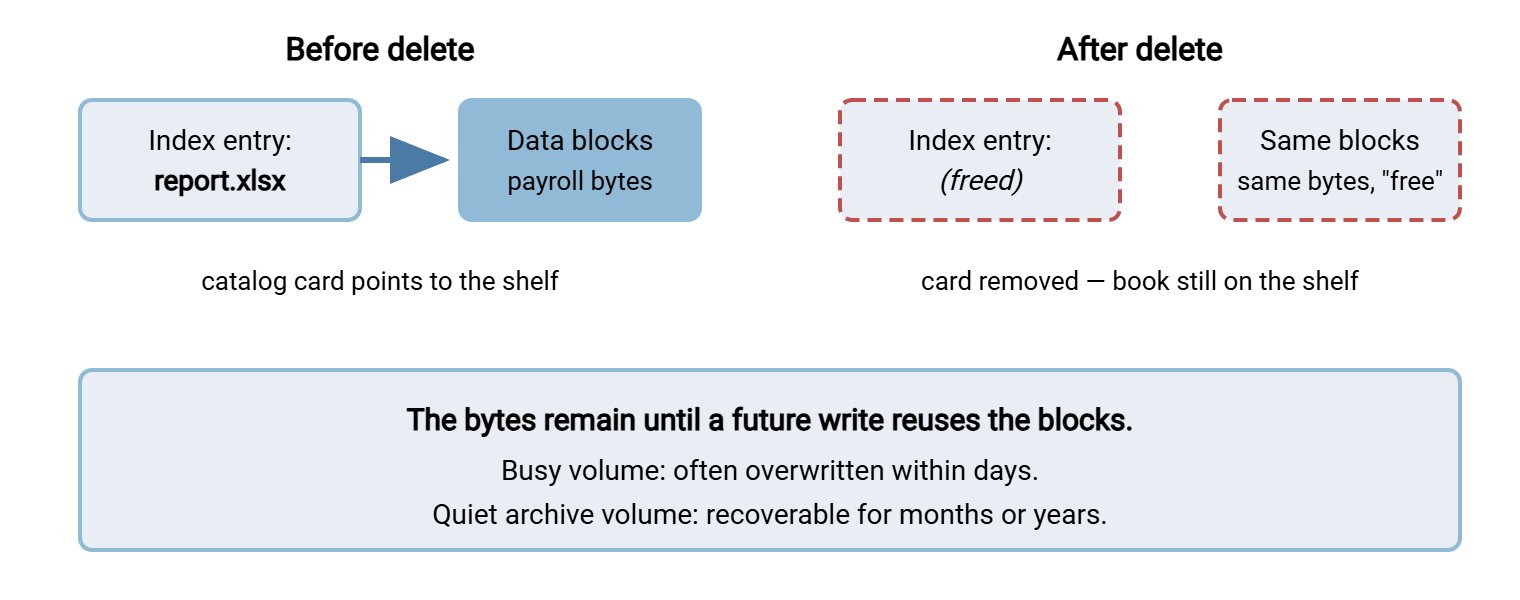
Two everyday details complete the picture. The Recycle Bin deletes nothing at all: it is a move into a hidden system folder. From there, "Empty Recycle Bin" performs the real (index-level) delete later. And deletions made by services, scripts, and network file operations bypass the Recycle Bin entirely and go straight to the index-level delete. That includes purge jobs and files removed over transfer protocols. That is why the purge design in this series uses its own holding-area folder as an undo mechanism. It does not rely on a bin that will not be there. The Recycle Bin is a desk drawer, not a shredder, and service accounts do not have desks.
Because freed blocks keep their bytes, undelete tools exist: they scan the free space of a volume for recognizable content and can often reconstruct recently deleted files. Whether that possibility matters is a question about who can run such a tool against your disk. On a healthy server in your locked rack, reading free space requires administrator or physical access. Someone with that access is a bigger problem than your deleted files. The risk becomes real when the disk itself leaves your control: decommissioning, warranty replacement, a leased server returned, a drive resold. Secure deletion is mostly a story about hardware leaving custody, not about files on running systems.
Every deletion pathway you use lands on this same mechanism. Consider the delete command a partner issues over SFTP, the cleanup step in a scheduled workflow, a right-click in Explorer, or a script's remove call. All of them end at the filesystem freeing the entry and the blocks. A transfer protocol's "delete succeeded" reply means the server's filesystem accepted the operation; it makes no statement about bytes, and no protocol could. Whatever promises your organization makes about destruction, they are built on top of this one behavior, so this is the layer to understand first.
The Copies That Outlive the Delete
Before worrying about residual bytes on one disk, deal with the bigger truth. The file you deleted almost certainly still exists as an ordinary, fully readable file somewhere else. Deleting the original while copies thrive is the most common gap between what an organization says ("we deleted it") and what is true. The usual survivors:
- Backups. Every backup taken while the file existed contains it, and those copies live until the backup cycle expires them. Deleting a file today removes it from tomorrow's backups, not from last month's.
- Shadow copies and previous versions. Windows volume snapshots quietly preserve point-in-time copies on the same server. A "deleted" file may be one right-click away under Previous Versions until the snapshots rotate out.
- Replicas. Anything mirrored for failover or synced to a second site has a twin that your delete may or may not propagate to. If it does propagate, the twin's disk has its own free-space story.
- The other end of every transfer. A file you sent exists on the recipient's systems, under their retention habits, forever outside your reach. A file you received still exists at its origin.
- The scattered operational copies — staging folders, archives, home directories, mailboxes — that this series' accumulation map exists to find.
The practical order of operations follows from this list. When a real destruction obligation arrives, delete all the live copies your map knows about. Note where backup copies exist and when they age out. Only then think about residual bytes. Anyone who starts with a disk-shredding tool while four intact copies sit in an archive folder has secured the wrong thing.
Northgate Retail received Acme's request to destroy everything exchanged under an expired contract. The administrator did the thorough-looking thing: ran a shredder over inbox\acme, emptied the holding area, and issued a destruction statement the same afternoon. Two weeks later a colleague updating the accumulation map found three hundred of the same files intact in archive\sent. They found forty more in the home directory of an analyst who had "kept a set for reconciliation." The statement had to be withdrawn and reissued, with an apology, after a second afternoon of deleting. Nothing had left Northgate's custody. The wrong thing had simply been secured first, very thoroughly.
Remember: the honest sequence is copies first, bytes second. "Really gone" means: live copies deleted everywhere you control, backup expiry understood and stated, and — only where the situation warrants it — storage-level sanitization for media leaving your custody.
When Overwriting Matters — and When It Doesn't
Overwriting (file "shredding") replaces a file's content with meaningless patterns before deleting it, so the freed blocks hold noise instead of payroll data. On a traditional spinning hard drive, a single overwrite pass defeats software recovery tools. The elaborate multi-pass rituals you may have read about address drive technology from another era and add time, not security, on modern disks. I once ran a seven-pass shredder overnight on a drive that was going straight back into the same rack; it added seven hours.
But per-file overwriting has honest limits even on spinning disks. The filesystem may hold fragments the tool cannot reach. Very small files can live inside the file table itself rather than in ordinary blocks. Journaling can preserve remnants of recent changes, and shadow copies may retain the original content outside the file's own blocks. A shredder utility overwrites the blocks it can see; it cannot promise the volume holds no other trace.
Solid-state drives change the story more fundamentally. An SSD's controller practices wear leveling — it spreads writes across physical memory cells to extend the drive's life. It remaps constantly between the addresses the operating system sees and the physical cells underneath. When your shredder "overwrites" a file on an SSD, the drive may well write the new pattern to fresh cells and simply retire the old ones. That leaves the original bytes in physical cells the operating system can no longer address. But a determined specialist with drive-level access potentially could. From software, you cannot verify which happened. With the related TRIM mechanism, the operating system tells the drive which blocks are no longer in use. This means SSDs often make deleted data unreadable fairly quickly on their own. That is helpful, but its timing and guarantees vary by drive, which is not the stuff destruction certificates are made of.
So the grown-up position is: per-file shredding is a niche tool that mostly makes sense on spinning disks in specific workflows. When an entire device must be cleansed, use the drive's own built-in sanitize operation. That is a command the drive firmware implements to erase all cells, including the remapped ones software cannot reach. Or use physical destruction through a disposal vendor. And for data that was properly encrypted all along, there is a cleaner answer than any of this.
Crypto-Erase: The Modern Answer
If data is stored encrypted and you destroy every copy of the decryption key, the data becomes unreadable everywhere at once. The surviving bytes, on every block of every drive, are ciphertext nobody can open. That is crypto-erase: sanitization by key destruction. It is the reasoning behind full-volume encryption on servers. A BitLocker-style encrypted volume means a failed drive sent back under warranty, or a decommissioned disk missed in a rushed migration, carries only ciphertext. The wear-leveling question stops mattering because even the unreachable cells hold encrypted content.
Crypto-erase is also why the single most useful secure-deletion step is one you take before any deletion is needed: encrypt the volumes that hold transferred data now. Do it while there is no crisis, and every future question — recovery from free space, drives in transit, sloppy disposal — collapses into key management. File-level encryption adds a second, finer-grained layer for particularly sensitive payloads; when that is worth the operational cost is covered in when to use file-level encryption. The caveats are real but manageable. Crypto-erase is only as strong as your certainty that no plaintext copies exist elsewhere and that the key was not backed up somewhere survivable. Key destruction must be as deliberate as the encryption was.
Matching the Method to the Situation
Almost every secure-deletion decision reduces to one question: is the storage staying in your custody, or leaving it? This table is the working summary:
| Situation | Appropriate method | Why |
|---|---|---|
| Routine retention purge on a running server | Ordinary delete, logged | Disk stays in custody; blocks recycle naturally; volume encryption covers the residue |
| Contractual or privacy destruction request | Delete every live copy; document; state backup aging | The obligation is about copies and evidence, not disk physics |
| Drive leaving custody (RMA, lease return, resale) | Crypto-erase and/or built-in sanitize | Free space and remapped cells go with the hardware |
| End-of-life media, highest sensitivity | Physical destruction via disposal vendor, certificated | Removes reliance on firmware claims; produces third-party evidence |
| SSD, per-file "shredder" tool | Skip it | Wear leveling means software cannot verify the overwrite landed |
Who decides which row applies? Not you alone. Contracts, regulators, and your legal or records team set the required standard of destruction — the same division of labor as retention periods themselves. Your role is to know what each method truly delivers, implement the chosen one faithfully, and refuse to promise more than the method can honestly achieve. Guidance like this article can explain the mechanics, but the standard your organization must meet is a question for the people who own the obligation.
Proof of Destruction: What You Can Honestly Say
Nobody can prove a negative across every disk, backup, and partner system in the world, and a careful reader of destruction statements knows it. What convinces auditors, partners, and regulators is not an absolute claim but a documented process faithfully executed. That documentation has four parts. It states what was deleted (paths, counts, date) and how (the method, matched to the situation). It includes the evidence it happened (logs) and the honest footnote about backups. In practice you assemble it from records you already keep: the purge job's own logs, and the server's activity log. Sysax Multi Server, for instance, records file operations including deletions to its activity log or database. That gives you a system-generated record of when a file was removed and by which account. A written statement built on those sources looks like this:
DESTRUCTION RECORD — partner offboarding, Acme Logistics

Scope     All files received from or staged for Acme:
          D:\Transfer\inbox\acme, D:\Transfer\archive\sent\acme
Action    All live copies deleted from the transfer server and
          the archive share on [date]; 212 files, 3.9 GB total.
Method    Standard deletion on encrypted volumes; holding area
          purged same day.
Evidence  Purge log run-id 4471; server activity log excerpt
          attached; folder listing after deletion attached.
Backups   Copies exist in encrypted backup sets and expire with
          the backup cycle, fully aged out after ninety days.
          No restore of this data will be performed except under
          legal instruction.
Signed    [name, role, date]
Every sentence in that record is checkable, which is exactly what makes it credible. Note what it does not say: it never claims the data is "unrecoverable by any means known to science." It says what was done, shows the trail, and bounds the backup question with a date. If a partner's contract demands a formal certificate of destruction for physical media, that certificate comes from the disposal vendor. The handover of the media to that vendor deserves the same documentation habit. That is a topic our chain of custody series treats in depth. For assembling deletion evidence into something audit-ready, the techniques in building an evidence pack apply directly.
One check belongs in every destruction workflow, and it must come first. Confirm the data is not under a legal hold — a preservation instruction that outranks every deletion request, including contractual ones. Destroying held data is the one mistake in this whole subject with no good recovery. That is why the legal holds article in this series treats the hold check as step zero of any purge or destruction.
A Practical Playbook for Transfer Servers
Pulling the layers into a working posture you can adopt this quarter:
- Encrypt the volumes that hold transferred data. This one act converts most future residual-data questions into key management, and it costs almost nothing on modern hardware.
- Let routine purges use ordinary deletes. The scheduled cleanup jobs from the purge article need no shredding ceremony. They might be built, for example, as Sysax FTP Automation scheduled tasks with file operations and emailed run results. Their job is copies and evidence, and encryption plus custody covers the bytes.
- Keep the logs. Purge logs and server activity logs are your future proof of destruction; give them their own retention row.
- Know your backup aging. Be able to state, in one sentence, how long a deleted file persists in backups. You will use that sentence often.
- Sanitize at the exit. Any drive leaving custody gets crypto-erase or built-in sanitize; the most sensitive media goes to certificated physical destruction. Tie this to your hardware lifecycle so it happens by checklist, not memory.
- Calibrate your promises. Say "deleted, logged, backups age out in ninety days" — not "gone forever." The precise statement is stronger, because you can defend it.
The Short Version
Delete removes the catalog entry, not the book. The bytes linger in free space until reused. Full copies linger in backups, snapshots, replicas, and the far ends of old transfers. For running servers you control, ordinary deletion plus volume encryption plus honest logging is the right everyday answer. Overwriting helps mainly on spinning disks and cannot be verified on SSDs, where wear leveling breaks the very idea of "writing over the same spot." Whole-device sanitize commands and crypto-erase are the modern tools. Physical destruction with a certificate is the endpoint for media that matters most. Proof of destruction is a documented process with logs, not a claim of magic. Combine this with the purge automation that handles the everyday deleting, and check legal holds before any destruction. A legal hold is the one instruction that stops all of it. The next time someone leans into the office and asks whether it is really gone, the answer will be longer than "yes" and a great deal stronger.
Frequently Asked Questions
Does emptying the Recycle Bin actually delete files?
Can someone recover files deleted from our transfer server?
Do I need a multi-pass file shredder?
Why is deleting files on an SSD different?
What do I say when someone demands proof a file is destroyed?
From the Sysax team: we build secure file transfer software for Windows. Sysax Multi Server is an FTP, FTPS, SFTP, and HTTPS server. Sysax FTP Automation handles scheduled, scripted transfers. Free trials are on the download page.