
Alerts Worth Raising from Transfer Logs
Logs are patient. They will sit in your collector for months, holding the exact evidence of an attack. They say nothing until you go looking — by which time the damage is done. An alert is what turns that patient record into an active early warning. It is a rule that watches the incoming logs. It taps you on the shoulder the moment a pattern worth your attention appears. Done well, alerting is the difference between finding out about a compromise while it is happening and finding out about it in next quarter's audit.
Done badly, though, alerting is worse than useless. A system that fires forty times a day for things that turn out to be nothing trains everyone to ignore it. And the one real alert, the forty-first, gets dismissed with all the rest. This is alert fatigue, and it has quietly defeated more monitoring programs than any attacker ever did. So this article is deliberately about a short list: the handful of alerts that genuinely earn a human's attention. It also covers the thresholds that keep them rare enough to still mean something.
It assumes you are already logging the right events (what to log) and can search them in one place (centralizing logs). Alerts run on top of both. This article is part of the Logging & Audit series.
The Alert Fatigue Trap
The instinct when you first set up alerting is to alert on everything that could conceivably matter. Resist it. Every alert you create is a small, recurring tax on human attention, and attention is the scarcest resource you have. An alert that fires often and rarely means anything does not add safety. It subtracts it, because it teaches your team that alerts are noise.
The governing principle is simple: an alert nobody acts on is worse than no alert at all. No alert is honest — everyone knows they have to go and look. A noisy alert is a lie, promising importance it does not deliver, until the promise is worthless. So the test for every rule you are about to create is not "could this ever indicate a problem?" — almost anything could. It is "when this fires, will a person reliably need to do something?" If the honest answer is no, it is not an alert; at most it is a line in a report.
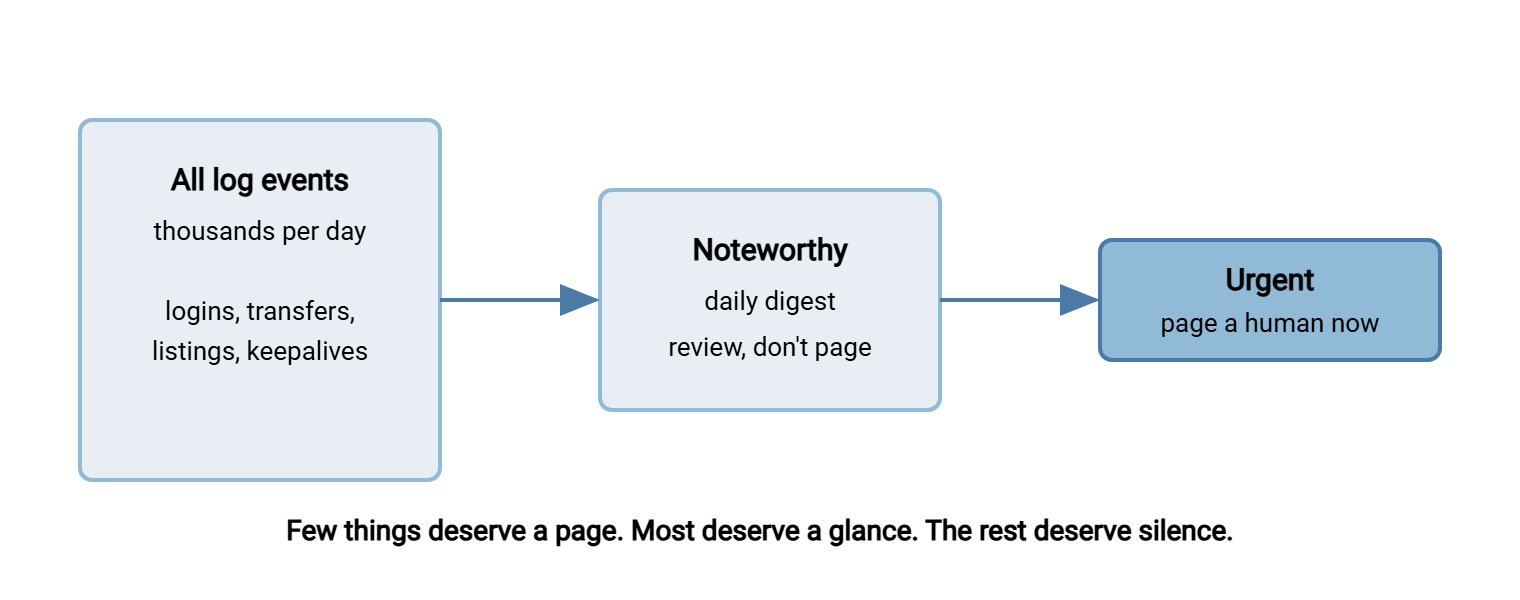
That distinction — page a human versus write it down for later — is the backbone of a sane alerting design, and we will return to it.
What Makes an Alert Worth Raising
Three properties separate a good alert from noise. Hold every candidate rule against them.
- Rare. It fires seldom, because the thing it detects is genuinely unusual. Rarity is what preserves the alert's meaning; the day a good alert fires, people lean in rather than sigh.
- Actionable. There is a clear next step when it fires — investigate this account, block this source, call this partner. An alert with no obvious response is just anxiety on a schedule.
- Grounded in a baseline. It knows what normal looks like, so it can recognize abnormal. "This account downloaded 4 GB" is meaningless without "this account normally downloads 40 MB." Almost every good transfer alert is really a comparison against a baseline you established by reading your own logs on quiet days. That is the habit built in reading transfer logs like a story.
The picture below is the shape every alerting pipeline should have. A flood of raw events narrows to a trickle of things worth recording. Only a few of those are urgent enough to interrupt a person.
The Short List of Alerts Worth Raising
Here are the alerts that repay their cost on almost any transfer service. Each corresponds to a way real incidents announce themselves — the attacker behaviors cataloged in the transfer threat modeling pillar, seen from the logging side.
1. Authentication storms
A burst of failed logins is the signature of password guessing, credential stuffing, or a spray across accounts. That is the pattern you learned to read in a suspicious session. Alert on it two ways. Watch for too many failures from one source in a short window (someone hammering you). Also watch for too many failures against one account in a short window (someone targeting a specific identity). The second is the more dangerous, because it may be the prelude to a successful compromise. Pair this alert with the defenses in the brute-force protection pillar. The alert tells you it is happening. The pillar tells you how to blunt it.
2. First-seen source addresses
Automated partners connect from stable, known addresses. A successful login for a partner or service account from an IP address never seen before for that account is worth a look. It is how a leaked credential first shows itself. This one needs care to avoid noise: partners do change addresses occasionally. So treat a first-seen IP for a routine account as a note to review. But treat a first-seen IP for an administrative or service account as urgent. The value is highest exactly where accounts should never roam.
3. Mass downloads and volume anomalies
The clearest exfiltration signal is an account suddenly moving far more data, or far more files, than it ever normally does. A service account's whole job might be to fetch one file a day. If it abruptly lists a directory and pulls everything in it, that is the shape of theft. This alert lives or dies on the baseline: you must know each account's normal volume to recognize an abnormal one. Set it as a multiple of the account's own rolling norm, not a single global number. That is because "a lot" means something different for a backup job than for a partner drop.
4. Off-hours administrative activity
Administrative changes — new accounts, permission grants, configuration edits — are rare, high-impact, and almost always done during working hours by known people. One happening at 3 a.m. is either a planned maintenance window you can suppress in advance, or something you very much want to know about right now. Because admin events are infrequent by nature, alerting on all of them outside business hours produces almost no noise. It catches one of the most important signals there is: an attacker consolidating control.
Two more worth considering
Beyond the core four, two others often earn their place. An account used from two distant places at once is a strong leaked-credential signal. Picture the same identity active from its normal automation host and, minutes later, from a residential address on another continent. And a log source that has gone silent is a server that abruptly stops forwarding. It signals either an outage or an attacker who has cut the logging. Both deserve a look, which is why the silence-monitoring from centralizing logs doubles as a security alert.
The Alert Rules, With Thresholds
Here is the short list as concrete rules you can adapt. The thresholds are sensible starting points, not gospel — the whole next section is about tuning them to your own traffic. Copy this and turn each rule into whatever your collector uses to define alerts.
ALERT RULES  --  starting points; tune every threshold to YOUR baseline

RULE  auth-storm-per-source
  when   authentication FAIL, grouped by source IP
  fires  10 failures from one source in 5 minutes
  route  PAGE      (brute force / credential stuffing)
  tune   exclude known scanners; raise count if noisy

RULE  auth-storm-per-account
  when   authentication FAIL, grouped by account
  fires  6 failures against one account in 5 minutes
  route  PAGE      (targeted guessing; may precede compromise)
  tune   allow more for partners with flaky clients

RULE  first-seen-source-for-account
  when   authentication OK from an (account, source IP)
         pair never seen before
  fires  on the first occurrence
  route  DIGEST for routine accounts;
         PAGE for admin + service accounts
  tune   keep a known-IP list per partner; suppress once accepted

RULE  mass-download
  when   download volume or file count, grouped by account
  fires  5x the account's rolling daily norm,
         OR more than 200 files in 10 minutes
  route  PAGE      (possible exfiltration)
  tune   set per-account baselines; allowlist known bulk jobs

RULE  off-hours-admin
  when   any account / permission / config change event
  fires  outside defined business hours
  route  PAGE      (rare, high-impact, attacker-consolidation)
  tune   register maintenance windows to suppress planned work

RULE  impossible-travel
  when   same account authenticates OK from two far-apart
         sources within a short window
  fires  on detection
  route  PAGE      (likely leaked credential)
  tune   account for VPN egress and legitimate multi-site jobs

RULE  source-fell-silent
  when   a forwarding server sends no logs
  fires  no lines received for 15 minutes
  route  PAGE      (outage OR logging deliberately cut)
  tune   widen window to the longest normal quiet period
Remember: every threshold in that block is a knob, not a law. The numbers exist so you have somewhere to start, but the right value is always "just above your real normal." A threshold copied blindly will either flood you or stay silent through a real event. Spend an hour comparing each rule against last month's logs before you trust it.
Thresholds That Avoid Fatigue
Tuning is where alerting succeeds or fails, and the method is more important than any specific number. Four practices keep the noise down without going blind.
Baseline first, then set the threshold just above normal. Before enabling a rule, run its condition against your history. How many failed logins does a busy-but-innocent hour really produce? What is each account's actual daily download volume? Set the threshold a comfortable margin above that real ceiling, so ordinary days stay quiet and only genuine outliers trip it. A threshold chosen from your own data almost never floods you. A threshold guessed from a blog post often does.
A concrete example makes the method vivid. Say you are setting the mass-download rule for a partner account. You pull its last sixty days and find it downloads between three and six files, totaling 20 to 60 MB, every morning — never more. A global threshold of "500 MB" would sail past a theft of everything the account can reach. That is because everything it can reach is only 200 MB. A global threshold of "100 files" would never fire either. But a per-account rule of "five times its own norm" trips the instant that account pulls 300 MB or thirty files. For this account, that is a screaming anomaly. For a backup account down the hall, it would be a Tuesday. The number that protects you is the one derived from the account it watches. That is why baselines beat blanket figures every time.
Allowlist the known-good. Much of what would otherwise be noise is predictable. Think of a specific bulk job that legitimately moves thousands of files, a monitoring probe that connects constantly, or a scanner you already know about. Exclude these explicitly rather than raising thresholds for everyone. That way, the rule stays sharp for the accounts that matter while ignoring the traffic you understand.
Suppress duplicates and register maintenance. One brute-force source should generate one alert, not one per failed attempt. Group and de-duplicate so a single event is a single notification. And before planned work, register a maintenance window so the off-hours-admin rule does not page the very person doing the maintenance. Predictable noise should be suppressed at the source, not endured.
Start loose, then tighten. It is tempting to set aggressive thresholds on day one. But that is how a new alerting system earns a reputation for crying wolf in its first week. Begin a little conservative, watch what fires, and tighten toward the real signal as you learn your traffic. Loosening a rule that annoyed everyone is harder than tightening one that was quietly too permissive.
| Alert | Why it matters | Default route |
|---|---|---|
| Auth storm (source or account) | Guessing or stuffing in progress | Page |
| First-seen source for account | Leaked credential surfacing | Digest (routine) / Page (admin) |
| Mass download | Possible exfiltration | Page |
| Off-hours admin | Attacker consolidating control | Page |
| Source fell silent | Outage or logging cut | Page |
Routing and the Feedback Loop
Not everything noteworthy deserves to wake someone. Split your outputs into two channels. Pages interrupt a human immediately and are reserved for things that need action now. Examples include an auth storm succeeding, a mass download, or off-hours admin. Everything else goes to a digest: a once-a-day summary that a person skims. It catches the slow-burn signals (a routine first-seen IP, a mildly unusual volume) without interrupting the person for them. The digest is where "interesting but not urgent" lives, and having it is what lets you keep the page channel sacred.
Finally, treat every alert as a chance to improve the system. A false positive is not a nuisance to dismiss. It is a signal to adjust — allowlist that job, raise that threshold, add that maintenance window. A missed event is a signal to add or loosen a rule. Over a few months this feedback loop converges on a small set of alerts that are almost always right. That is the only kind anyone keeps paying attention to. Alerting is not a thing you configure once; it is a thing you tend.
None of this works without an owner. Even a two-person shop needs a plain answer to "who looks, and when." That means a five-minute skim of the digest each morning, and a shared page channel someone is always responsible for during the day. An alert with no owner is an alert that rots. It fires into an inbox nobody reads until the inbox itself becomes noise. The routing you design is only as good as the human agreement that sits behind it. So write that agreement down alongside the rules.
From Alert to Action
An alert is a beginning, not a verdict. Its whole value is capped by what happens after it fires. So the last piece of a good alerting system is a light, shared runbook. A few agreed steps produce the same sensible response no matter who catches the page at 2 a.m. You do not need a thick binder; you need four moves everyone knows.
Acknowledge. Claim the alert so the rest of the team knows it is being handled and it will not be silently dropped or double-worked. An unacknowledged page is a dropped catch waiting to happen.
Reconstruct. The alert points at a single line; the meaning lives in the session and history around it. Pull the surrounding session and the account's recent activity using the reconstruction skills from reading transfer logs like a story. Look at the failures before a success, the behavior after a login, and whether this source has ever appeared before. Ninety seconds of reading usually settles what the alert alone cannot.
Decide. One of three things is true: it is a real event, a tuning miss, or benign. A real event means contain and escalate. For a real event, block the source, disable or lock the account, rotate the credential, and pull in whoever owns incident response. A tuning miss means fix the rule now, while the example is fresh. Benign means note why it was benign, so the next person does not re-investigate the same non-event from scratch.
Record. Write down what fired, what you found, and what you did. That same two-line note seeds an incident report and an audit answer later. A great alert with no recorded response still ends in a shrug six months on. A modest alert with a clear trail becomes evidence. The alert got you to look; the record is what makes looking count.
Where This Leaves You
Good alerting is an act of restraint. Pick the short list of patterns that reliably mean trouble. Those are authentication storms, first-seen sources, mass downloads, off-hours admin, and a couple of leaked-credential and silence signals. Set each threshold just above your real normal so the alerts stay rare enough to matter. Split urgent pages from a reviewable digest, suppress the predictable noise, and let every false positive tune the rules. The reward is a monitoring system your team actually trusts. So on the day a real alert fires, someone acts on it instead of clearing it.
From here, turn the same logs into evidence with audit-ready reporting. Sharpen the reading skills every alert relies on in reading transfer logs like a story. Making that evidence trustworthy in the first place is the job of tamper-resistant audit trails, the previous step in this series.
Frequently Asked Questions
How many failed logins should trigger an alert?
What is alert fatigue, and why is it dangerous?
How do I alert on mass downloads without flagging legitimate big jobs?
Should every alert page someone immediately?
Why alert when a server stops sending logs?
From the Sysax team: we build secure file transfer software for Windows. Sysax Multi Server is an FTP, FTPS, SFTP, and HTTPS server. Sysax FTP Automation handles scheduled, scripted transfers. Free trials are on the download page.