
Self-Hosted vs SaaS Transfer Tools: The Risk Trade
"Surely it's safer if the data never leaves the building?" "Surely it's safer if the patching is done by people whose whole job is patching?" Both sentences get said in every transfer-tool evaluation, usually within a minute of each other, and both are arguing the wrong question. Neither model is more secure in general. Each one concentrates different risks in different places, and the real question is which set of risks your organization is better equipped to carry.
This article lays the trade out honestly. It covers who holds your data under each model, who patches and how fast, and what a breach looks like in each world. It covers what happens to availability and operations, and how hard it is to leave. It ends with a two-column comparison table and plain guidance on which situations favor which model. It is part of our Vendor Assessment series, and one thing needs saying before the comparison begins.
The disclosure: Sysax sells self-hosted transfer software, so we have an obvious horse in this race. That is precisely why this article is written to a standard a SaaS vendor could also sign. Every advantage claimed for self-hosting is matched by the honest cost, and every SaaS risk by the honest benefit. If at any point the scales below seem to tip conveniently toward what we sell, hold us to the standard of our own series and push back.
The Two Models, Precisely
Definitions first, because the fork has some in-between paths that muddy arguments.
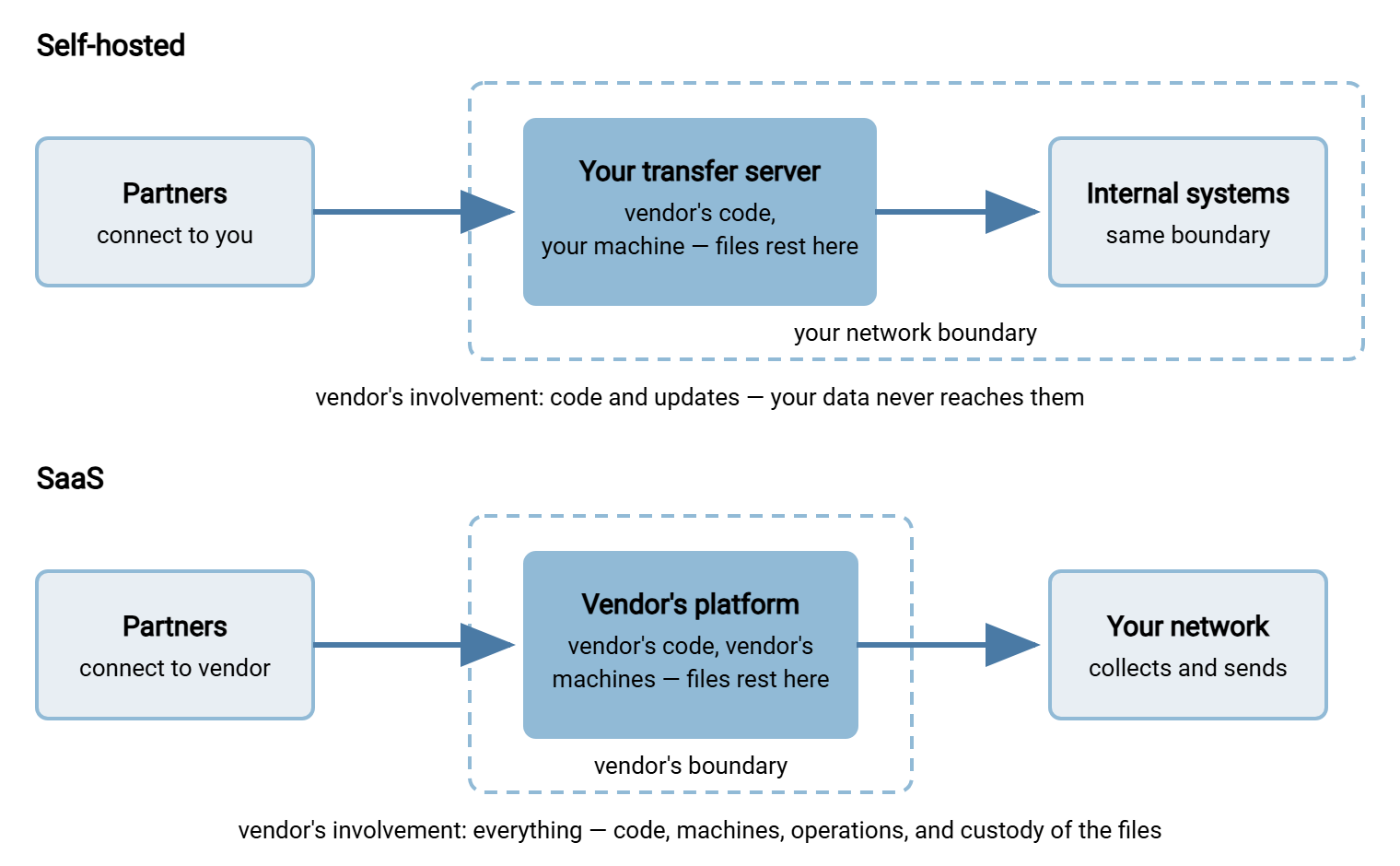
Self-hosted means you license the vendor's software and install it on servers you control. Those might be in your own building, your data center, or on cloud machines you rent and administer. The vendor supplies code and updates; you supply the hardware, the operating system, the network boundary, and the people. Your files terminate on your systems and never touch the vendor's.
Software as a service (SaaS) means the vendor operates the transfer platform on their infrastructure and you subscribe to it. Your partners connect to the vendor's endpoints. Your files pass through — and usually rest on — the vendor's systems. The vendor's staff run, patch, and monitor the platform. You administer accounts and settings through their interface.
Between the poles sit hybrids — vendor-managed software on your cloud account, self-hosted gateways in front of a hosted core. They inherit a mix of the properties below. And note one distinction that trips people constantly: self-hosted software running on a rented cloud virtual machine is still self-hosted. You have outsourced the hardware, not the operation; the patching, hardening, and custody questions all still point at you. The provider will gladly rent you the machine, but it does not rent out discipline.
The diagram below shows the essential difference as a data path: where the files rest, and whose boundary they rest inside.
Who Holds Your Data
Custody is the cleanest difference. Self-hosted, your files rest only on systems you control. Questions about data location answer themselves: the data is where you put the server. Suppose you operate under residency or localization rules that require data to stay in-country. That is the territory mapped in our cross-border transfers series. In that case, self-hosting makes the compliant answer structurally simple. Custody also means your logs, your forensics, and your access decisions, with nobody else's staff in the picture.
SaaS puts your files, at least transiently and usually at rest, on the vendor's systems. That is not inherently unsafe. A good vendor encrypts stored data, isolates tenants, restricts and logs staff access, and lets you choose a hosting region. But each of those protections is now a claim to assess rather than a property you control. The questions in group five of the vendor question set exist for exactly this. They ask who can access customer data, under what controls, in which regions, with what encryption and key custody.
Be fair about the other side of custody: holding the data yourself only helps if you protect it well. A SaaS vendor's storage controls, tested by attestation audits and many customers' scrutiny, can be substantially better than an under-resourced internal server nobody hardens. Custody moves accountability; it does not automatically move quality.
One custody channel exists in both models and is routinely forgotten: support access. A SaaS vendor's support staff may be able to see your tenant as part of their job. A self-hosted vendor's support engineer may remotely drive your console during a troubleshooting session. In both cases the practical rules are the same. Access starts when you say so, ends when the case ends, and lands in a log. But under self-hosting, enforcing those rules is in your hands. Under SaaS you are verifying the vendor's account of them. Neither is a reason to avoid support; both are a reason to ask how it works before the first urgent ticket.
Who Patches, and How Fast
Patching is the sharpest edge of the whole trade, and the one the industry's well-publicized transfer-product breaches illuminated from both directions.
With SaaS, the vendor patches the platform for everyone at once. When a serious flaw surfaces, their security team can have the fix live before most customers finish reading the advisory. Your exposure window is their response time, and good operators are fast. The corresponding cost: you cannot test the change first, schedule it around your quiet period, or decline it. You also inherit their pace when it is slow, with no lever of your own to pull.
With self-hosting, you control the window — and you carry it. You can stage a patch in a test environment, verify your flows, then roll it out on your schedule, which is real operational safety. But when the advisory is urgent, "your schedule" must mean days or better. History is blunt about what happens otherwise. In the well-known breach waves, many victims were running installations for which a fix already existed, sometimes for weeks. Their model did not fail them; their patching did. Self-hosting is only as secure as your discipline. The honest self-assessment before choosing it is whether that discipline — a named owner, a monthly rhythm, an emergency path — actually exists. Our update and patch strategy article describes what the discipline looks like when it is real. I have asked whether it exists in a good many rooms, and the pause before the answer is usually the answer.
We will state our own position in those terms. If you run Sysax Multi Server, it is self-hosted on your Windows server. So we can publish fixes for it, but only you can apply them. Choosing our model means accepting that split of labor with open eyes — that is the deal with every self-hosted product, ours included.
Remember: the model you can operate well beats the model that looks better on paper. A SaaS platform patched today by experts is safer than a self-hosted server patched never. A well-run self-hosted server is safer than a SaaS tenant nobody configured carefully. The variable is you, not the diagram.
Blast Radius: Two Different Bad Days
Blast radius — how far a single compromise spreads — is where the models diverge most interestingly, because each has a nightmare the other lacks.
The self-hosted nightmare is the product flaw exploited across the installed base. A serious vulnerability becomes public, attackers scan for every reachable installation, and each exposed customer is breached separately on their own infrastructure. Whether you fall depends on your own variables: how quickly you patch, and how reachable your server was in the first place. Installations restricted by IP allow-lists, VPN, or gateway architecture often ride out waves that engulf openly exposed ones. Reducing that reachability is a design discipline of its own; see why transfer servers get a DMZ. When it does happen, the bad day is fully yours: your logs, your forensics, your notification duties, your control of the response.
The SaaS nightmare is the platform compromise. If attackers breach the vendor's service itself, every tenant's data is potentially in scope simultaneously, including yours. You may have configured nothing wrong at all. Your visibility into what happened is whatever the vendor discloses. Your response timeline is coupled to theirs. Your evidence is in their custody. The mirror-image comfort: a serious SaaS operator runs monitoring and a security team most customers could never staff. That operator may detect and contain an attack that would have lived quietly on your own server for months.
Neither nightmare is hypothetical; both patterns have played out publicly in the transfer-tool world. The planning consequence is different in each case. Self-hosted teams should invest in reachability limits and patch speed. SaaS teams should invest in understanding the vendor's incident history, notification commitments, and their own tenant-side controls. Both should assume their model's bad day eventually arrives, which is the working premise of this series' opening article.
Availability, Operations, and the Human Budget
Security debates skip too quickly past a mundane truth: someone has to run the thing. Backups, certificate renewals, log rotation, disk space, failover, monitoring at three in the morning — under self-hosting, all of it lands on your team. The security consequences of skipping it are real even though no attacker is involved. An expired certificate takes partner transfers down as effectively as an outage. An unwatched disk fills and silently stops your logging. It prefers to do so on a public holiday.
SaaS converts that operational load into a subscription. Availability engineering, redundancy, and monitoring come from a team whose whole job is the platform. For a small or stretched IT team, this is a legitimate security argument, not a convenience argument. The most dangerous transfer server in any estate is the one nobody really owns. The costs run the other way in control. Maintenance happens on the vendor's schedule, features change under you, and an internet or vendor outage stops your flows with nothing local to fail over to. (The status page, throughout, will report all systems operational.)
Budget the humans honestly before choosing. If no one on the team can own patching, monitoring, and renewal calendars, that fact matters more than any architectural preference — in either direction.
Kestrel Payroll chose self-hosting for custody reasons, correctly, and then named nobody as the server's owner, incorrectly. The first quarterly spot-check found it three releases behind, one of them a security fix. The advisory mailbox had been unread since the administrator who set it up had moved to another team. Nothing had happened yet; the server sat behind an allow-list and the flaw needed a login. The fix took an afternoon and a calendar entry. The custody argument had been sound all along; it just had nobody standing behind it.
Exit, Lock-In, and Long-Term Control
How hard is it to leave? That is the dimension nobody evaluates until it hurts.
Self-hosted software keeps running whether or not the vendor thrives. If the vendor is acquired, raises prices, or disappears, your server still works tomorrow morning. That is a real cushion, with a hard limit. Software without security fixes ages badly, so the cushion buys you migration time, not a permanent answer. Your data is already on your systems, so leaving means standing up a replacement, moving accounts and folders, and repointing partners. That is work, but work you control. Products built on standard protocols make this dramatically easier, because partners' existing clients keep working; proprietary protocols quietly deepen the moat.
Leaving a SaaS platform means exporting your data, configuration, and — often forgotten — your transfer history and logs. Those records may be evidence you are required to retain. It also means repointing every partner away from the vendor's endpoints, which is partner-coordination work on someone else's timetable if the exit is not voluntary. None of this is prohibitive, but all of it is easier to negotiate before signing than after. The contract questions — data return, deletion attestation, notice periods — belong with procurement and legal rather than the admin. (As with everything in this series: education, not legal advice.)
Both models deserve an exit plan written on a calm day. The checklist for keeping one realistic — including the log-export question and the partner-repointing inventory — is in vendor security after the purchase. Calm days are rarer than they sound; book one.
The Trade on One Table — and Who Should Pick Which
The comparison, honestly compressed:
| Dimension | Self-hosted | SaaS |
|---|---|---|
| Data custody | Files stay on your systems; location questions answer themselves | Files rest with the vendor; isolation, staff access, and region become assessed claims |
| Patching | You control timing — and carry the lag; discipline required | Vendor patches everyone at once; fast, but untestable and unschedulable by you |
| Worst-case breach | Product flaw exploited install-by-install; reachability and patch speed decide your fate | Platform compromise can touch all tenants at once; response and evidence run through the vendor |
| Operations | Backups, certificates, monitoring, availability — all yours | Included, run by specialists; outages and maintenance on their schedule |
| Visibility | Full logs and forensics in your hands | What the platform exposes; incident detail arrives via disclosure |
| Exit | Software survives the vendor for a while; migration is work you control | Data, config, and log export plus partner repointing; negotiate terms before signing |
| Human cost | Needs a named owner with real time | Needs an administrator, not an operations team |
Self-hosted tends to fit when data custody or localization rules dominate. It tends to fit when your team already has patching and operations discipline (or the flow is internal enough to limit exposure). It tends to fit when partners connect into infrastructure you must control end to end. It also tends to fit when you want logs, forensics, and exit fully in your own hands.
SaaS tends to fit when there is no realistic operations capacity to own a server. It tends to fit when partners are many, global, and availability-sensitive. It tends to fit when your own hosting environment is weaker than a good vendor's. It also tends to fit when the speed of vendor patching honestly beats what your calendar would deliver.
Many estates land on both: a self-hosted server for the regulated, custody-sensitive flows and a hosted service for ad-hoc person-to-person sharing. They choose per flow rather than by ideology. The client side of automation often bridges the two. An automation client such as Sysax FTP Automation runs on your own machines and moves files on a schedule over the standard protocols. It does so whether the far end is a server in your rack or a hosted endpoint. That is one reason standard protocols are worth insisting on in either model. Whichever way a given flow goes, the assessment obligations of this series apply with equal force. The question groups just shift weight, exactly as laid out in the vendor question set.
Before you commit, answer five questions on paper:
FIVE HONEST QUESTIONS BEFORE CHOOSING A MODEL

1. Who, by name, will apply security patches - and within how many days
   of an urgent advisory? If no name, lean SaaS.
2. Must this data stay in a specific country or inside our custody by
   rule or contract? If yes, lean self-hosted (or region-pinned SaaS
   with evidence).
3. If the tool is down for a day, what breaks - and which model's
   failure mode can we tolerate better?
4. If we had to leave this product in a year, what would leaving take?
   Write the steps for both models; compare the lists.
5. Which bad day scares us more: our own server breached because we
   lagged a patch, or our data caught in a platform-wide vendor
   incident we can only watch? Neither answer is wrong - but one of
   them is yours.
Choosing With Open Eyes
The self-hosted vs SaaS decision is a risk allocation, not a purity test. Self-hosting buys custody, control, and independence, and bills you in operational discipline. SaaS buys operational excellence and patch speed, and bills you in custody, visibility, and exit friction. Both bills are real; both are payable by the right team.
Decide per flow, and write down which risks you accepted and who accepted them. Revisit the choice when circumstances change — a shrinking team, a new localization rule, a vendor acquisition. For the questions to put to any vendor on either side of the fork, start with the security questions to ask a transfer vendor. For keeping the chosen vendor honest over the years, continue to vendor security after the purchase. And the next time somebody in the room starts a sentence with "surely it's safer if," you will have the second half ready.
Frequently Asked Questions
Is self-hosted automatically more secure because the data stays with us?
Is SaaS automatically more secure because experts run it?
Our transfer software runs on a rented cloud virtual machine. Is that SaaS?
Can we use both models at once?
What single factor should weigh most in the choice?
From the Sysax team: we build secure file transfer software for Windows. Sysax Multi Server is an FTP, FTPS, SFTP, and HTTPS server. Sysax FTP Automation handles scheduled, scripted transfers. Free trials are on the download page.