
Why Vendor Security Matters for Transfer Tooling
Somewhere in your purchase records there is a comparison sheet. It has a column for protocols, one for features, and one for price. Perhaps it has one for support and one for how pleasant the console is. There is no column for the vendor. Nobody scored the company that wrote the code or the habits of the people who maintain it. Nobody scored how fast they ship fixes, or how straight they talk when something goes wrong. Yet on the day the tool went live, every one of those things became part of your security posture. That happened whether it was on the sheet or not.
This is not a theoretical worry. Some of the most damaging security incidents of recent memory traveled through file transfer products. Organizations with careful firewalls, patched operating systems, and trained staff were breached anyway. That was because attackers found one flaw in a transfer product and used it against every customer running it. The industry learned, expensively, that the tool sitting on the data path deserves the same scrutiny as the data path itself.
This article explains why transfer tooling in particular attracts attackers and what supply-chain risk means in plain words. It explains what you are actually trusting a vendor with under each delivery model. It shows how to assess vendors proportionately, without pretending every organization needs a forty-page questionnaire. It is the foundation of our Vendor Assessment series. One disclosure belongs right up front: Sysax, whose site you are reading, is itself a transfer-tool vendor. Read everything here as the standard you should hold us to as well.
The Tool That Sits Where the Files Are
Your attack surface is the collection of points where an attacker could try to get in: open ports, login pages, user accounts, software with known flaws. Most hardening work is about shrinking that surface. A file transfer tool, by its nature, sits at one of the most valuable points on it.
A transfer server concentrates four valuable things in one place. It holds credentials — accounts and passwords or keys for every partner and internal user who moves files. It holds cryptographic keys — the host keys and certificates that prove your server's identity. It is frequently reachable from the internet, because partners outside your network need to connect to it. And it touches the files themselves: payroll runs, patient records, invoices, database exports. Whatever your organization considers worth moving is, at some moment, inside that software's memory and on its disk. Seen from the wrong side of the firewall, it is a very well-stocked room.
An attacker who compromises a workstation gets one user's world. An attacker who compromises your transfer tool gets everyone's traffic, plus a well-connected foothold that your firewall was deliberately configured to allow inbound connections to. That combination — high value, deliberate exposure — is why transfer software is hunted so specifically, a pattern we cover in detail in common attacks on file transfer systems.
The diagram below shows the position the vendor occupies. Their code stands between the outside world and your internal systems, and their update channel feeds that code continuously. Every file you transfer crosses software you did not write.
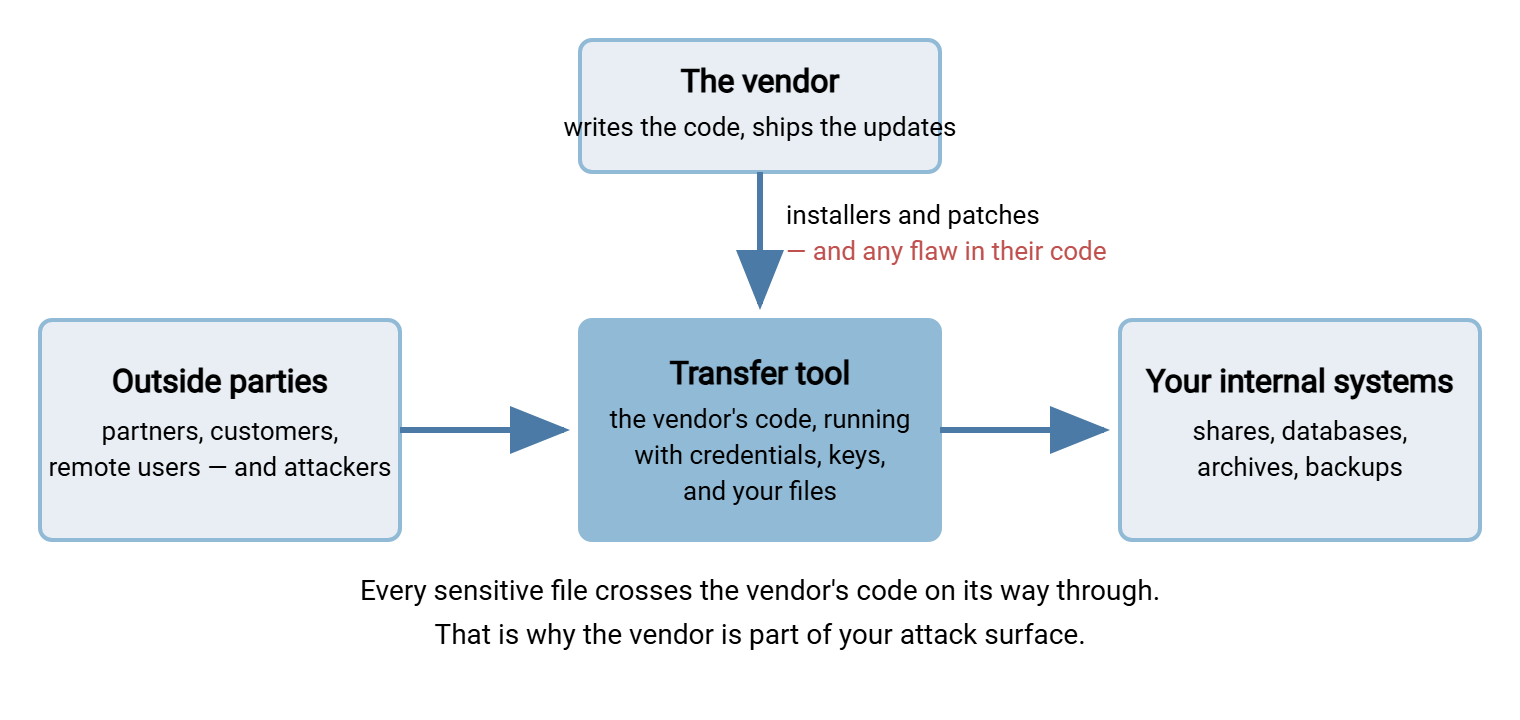
None of this means transfer tools are uniquely dangerous — it means they are uniquely worth choosing carefully. The same concentration of value that attracts attackers is exactly why the software exists. One hardened, logged, well-understood gateway is better than files scattered across email and personal cloud accounts. (Those scattered files are still out there, incidentally. They are just no longer the plan.)
What the Industry Learned the Hard Way
For years, vendor assessment was treated as paperwork — a checkbox exercise for the largest enterprises. What changed the industry's mind was a series of well-publicized breaches of managed file transfer products. This is the enterprise category of transfer software, usually shortened to MFT. The details differed, but the shape repeated, and the shape is what matters.
In each case, attackers studied a widely deployed transfer product and found a serious vulnerability. Often, it was one the vendor did not yet know about. Security people call that a zero-day because defenders have had zero days to prepare for it. Instead of attacking one company, the attackers scanned the internet for every installation of that product. They exploited them all, in some cases within hours. Hundreds of organizations were breached through the same hole at the same time. Many of the victims had done everything else right: their operating systems were patched, their staff trained, their firewalls tight. The one decision that undid them was made years earlier, in a procurement meeting, when nobody asked hard questions about the product being bought.
Four lessons from those incidents are worth carrying into every evaluation you do:
- Product choice is a security decision. The moment a tool touches your data path, its flaws are your flaws. Feature lists and price matter, but they are not the whole decision.
- Vendor response speed matters more than vendor perfection. Every non-trivial product has had vulnerabilities. The difference between a bad week and a catastrophe is often the vendor's speed. How fast do they publish an advisory, ship a fix, and tell customers clearly what to do?
- You have to be listening. Several victims were breached after a patch existed, because nobody in the building knew an advisory had been published. Hearing about fixes is your job; we cover how in vendor security after the purchase.
- Internet-facing transfer endpoints are actively hunted. Attackers maintain lists of which organizations run which transfer products. Assume yours is on such a list, and let that assumption drive your patching discipline.
Remember: the organizations hit hardest by transfer-product breaches were not careless. They were ordinary customers of software that failed them, without a plan for that possibility. Vendor assessment is how you build the plan before you need it.
Supply-Chain Risk in Plain Words
The phrase you will hear around this subject is supply-chain risk. Stripped of jargon, it means: risk you inherit from the things you buy rather than build. A bakery inherits risk from its flour supplier. If the flour is contaminated, the bread is contaminated, no matter how clean the bakery's own kitchen is. Software works the same way, with one twist — the supply relationship never ends. Your transfer tool is not a sack of flour delivered once. It is code that keeps arriving, update after update, for as long as you run it. Flour, whatever else you can say about it, does not ship patches.
When you install a vendor's product, you are extending trust to a chain of things you will never see directly:
- Their developers and their practices — code review, security testing, how they handle a reported flaw.
- Their ingredients — modern software is assembled from libraries and components the vendor did not write either. A flaw in a widely used library surfaces in thousands of products at once, including, possibly, yours.
- Their build and release systems — the machinery that turns source code into the installer you download.
- Their update channel — the path by which new versions reach you.
The update channel cuts both ways. Applying updates promptly is the single most effective defense against the breach pattern described above — the victims who patched fast fared far better. At the same time, the wider software industry has seen incidents where an update channel itself was compromised. Attacker code rode in disguised as a legitimate update. That risk is real but rare. The everyday failure, by an enormous margin, is the opposite one: patches that exist and never get applied. I have yet to meet a poisoned update in a transfer estate; I have lost count of the unapplied ones. Do not let a theoretical fear of poisoned updates talk you out of the practical discipline of patching. Our guide to update and patch strategy for transfer servers shows how to do it with appropriate care. That means staged rollouts, checksums on downloaded installers, and a test pass before production.
You cannot audit a vendor's source code, their build servers, or their hiring. What you can do is judge the signals they give off. Do they publish security advisories at all? Do they describe how to report a vulnerability to them? How do they talk about past flaws? You can also verify their product's behavior yourself in a trial. Those observable signals are the raw material of the assessment methods in the rest of this series.
What You Trust a Vendor With Depends on the Delivery Model
Not all vendor relationships expose you equally, and the biggest single variable is the delivery model — where the software runs and who operates it.
With self-hosted software, you install the vendor's product on servers you control. You trust their code and their update channel, but your data stays on your machines. Your staff hold the administrator accounts, and your network rules decide who can reach the service. The balancing cost is that operating it — hardening, patching, monitoring, backups — is your job.
With software as a service (SaaS), the vendor runs the product on their infrastructure and you use it remotely. You trust everything above plus the vendor's day-to-day operations. That includes their server hardening, their staff's access to customer data, the isolation between you and their other tenants, and their availability. In exchange, patching and operations stop being your burden. For a stretched team, that is a genuine security benefit. An expert operations team patching promptly can beat an overloaded admin patching never.
Neither model removes vendor risk; each relocates it. The honest comparison — blast radius, availability, exit options, data sovereignty — gets its own article in this series, self-hosted vs SaaS transfer tools. For now the point is simpler: know which trust package you are signing up for, because the questions you ask the vendor differ accordingly.
This is a natural place to show our own cards. Our product Sysax Multi Server is self-hosted: it runs on your own Windows server. Your files never pass through Sysax infrastructure — we never hold your data at all. That answers one important assessment question (who holds the data) by design. It deliberately does not answer the others. Our code quality, our patching practice, and our advisory habits are exactly as assessable as any other vendor's. They are exactly as much your business. Hold us to the full standard this series describes.
Right-Sizing the Assessment
Many teams, having learned that vendor risk is real, go wrong in the other direction. They borrow a giant enterprise questionnaire, send all two hundred questions to every vendor, and drown in unread answers. Assessment that nobody digests is not security; it is ceremony. The professional move is proportionality: spend assessment effort in proportion to what the tool will touch and what could go wrong.
Northgate Retail once borrowed a parent company's questionnaire for a tool that would move store shelf layouts — public data, internal network only, one flow. Three vendors answered all two hundred rows. The answers sat in a shared folder for five weeks while the project waited on "security review." When the review finally happened it took forty minutes. That was because six of the two hundred rows applied to a server that nothing outside the building could reach. The next questionnaire had eleven questions and a tier box at the top. Nobody missed the other hundred and eighty-nine.
Three questions set the tier:
- What data will flow through it? Public marketing files are one thing; payroll, health, or cardholder data another. If regulated data is involved, the relevant rules may also have vendor-management expectations of their own — see our compliance frameworks series for how those regimes think.
- How exposed is it? An internet-facing server reachable by anyone deserves far more scrutiny than an internal tool on an isolated network segment.
- What is the blast radius? Blast radius means: if this one thing is fully compromised, what else falls? A transfer server holding credentials for fifty partners has a larger blast radius than one moving files between two internal systems.
High marks on any of the three justify the full treatment: a written question set, evidence for key claims, a hands-on trial, and a recorded decision. Low marks justify an honest lightweight pass — an hour reading the vendor's security material, a handful of pointed questions, a trial in a test network. Both are legitimate. What is not legitimate is skipping the thinking entirely.
One boundary worth stating plainly: this series is education for the administrator, not legal advice. Deciding whether a vendor's contract terms are acceptable, and formally accepting residual risk, belongs to procurement, legal, and management. Your role is the technical substance — being the person in the room who can tell whether an answer about encryption or logging actually means anything. The checklist below is scoped to that role.
A RIGHT-SIZED VENDOR CHECK — copy, adapt, keep with your purchase notes

TIER IT (five minutes)
[ ] Data through the tool:   public / internal / regulated
[ ] Exposure:                internet-facing / partner-only / internal-only
[ ] Blast radius if owned:   one flow / one department / most of the estate
    -> Two or more "high" answers = full assessment. Otherwise lightweight.

BEFORE BUYING
[ ] Send a short written question set (see the questions article in this series)
[ ] Read the vendor's security page; list each claim you intend to verify
[ ] Confirm they publish security advisories, and where
[ ] Confirm there is a stated way to report a vulnerability to them
[ ] Ask how customers are told about patches, and how often releases ship

VERIFY IN A TRIAL
[ ] Install in a test network first, never straight into production
[ ] Confirm claimed protocols and security settings actually exist and work
[ ] Confirm logging records what you would need in an investigation
[ ] Fail some logins on purpose: do lockout and alerting behave as claimed?

DECIDE AND RECORD
[ ] One page: what you checked, what you found, what remains open
[ ] Name who accepted any remaining risk (not you alone)
[ ] Diary note to re-check the vendor once a year, or on any breach news
Assessment Is a Lifecycle, Not an Event
The checklist hints at the larger shape: vendor security has a before, a during, and a long after.
Before buying, your leverage is highest: a vendor answering pre-sales questions is a vendor at their most responsive, and I say that as one. Use that window to ask the substantive questions collected in the security questions to ask a transfer vendor. Read the answers with the healthy skepticism taught in reading vendor security claims.
During evaluation, prefer verification to belief. A vendor who offers a genuine free trial is handing you the means to check their claims yourself. Treat that as both an opportunity and a signal. We publish trials of our own products on the download page for exactly this reason. Claims about protocols, logging, or lockout behavior are things you should be able to test on your own test server before any money moves. That applies to our software and anyone else's.
After purchase, the relationship becomes routine, and routine is where vigilance goes to die. Advisories arrive, versions age, companies get acquired, and products quietly approach end of life. The sustaining habits get their own article in staying alert after the purchase. Client-side tooling belongs in this picture too. An automation client such as Sysax FTP Automation runs on your machines with stored credentials for every server it talks to. That makes it just as much a data-path component as the server it connects to. Inventory every transfer tool you run, server and client, and give each one an owner, an update source, and a review date. Yes, the client on the finance workstation too.
The Mindset to Keep
Vendor risk is ordinary risk, and that is the practical truth to leave with instead of anxiety. You already manage risks you cannot eliminate — hardware fails, people click things, power goes out — by choosing well, watching closely, and keeping a fallback. Vendors are no different. Choose one who shows their work. Verify what you can touch, patch what they ship, and subscribe to what they publish. Know roughly what you would do if you ever had to leave.
Do that, and a vendor's bad day does not have to become your worst one. The next article in this series turns the mindset into concrete material. Read the security questions to ask a transfer vendor, grouped by theme, with the reasoning behind each. For the attacker's-eye view of why transfer systems draw fire in the first place, common transfer attacks is the companion read. And the comparison sheet finally gets the column it was missing.
Frequently Asked Questions
Is vendor security assessment only for large companies?
Our transfer tool is self-hosted. Do we still need to worry about the vendor?
What is supply-chain risk in simple terms?
Are software updates from a vendor a risk or a protection?
How often should we re-assess a vendor after buying?
From the Sysax team: we build secure file transfer software for Windows. Sysax Multi Server is an FTP, FTPS, SFTP, and HTTPS server. Sysax FTP Automation handles scheduled, scripted transfers. Free trials are on the download page.