
Why File Transfer Services Live in a DMZ
Sooner or later, every organization has to exchange files with the outside world. A partner uploads orders overnight. A customer sends artwork too large for email. A vendor collects reports every morning. The easy answer is to stand up an SFTP or FTPS server and forward a port to it. The moment you do, one of your machines becomes reachable by the entire internet, not just by the partner you built it for.
Where that machine lives on your network matters more than almost any setting inside it. This article explains the DMZ in plain words. It is the buffer network that keeps internet-facing services at arm's length from everything else you run. The article covers what it actually is and the blast-radius logic that justifies it. It covers what belongs inside one and what never does, and what a typical mid-size layout looks like end to end. It is part of our DMZ and gateway architecture series, and it is the foundation the rest of the series builds on.
An Internet-Facing Service Is a Doorway
An internet-facing service is any program that listens for connections from outside your network — a web server, a mail server, or in our case a file transfer server. To be useful it must be reachable by strangers. That is not a flaw; it is the job description.
But reachable by strangers means reachable by everyone. Automated scanners sweep the public address space around the clock, cataloging every open port they find. Open a transfer port to the internet and the first probes typically arrive within minutes; automated password guessing follows soon after. None of this is targeted or personal — it is background weather on the modern internet, and it never stops. If you have not watched it happen, the auth log of any freshly exposed server is a sobering read.
File transfer servers make unusually attractive doorways. They hold credentials by design, because partners must log in. They receive business data by design, because that is their purpose. They run around the clock, because partners transfer at all hours. And they are often set up once for a single project and then forgotten, which makes them the least-patched thing on many networks. So the defender's question is not only "how do I keep attackers out of this server?" It is also "if this server falls anyway, what does the attacker get next?" The first question is answered by hardening. The second is answered by architecture — by where the server lives.
The Flat-Network Problem
Picture the setup most networks start with. There is one internal network — one LAN — and everything sits on it as equals. That includes workstations, the domain controller, the internal file server, the printers, and now the new transfer server. The firewall at the edge forwards one port, say port 22 for SFTP, to the transfer server's internal address. Partners connect, files arrive, everyone is happy.
The diagram below shows this arrangement, and why it deserves a second look. The exposed server sits shoulder to shoulder with everything it could hurt.
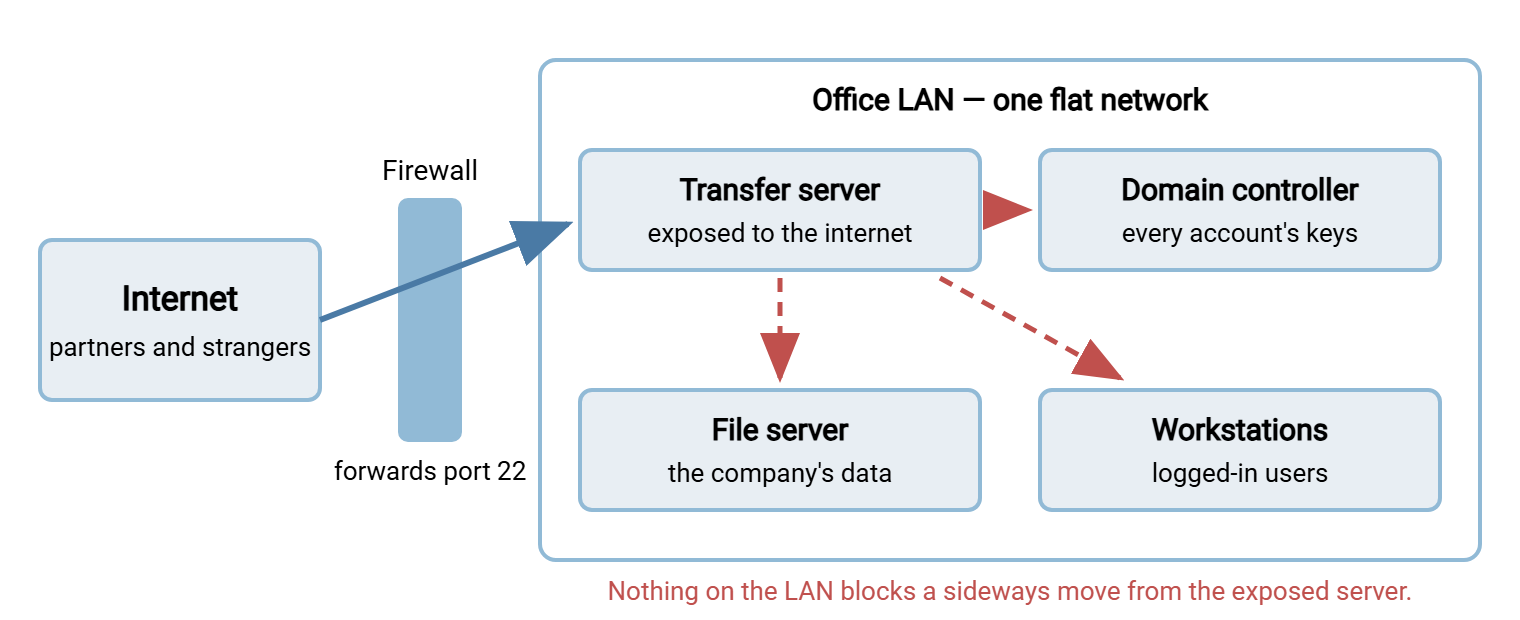
Now play the bad day forward. The transfer service has a vulnerability, or a partner's password was stolen, or a brute-force run finally lands. The attacker is now executing code on a machine that sits beside everything you own. The next step is lateral movement — hopping from the first foothold to its neighbors. On a flat network there is nothing in the way. The exposed server can reach the domain controller's login services, the file server's shares, and every workstation. That is because they are all one broadcast domain with no barrier between them.
Security people describe this with the term blast radius: the set of things an attacker can reach from a compromised system. On a flat network, the blast radius of the transfer server is the entire company. One guessed password on a forgotten box becomes a network-wide incident. That is the problem the DMZ exists to solve.
What a DMZ Is, in Plain Words
A DMZ borrows its name, "demilitarized zone," from geopolitics. Network documentation also calls it a perimeter network or screened subnet. It is a small, separate network wedged between the internet and your interior network, with a firewall boundary on each side. Services that must talk to strangers live in the DMZ. Nothing else does.
The best everyday analogy is a reception lobby. Visitors can walk into the lobby without a badge — that is what the lobby is for. But the door from the lobby into the offices is locked from the lobby side. The lobby holds nothing valuable, and the receptionist watches everyone who enters. If a visitor turns out to be a burglar, they are stuck in a small room with a locked door, not wandering the building.
The buffer also buys something less obvious: time. An attacker who lands on a flat network can start reaching valuable systems in the same minute. An attacker who lands in a DMZ has to find a way through a second, deliberately closed boundary. Every attempt to do so is exactly the kind of traffic your monitoring should scream about. That is because legitimate DMZ hosts never initiate connections inward. The buffer converts a silent disaster into a noisy, detectable one, which is often the difference between an incident report and a headline.
The two firewall boundaries have different jobs:
- The outer boundary (internet to DMZ) admits only the specific transfer ports, only to the specific edge host. Everything else from the internet is dropped.
- The inner boundary (DMZ to interior) denies everything by default. The interior may reach into the DMZ deliberately — to collect files, to administer the host — but the DMZ initiates nothing inward. The door is locked from the lobby side.
The diagram below shows the three zones and, critically, the direction of every arrow crossing a boundary.
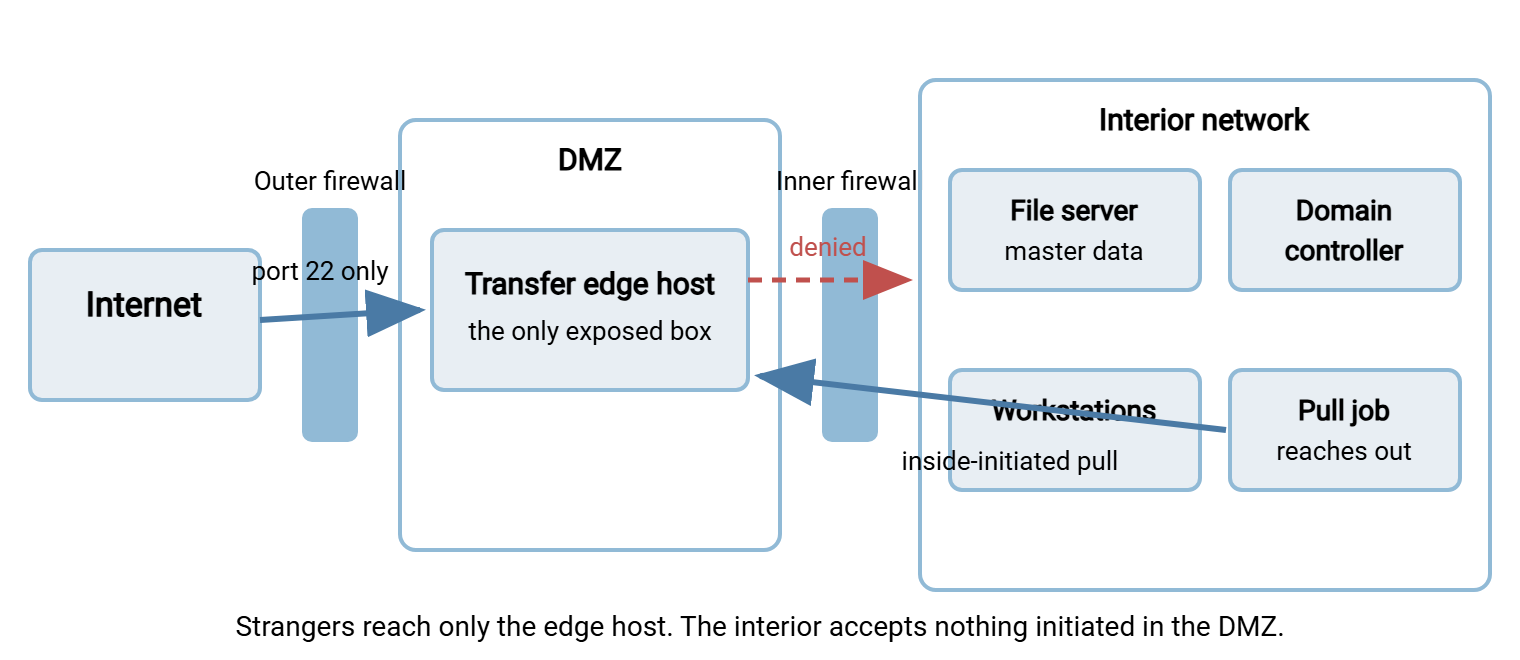
Read the arrows carefully, because they carry the whole idea. Strangers stop at the edge host. If the edge host falls, the attacker is standing in a small, watched room whose only inward door is locked from the other side. Files still flow inward — but they flow because a job on the interior reaches out, collects them, and brings them home. Who initiates each connection turns out to be the heart of DMZ design. It gets a full article of its own in designing inbound vs outbound flows.
Remember: a DMZ does not make the edge server harder to compromise. It decides what a compromise is worth. Hardening the box and buffering the network answer two different questions, and you need both.
What Belongs in the DMZ — and What Never Does
The membership test is one sentence: does the internet need to reach it? If yes, it is a DMZ candidate. If no, it stays inside. A second test then applies to everything that passes the first. Strip the candidate of anything it does not strictly need, because you are placing it somewhere you assume it can be captured.
| System | Placement | Why |
|---|---|---|
| Transfer edge server (SFTP/FTPS/HTTPS) | DMZ | Strangers must reach it — that is its job |
| External web server or reverse proxy | DMZ | Same reason — public by design |
| Internet-facing mail relay | DMZ | Receives connections from any mail server on earth |
| Domain controller | Interior, always | Holds the keys to every account you have |
| Internal file server, database | Interior, always | Master copies of business data live inside |
| Backup systems | Interior, always | The last line of recovery must not share the edge's risk |
| Admin workstations | Interior, always | Loaded with privileged credentials by nature |
Two disciplines give the DMZ its value, and both are strict enough to deserve their own article, keeping data and credentials out of the DMZ. First: nothing in the DMZ may hold credentials that open interior systems — no domain membership, no stored interior passwords, no SSH keys that log into inside machines. Second: nothing in the DMZ keeps long-lived data — files pass through the edge and dwell there for minutes, not months. An edge host that satisfies both rules is a poor prize. An attacker who captures it gets a nearly empty room.
One Firewall or Two?
The classic textbook picture shows two separate firewalls with the DMZ sandwiched between them. Sometimes the firewalls even come from two different vendors, so that a flaw in one product does not open both doors at once. Large organizations still build it that way, and the diagrams in this series draw it that way because it makes the two boundaries easy to see.
The far more common real-world build uses one firewall with three interfaces — often called a three-legged firewall. One leg faces the internet, one leg is the DMZ, and one leg is the interior. The same box enforces the rules between all three zones. Is that a "real" DMZ? Yes. The separation comes from the enforced policy, not from the number of chassis. Two boxes buy you vendor diversity and independent failure; one box costs half as much and halves the administration. For small and mid-size networks, the three-legged design is the sensible default. The budget end of the spectrum is covered honestly in DMZ on a budget.
Whichever hardware you use, the policy is what matters, and the whole of it fits in five lines you can adapt directly:
# The whole DMZ policy, in five lines
1. Internet -> DMZ:   allow only the transfer ports, only to the edge host
2. DMZ -> interior:   deny everything - no exceptions by default
3. Interior -> DMZ:   allow the pull job and admin sessions, from named hosts only
4. DMZ -> internet:   deny unless the edge host truly must dial out - then name it
5. Log every allow and every deny on every leg; ship logs off the edge host at once
If you memorize nothing else from this series, memorize line 2. Nearly every DMZ that fails in practice fails because line 2 grew exceptions until it meant nothing.
A Typical Mid-Size Layout, End to End
Here is how the pieces fit together in a concrete, common build — one partner file arriving, start to finish.
A partner connects to transfers.example.com on port 22. The outer firewall permits exactly that: TCP 22, to the edge host's address, nothing else. The edge host is a small server in the DMZ. On Windows networks, a box running Sysax Multi Server fills this role, speaking SFTP and FTPS to the outside world. It is not joined to the domain. Its accounts are local, one per partner, each locked to its own folder. The partner authenticates, uploads the file into their drop folder, and disconnects. As far as the partner can tell, the job is done.
The file is now at the edge — and the edge is not where it belongs. Every few minutes, a scheduled job on an interior machine connects outward through the inner firewall to the edge host. It collects whatever has arrived and deletes it from the edge. It files the data on the internal file server where the business actually uses it. A scheduled-transfer tool such as Sysax FTP Automation running inside the network handles exactly this kind of unattended pull. Note the direction: the interior dialed out. The inner firewall still contains zero rules that allow the DMZ to start a conversation inward.
Outbound files travel the mirror image of the same path. When the business needs to send a report to a partner, an interior job pushes the file outward to a pickup folder on the edge host. The partner connects in from the internet to collect it. Again, both boundary crossings were initiated from the safer side: the interior pushed outward, the partner connected to the edge. At no point did the DMZ host start a conversation with the interior, and at no point did a partner touch an interior machine.
Meanwhile, every login attempt and every transfer on the edge host is written to a log. The log is shipped off the box as it happens, to a collector the edge cannot rewrite. That is because a compromised host's logs cannot be trusted after the fact. Log shipping and the alarms worth setting get a full article later in this series. The wider discipline lives in our transfer logging and audit series.
One practical wrinkle deserves a mention here: protocol choice changes how much of the outer firewall you must open. SFTP needs a single port, which keeps the edge rules beautifully short. FTPS needs its control port plus a published passive port range — a block of high ports for data connections. The firewall must also admit that range. If you run FTPS at the edge, size and publish that range deliberately. Our guides to configuring passive port ranges and the firewall's view of each protocol walk through it.
What a DMZ Does Not Do
A DMZ is a container for risk, not a reduction of it. Three limits are worth stating plainly, because each one is a mistake someone makes every week.
It does not harden the service. The edge host still needs patching, minimal installed software, strong authentication, and sane configuration — the whole program in our hardening transfer servers series. A DMZ full of soft, unpatched services is not a buffer; it is a staging area conveniently prepared for the attacker.
It does not inspect content. Files pass through the DMZ because you invited them. A malicious file uploaded by a compromised partner account rides the pull job inward like any other file. Scanning and quarantine have to happen on their own terms, ideally on the interior side before files reach people.
It is not the end of segmentation. The DMZ is the oldest and coarsest network-segmentation move — one buffer zone at the perimeter. Modern practice keeps subdividing: separating servers from users inside, narrowing every path to the minimum, treating every network as somewhat hostile. That direction of travel is covered in our zero trust file transfer series. None of it replaces the DMZ for internet-facing services; it extends the same logic inward.
Where to Go From Here
The short version to carry away: an internet-facing transfer server will be probed, and you should assume it can eventually fall. A DMZ accepts that and arranges the network so the fall is survivable. The exposed box stands alone in a buffer zone and holds nothing worth stealing. The interior firewall refuses every conversation the DMZ tries to start. Blast radius shrinks from "the company" to "one disposable server."
From here, the natural next step is DMZ patterns for file exchange. It compares the three ways to build this — from a simple port forward to a full gateway. It helps you pick by size and risk. Then keeping data and credentials out of the DMZ turns the two strict rules from this article into a working discipline. If you run a small network and two firewalls sounds like someone else's budget, go straight to DMZ on a budget. Real segmentation is more reachable than it looks.
Frequently Asked Questions
Is this the same as the "DMZ host" setting on a home router?
Do I need two physical firewalls to have a real DMZ?
Should the DMZ transfer server join our Windows domain?
We use SFTP, so everything is encrypted. Do we still need a DMZ?
What is the difference between a DMZ and a VLAN?
How many machines should be in the DMZ?
From the Sysax team: we build secure file transfer software for Windows. Sysax Multi Server is an FTP, FTPS, SFTP, and HTTPS server. Sysax FTP Automation handles scheduled, scripted transfers. Free trials are on the download page.