
The Attacks File Transfer Services Actually See
Open the authentication log on any internet-facing transfer server and read the last hour. You will not find anything exotic. You will find the same password tried against forty usernames at six-second intervals, from an address that has never sent you a file and never will. Security writing loves the rare and clever attack. Real transfer servers mostly face a short, repetitive list. It includes password guessing at industrial scale and eavesdropping on connections that never should have been unencrypted. It includes interception by imposters, filenames crafted to escape their folders, and uploads that carry something hostile. Every few years, a flaw in the transfer software itself turns customers into victims wholesale. Learn these six families and you understand the overwhelming majority of what will ever be aimed at your service. The attackers are not being unimaginative. They are being efficient.
This article explains each family the way a defender needs it explained. It covers what the attack is and what it looks like from your side of the wire (especially in your logs). It covers the first-line defense that blunts it. What you will not find here is a how-to. The goal is to recognize and prevent these attacks, not to rehearse them. It is part of our File Transfer Threat Modeling series. It pairs naturally with the attack surface article. That one mapped the doors. This one describes the ways people push on them.
Reading the List Like a Defender
Two facts shape everything below. First, most attacks are automated and indiscriminate. Software works through lists of reachable servers, trying the same cheap techniques against each. Whether your organization is large, small, or interesting never enters into it. This is good news in disguise: cheap attacks have cheap, well-understood counters, and deploying them filters out the vast majority of hostile attention. Second, attackers take the cheapest path that works. Nobody develops a sophisticated interception capability against a server that accepts admin / admin123. Defenses therefore compound in order. Closing the cheap paths forces the remaining attackers to spend more, make more noise, and show up more clearly in your logs. I have watched a log go quiet within a day of turning on lockouts. The automated majority does not take you up on extra effort.
"First-line defense" in each section below means exactly that — the control that defeats the attack's cheapest form. Full defensive programs behind each first line live in their own series, linked as we go.
Credential Guessing and Stuffing
The most common attack on any login-bearing service is trying credentials until one works. It comes in recognizable variants, and the vocabulary matters because each leaves a different fingerprint. A brute-force attack hammers one account with many passwords. A dictionary attack is the same, using lists of likely passwords rather than every combination. Credential stuffing replays username-and-password pairs stolen in breaches elsewhere, betting that people reuse passwords across services — which they do. Password spraying inverts the pattern: one likely password tried against many accounts, slowly, precisely to stay under lockout thresholds.
From your side, the signature is authentication failures with machine-like regularity. A fragment like this tells the story:
02:41:03  198.51.100.60   USER alice     530 Login incorrect
02:41:09  198.51.100.60   USER bmurphy   530 Login incorrect
02:41:15  198.51.100.60   USER cdiaz     530 Login incorrect
02:41:22  198.51.100.60   USER dvargas   530 Login incorrect
02:41:28  198.51.100.60   USER erosen    530 Login incorrect
-- one password, many users, even spacing: spraying --
04:17:41  203.0.113.11    USER svc_edi   530 Login incorrect
04:17:42  203.0.113.11    USER svc_edi   530 Login incorrect
04:17:44  203.0.113.11    USER svc_edi   530 Login incorrect
-- one user, rapid fire: brute force --
One detail should raise your pulse: in the spraying block, the usernames are plausible — they follow a real naming convention. Generic names (admin, test, ftp) mean bulk scanning; your naming convention means someone did homework. Detection depends entirely on these events being recorded somewhere reviewable. On Sysax Multi Server, the activity log captures every authentication attempt with source address and timestamp. That is precisely the raw material this reading requires.
First-line defense: make guessing expensive and reuse worthless. Lockouts and progressive delays cap the attempt rate. Key-based or certificate authentication removes the guessable secret entirely. Unique per-service credentials defeat stuffing, since a password stolen elsewhere opens nothing here. The complete program — thresholds that do not lock out clumsy partners, auto-banning, monitoring — is our brute-force protection series.
Cleartext Sniffing
Sniffing is passive eavesdropping: an observer positioned somewhere on the network path records traffic as it passes. Against encrypted protocols the recording yields ciphertext. Against plain FTP — which transmits everything unencrypted — it yields this:
USER alice
PASS Autumn!2Leaves
RETR payroll_export.csv
That is not a special decoded view. That is literally what crosses the wire in a plain FTP session: the username, the password, and every file byte, readable by anything on the path. "On the path" is a broader set than intuition suggests. It includes any machine on the same network segment in the wrong configuration, or a compromised switch or router. It also includes an untrusted wireless network, or a tapped link at a hosting provider or ISP. The attacker needs position, not skill — recording is the easy part.
What makes sniffing uniquely dangerous is what it looks like in your logs: nothing. The session completes normally; the server saw a legitimate login; the observer transmitted nothing and left no trace. You will never detect passive interception after the fact — you can only make it worthless in advance. Your dashboard, meanwhile, will report a very good day.
Remember: passive eavesdropping produces no log entries, no failed logins, no alerts. "We've never had a problem with plain FTP" means "we would have no way of knowing" — absence of evidence is the attack working as designed. The only defense is encryption before the fact.
First-line defense: encrypt the transport, everywhere the traffic could be observed. FTPS wraps FTP in TLS; SFTP runs inside SSH; both reduce an on-path observer to recording noise. The rare situations where unencrypted FTP remains defensible — genuinely isolated networks, genuinely public data — are examined honestly in when plain FTP is still acceptable. The project of eliminating the rest is our retiring plain FTP series.
Man-in-the-Middle
Encryption defeats the passive observer, so the active attacker's next move is to become the endpoint. In a man-in-the-middle (MITM) attack, the adversary inserts themselves between client and server and maintains two separate connections. They impersonate the server toward the client and the client toward the server. They relay traffic while reading or altering it. Each side believes it is speaking to the other; both are speaking to the middle.
The diagram below shows the shape: what looks like one encrypted conversation is actually two, with the attacker terminating each.
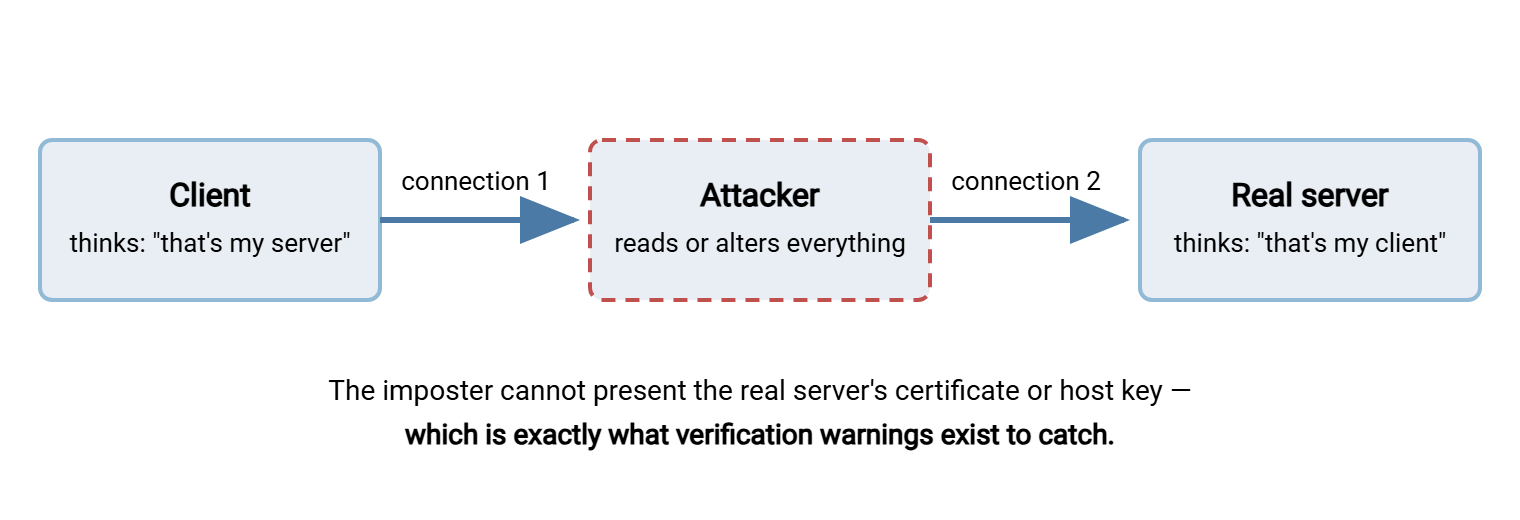
Getting into the middle takes real position. That might be a hostile wireless access point, a poisoned local network, or tampered DNS steering connections to the wrong address. So this attack is far rarer than credential guessing. The good news is that the secure protocols already detect it. An imposter cannot present the genuine server's TLS certificate or SSH host key. So the client sees a verification failure — a certificate warning, or SSH's alarming "host key has changed" message. The attack succeeds in practice mainly because humans and scripts have been trained to click through those warnings. Automation is quietly configured to skip verification because it once got a job running faster.
Unattended jobs deserve special mention, because they are where this defense most often gets quietly disabled. A script that fails on a host-key check at 2 a.m. is an inconvenience. Somewhere along the way, an administrator "fixes" it by telling the client to accept any key. That converts a one-time inconvenience into a permanent blind spot. The correct pattern is the opposite. Record the legitimate fingerprint once, at setup time, through a channel you trust. Have the job fail loudly if the far end ever presents anything else. A loud failure on a changed key is the system working. I know, because I once silenced one, and a review caught it first.
First-line defense: treat identity verification as non-negotiable. Verify and pin host key fingerprints in automated jobs. Use properly issued certificates that validate cleanly. Never configure a script to ignore verification failures. Treat a changed host key as an incident to investigate rather than a prompt to click past. How the underlying trust machinery works — and fails — is the subject of our encryption in transit series.
Path Traversal and Directory Escape
Path traversal targets the server software's discipline rather than its cryptography. Transfer protocols let clients name files and directories, and every filesystem understands the notion of a parent directory. A traversal attack submits path names built to walk upward and sideways out of the folder the account was assigned. The aim is to read files elsewhere on the server. Or worse, the aim is to write into locations that influence the system itself. Related tricks abuse links planted in upload areas that point outside the tree, so that later operations follow them out. The flaw being exploited is always the same. Somewhere, the server trusted a client-supplied path instead of verifying that the final resolved location stayed inside the permitted root.
From your side, the signature is paths in logs that no legitimate client would send. Look for parent-directory hops chained together, or absolute paths where relative ones belong. Look for system locations appearing in requests from ordinary transfer accounts. Modern, maintained server software resists these tricks. This class of flaw is well understood, and current implementations canonicalize and check paths before acting on them. That is why the attack's cheapest victims are old versions running unpatched. Attackers do not need new tricks while the old ones still work.
First-line defense: layers, because each one assumes the previous failed. Keep server software current, so known traversal flaws are closed. Confine every account to its own virtual root (the chroot idea — the account's visible "/" is really one designated folder, with no path leading out). And run the service itself as a limited operating-system user, so that even a successful escape lands with crippled privileges. Directory design that makes confinement natural is covered in the file server permissions series.
Malicious Uploads
Any service that accepts files from outside will eventually be handed a hostile one. The intent comes in three flavors, each with its own failure mode:
- Your server as distribution point. The upload is aimed at your downstream users and partners: malware parked on your trustworthy server, waiting to be fetched by people who trust you. Your reputation is the delivery mechanism.
- Your automation as the victim. The upload is aimed at whatever processes it next. That might be an import job that parses arriving files, an application that opens them, or a script that acts on their contents. The transfer service passes the file intact; the explosion happens one step downstream, where the trust is.
- Your resources as the target. These uploads are built to exhaust rather than infect. They might contain endless junk to fill the disk until real jobs fail. Or they might be archive files crafted to expand catastrophically when decompressed (the "zip bomb"), stalling whatever unpacks them.
The log signature is behavioral. Watch for uploads from accounts that normally only download, or file types that have no business in the flow (executables arriving in an invoice folder). Watch for sudden volume from a quiet account, or names that mimic system files. Anonymous or weakly guarded upload areas attract this abuse fastest. Our anonymous and guest access series covers that corner. But authenticated flows are not exempt, because a partner's compromised system uploads with a partner's valid credentials.
Northgate Retail caught one of these gaps in a design review rather than an incident. Supplier price files landed in an upload folder, a scanner swept that folder every fifteen minutes, and an import job read it every ten. Nobody had put the two schedules side by side until the review did. The arithmetic was uncomfortable: the import regularly consumed a file before the scanner had seen it. They moved the import to read from a separate folder that only the scanner wrote to. So an unscanned file had no path to the import at all. Nothing hostile had arrived. The point of the review was to stop depending on that.
First-line defense: constrain what can arrive, then inspect it. Restrict upload areas to expected file types and sane sizes. Store uploads where nothing executes them. Scan arrivals with malware tooling and hold suspicious files in quarantine rather than deleting them silently. Never let downstream automation consume files that skipped the checks. The full pipeline design — scan placement, quarantine workflow, the limits of scanning encrypted content — is our malware scanning series.
The Supply-Chain Lesson
The last family arrives through no mistake of yours. Waves of real-world incidents have followed a now-familiar shape. A vulnerability is discovered in a widely deployed file transfer product. Exploitation is automated against every reachable installation. Hundreds of organizations are breached in days through software they installed in good faith and operated correctly. The attackers did not defeat these victims' configurations. They defeated the product, and every exposed customer inherited the result.
You cannot prevent a vendor's bug, but the blast radius on your side is substantially yours to set, and the defensive lessons are concrete:
- Know what you run, and hear about it fast. Keep an accurate inventory of transfer software and versions, plus a subscription to the vendor's security advisories. Those decide whether you patch in hours or learn from an incident report.
- Patch edge software on emergency footing. Internet-facing transfer services deserve a faster patch lane than internal tools, because exploitation of published flaws begins within days.
- Keep the cupboard bare. These breaches steal whatever data is sitting on the server when the exploit lands. A server that moves files and promptly removes them loses one day's traffic; one that quietly archives everything loses its history.
- Watch behavior, not just logins. Post-exploit activity — odd processes, unexpected admin actions, unusual outbound connections — is visible to monitoring even when the entry itself was a legitimate-looking request.
These habits — inventory, fast patching, minimal residue, behavioral monitoring — belong to the broader discipline in our hardening transfer servers series. They blunt every attack in this article, not just the supply-chain one. All four are boring, which in this field is the highest compliment available.
One Table to Pin Up
The whole article, compressed for the wall next to your monitor:
| Attack | What you see from your side | First-line defense |
|---|---|---|
| Guessing / stuffing / spraying | Rhythmic auth failures; many users or many passwords | Lockouts and throttling; keys over passwords; unique credentials |
| Cleartext sniffing | Nothing — the attack is invisible to logs | Encrypted protocols (SFTP/FTPS) everywhere observable |
| Man-in-the-middle | Certificate warnings; changed host keys | Strict certificate / host-key verification; never skip, never click through |
| Path traversal | Impossible paths in logs; parent-directory chains | Patched software; per-account virtual roots; limited service user |
| Malicious uploads | Wrong types, odd volumes, out-of-character accounts | Type/size limits; no-execute storage; scanning and quarantine |
| Supply-chain exploitation | Vendor advisory; odd server behavior with valid-looking access | Inventory and fast patching; minimal data retention; behavior monitoring |
What This List Should Change
There are six families, with a pattern worth noticing. Half of them are defeated by decisions you make once: encrypted protocols, verified identities, confined accounts, patched software. The other half are defeated by attention: logs read, anomalies chased, arrivals inspected. That split is the honest shape of transfer security: configuration plus vigilance, neither sufficient alone. "We have a firewall" answers none of the six rows.
To connect these attacks back to the people behind them, revisit what attackers actually want. To find which of your own flows are exposed to which family, run the step-by-step threat modeling method — its "what can go wrong" prompts map directly onto this list. And for the attack family that comes from inside the building, continue to insider risk in file movement.
Frequently Asked Questions
Which of these attacks is most likely to hit my server first?
How would I even know if someone sniffed my plain FTP traffic?
Are certificate warnings and host-key warnings really a big deal?
Can my server be attacked even if every account has a strong password?
Is plain FTP safe from sniffing if it only runs inside our LAN?
Do I need to understand attacks in more depth than this to defend properly?
From the Sysax team: we build secure file transfer software for Windows — Sysax Multi Server, an FTP, FTPS, SFTP, and HTTPS server, and Sysax FTP Automation for scheduled, scripted transfers. Free trials are on the download page.