
Detecting New Files: Polling vs Filesystem Events
Every watch folder stands on one deceptively simple ability: noticing that a new file has arrived. Get detection right and the rest of the workflow — claiming, processing, archiving — runs on rails. Get it wrong and you meet the two classic watcher failures: the file that sat unnoticed for six hours, and the file that was noticed twice. Both produce the same phone call. Both trace back to how the watcher answers the question "is there anything new in here?"
There are exactly two families of answer. Either the watcher asks, repeatedly, on a timer — that is polling. Or it arranges to be told, by subscribing to change notifications from the operating system — that is event-driven detection. Each is honest work with honest flaws. The flaws are different enough that most production systems end up combining them. This article, part of our watch folders and event-driven transfers series, explains both mechanisms in plain words. It prices their costs without marketing gloss and covers the network-share problem that ambushes so many setups. It ends with the hybrid design that experienced teams converge on.
What "New" Means Before Anything Can Detect It
Before choosing a mechanism, pin down what the watcher is actually looking for. "New" could mean a name it has never seen, a file modified since the last check, or a file created after some remembered timestamp. Each definition needs state — a list of seen names, a high-water-mark time. State invites bugs: the list grows forever, the timestamp drifts, a resent file with an old date slips past.
The four-room layout from the hot folder pattern quietly dissolves the problem. Because every processed file is moved out of the inbox, the definition of new collapses to: any file currently in in/. No seen-list, no timestamps, no memory at all. The folder's contents are the to-do list, and an empty folder means all caught up. This is worth internalizing, because it changes how you read the rest of this article. Detection does not have to be perfect. It only has to eventually notice what is sitting in the inbox. A design where the folder itself holds the state forgives a missed event or a skipped poll. The file is still there, patiently waiting for the next look.
With the target defined, on to the two ways of looking.
Polling: Ask the Folder on a Timer
Polling is the mechanism you would invent on your own: list the directory, act on what you find, sleep, repeat. A scheduled task that scans every minute is a poller. So is a script in a loop, and so is the folder-check cycle inside most commercial monitoring tools. The shape, with the completeness check every real poller needs, looks like this:
every 30 seconds:
    names = list files in in/
    for each name:
        if name matches a temp pattern (*.part, *.tmp)  -> skip
        size1 = size of file
        wait 5 seconds
        size2 = size of file
        if size1 != size2      -> skip   (still being written; next sweep will retry)
        move file to work/               (the claim - now it is ours)
        process the file from work/
Two details in the sketch do real work. The temp-pattern skip and the size-stability wait are the watcher's defense against grabbing a file mid-upload. That topic has its own depth in the arrival contract article. And notice that a file that fails the checks is simply skipped, not remembered. The next sweep re-evaluates it fresh. Polling plus a folder-as-state design is self-healing by construction.
The honest costs
Polling's price list is short but real, and it scales with two numbers: how often you poll, and how much you list.
- Latency is the interval, worst case. A file landing just after a sweep waits nearly a full interval. Average detection delay is half the interval. If the business needs files handled within two minutes, a five-minute poll cannot deliver, however healthy it looks.
- Empty checks are the steady-state cost. A folder that receives six files a day, polled every 30 seconds, gets listed almost three thousand times daily for six hits. Each listing is cheap. Thousands of listings across dozens of watched folders on a shared server stop being free. That is particularly true on network storage, where every listing is a round trip.
- Big directories punish every sweep. Listing cost grows with entry count. This is one more reason the inbox must stay empty when idle and the archive must live elsewhere. A poller scanning an
in/that doubles as a 40,000-file archive does slow, pointless work every cycle. - Tight loops need supervision. A poller is a long-running process (or a very frequent scheduled task). So something must notice when it dies — the transfer job monitoring series calls this watching the watcher.
Choosing the interval is a business decision dressed as a technical one. Ask: how stale may a file be before someone is annoyed or a deadline is missed? Take that tolerance, divide by a comfortable margin — many teams use half — and you have the interval. Partner intake commonly lands at 30–60 seconds. Internal report distribution can be happy at five minutes. Anything demanding sub-second reaction has left polling territory. Resist the reflex to poll every second "to be safe." You buy latency you do not need with load you will eventually notice.
Filesystem Events: Let the OS Tell You
The operating system already knows the moment a file appears — it performed the creation. Event-driven detection taps into that knowledge. The watcher registers interest in a directory. The OS delivers change notifications — small messages saying "something happened here: a file was created, renamed, written, deleted." No sweeps, no intervals. The watcher sleeps until woken, wakes within milliseconds of a change, and idles at essentially zero cost.
The mechanisms are real, built into the platforms, and available to scripts. On Linux, the kernel's inotify facility does this, and the inotifywait command-line tool makes it scriptable:
inotifywait -m -e close_write -e moved_to --format '%f' /data/intake/acme/in
# emits one line per event, e.g.:
#   acme_orders_YYYYMMDD.csv
The event choice matters more than the tool. The event close_write fires when a writer closes a file it was writing. The event moved_to fires when a file is renamed into the directory. Both are far safer triggers than "file created," which fires while the file is still empty. On Windows, the equivalent is the directory change notification facility. Administrators use it through the .NET FileSystemWatcher class, scriptable from PowerShell. Subscribe to a folder, receive Created and Renamed events as they happen.
The caveats, told straight
Instant and free sounds like a clean win. It is not, and the reasons are well known to everyone who has run event-driven watchers in production:
- Events can be dropped. Notifications queue in a fixed-size buffer between the OS and your process. Files can arrive in a burst — a partner uploads four hundred files, an archive is unpacked into the folder. If that happens and your handler is slow, the buffer overflows and events are silently discarded. Both platforms document this behavior. The files exist; you were just never told.
- Missed means missed forever. Events have no memory. Whatever happened while your watcher was down — crash, deploy, reboot — generated notifications that nobody was listening for. Those notifications are gone. A pure event watcher that restarts is blind to the backlog sitting in its own inbox.
- An event is not a completed file. A creation notification says a name exists, not that the producer finished writing. Reacting to the raw event is the classic way to grab half a file. The settle logic from the polling sketch is still required, just triggered differently.
- Subscriptions can die quietly. A watch on a folder that gets moved, unmounted, or briefly disconnected can end without a clear error. The process keeps running, receiving nothing, looking healthy.
None of this makes events bad. It makes them fast but forgetful — an excellent accelerator and a poor foundation. Which points directly at the network-share problem, where the forgetfulness becomes structural.
The Network Share Problem
Here is the caveat that ambushes more watch-folder projects than any other. Change notifications are generated by the machine hosting the filesystem. When you watch a folder on a network share, your subscription must be relayed by the file server across the network. That network share could be an SMB path like \\filesrv\intake, or an NFS mount. That relay is best-effort at best. Depending on the server, the protocol, and the mood of the connection, remote notifications arrive late, arrive partially, or quietly stop arriving after a reconnect. A change made directly on the file server, or by a third machine, may never generate an event on yours at all. Every experienced admin has a story about the FileSystemWatcher on a mapped drive that worked in every test and then missed Friday's files.
The guidance is blunt: on network shares, do not trust change notifications alone. Poll. Polling works over any share, because a directory listing is an ordinary remote operation with no subscription to break. If the latency of a reasonable interval is genuinely unacceptable, run the watcher on the machine that hosts the disk. There, notifications are local and reliable. Let that watcher do the remote transfer instead. (Whether files should be flowing over a share at all, rather than through a transfer protocol, is its own debate — see network shares vs file transfers.)
Remember: filesystem events are trustworthy on a local disk and best-effort everywhere else. If the watched folder lives across a network, build on polling, and treat any notifications you do receive as a bonus, never as the source of truth.
The Hybrid: Events for Speed, Sweeps for Truth
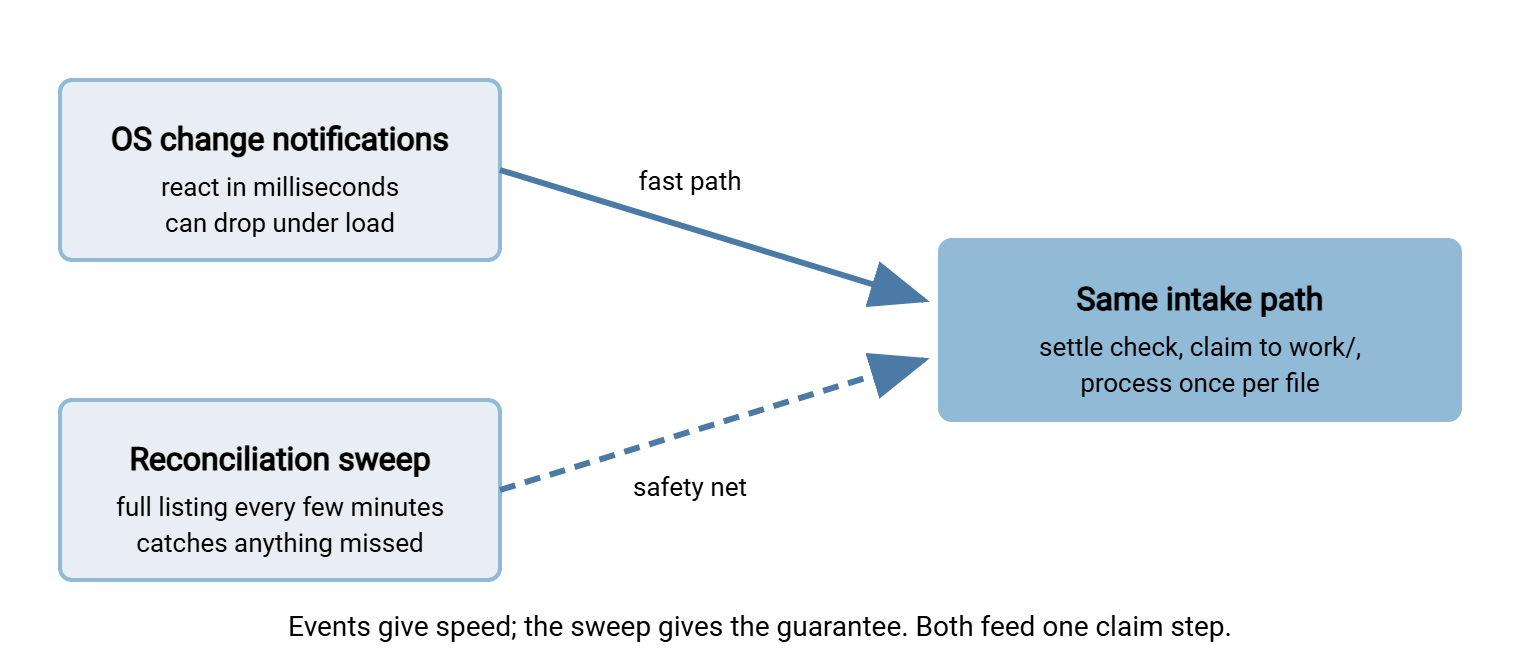
Look at the two failure lists side by side and a pleasant symmetry appears. Polling is slow but never permanently misses a file that is still present. Events are instant but miss files in exactly the situations — bursts, restarts, network hiccups — where you can least afford silent gaps. Each mechanism's weakness is the other's strength, so mature systems use both. The diagram shows the combined design.
The rules of the hybrid:
- Subscribe to events for the folder, and route each notification into the normal intake path — settle check, claim, process.
- Sweep on a relaxed timer — a full listing every few minutes, feeding the very same intake path. The sweep exists to catch what events missed. Because the intake path claims files by moving them, a file found by both routes is still processed once.
- Sweep at startup, always. The first act after any restart is a full scan, which drains whatever accumulated while the watcher was down.
- On network storage, drop rule 1 and let the sweep interval carry the latency requirement alone.
The hybrid adds one requirement: separate detection from action enough to handle repeated notices. The message "I found a file" must be able to arrive twice without processing the file twice. The claim move provides exactly that. Whichever path moves the file into work/ wins, and the other path finds nothing to claim. This idempotent-intake idea matters even more when failures and retries enter the picture — the subject of designing watch folders that handle failure.
Polling vs Events at a Glance
| Question | Polling | Filesystem events |
|---|---|---|
| Detection latency | Up to one interval; half on average | Milliseconds |
| Idle cost | A listing every interval, forever | Near zero |
| Behavior under bursts | Unaffected; next sweep sees all | Buffer can overflow; events silently lost |
| After watcher downtime | Next sweep finds the backlog | Missed events are gone; needs a startup sweep |
| On network shares | Works anywhere a listing works | Best-effort; may silently stop |
| Complexity | A loop and a timer | Subscriptions, buffers, lifecycle handling |
| Best role | Foundation and safety net | Latency accelerator on local disks |
Choosing for Your Actual Workload
Concrete recommendations, in the order the situations usually arise:
- Partner intake, latency tolerance in minutes: poll. A 30–60 second interval on a local disk is trivial load, self-healing, and easy to reason about at 3 a.m. This covers the majority of transfer-team watch folders.
- Local folder, seconds matter: events plus the reconciliation sweep — the full hybrid. Take the operational cost of subscriptions only when the latency is worth buying.
- Watched folder on a share: poll, and consider relocating the watcher to the file server itself if the interval you need feels uncomfortably tight.
- Many folders, few arrivals: events shine here. Hundreds of subscriptions idle at no cost, where hundreds of pollers would grind through empty listings. Keep the sweep, just make it lazy.
- You would rather configure than build: use a tool that has already made these choices. Folder monitoring is a core feature of Sysax FTP Automation. It watches a folder and launches transfer tasks when files arrive. The detection loop, retry behavior, and failure notifications are handled as configuration rather than as your code to maintain.
One more option deserves its own mention, because it dissolves the problem instead of solving it. When the files arrive by upload to a server you control, the server itself knows the moment an upload completes. It is the one component that knows with perfect reliability — no polling, no filesystem subscription, no guessing. Server products expose this as event triggers. In Sysax Multi Server, the Pro and Enterprise editions can run actions on server events such as a completed upload. That turns detection from an inference problem into a fact the server hands you. The broader family of such alternatives — server triggers, queues, webhooks — is mapped in event-driven options beyond the watch folder.
The Short Version
Detection is a solved problem as long as you respect both halves of the solution. Polling asks on a timer: slow by the width of its interval, immune to bursts and restarts, and the only mechanism worth trusting across a network share. Filesystem events answer instantly and idle free. But they drop under load and forget everything when your process is down. They only ever announce that a name appeared — never that a file is complete. Build on the folder-as-state design so detection never needs memory. Add events where local latency genuinely matters, and keep a reconciliation sweep running underneath everything. The sweep is the only mechanism that can promise "nothing is missed."
Detection tells you a file exists. It cannot tell you the file is ready. That promise has to come from the producer. Negotiating it is the next article: the arrival contract. And for the workflow around detection — the rooms the detected file moves through — start at the hot folder pattern.
Frequently Asked Questions
Is polling considered bad practice?
What polling interval should I start with?
Why does my watcher miss files on a mapped drive or network share?
If I get a file-created event, is the file ready to process?
What happens to filesystem events while my watcher is stopped?
Can I skip detection entirely?
From the Sysax team: we build secure file transfer software for Windows. Sysax Multi Server is an FTP, FTPS, SFTP, and HTTPS server. Sysax FTP Automation handles scheduled, scripted transfers. Free trials are on the download page.