
The Hot Folder Pattern, Explained
Somewhere in almost every organization there is a folder with a special property: put a file in it, and something happens. An invoice dropped there gets uploaded to a partner. A scanned contract gets filed. A report lands and, minutes later, three people have it in their inbox. The folder looks ordinary in Explorer, but it is really the front door of an automated workflow. That is a hot folder — also called a watch folder, drop folder, or monitored directory, depending on who built it.
The pattern is one of the oldest and most durable ideas in file automation. It is worth learning properly rather than by imitation. A hot folder built casually — one directory, files processed wherever they land — works fine in a demo and then loses files in production. This article covers the full anatomy: the four areas a serious hot folder needs and how a file moves through them. It covers the rules that keep the workflow honest and the flows the pattern fits best. It is the foundation article of our watch folders and event-driven transfers series. The rest of the series builds on the vocabulary established here.
A Folder Where Arrival Is the Instruction
Start with the core idea. In most automation, a schedule is the instruction: at 02:00, run the job. In a hot folder, the file's arrival is the instruction. Nobody tells the system to process acme_orders_YYYYMMDD.csv; the act of placing it in the watched directory is the request. The sender does not need credentials to your scheduler, an API, or any knowledge of what happens next. They need to know one thing: put the file here.
Three roles show up in every hot-folder workflow, and naming them now saves confusion later:
- The producer — whoever creates the file and places it in the folder. A partner uploading over SFTP, an application writing an export, a scanner, a human dragging a file across.
- The watcher — the process that notices new files and reacts. It might be a script in a loop, a scheduled task with a short interval, or a folder-monitoring feature in a transfer tool.
- The action — what the watcher does with the file: transfer it somewhere, transform it, unpack it, route it onward.
The reason the pattern appears everywhere is that a folder is the one integration surface everything can use. Every operating system, every application, every scripting language, every partner, and every human can write a file to a directory. No API to learn, no library to install, no protocol negotiation. The folder is the lowest common denominator — and unlike most lowest common denominators, it is actually good.
One clarification prevents a common muddle. The watched folder is on the receiving side of a handoff, but the overall flow can point in either direction. A hot folder can collect files that partners push to you. Or it can be the place your own application drops files that a watcher then pushes out to a partner. If the push/pull distinction is fuzzy, our fundamentals article on push vs pull transfers sorts it out. Hot folders play happily in both arrangements.
Why Not Just Run Everything on a Schedule?
The obvious alternative is a scheduled job: every hour, look in the folder, process whatever is there. Scheduling is a fine tool — we cover it across the automation ladder series — but for arrival-driven work it has three honest costs.
Latency you chose in advance. A file that lands one minute after the hourly run waits fifty-nine minutes. For a nightly batch nobody cares. Consider an order file a customer is waiting on, an invoice with a cutoff time, or a document feeding a person's next task. For those, that built-in delay is the difference between "it just works" and a ticket. To shrink the delay you shrink the interval. At some point your "schedule" is a poll every thirty seconds — which is a watcher, just written without admitting it.
Empty runs. A schedule fires whether or not there is work. A job that runs 24 times a day for a file that arrives twice a week does 22 useless runs daily. Each one logs, and each one holds credentials. Each one adds a line of noise in the monitoring you have to learn to ignore. Event-driven flows do work only when there is work.
Clumping. Scheduled processing means everything that arrived since the last run is handled in one burst. If the action is expensive — a large upload, an unpack-and-validate — the burst competes with itself. One bad file can hold up the whole accumulated batch. Arrival-driven processing spreads the work out and isolates each file's fate.
The honest counterpoint: schedules are simpler to reason about and easier to test. They are perfectly correct for flows where timing is naturally periodic — end-of-day extracts, weekly archives. They fit anything where the business rhythm, not the file, sets the pace. The pattern in this article is not a replacement for the scheduler. It is the next rung when arrival timing matters. Many production watchers are, under the hood, a scheduled task on a short interval. The pattern cares about the folder discipline, not the trigger mechanism. How watchers actually notice files, and what that costs, is the subject of the next article, detecting new files: polling vs filesystem events.
The Four Rooms: Anatomy of a Real Hot Folder
Here is the part that separates a production hot folder from a demo. A serious hot folder is not one directory. It is a small suite of directories — think of them as rooms a file moves through. The moves between them are what make the workflow observable and safe. The diagram below shows the standard four-room layout and the moves between rooms.
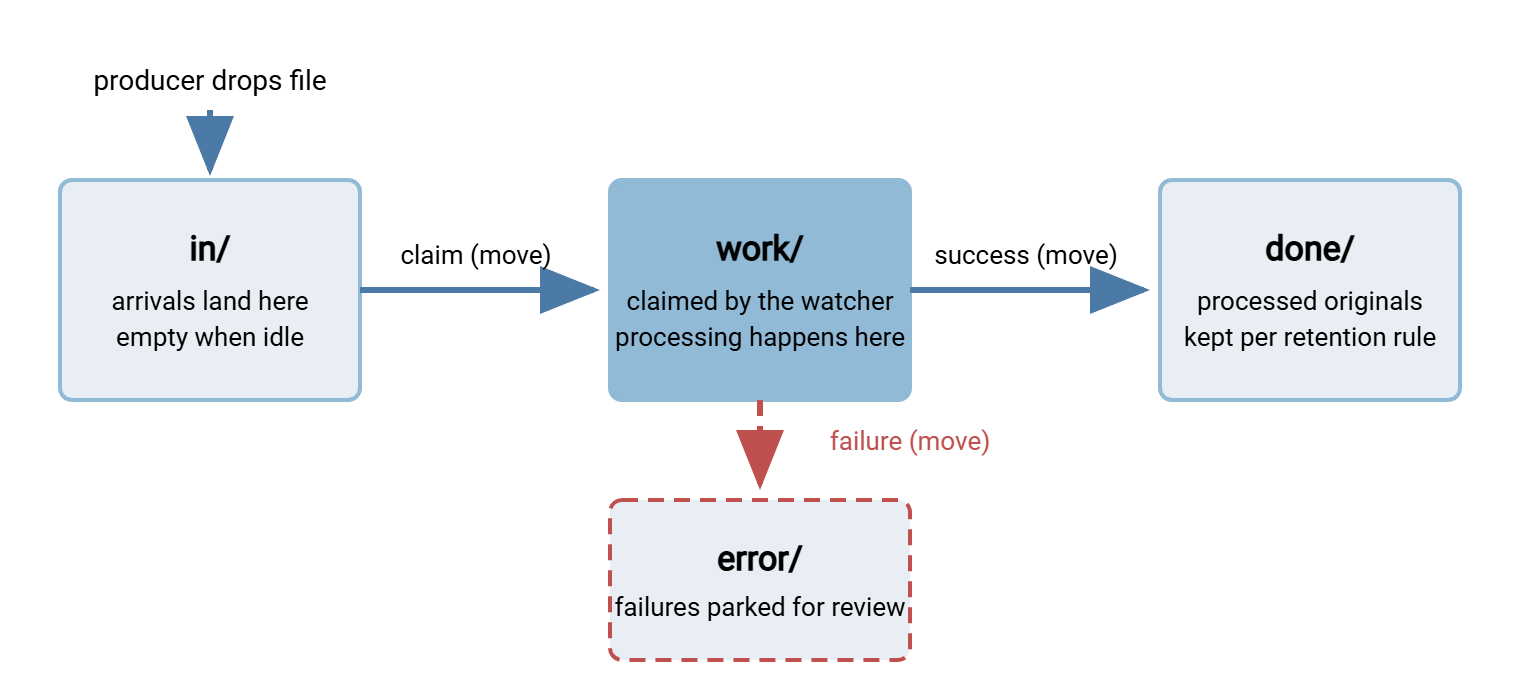
On disk, a per-partner intake tree looks like this:
D:\intake\acme\
    in\        the watched folder - the only path the producer knows
    work\      files the watcher has claimed and is processing
    done\      successfully processed originals, kept N days
    error\     failed files, each with a note saying why
    tmp\       optional: producers stage uploads here, then move to in\
Each room has one job:
- in/ — the inbox. The only directory the producer ever touches, and the only one the watcher scans. Its defining property: when the system is idle, it is empty. A file sitting in
in/is, by definition, work not yet started — which makes backlog visible with a single directory listing. - work/ — the workbench. The first thing the watcher does with a new file is claim it by moving it here. Processing happens on the workbench, never in the inbox. The move marks the file as taken. It keeps a second watcher instance (or a rerun after a crash) from grabbing it, and gets it out of the producer's reach. A sender who re-uploads a corrected file must not overwrite one you are halfway through processing.
- done/ — the archive. On success, the original moves here, usually renamed with a datestamp so reruns never collide. This is your evidence: when a partner says "we sent that file,"
done/answers. It needs a retention rule from day one, because archives that only grow eventually fill the disk. That pattern has its own article in where transferred files accumulate. - error/ — the sick bay. Files that failed validation or processing move here, parked where they cannot jam the pipeline, together with enough context for a human to act. Error-area design has more depth than it first appears — quarantine moves, retry-or-park decisions, alerting. It gets its own article in this series: designing watch folders that handle failure.
Why all the moving? Because a move within one disk volume is a rename — the file's directory entry changes, not its contents. So it is effectively instant and, crucially, all-or-nothing. A file is in in/ or in work/, never half of each. Copying between stages, by contrast, creates exactly the half-written-file problem this pattern is trying to avoid. The deep mechanics of renames, temp names, and partial-file protection belong to our companion partial-file safety series. For this article, the rule is enough: between rooms, always move, never copy. Keep all the rooms on the same volume so the moves really are renames.
The Life of One File
Walk one file through to make the anatomy concrete. A partner's system uploads acme_orders_YYYYMMDD.csv into in/ over SFTP. The upload takes eleven seconds — an interval during which the file exists but is incomplete.
Arrival. The watcher notices the new name. It does not pounce. First it applies an arrival check: is this file actually finished, or still being written? It uses whatever handshake was agreed with the producer. That might be a temporary name that gets renamed when complete, a marker file, or a wait-until-the-size-stops-changing test. This handshake matters enough to be its own article, the arrival contract. For now, note only that a well-built watcher never assumes presence means completeness.
Claim. Satisfied, the watcher moves the file from in/ to work/. From this instant the file is invisible to fresh scans and safe from the producer. If the watcher crashes now, the file waits on the workbench. In that case, a recovery rule ("anything in work/ at startup is suspect — decide before rescanning") deals with it.
Process. The action runs: validate the header row, encrypt, upload to the destination over SFTP, verify the size on the far end. Every step logs the filename, so the file's story is reconstructible later.
Outcome. Success: the original moves to done/, stamped into a name like acme_orders_YYYYMMDD_HHMMSS.csv. That way, a resend the same day cannot collide. (Naming conventions that sort and never clash are the file naming and datestamping series.) Failure: the file moves to error/ with a note, and someone is told. Either way, the workbench is clear and the inbox is empty. The system is idle, and it looks idle.
Notice what you can now do that no single-folder setup allows: audit the flow with dir. Inbox empty means all caught up. Three files in work/ means processing is underway — or stuck, if they have been there an hour. Anything in error/ is a task for a person. The directory tree is the state machine, and a directory listing is the status report. That observability, more than any single safety property, is why the four-room layout wins.
Remember: a healthy hot folder is an empty hot folder. If files linger in in/ when nothing is wrong, your watcher is too slow or too cautious. If they linger without anyone noticing, you have no monitoring. "Empty when idle" is the invariant everything else in this series defends.
House Rules for a Hot Folder That Lasts
The anatomy gives you the rooms; these rules keep order in them. They are short enough to paste into the runbook for every watch folder you build:
- One watcher per inbox. Two processes scanning the same
in/will eventually race for the same file. If you need parallelism, let one watcher claim files and hand them to workers — claiming stays single. - The producer touches only in/ (and tmp/ if used). Senders never write into
work/,done/, orerror/. Enforce it with permissions, not politeness — on an SFTP intake, the account's write access ends at the inbox. - Claim before you process. Never run the action on a file still sitting in
in/. The claim move is what makes crashes, restarts, and accidental double-starts survivable. - Move, never copy, between rooms — and keep rooms on one volume. A cross-volume "move" is secretly a copy-then-delete, with a window where the file exists twice or half-exists. Same volume, real renames.
- Name the outcome into the archive. Datestamp files as they enter
done/. Future-you, mid-incident, will sort the listing and read the day's history straight off the filenames. - Give error/ an owner and an alert. An unmonitored error folder is where files go to be discovered in a quarterly cleanup. Every arrival there should notify someone whose job includes acting on it.
- Write the contract down. One page: what may be dropped, how completeness is signaled, what happens on success and failure, who to call. Share it with every producer — the checklist for that conversation is in the arrival contract article.
None of these rules is clever, and that is the point. Hot folders fail through accumulated informality — a second watcher added during an incident, a helpful colleague processing files in place, an error folder used as storage. The rules are cheap to follow from day one and expensive to retrofit after the first lost file.
Where the Pattern Fits — and Where It Strains
Hot folders shine when work arrives as discrete files, at unpredictable times, each with an independent fate:
- Partner intake. Trading partners deliver orders, invoices, or statements into a per-partner inbox. Each file is validated and forwarded on its own merits. This is the classic case, and the one our worked example, building a watch folder workflow end to end, constructs in full.
- Application handoff. An in-house application exports a file and drops it; the watcher owns delivery. The application team never learns SFTP, keys, or retry logic — decoupling that keeps transfer expertise in one place.
- Device output. Scanners, lab instruments, and recording equipment that can write to a folder — often the only integration such devices offer — feed pipelines through a watched directory.
- Human-triggered automation. "Drag the file here and the right thing happens" is an interface every colleague already knows how to use. It needs no training and no portal login.
You do not have to script any of this from scratch. Folder monitoring is a core feature of Sysax FTP Automation. It watches a folder and runs a transfer task when files arrive. The retry, error handling, and email notification plumbing is already built in. The four-room discipline in this article maps directly onto how you would lay out such a tool's source and archive locations. And when your own server is the inbox — partners upload to you — Sysax Multi Server approaches the same problem from the receiving side. Its Pro and Enterprise editions can trigger actions on server events such as uploads. They react the moment the transfer completes rather than watching the disk afterward.
The strain points are just as predictable, and worth knowing before you commit:
- Very high volume. Directories with tens of thousands of small files arriving per hour make every scan slow and every listing painful. At that scale, message queues do the job folders are straining to do.
- Cross-file semantics. "Process these five files as one batch, in order" fights the pattern, which treats each file independently. It can be done — with manifest files — but if most of your work is multi-file transactions, the folder is the wrong unit.
- Request/response. A producer that needs an answer back ("was my file accepted?") gets only silence from a folder. Response files can be arranged, but at that point an API often serves better.
- Many machines watching shared storage. Watchers on network shares inherit that platform's notification quirks — a real enough problem that the detection article spends a section on it.
When a flow hits these limits, the answer is usually not a fancier folder — it is a different event mechanism. A later article in this series, on event-driven options beyond the watch folder, maps those exits. The news from that article is reassuring for the file-shaped, partner-facing, human-compatible work most transfer teams actually do. The well-built watch folder remains the right answer far more often than its age suggests.
The Pattern on One Page
A hot folder is a directory where arrival is the instruction. Built properly, it is four directories, not one. There is an inbox that is empty when idle and a workbench where claimed files are processed. There is an archive that records success and an error area that parks failure in front of a human. Files move between rooms by rename — instant, atomic, observable — and the directory tree itself becomes the workflow's state machine. The pattern beats a blind schedule wherever arrival timing matters. It costs nothing a filesystem does not already provide. Every system and person who can write a file understands it.
From here, the series digs into each joint of the machine. It covers how watchers actually detect new files (polling, OS notifications, and their honest tradeoffs). It covers what a watcher may assume about an arriving file (the producer handshake). And it eventually offers a complete worked build you can adapt. If you only remember one thing meanwhile, make it the invariant: empty when idle — and someone is watching the watcher.
Frequently Asked Questions
What is the difference between a hot folder and a watch folder?
Do I really need four separate folders?
Why move files between folders instead of copying them?
Is a hot folder better than a scheduled job?
Can several processes watch the same folder for extra capacity?
What happens if a file arrives while the watcher is down?
From the Sysax team: we build secure file transfer software for Windows. Sysax Multi Server is an FTP, FTPS, SFTP, and HTTPS server. Sysax FTP Automation handles scheduled, scripted transfers. Free trials are on the download page.