
Shares vs Transfers: Trust Boundaries, Semantics, and Choosing Correctly
"Put it on the share." "Just send it over." Two sentences from the same meeting, about the same invoice file, and nobody in the room heard a difference. There is one, and it is architectural. A network share gives people live, in-place access to a single copy of a file that never leaves its server. A file transfer delivers a copy of the file across a boundary, to another system, another site, another organization, and then lets go. Both end with someone able to open the file, which is why they get treated as interchangeable. It is why so many file-handling messes begin with the wrong one chosen out of habit. The habit is nobody's fault. The share was what was there.
This article draws the line properly. You will see what each model actually promises: what file locking really does on a share, and what a delivery event really guarantees in a transfer. Then come three practical tests (trust boundary, audit, distance) that sort almost any workflow correctly. At the end, a dozen everyday workflows get sorted onto the right side of the line, including several where the humble share is the honest winner. This is the foundation piece of our Shares vs Transfer series. The broader taxonomy of moving files, with transfer, sync, and share as three siblings, lives in our File Transfer Fundamentals series.
One Copy Accessed vs a Copy Delivered
Start with what each thing physically is.
A network share is a folder on a server that a share protocol exposes over the network. One option is SMB (Server Message Block), the native Windows protocol behind mapped drives and \\server\share paths. The other is NFS (Network File System), its Unix-heritage counterpart. NFS is covered in our NFS fundamentals guide. Clients map or mount the share. From then on every open, read, and save travels across the network to the one copy on the server. Nothing is delivered anywhere. Access is granted instead: the file lives in one place, and the network extends everyone's reach to it. The file stays home and receives visitors.
A file transfer is a discrete event. A copy of the file crosses from one system to another — over SFTP, FTPS, HTTPS, or plain FTP — with a beginning, an end, and an outcome. When the event finishes, two independent files exist. The receiver's copy does not change when the sender's does; the sender's copy is untouched by anything the receiver does. The connection that carried the copy closes, and the relationship between the two files is over.
The diagram below shows the two shapes side by side: many users reaching one live copy on a share, and a single copy crossing a boundary as a logged delivery.
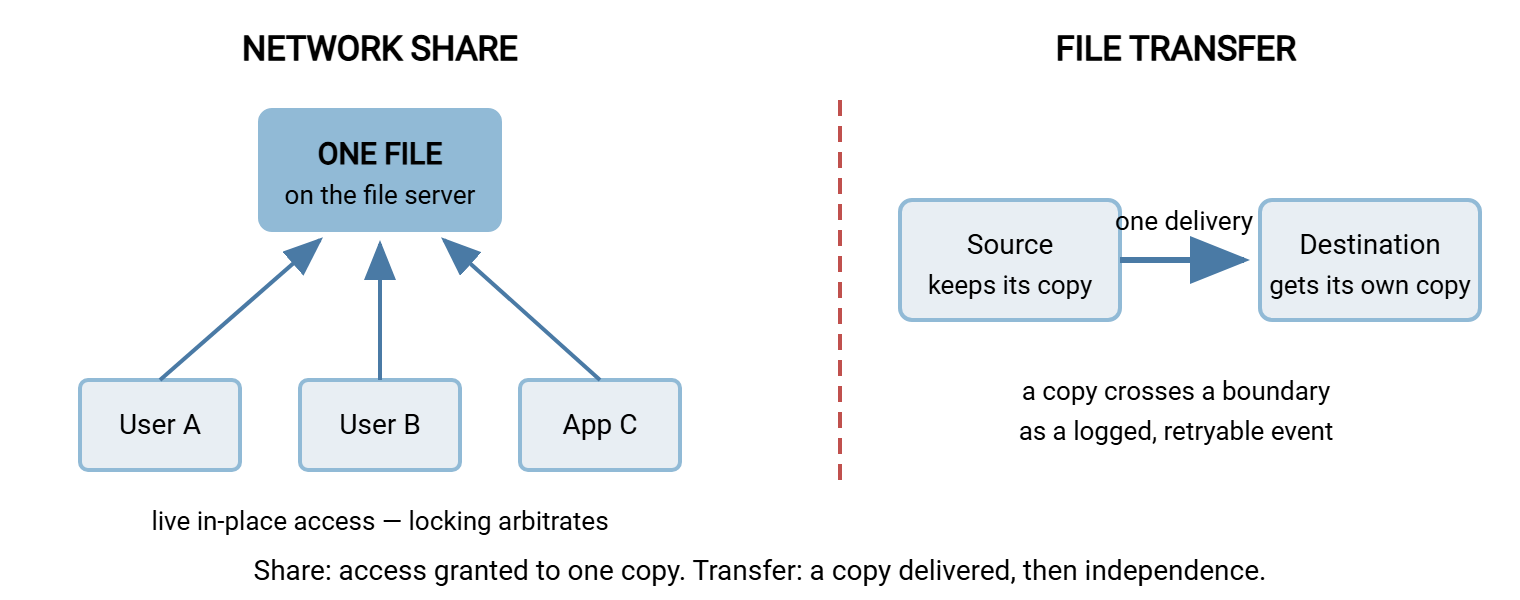
Everything else in this article follows from that difference. A share's central question is "who else is touching this file right now?" A transfer's central question is "can I prove it arrived?" Those are different questions, answered by different machinery. Ask a share whether the file arrived and you will get a directory listing.
What a Share Promises: One Live Copy, Arbitrated
The share's promise is that there is exactly one current version of the file, and everyone sees it. Nobody emails copies around; nobody wonders which version is real. That promise needs enforcement, and the enforcement mechanism is locking. It is the file server's way of arbitrating what happens when two people reach for the same file at once.
Locking comes in layers. A whole-file lock is the one users meet. Open a spreadsheet that a colleague already has open for writing, and the application tells you the file is locked and offers read-only access. The application requested exclusive access when it opened the file; the server granted it to the first requester and refuses it to the second. A byte-range lock is finer-grained: an application locks only a region of the file. That is how some multi-user applications — shared workbooks, desktop database files — let several users write to different parts of one file safely. These applications do not merely benefit from share semantics; they depend on them. Move such a file anywhere that locking is not enforced and it will eventually corrupt. Eventually has a way of meaning month-end.
There is a performance layer too. Share protocols let a client cache — keep a temporary local working copy of file data. That way, repeated reads and small writes do not each cross the network. The server hands out a revocable permission to cache (SMB calls these leases, or historically opportunistic locks). It revokes that permission the moment another user opens the same file, forcing the first client to flush its changes back. This dance is why a share on a fast office network feels like a local disk. Most of the time you are reading your own cache, and the server only interrupts when the one-copy promise is at stake.
Notice what all this machinery assumes: every participant can reach the one copy quickly, and stays connected while working. Both assumptions hold beautifully on a LAN and degrade badly over distance — a preview of why mapped drives crawl over VPN and WAN.
What a Transfer Promises: A Delivery You Can Point To
A transfer promises something a share never does: an event. The delivery has a start time, an end time, and a result — success or failure. That sounds mundane and is actually the whole point, because events are the things you can schedule, retry, alert on, and prove. Nobody has ever been paged by a folder.
- It can fail loudly. A transfer that does not complete returns an error, and automation can retry it or page someone. A share has no equivalent concept — there is no moment at which "the file reached accounting" either happened or did not.
- It can be logged as evidence. One log line captures who connected, what file moved, how many bytes, and whether it completed. "Did the partner fetch the invoice batch last night?" becomes a question with a lookup, not an investigation.
- It creates independence. The receiver owns their copy: they can rename it, process it, archive it, or delete it without consulting anyone. The sender's copy is unaffected. For a handoff between systems or organizations, that clean separation is exactly right.
What a transfer does not promise is currency. The delivered copy is a snapshot; it goes stale the moment the source changes. If the real requirement is "the destination always has the latest," a one-time transfer gives you "the latest as of Tuesday." A schedule of repeated transfers is an approximation whose staleness equals the gap between runs. Sometimes that approximation is perfect (nightly batch feeds); sometimes it means the requirement was really mirroring or shared access, which are different tools.
Test One: Where Is the Trust Boundary?
The first test is also the sharpest. A trust boundary is the line between the systems and people you administer and vouch for, and everyone outside that line. Inside are your domain accounts, your patched machines, your network. Outside are partners, vendors, customers, contractors, other sites you do not control.
A share is filesystem access, and granting it means bringing someone inside the line. To give an external party a share, you typically give them a VPN connection and a directory account. At that point they are on your network with a domain identity. The share protocol offers them the same rich surface it offers employees: browsing, enumeration, every misconfigured permission on every adjacent share. The share protocols were designed for trusted local networks. SMB's port 445 should never face the internet, and every security guide agrees on that point. The full hardening story is in securing SMB.
A transfer endpoint is the opposite architecture: a narrow, single-purpose door built to be knocked on from outside. An SFTP or HTTPS server gives the outside party one protocol, their own credentials, a view jailed to one folder, and a log entry for every action. Nothing else on your network is visible or reachable through it. Crossing boundaries is not a risky extra use of a transfer server — it is the job the thing was designed for. The door is small on purpose.
Meridian Parts learned where its boundary really ran during a routine access review. A supplier had been given a VPN login and a domain account years earlier so it could drop drawings into one folder on the engineering share. The arrangement had worked without a single complaint since. The reviewer, checking effective permissions, found the account could also list two neighboring shares through inherited read rights that nobody remembered granting. Nothing had been taken, as far as anyone could tell, and the supplier had never wandered. The account was moved to an SFTP login jailed to a single folder that week, and the VPN credentials were retired. One folder's worth of trust had been issued as a pass to the whole building.
Remember: the rule of thumb sorts most workflows in ten seconds. On the same side of the trust boundary, a share is a legitimate candidate. When crossing the boundary, a transfer wins almost every time. When you find VPN accounts that exist only so an outsider can reach a folder, you have found a transfer flow wearing a share costume.
Test Two: What Must You Prove Afterward?
Shares and transfers differ almost comically in how naturally they produce an audit trail — a record of who did what to which file, kept for later scrutiny.
File servers can audit share activity: Windows object-access auditing will happily write an event for every open, read, and permission check. In practice those logs are voluminous, off by default, and shaped like filesystem operations rather than business events. Reconstructing "who took the salary file and when" from object-access events is an afternoon of forensic work. Proving a specific file reached a specific partner is not a question a share can answer at all, because nothing "reaches" anything. Files just sit there while access happens around them. I have spent that afternoon more than once, and it does not get shorter.
A transfer log answers those questions natively, because the protocol's unit of work matches the auditor's unit of interest. That means a session, an authenticated identity, a named file, a byte count, a result. If a workflow comes with sentences like "we must be able to show," "retention requires," or "the customer's security questionnaire asks" — that workflow is asking for delivery events, not shared access.
Be honest in the other direction too: most internal collaboration needs no per-open evidence at all. Nobody audits which of five teammates opened the project plan. Demanding transfer-grade logging from a departmental share is gold-plating; the test cuts both ways. The lunch rota does not need a signed receipt.
Test Three: How Far Away Are the Users?
The third test is distance, and it is the one users discover for you. Share protocols hold a continuous conversation with the server. Every directory listing, metadata check, and read is a small request that must cross the network and come back before the next step proceeds. On a LAN, where a round trip costs a fraction of a millisecond, the conversation is invisible. Over a VPN or WAN link, where each round trip costs tens of milliseconds, the same conversation multiplies into seconds and minutes of waiting. Bandwidth barely matters; the delay per exchange does, which is the same distinction our latency versus bandwidth guide draws for transfers. I have timed a folder listing that took a blink in the office and long enough over the VPN to fetch coffee.
A transfer makes the opposite bet: pay the network cost once, moving the whole file in an efficient stream, then work on a local copy at local speed. That is why "download it, edit it, upload it back" outruns "edit it in place across the VPN" so dramatically for remote users. The arithmetic — round trips per operation, counted honestly — fills its own article: why mapped drives crawl over VPN and WAN. For sorting purposes, the short version: users and file on the same LAN, share; users far from the file, deliver copies instead of stretching access.
A Dozen Everyday Workflows, Sorted
Apply the three tests — boundary, audit, distance — to twelve workflows every administrator will recognize. Notice that the share column wins plenty of them: this is a sorting exercise, not a sales pitch for either side. We sell transfer software, so count the share wins yourself; they hold up.
| Workflow | Better model | Deciding factor |
|---|---|---|
| Finance team editing the budget workbook, one office | Share | One live copy; locking arbitrates simultaneous editors |
| Sending the finished statements to the external auditor | Transfer | Crosses the org boundary; delivery must be provable |
| Design team on large project files, same LAN | Share | Big files, local speed, constant collaboration |
| Nightly export from the ERP to the warehouse system | Transfer | System-to-system handoff needs retry, logging, alerting |
| Branch staff opening HQ documents over the VPN all day | Transfer (or replication) | Distance test fails; deliver copies to the branch instead |
| Contractor submitting weekly deliverables | Transfer | No domain account or VPN needed for one folder's worth of trust |
| Project team scratch space | Share | Ephemeral, internal, zero ceremony wanted |
| Distributing price lists to thirty stores | Transfer | Scheduled push, per-store success/failure visibility |
| App servers reading shared media in one data center | Share | Same rack, same trust zone, live reads — SMB or NFS is right |
| Receiving invoice files from a trading partner | Transfer | Boundary and audit tests both point one way |
| Office copier scanning contracts to a folder | Share | On-LAN device, internal destination; scan-to-share is fine |
| Getting the nightly backup set to another site | Transfer | Independent delivered copies are the entire point of offsite |
The pattern is hard to miss once the tests are in hand. Shares win when people or systems inside one trust zone and one building need live access to one copy. Transfers win at every boundary: between organizations, between sites, between systems that need a clean handoff, and wherever someone will later ask for proof.
When One Process Needs Both
Real workflows often chain the two models, and the chain is healthy as long as each link uses the right one. A contracts team collaborates on drafts on the departmental share for weeks — live access, locking, one current version. Then the signed final must reach the counterparty, and that step is a delivery: it crosses the boundary and needs a record.
The clean pattern is a share-side handoff folder feeding a transfer flow. The team drops the final into \\fileserver\contracts\outbound; an automation client watches that folder. It delivers whatever appears to the partner's endpoint over SFTP, with retries and a log. That watcher role is exactly what Sysax FTP Automation does — folder monitoring, scheduled and scripted transfers, retry and error handling. So the share stays the comfortable internal workspace while the boundary crossing becomes a proper logged event. In the other direction, outsiders may need to send files to you. In that case, a Windows transfer server such as Sysax Multi Server gives each partner an SFTP, FTPS, or HTTPS account jailed to its own folder. Your internal jobs collect from that folder. The outsider never touches a share at all.
What should make you uneasy is the chain's absence: partners writing directly into internal shares, or a share stretched across the WAN because "that's where the files are." Those setups work until the day they visibly don't. The warning signs and the redesign path are the subject of recognizing when a workflow has outgrown the shared drive.
Choosing Correctly: The Short Version
A share grants live access to one copy; locking and caching exist to keep that one copy coherent among simultaneous users. A transfer delivers an independent copy across a boundary as an event that can fail, retry, and be proven. Run each workflow through three tests. Boundary: does anything cross the line between your administration and someone else's? Audit: will anyone ever need to show what moved where? Distance: are the users far from the file? Zero yeses — use the share and enjoy it; shares remain the right tool for most internal, same-site collaboration. Any yes — build the flow as a transfer, or chain the two with a handoff folder.
From here, the natural next reads include why mapped drives crawl over VPN and WAN for the distance test in full arithmetic. Read securing SMB for keeping the shares you rightly keep. When a delivery flow does cross a boundary, the protocol to reach for first is SFTP — our SFTP series covers it end to end. Next time both sentences come up in one meeting, you will hear the difference.
Frequently Asked Questions
Is a network share the same as cloud file sharing?
Why not just give a partner VPN access to our share?
Are transfers more secure than shares?
What is file locking, in one paragraph?
Why do auditors prefer transfer logs over share logs?
Can one workflow use both a share and a transfer?
From the Sysax team: we build secure file transfer software for Windows. Sysax Multi Server is an FTP, FTPS, SFTP, and HTTPS server. Sysax FTP Automation handles scheduled, scripted transfers. Free trials are on the download page.