
Locking Down or Removing Guest Access Safely
The change ticket said "disable anonymous login, low risk, no known users." It was approved in four minutes and applied on a Friday. On Monday, a partner whose nightly script had fetched a price list through that door for six years called to ask why it had stopped. Turning off anonymous access is one line in a config file. Turning it off safely is a small project. The difference between the two is a pile of broken automation, an unhappy partner, and an outage that arrives with a four-minute approval already attached. The one thing worse than an anonymous door left open is an anonymous door slammed shut on a legitimate process nobody remembered was using it.
This article is the careful way to close guest access. It covers how to confirm who actually depends on a door before you touch it. It explains how to announce a deprecation so the humans have time to move, and how to stage the closure so a mistake is reversible. It covers how to watch for fallout after. It also explains how to think about rollback so you are never one config change away from disaster. The techniques apply whether you are removing an anonymous FTP login, a shared guest account, or an open web listing.
This is part of our Anonymous and Guest Access series. It assumes you have already found the doors and decided — using the legitimate-cases test — that a given one should close. Here we close it without breaking anything. The Friday-afternoon version is faster, and that is all it has going for it.
First, Know Who Walks Through the Door
The single biggest mistake in closing anonymous access is assuming it is unused because you don't use it. Anonymous doors accumulate silent dependents: a partner's nightly script that fetches a file, or a monitoring job that drops a report. The dependents also include an embedded device configured years ago, or a customer download link printed in documentation you have never seen. None of them will speak up until the door is already gone. They will, however, be prompt about it afterward.
So before any change, watch the door. Turn up logging on the anonymous account and let it run long enough to catch infrequent users. A full month is the right instinct, because the most dangerous dependent is the one that runs on a monthly cycle. I have been caught by a quarterly one, which is why the runbook says "at least." Everything worth logging is covered in our transfer logging and audit series. But for this purpose you want, per session: the source address, the timestamp, the files touched, and whether it was a read or a write.
Then read what you collected with three questions in mind:
- Is anyone actually using it? A door with a month of logs showing only scanner noise is a door you can close with confidence. That noise is brief connections that list the root and leave, from addresses all over the world. Distinguishing a real user from a scanner is mostly about repetition and purpose: real users come back, from stable addresses, and touch the same real files.
- Who are the real users, and what do they do? For each genuine dependent, you want to know the source address, the files involved, and ideally a human or organization to contact. This is the list you will migrate before you close.
- Read or write? A door that only ever served downloads is a different closure than one accepting uploads. Writers need somewhere new to put files; readers need a new place to get them. Plan both.
Telling the two apart is easier than it sounds once you know the tells. A scanner connects, lists the top-level directory or requests a single well-known path, and disconnects within a second or two. It does this from a different address almost every time, often from networks on the other side of the world from your users. A real dependent behaves like something with a job to do. It returns on a rhythm (the same time each night, the same day each month), from an address or a small set of addresses that stay constant. It touches the same real files rather than probing at random. When you sort a month of sessions by source address and count repeats, the genuine users rise to the top of the list. The noise scatters across thousands of one-time addresses below them. That sorted list, not your memory, is the ground truth for who depends on the door. Memory is a fine thing and a poor log source.
Remember: "nobody uses it" is a conclusion you earn from a month of logs, not an assumption you start with. The whole point of watching first is to convert a risky guess into a known fact — and to build the contact list that makes a clean deprecation possible.
The Lockdown-with-Deprecation Sequence
Once you know who depends on the door, close it as a staged sequence rather than a single switch. Each stage is reversible, and each gives dependents time to react. The order is designed so that the irreversible-feeling step comes only after you have proven nobody is left. Treat the checklist below as a runbook — copy it into your change ticket and check off each step:
ANONYMOUS-ACCESS DEPRECATION RUNBOOK   (one door)
Door: ______________________   Owner: ______________   Ticket: ________

[ ] 1. OBSERVE  (>= 1 month)
      - Enable per-session logging on the anonymous/guest account.
      - Collect source IP, timestamp, files, read/write for every session.
      - Classify: scanner noise vs. real repeat users.

[ ] 2. IDENTIFY + CONTACT
      - List real dependents (address, files, human/org contact).
      - Provide each one an authenticated replacement (account, HTTPS URL,
        signed link) and confirm they can use it.

[ ] 3. ANNOUNCE  (set a dated cutoff)
      - Publish deprecation notice where users will see it.
      - State the cutoff date and the replacement, plainly.

[ ] 4. WARN IN-BAND  (banner / placeholder)
      - FTP: set a login banner naming the cutoff and replacement.
      - Web listing: replace the index with a notice page pointing onward.

[ ] 5. SOFT-CLOSE  (reversible)
      - Restrict anonymous login to known good source addresses only,
        OR disable it while leaving the data and accounts in place.
      - Keep the replacement running in parallel.

[ ] 6. MONITOR the soft-close  (1-2 weeks)
      - Watch logs for failed anonymous attempts from unknown-but-real users.
      - Each surprise = a missed dependent; help them migrate, do not reopen.

[ ] 7. HARD-CLOSE
      - Fully disable anonymous/guest login in the server config.
      - Remove the guest account's write rights first, then the account.

[ ] 8. VERIFY + RECORD
      - Re-run the anonymous login test: it must now fail (expect 530).
      - Record the change, the date, and where any moved data now lives.
      - Keep the moved data recoverable for a defined grace period.
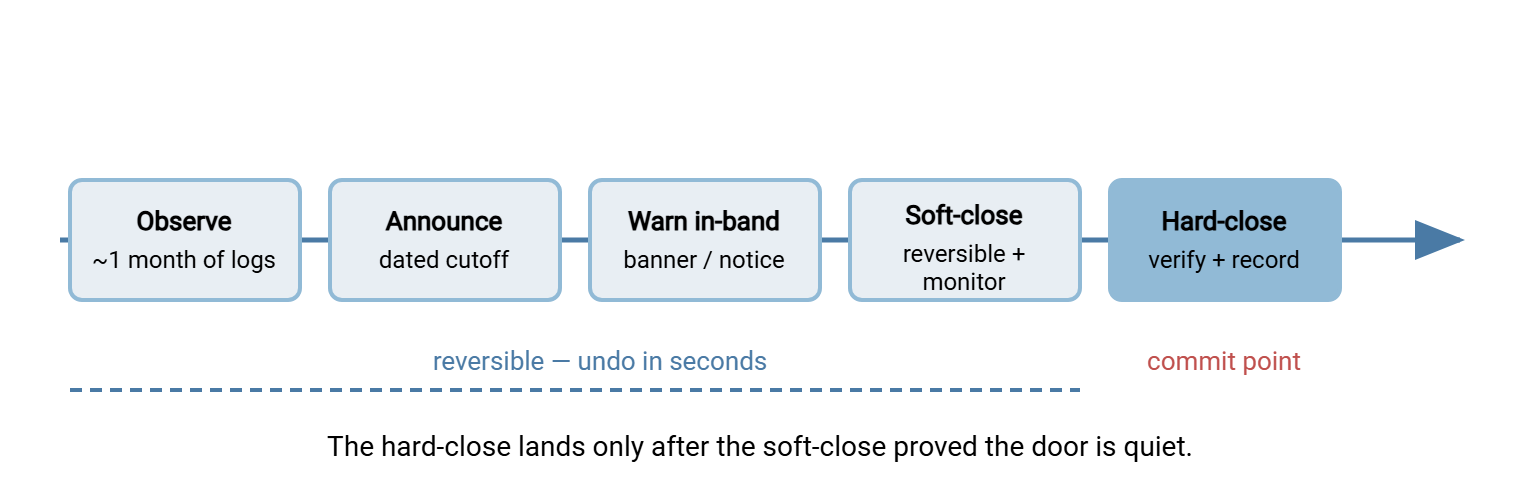
Two properties make this sequence safe. First, reversibility moves in one direction: every step up to the hard-close can be undone in seconds, and the hard-close only happens after a soft-close proved the door is quiet. Second, the data outlives the door. You are closing an access method, not deleting files. Moved data stays recoverable for a defined grace period. That way, a dependent you missed can be served from the new location rather than by reopening the old one.
Writing a Deprecation Notice People Act On
A deprecation notice exists to move people before the deadline, not to give you cover after it. The ones that work share a shape:
- A specific cutoff date. "Soon" moves nobody. "This access is disabled after the last day of next month" creates a deadline people plan around. Give enough runway for a partner's change process — weeks, not days.
- The replacement, concretely. Do not just announce a removal; hand over the new way in the same breath. "Fetch these files from https://… instead," or "contact us for an SFTP account." A notice that says what is ending but not what replaces it generates support tickets, not migrations.
- A reason a non-specialist accepts. "For security, we are retiring unauthenticated access" is enough. You are not writing a threat model; you are giving a busy person permission to stop arguing and start migrating.
- A way to reach you. Some dependent you never identified will surface when they read the notice. That is a feature — it is exactly the person you wanted to find. Make it easy for them to raise a hand before the cutoff rather than discover the outage after.
Place the notice where the actual users will meet it, which is rarely a company blog. For an FTP door, the highest-value channel is in-band: the login banner, the text a server sends right after connection, before or just after login. Every real user's client sees it every time they connect, which reaches automated dependents' human owners far better than any email. For an open web listing, replace the directory index itself with a short notice page that states the cutoff and links to the replacement. The blog post will be read by the person who wrote it.
The diagram below shows how the reversible stages line up against a timeline, so the irreversible step lands only after the door has gone quiet.
Migrating the Real Users First
Everyone your observation phase identified as a genuine dependent should be on the replacement before the door closes, not after. Match the migration to what they were doing:
- Downloaders move to an HTTPS URL for the same files, or, if the file is for one recipient, a time-limited signed link. The alternatives article covers the choice; the point here is to have the new location live and tested before you announce the cutoff.
- Uploaders — partners or processes that dropped files anonymously — move to an authenticated account, one identity per partner so their activity is finally attributable. A server that handles per-user authentication across FTPS, SFTP, and HTTPS, such as Sysax Multi Server, lets you issue each former anonymous uploader a named login on the same box. That turns an untraceable shared door into individual accounts you can log, limit, and revoke.
- Embedded devices that only speak anonymous FTP are the hard case, because you often cannot change them. Contain rather than migrate: restrict the door to that device's address and network segment, and treat replacing the device as a separate track. Our retiring plain FTP series covers this containment pattern fully.
Migrating before closing is what converts a disruptive cutoff into a non-event. When the door finally closes, the people who mattered are already using the new path and never notice — which is exactly the outcome you want. A closure nobody notices is the only kind worth planning.
One migration detail saves a lot of grief: keep the old and new paths running in parallel for the whole deprecation window rather than cutting over in a single step. A partner who updates their script to the new HTTPS URL on their own schedule can verify it works while the anonymous door is still there as a fallback. So a mistake in the new path fails safe instead of failing loud. Only after the soft-close monitoring confirms the old door has gone quiet do you retire the parallel arrangement. This overlap costs you a little duplication for a few weeks. It buys you the ability to migrate each dependent at their pace. You avoid forcing every one of them through the same hard cutover on the same day.
Monitoring After the Door Closes
Closing the door is not the end of the job; the days and weeks after are when a missed dependent surfaces. Watch for it deliberately.
Keep logging the (now soft-closed or disabled) anonymous account and read the failed attempts. A stream of failures from random scanner addresses is the expected background noise — ignore it. But a repeated failure from a stable address, especially one that used to succeed in your pre-closure logs, is a real user who did not get the message. That is a person to contact and migrate, not a reason to reopen the door. The distinction matters: reopening for one straggler undoes the whole project, while helping them onto the replacement finishes it.
Bluewater Bank ran the sequence on a guest FTP door that a month of logs had declared quiet apart from scanners. Two weeks into the soft-close, the failed-login report showed the same internal address trying every night at ten past two. The source was a statement-archiving job on a server the observation window had missed. That was because the server had been down for maintenance for most of the month. Nobody reopened the door. The job's owner was issued a named SFTP account the next morning. The script was pointed at it and tested during the day. The soft-close window was extended by a week in case anything else had been hiding behind a maintenance calendar. The hard-close went through quietly after that, and the runbook gained a line: check the maintenance schedule against the observation window.
Watch the replacement side too. A spike in support tickets, or in errors against the new HTTPS endpoint, can mean the migration instructions were unclear or the new path has a problem. Closing the old door and quietly breaking the new one is not progress. For anything you soft-closed by address restriction rather than full disable, revisit it after the monitoring window and finish the hard-close. That way, a "temporary" measure does not quietly become permanent and forgotten — a future audit finding in its own right. Temporary address restrictions have a way of celebrating anniversaries.
Rollback Thinking
Every stage of the sequence should have an answer to "what if this breaks something I did not predict?" That answer is almost never "reopen anonymous access." It is a return to the previous, still-reversible stage, the same discipline as any other change rollout and rollback.
Concretely: if the soft-close reveals a dependent you cannot migrate before the cutoff, you do not undo the closure. Instead, you extend the soft-close window and the deprecation deadline while you help them. If the hard-close breaks something, the fix is to restore access for that specific dependent through the replacement or a narrow address allowance, not to swing the anonymous door back open for the world. And because the data outlived the door, you can always serve a surprised user from the preserved copy rather than by resurrecting the old access method.
The mindset is worth stating plainly: you are trying to reach a state where anonymous access is gone and stays gone. Every rollback path should move you toward that state or hold position, never back to square one. A door you reopen under pressure is a door you will be closing again next quarter, having taught everyone that the deadline was negotiable. I have done this once, and once was educational.
Bringing It Together
Closing anonymous access safely is mostly patience applied in the right order. Observe long enough to know who really depends on the door. Give those people an authenticated replacement and a dated notice. Close in reversible stages with an in-band warning. Monitor the failures afterward to catch the dependents you missed. Keep every rollback path pointed toward "gone for good" rather than "open again." The data outlives the access method throughout, so a mistake is always recoverable without reopening the door. You can still apply the final change on a Friday. By then the day will not matter.
With the door closed, two follow-ups finish the work. If the door existed for public distribution, stand up its proper replacement using modern alternatives for public file distribution. And fold the now-closed door into your broader cleanup. The retiring plain FTP series treats anonymous removal as one move in decommissioning legacy transfer entirely. It shows how to confirm a closure actually stuck rather than quietly coming back.
Frequently Asked Questions
Can't I just disable anonymous access and deal with complaints as they come?
How long should I watch the door before closing it?
Where should the deprecation notice go so people actually see it?
After I close the door, someone real still shows up. Do I reopen it?
What about a device that only speaks anonymous FTP and can't be changed?
How do I confirm the door is actually closed?
From the Sysax team: we build secure file transfer software for Windows. Sysax Multi Server is an FTP, FTPS, SFTP, and HTTPS server. Sysax FTP Automation handles scheduled, scripted transfers. Free trials are on the download page.