
Modern Alternatives for Public File Distribution
"Where do customers get the firmware?" "From the FTP site." "Which browser do they use?" A pause. If your reason for keeping an anonymous door is "we need to let people download our files," this article is where that reason gets a better home. The need is completely legitimate. Publishing files to a wide or unknown audience is a real requirement. But anonymous FTP is no longer the tool for it. Three modern approaches do the same job with less risk. Choosing between them is mostly a matter of matching your audience, your scale, and your appetite for maintenance.
We will walk through all three: a plain HTTPS download server, a deliberately configured object-storage bucket, and time-limited signed links. For each you will see what it is, when it fits, and the one mistake that ruins it. Then a comparison table puts them side by side on safety, cost, and effort so you can pick with confidence. By the end you will be able to retire a public anonymous FTP door. You will be able to replace it with something both safer and, for your users, easier to use.
This is part of our Anonymous and Guest Access series, and the natural next step after you have decided a public-download door should close. For the full depth on the web protocol itself, our HTTP and HTTPS file transfer series is the companion. None of the three needs a browser that speaks FTP, which is just as well.
Why Not Just Keep Anonymous FTP?
A fair question deserves a direct answer. Even run carefully — strictly read-only, isolated root, reviewed contents — anonymous FTP is a poor fit for public distribution today. The reasons have nothing to do with how well you configure it:
- Your users can't open it. Mainstream browsers have removed FTP support. A public FTP link is one a large share of your audience literally cannot click, which turns "download our file" into a support conversation.
- It's cleartext by default. Plain FTP protects nothing on the wire, so even public files can be tampered with or swapped in transit. HTTPS encrypts every download without the user doing anything.
- It carries the whole anonymous risk list. Every concern from our history and risk article rides along, and it is one misconfiguration away from becoming writable.
- It fits nothing else you run. Caches, content-delivery networks, metrics, and access logs all assume HTTP. Anonymous FTP sits outside the entire modern distribution toolchain.
The alternatives below keep the one thing you actually wanted from anonymous FTP — "anyone can fetch the file without an account" — while dropping the liabilities. The liabilities were never the point; they just shipped in the same box.
Alternative 1: A Plain HTTPS Download Server
The most direct replacement for a public FTP archive is a web server serving files over HTTPS. Put the files in a directory, point a web server at it, and hand out https:// links. This is how the overwhelming majority of public file distribution works, and for good reason.
What it is: a standard web server delivering static files. Users click a link or run curl/wget; the file downloads over an encrypted connection. No account, no client software beyond a browser, no FTP-specific anything.
When it fits: almost always, and especially when you want maximum compatibility and full control of the box. If you already run a web server, or a transfer server that also speaks HTTPS, this is often nearly free to add. A multi-protocol server such as Sysax Multi Server serves HTTPS alongside FTP, FTPS, and SFTP. So the same Windows host that used to offer an anonymous FTP login can publish the identical files over HTTPS instead. The sanctioned door replaces the anonymous one without new hardware.
The mistake that ruins it: accidentally serving more than you meant to. The classic error is leaving automatic directory listing switched on. Then a URL pointing at a folder returns a browsable "Index of /" page exposing every file in it. That includes the ones you staged but never meant to link. Turn directory listing off and serve an explicit index or download page that names only what you intend to share. Keep the served directory free of anything non-public. Do that and an HTTPS download server is boringly safe, which is exactly what you want from public distribution. The folder named public will be taken at its word.
Kestrel Payroll replaced its anonymous FTP archive of rate-table updates with an HTTPS download server. As a last step before announcing it, the team fetched the folder URL from a laptop on a coffee-shop network rather than from the office. The response was an "Index of /downloads/" page, and third from the top was next quarter's rate table, staged early and not yet meant to exist. Nothing had been announced, so nothing had leaked. Directory listing went off that afternoon. An explicit download page naming only the current files replaced it. The release checklist gained a line: fetch the public URL from outside before you tell anyone it is there. The staged file moved to a folder the web server could not see.
There is a second, quieter benefit worth naming: an HTTPS download server slots into monitoring and integrity practices you may already run. Every download is an ordinary web request, so your existing access logs, rate limiting, and metrics see it. You can tell how often a file is fetched, spot a sudden abnormal spike, and rate-limit an abuser without inventing anything FTP-specific. Publishing a checksum next to each file lets downloaders verify they got an untampered copy. Our file integrity verification series covers the practice. The practice costs you nothing but a second small file. The second small file is the one people thank you for.
Internally, the same pattern — an authenticated HTTPS drop for staff or partners rather than a fully public one — is covered in building an internal HTTPS file drop.
Alternative 2: A Deliberately Configured Public Bucket
Object storage is the cloud way to store and serve files. Instead of a filesystem on a server you manage, you put files ("objects") into a "bucket" hosted by a storage provider. Each object gets a URL. A bucket can be made publicly readable so that anyone with the URL can download the object over HTTPS. It is effectively a public download server you do not have to run. Somebody still runs it. You just do not get paged.
What it is: provider-hosted file storage with per-object HTTPS URLs. You upload objects through an authenticated management interface; you choose, per bucket or per object, whether the public may read them.
When it fits: larger audiences, big files, spiky demand, and cases where you would rather not operate and scale a download server yourself. Object storage handles a global crowd and a traffic spike without you provisioning anything. It pairs naturally with a content-delivery network for reach. If your public distribution is more than a trickle, this is often the least-effort option to run once it is set up.
Two practicalities shape whether it is right for you. First, cost follows traffic: providers bill for storage and, more significantly, for egress — the bandwidth of everything downloaded. A wildly popular free file, or one an abuser hammers, can run up a real bill in a way a fixed-bandwidth server you own does not. So know your provider's pricing before you publish anything likely to go viral. Second, the URL scheme is public and guessable in shape. So never rely on an obscure object name as a substitute for the access setting. "Nobody will guess this filename" is the same failed obscurity argument that anonymous FTP taught us not to trust. Set the access deliberately and let the object name be convenience, not security.
The mistake that ruins it — and it is a serious one: making a bucket public that should not have been, or making it more public than intended. A single access setting stands between "these specific files are public" and "this entire bucket, including things I forgot were in it, is readable by the whole internet." Publicly exposed storage buckets are one of the most common sources of large data exposures. That is precisely because the misconfiguration is easy to make, easy to miss, and immediately world-visible. Treat public as a deliberate, per-bucket decision:
- Default to private. Buckets should be private unless you have a specific reason otherwise. Never rely on an inherited or account-wide default to keep them that way.
- One bucket, one purpose. Put genuinely public files in a bucket that holds only public files. Never flip a mixed-use bucket to public — you will expose whatever else is in it.
- Verify from outside. After configuring, fetch an object anonymously from a machine with no credentials to confirm the public files are reachable. Try to list or fetch something that should be private to confirm it is not.
- Review on a schedule. Public-access settings drift as teams add objects. Re-check which of your buckets are public, and why, as a standing task.
Remember: a public bucket is a public directory listing with global reach and no server for you to harden. That makes it powerful and unforgiving in equal measure. The safety comes entirely from configuration discipline. So make "public" a decision someone signs off on per bucket, never a setting that drifts.
Alternative 3: Time-Limited Signed Links
The first two alternatives publish files to everyone. Sometimes that is not what you want. You want to give a specific file to a specific person without granting them a standing account and without making the file world-public. That is what a signed link, also called a presigned URL, is for.
What it is: a single URL that grants access to one specific object for a limited time, after which it stops working. The link carries a cryptographic signature that the storage system verifies, so possession of the URL is the access — no login — but only until it expires. You generate one on demand and send it to the recipient.
When it fits: one-to-one or one-to-few distribution where the audience is known but you do not want to run accounts for them. That includes sending a customer their export, a vendor a large deliverable, a partner a one-off file. It is the precise, modern answer to the "just put it on the anonymous FTP so they can grab it" habit. It beats that habit on every axis. The access is scoped to one file, it expires on its own, and there is no permanent open door left behind. I said "just put it on the FTP" myself for years, and meant it kindly.
The mistake that ruins it: treating the link as secret when it is really a bearer token. Anyone who gets the URL — forwarded, logged, leaked — can use it until it expires. So keep expiry windows short and send links over channels you trust. Lean on the expiry as the real safety net rather than assuming the URL stays private. Used that way, signed links give you the convenience of anonymous access with almost none of the standing risk. Our dedicated article on presigned URLs covers generating and scoping them properly.
Signed links also solve a problem anonymous FTP handled badly: attribution and revocation. Because you generate each link deliberately, you know which link went to whom and when. You can size the expiry to the job — minutes for something sensitive, a few days for a large download over a slow connection. If a deliverable turns out to be wrong or was sent to the wrong person, a short window means the exposure closes itself quickly rather than lingering as a permanent open path. None of that was possible with a file parked in an anonymous directory, where access was indefinite and every visitor was the same faceless guest. The anonymous directory kept no guest book, and the guest never asked for one.
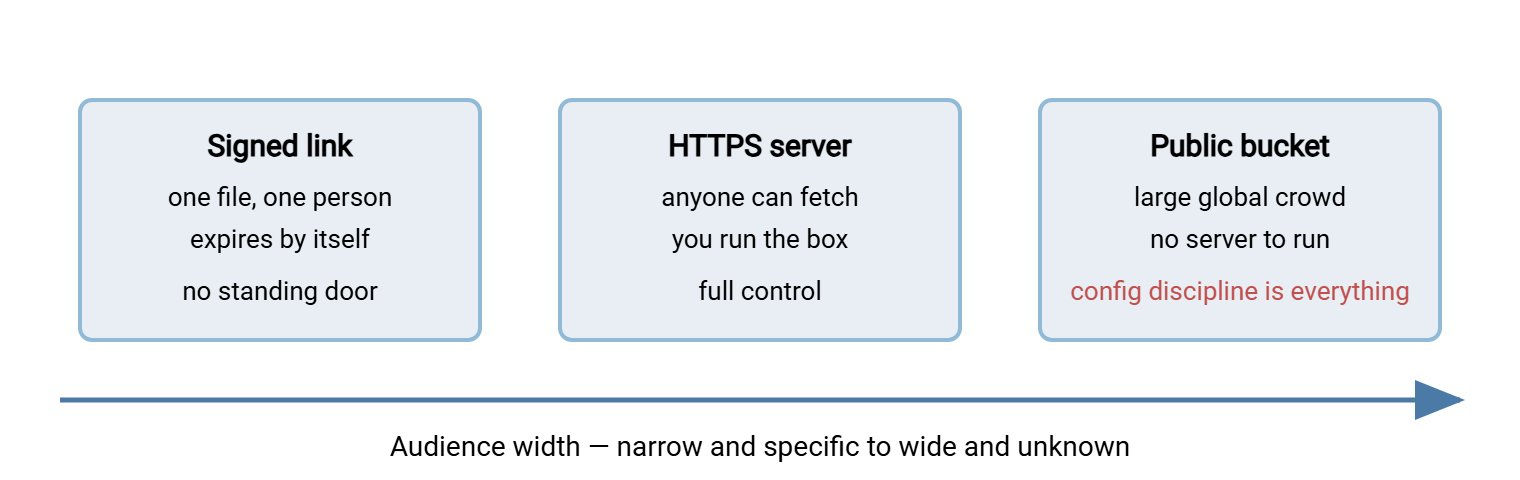
The diagram below places the three approaches on a single axis — how wide the audience is — so you can see which problem each one solves.
Comparing the Three on Safety, Cost, and Effort
Put them side by side. "Effort" splits into setup effort (getting it running) and ongoing effort (keeping it safe and working), because they differ sharply. A public bucket is easy to keep running but demands standing configuration vigilance. An HTTPS server is more to set up but predictable to operate.
| Aspect | HTTPS download server | Public object-storage bucket | Time-limited signed link |
|---|---|---|---|
| Best audience | Anyone; small to medium scale you control | Large or global; big files; spiky demand | One known recipient, or a few |
| Encrypted in transit | Yes (HTTPS) | Yes (HTTPS) | Yes (HTTPS) |
| Standing exposure | Only what you place in the served folder | Whole bucket if misconfigured — high stakes | One object, and only until expiry |
| The mistake to avoid | Directory listing left on | Making the wrong (or mixed) bucket public | Long expiry; link leaks and still works |
| Setup effort | Moderate — you run and secure the server | Low to moderate — provider hosts it | Low — generated on demand |
| Ongoing effort / cost | Server upkeep; bandwidth is yours | Config vigilance; pay for storage + egress | Minimal; needs a store behind it |
These are not mutually exclusive — most mature setups combine them. Every estate I have worked in ended up running all three, planned or not. A common shape: public releases live in a deliberately-public bucket for scale, and the marketing site links to them over HTTPS. One-off deliverables to named customers go out as signed links. Pick per distribution job, not once for the whole organization.
A Short Decision Path
If you want a rule of thumb to start from, follow these questions in order and stop at the first "yes":
- Is this file for one specific person or a small known set? Use a time-limited signed link. Do not stand up a public anything for a one-to-one handoff.
- Is the audience large, global, or the files big and demand spiky? Use a deliberately-configured public bucket, one that holds only public files, verified from outside.
- Otherwise — a modest public audience and you want full control? Serve it from your own HTTPS server with directory listing off.
Every branch lands on HTTPS, none requires the visitor to have an account, and none leaves a standing anonymous door. That is the whole point: you replaced "anyone can log in with no identity" with "anyone can fetch exactly the files you published, encrypted, and nothing else." The scanners will keep knocking. There will be nothing to open.
Wrapping Up
Public distribution does not need anonymous FTP, and it has not for a long time. An HTTPS download server gives you compatibility and control. A deliberately configured public bucket gives you scale without running a box, at the cost of unforgiving configuration discipline. Time-limited signed links give you precise one-to-one delivery with no standing exposure. All three encrypt in transit, all three work in a browser, and none of them leaves an open, identity-free door for scanners to find.
With the replacement chosen, close the old door properly using locking down or removing guest access safely. If you are receiving files rather than publishing them, read how anonymous upload drops get abused before you open anything writable. For the protocol depth behind these approaches, the HTTP and HTTPS file transfer series and its presigned URLs article carry the detail.
Frequently Asked Questions
Is HTTPS really more secure than anonymous FTP for public files?
What is the single biggest risk with a public storage bucket?
How is a signed link different from just posting a download URL?
Can I use my existing file transfer server for HTTPS downloads?
Should I worry that a signed link might get forwarded?
Do I have to pick just one of these?
From the Sysax team: we build secure file transfer software for Windows. Sysax Multi Server is an FTP, FTPS, SFTP, and HTTPS server. Sysax FTP Automation handles scheduled, scripted transfers. Free trials are on the download page.