
Auditing for Anonymous and Guest Access You Forgot
The loop finished at four in the afternoon and printed one line nobody expected: OPEN legacy-app01. Nobody in the room recognized the host. That is the door that hurts you. Not the anonymous FTP server you know about, but the one nobody remembers. It is a guest login on a server three teams removed from yours. It was left enabled by a default installer, or inherited with an acquisition, or configured for a project that ended two reorganizations ago. Nobody uses it, nobody documents it, and nobody closes it, until a scanner or a security researcher finds it first.
This article is the audit that produces that line, and you can run it this week. We will sweep configuration files and run a scripted test-login check across your whole estate. We will hunt for web-exposed directory listings and account for the specific ways anonymous access hides on servers you inherited. Every technique here is framed around one hard rule: you test your own systems only. Auditing your estate is diligence; probing someone else's is an offense.
This is part of our Anonymous and Guest Access series. It assumes you have read why anonymous access is a risk; here we find it. What you do with each finding — keep, harden, or close — is the subject of the articles that follow. Finding it is the part that fits in an afternoon.
First, Define the Estate
You cannot audit what you have not listed. Before testing anything, build an inventory of every host that could possibly offer a file-transfer login. Anonymous access hides best on the servers missing from your mental map, so cast wider than the machines you think of as "the FTP servers." There are always more of them than the phrase suggests.
Pull your candidate list from several sources, because no single source is complete:
- Asset and configuration inventories — the official list, and the one most likely to be out of date. Use it as a starting point, not the truth.
- DNS records — anything named
ftp,files,upload,download,share,data, orpubis a candidate. Export the whole zone and read it; the revealing names are often the forgotten ones. - Firewall and load-balancer rules — any rule forwarding
port 21(FTP),port 990(implicit FTPS),port 22(SFTP/SCP), or a web port to an internal host points at a transfer service you must check. - Your own network scan — scanning your assigned address ranges for listening transfer ports is the one authoritative source. It sees what is actually running rather than what someone wrote down. Confirm the ranges belong to you before you scan.
The goal is a spreadsheet or list: hostname, address, which transfer ports answer, and who owns the box. This inventory pays off well beyond this audit — it is the same list our retiring plain FTP series calls for, so build it once and reuse it. It is also the seed of a proper transfer inventory, if you do not have one yet.
One caution on completeness: the inventory that matters is the one that reflects reality, not the one that reflects the org chart. A host handed off between teams often keeps answering on its old address long after everyone assumes it was decommissioned. A virtual machine cloned from a template inherits whatever the template had enabled. When the documented list and the network scan disagree, the scan wins — it is reporting what is actually listening. Reconcile the two before you move on. Flag every host that appears in one source but not the other as something to explain rather than something to ignore. Servers do not decommission themselves; they just stop being mentioned.
Sweep 1: Read the Configurations
The fastest way to know a server's intent is to read its configuration, because config states what was meant while a login test only shows what is. On every transfer server you administer, find the setting that controls anonymous or guest access and record its value.
What the setting looks like depends on the software. FTP servers built into operating systems usually expose an explicit toggle. This is an "allow anonymous" flag, or a stanza that maps the anonymous and ftp usernames to a guest account and a home directory. Managed transfer products keep the equivalent in a user list: look for an account literally named anonymous, guest, or public, and for any account flagged as not requiring a password. On Sysax Multi Server, for instance, every login corresponds to a defined user. So an anonymous door appears as an entry in the account list rather than as a hidden default. That makes this sweep a matter of reading the list rather than grepping files.
For each server, write down three facts:
- Is anonymous/guest login enabled? Yes or no, from the config, not from memory.
- What is the guest home directory, and what is in it? The path the anonymous account lands in — you will inspect its contents in a moment.
- Is that directory writable by the guest account? This single fact separates a moderate finding from an urgent one. Configs often get it wrong, so you will confirm it live in the next sweep.
Remember: a config sweep tells you what the server was configured to do; a login test tells you what it actually does. They disagree more often than you would like — a permission set upstream, a default you did not know about, an overlay you forgot. Do both, and trust the live test when they conflict.
Sweep 2: The Estate-Wide Test-Login Check
This is the heart of the audit: actually attempt the anonymous login on every server in your inventory, and record the result. Doing it by hand on two servers is fine. Doing it reliably on forty is a job for a small loop. A loop also gives you a repeatable check you can rerun monthly to catch the next forgotten door before it ages.
Authorization first. This loop connects to servers and attempts a login. Run it only against hosts you administer, from an inventory you have confirmed is yours, with whatever change ticket or manager sign-off your organization expects for security testing. Keep the target list in a file you control, and never point this at an address you are not certain you own.
Put your confirmed hostnames in a plain text file, one per line:
# my-ftp-servers.txt — hosts I administer, confirmed mine
ftp.example.internal
files.example.internal
archive.example.internal
legacy-app01.example.internal
Then loop over the list with curl, attempting an anonymous login against each and printing a one-line verdict. curl ships with modern Windows, macOS, and Linux, so this runs almost anywhere:
#!/usr/bin/env bash
# Estate-wide anonymous-FTP check. YOUR OWN SERVERS ONLY.
# Reads hostnames from my-ftp-servers.txt, one per line.

while read -r host; do
  # skip blank lines and comments
  [ -z "$host" ] && continue
  case "$host" in \#*) continue ;; esac

  # Attempt an anonymous directory listing, 10-second cap.
  if curl -sS -m 10 --user "anonymous:audit@example.internal" \
       "ftp://$host/" >/dev/null 2>&1; then
    echo "OPEN    $host   <-- anonymous login SUCCEEDED, investigate"
  else
    echo "closed  $host   anonymous login refused or host unreachable"
  fi
done < my-ftp-servers.txt
Run it and read the OPEN lines. Each one is a server where the anonymous login worked and that you need to investigate. The closed lines are refusals or unreachable hosts. The loop cannot tell those apart, so treat closed as "not confirmed open," not as "definitely safe." Re-check any host you expected to answer.
For every OPEN host, connect by hand and answer the two questions the loop cannot:
- What can the guest see? List the directory. If anything there looks like business data, backups, exports, or configuration, you have an exposure finding on top of the open-login finding.
- Can the guest write? Try to upload a tiny throwaway file, note whether it succeeds, and delete it immediately if it does. A writable anonymous directory is the urgent category — go straight to the upload-drop abuse article for what that exposes and how fast it gets found.
Two refinements make this loop more useful without making it complicated. First, widen it beyond FTP. The same pattern tests a guest SFTP login (swap the scheme and let it fail on the key prompt). It also tests an anonymous web listing (fetch the URL and look for a directory index). Second, run it on a schedule and diff the output against last month's. A host that flips from closed to OPEN is a change someone made. You want to hear about it the same week, not at the next annual audit. Annual audits are where surprises go to mature.
Meridian Parts ran the loop for the first time on a Tuesday and got one OPEN line, for a host the inventory listed as "engineering file drop, decommissioned." The hand check found that the guest account could write. A listing several directories down showed a few hundred gigabytes of files that nobody at Meridian had uploaded and nobody could name. The server had been quietly working as someone else's storage. The team removed write access that afternoon and preserved the listing and the transfer logs for the security review. They added the host to the loop's target file so it would be tested every month whether or not anyone remembered it. The inventory entry now reads "decommissioned, verified," with a date next to it.
Sweep 3: Web-Exposed Directory Listings
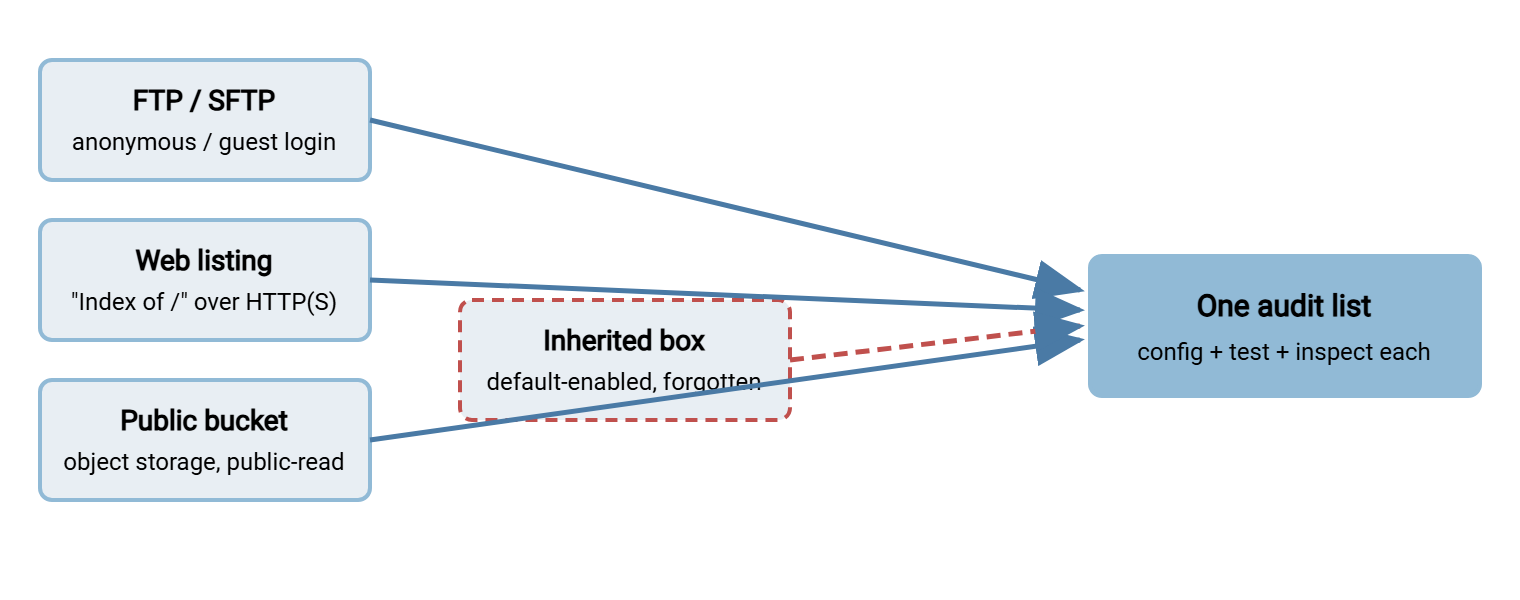
Not every anonymous door speaks FTP. A very common variant is the open directory listing served over plain HTTP or HTTPS. Here a web server is configured to show the contents of a folder when no index page is present. Point a browser at the path and you get a bare list of files — the web's version of an anonymous /pub, and just as exposed. "Index of /" is the web server's way of saying "help yourself."
These hide in predictable places. Check any web server you run for automatic directory indexing turned on where it should not be, especially under paths like /files/, /downloads/, /uploads/, /backup/, /tmp/, or /shared/. The signature in a browser is a plain title such as "Index of /files" followed by a clickable list of names and timestamps. From a script, fetch the candidate URL and look for that index markup or a telltale list of file links:
curl -sS -m 10 "https://files.example.internal/uploads/" | grep -qi "Index of" \
  && echo "OPEN LISTING  files.example.internal/uploads/  <-- directory index exposed"
Object storage deserves its own look here, because a public bucket is the modern open directory. A storage bucket set to public-read exposes its object list and contents to anyone with the URL. A single wrong access setting can turn a private store into a world-readable one without any obvious warning. Review the public-access settings on every bucket your team owns and confirm that "public" is a deliberate choice for that specific bucket, never an inherited default. We cover deliberately-public buckets, and the misconfiguration that makes them dangerous, in the alternatives article.
The diagram below maps the four places anonymous access hides, so your audit covers all of them rather than just the obvious FTP box.
The Inherited-Server Surprise
The audit's real payoff is the server you did not know you owned. Anonymous access clusters on inherited infrastructure for reasons worth naming, so you know where to look hardest.
Acquisitions and mergers
When your organization absorbs another, you absorb its servers — and its habits. The acquired team may have run an anonymous drop for years as normal practice. Those hosts often arrive without documentation, sometimes without even a clean handoff of who administers them. Every transfer server that entered your estate through an acquisition deserves an explicit anonymous-access check, because its previous owners' assumptions are now your liability. The acquisition paperwork never lists the guest accounts.
Default-enabled installations
Some FTP server packages historically shipped with anonymous access on by default. An administrator who installed one to solve a quick problem, accepted the defaults, and moved on may have stood up an anonymous server without ever choosing to. I have done exactly this, and I found out from a scan report. These are pure landmines: nobody decided to allow anonymous access, so nobody thinks to question it. Your config sweep catches them; the point is to expect them on any server whose setup history you cannot fully account for.
Departed staff and dead projects
The administrator who set up a guest share for a specific project, then left the company, takes the context with them. The share remains, doing nothing useful and quietly accepting connections. When your login loop reports an OPEN host that nobody on the current team recognizes, you have almost certainly found one of these. It is a door held open by an assumption whose owner is gone. Transfer accounts outlive their owners as a matter of routine.
Appliances and embedded systems
Printers, scanners, cameras, network gear, lab instruments, and building-control systems frequently embed a small FTP or TFTP service. It sometimes has anonymous access. There is rarely a way to see it in a normal server inventory. I have yet to audit an estate where at least one printer was not quietly running one. These devices seldom appear in asset lists as "file servers." That is exactly why a network scan of your own ranges — not just a review of documented servers — belongs in this audit. Containing that class of device is its own discipline, covered across our retiring plain FTP series.
A pattern connects all four cases: anonymous access survives wherever ownership is unclear. Nobody audits a server they do not believe is theirs, and nobody questions a setting they never chose. So when you run this audit, spend your attention proportional to your uncertainty. The hosts you can fully account for are the least likely to surprise you. The ones with a fuzzy history are where the forgotten doors actually live. Suppose your login loop returns an OPEN host and no one on the team can say why it exists or who depends on it. Then you have found precisely the kind of door this whole audit is meant to catch. Treat that gap in knowledge as a finding in its own right, not merely a gap to fill later.
Recording and Ranking What You Find
An audit that ends in a pile of notes changes nothing. Turn every finding into a row with enough detail to act on and to rank. A simple table does the job:
| Host | Surface | Writable? | Non-public data? | Priority |
|---|---|---|---|---|
| legacy-app01 | FTP anonymous | Yes | Unknown | Urgent |
| files.web | HTTP directory index | No | Yes (a backup) | Urgent |
| archive.pub | FTP anonymous | No | No (public drivers) | Review |
Rank by damage potential, not by how easy each is to fix. Writable anonymous areas come first — they are the free-hosting and malware-staging risk, and they get found fastest. Read-only areas holding non-public data come next — active exposure, even without write access. Read-only areas holding genuinely public files come last, and those are the ones to weigh against the legitimate-cases test before touching. Anything you cannot classify counts as urgent until proven otherwise; unknown contents on an open door is not a state to leave running over a weekend. Disks prefer to fill on weekends.
Wrapping Up the Audit
Finding forgotten anonymous access is mostly discipline, not cleverness. Inventory every host that could offer a transfer login and read the configs. Run a test-login loop against your own estate and reread its results. Check the non-FTP surfaces — web listings and public buckets — that the FTP-shaped mental model misses. Expect the worst findings on inherited, default-configured, and orphaned servers, and rank what you find by what it exposes and whether it is writable.
With a ranked list in hand, the series splits by verdict. Doors that might be legitimate go to the few legitimate anonymous-access cases, which offers safer designs for the survivors. Everything else goes through a careful lockdown so you close doors without breaking the rare real user. And keep the login loop — scheduled and diffed, it turns a one-time audit into an ongoing alarm. Next time it prints OPEN, you will at least recognize the host.
Frequently Asked Questions
Is it legal to run this test-login loop?
The loop says "closed" for a server. Am I definitely safe?
Why check the config if the login test already tells me the answer?
How do I find open directory listings that aren't FTP?
We inherited servers with no documentation. Where do I start?
How often should I repeat this audit?
From the Sysax team: we build secure file transfer software for Windows. Sysax Multi Server is an FTP, FTPS, SFTP, and HTTPS server. Sysax FTP Automation handles scheduled, scripted transfers. Free trials are on the download page.