
The Few Legitimate Anonymous-Access Cases Left
"So we close all of them?" It is the natural question after two articles on why anonymous access is mostly a liability, and the honest answer is no. Anonymous access is not always wrong. A small number of real needs are genuinely served by letting unidentified users connect, and pretending otherwise pushes administrators toward either dishonest audit answers or brittle workarounds. The goal of a good security posture is not zero anonymous access at any cost. It is no anonymous access that has not survived a deliberate test, deployed with a design that limits what it can do.
This article is that test. We will look at the two situations that still justify unauthenticated access — public downloads and inbound-only drops. For each, we will look at the safer design that keeps the convenience while removing most of the danger. We will also mark the line where the honest answer is not "make anonymous FTP safer" but "stop using FTP for this at all and serve it over HTTPS." By the end you will be able to look at any anonymous door your audit turned up and decide, with reasons, whether it stays, changes shape, or closes.
This is part of our Anonymous and Guest Access series. The other side of the ledger is short, but it is not blank.
The Test Every Case Must Pass
Before any specific use, apply four questions. A legitimate anonymous case answers all four cleanly. If a use case stumbles on even one, it belongs in the lockdown pile, not the keep pile.
- Does the audience genuinely have to be anonymous? Not "would authentication be mildly annoying," but "is it actually impossible or unreasonable to identify these users?" A stranger downloading your free, published files qualifies. A known list of partners does not — they can each have an account.
- Is the data genuinely public, or the drop genuinely one-way? Read access must expose only things you would happily hand to anyone on earth. Write access must not be paired with read or list access, or you have built free hosting.
- Can you contain the blast radius? If the anonymous account were fully abused tomorrow, what is the worst outcome? A design where the answer is "some junk in a quarantined folder" passes; one where the answer is "who knows" fails.
- Is FTP even the right tool? For most surviving cases, the honest modern answer is HTTPS. If you cannot articulate why this specific case needs FTP rather than a web download, that is your signal.
Remember: the test is not "can I imagine a use for this?" — you always can. The test is whether the use survives all four questions and whether a safer design would serve it just as well. Most anonymous doors fail the fourth question before they reach the others.
Legitimate Case 1: Public Downloads
The clearest surviving case is distributing files you want the whole world to have: open-source software and its checksums, published research data, product documentation, drivers and firmware, press kits, public datasets. The audience is by definition anonymous — you neither know nor care who they are — and the data is public by intent. This is the direct descendant of the classic /pub archive, and the need is real.
What has changed is the right mechanism. The need to publish public files is legitimate; serving them over anonymous FTP is, in almost every case today, not the best way to meet it. We will return to that below. But when anonymous FTP genuinely stays — a legacy client base that expects it, an internal mirror, a transition period — the design must be strictly read-only. Strictly, as in tested, not as in intended.
The safer design: a read-only public root
A public-download area should be incapable of accepting an upload. Not "configured to discourage" uploads — incapable of them. Build it so:
- The anonymous account has read and list rights only. No write, no delete, no rename, no create-directory. Enforce this at the filesystem level, so even a server misconfiguration cannot grant more than the filesystem allows. Our file server permissions series covers making these grants stick.
- The public root is isolated. The anonymous account is confined to one directory tree — through a chroot jail or the equivalent virtual-root feature — that contains nothing but the public files. No path from it should reach business data, home directories, or system files, even by climbing with
... - Publishing happens from elsewhere. Files enter the public tree through an authenticated, separate channel — an administrator, a build pipeline, a scheduled job — never through the anonymous door. The anonymous side is a one-way window: the world looks in, nobody reaches through.
- You verify the read-only claim. After building it, connect as the anonymous user and try to upload. It must fail. A comment in a config file saying "read only" is a hope; a refused upload is a fact.
A read-only public root defuses the two worst risks from the risk list — free-hosting abuse and malware staging — because both require writing. What remains is exposure risk, and you manage that with discipline. Nothing goes into the public tree that is not meant to be public. Someone reviews its contents on a schedule rather than trusting that it stayed clean. Public folders drift toward whatever was convenient last quarter.
Acme found its legitimate case the hard way. A lockdown sweep disabled anonymous login on an old server nobody had claimed. Within a day the support desk was hearing from field technicians whose firmware downloads had stopped. The server had been the public firmware mirror for a whole product line, and nobody had written that down. The team restored the door the same afternoon, but in the read-only shape above. Anonymous rights were trimmed to read and list. The public tree was isolated from everything else on the box, and firmware was published into it by an authenticated build job. The server then went into the inventory with an owner, a purpose, and the date of the decision. The mirror had passed the four-question test all along; what it had failed was the paperwork.
One subtlety trips people up here: the file listing itself is information. A read-only public archive still tells every visitor exactly what files exist, their sizes, and their timestamps. For genuinely public software mirrors that is fine — the listing is the point. But suppose your public tree holds anything whose existence is sensitive. That could be an unreleased product name in a filename, a customer's name on a document, or a version number you have not announced. In that case, the read-only door leaks that even though nobody can download anything they should not. When in doubt, publish an explicit index of what you intend to share and turn automatic directory listing off. That way, visitors see only the files you named rather than everything that happens to be in the folder. I have watched a product name leak that way, through a listing rather than a download.
Legitimate Case 2: Inbound-Only Drops
The second surviving case is the mirror image: you need to receive files from many people you cannot practically pre-enroll. A conference collecting presentation files from speakers, a lab accepting sample submissions, a support process taking log bundles from customers who will never log in again, the modern echo of the old /incoming directory. Issuing every one of them a named account is real friction, and sometimes genuinely impractical.
This case is more dangerous than public downloads, because it requires write access — the exact thing abusers hunt for. It can still be done safely, but only with a specific and slightly counterintuitive design. We learned the design the slow way, one filled disk at a time.
The safer design: upload-only, no-list, no-read
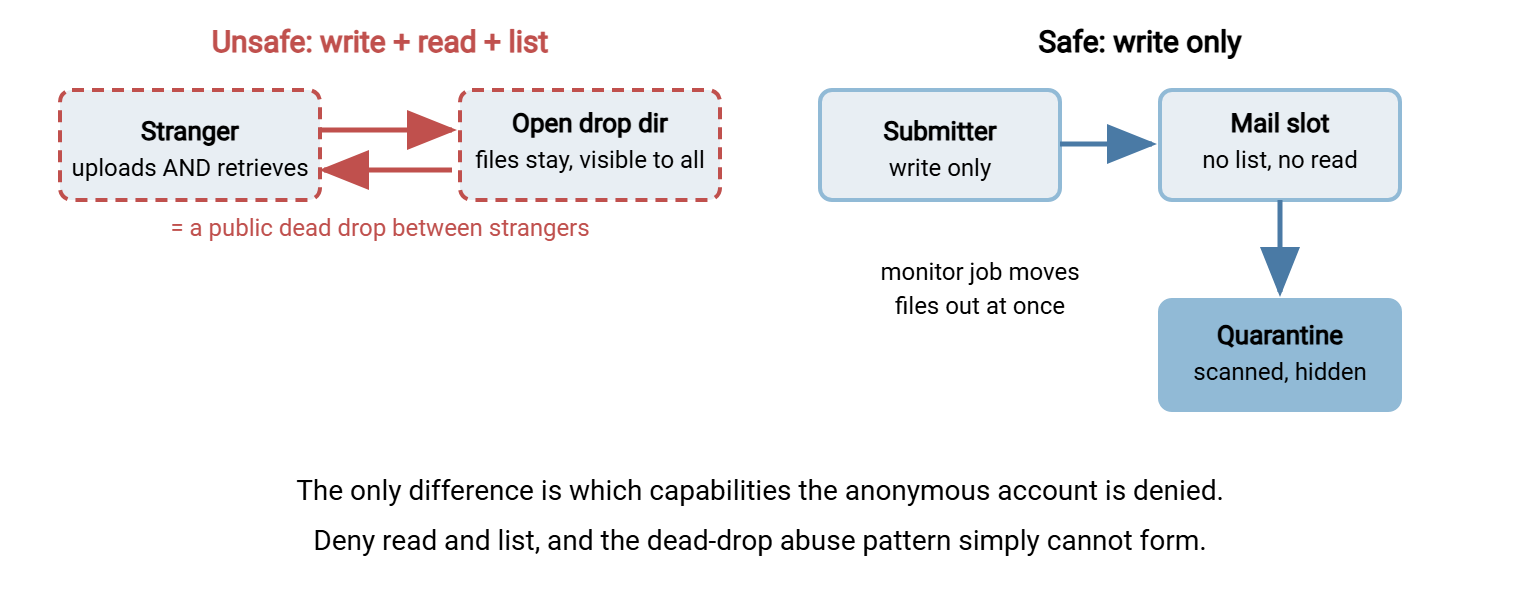
The key insight is that a submission drop needs exactly one capability — write — and must be denied every other. In particular it must deny reading and listing. Here is why that matters so much: if anonymous users can write files and read them back and list the directory, you have not built a drop box. You have built a public read-write file share — a dead drop where strangers exchange files through your server, which is precisely the abuse pattern in our upload-drop abuse article. Removing list and read breaks that pattern. An abuser cannot confirm their upload landed, cannot retrieve it, and cannot advertise a working drop to others. That removes almost all of the incentive. A drop nobody can read back from is a boring drop, which is the goal.
So the drop is built like this:
- Write only. The anonymous account can create files in the drop directory and nothing else. It cannot list the directory, download, overwrite an existing file, delete, or make subdirectories. A visitor can drop a file in and that is the entire vocabulary available to them.
- Files leave the landing zone immediately. An authenticated background process — a folder-monitoring job — moves each arrival out of the drop directory into a staging area the anonymous user cannot see, on a tight schedule. The drop directory is a mail slot, not a mailbox: things fall through it and are gone from the visitor's reach at once.
- Everything is scanned and quarantined. Treat every uploaded file as hostile until proven otherwise. It goes to quarantine, gets malware-scanned, and is only then released to whoever needs it — the workflow in our malware scanning series. An inbound drop is an open invitation for malicious files; scanning is not optional.
- Quotas and limits cap the damage. Size limits per file, a total cap on the drop directory, and rate limits per source address keep a single abuser from filling your disk before the monitor catches up. Design details are in the upload-drop article.
The diagram below contrasts the dangerous shape with the safe one — the difference is entirely about which capabilities the anonymous account is denied.
A scheduled folder-monitoring tool is what makes the "files leave immediately" step real. A product such as Sysax FTP Automation watches a directory and acts on new arrivals — moving them to staging, kicking off a scan, alerting a human. So the landing zone empties itself continuously rather than waiting for someone to remember to check it.
The Better Answer for Most Cases: HTTPS
Here is the line to draw. Both cases above are legitimate needs, but for the large majority of them the right mechanism is no longer anonymous FTP — it is HTTPS. If you are standing up something new, or you have any freedom to change something old, reach for the web before you reach for an anonymous FTP door.
For public downloads, a plain HTTPS web server is better on every axis that matters:
- Everyone already has a client. Every browser, every
curlandwget, every download manager speaks HTTPS. Mainstream browsers have dropped FTP support entirely, so an anonymous FTP download link is one many of your users literally cannot open anymore. - It is encrypted in transit by default. Plain FTP sends everything in the clear; HTTPS protects the connection without the visitor doing anything. Even for public files, this stops tampering and injection on the wire.
- It is read-only by nature. A static download page cannot be uploaded to. The dangerous capability is absent by construction rather than by careful configuration.
- It fits the tools you already run. Caching, content-delivery networks, access logs, and metrics all assume HTTP. The whole ecosystem of public distribution is built around it.
For inbound drops, an HTTPS upload form or endpoint gives you what anonymous FTP cannot. It gives you a place to put a size check, a file-type check, and a simple challenge to deter bots. It also gives you a clean handoff straight into your scanning-and-quarantine pipeline. All of this happens before the file is ever written to disk. The form or endpoint also gives the submitter something anonymous FTP never did: a clear confirmation page. That way, an honest sender knows the upload worked without needing the read-and-list access that makes a drop dangerous. The mechanics are covered in how web upload works.
And suppose you need to hand a specific file to a specific person without giving them a standing account. That is the "send this one file to this one customer" case that people reach for anonymous FTP to solve. The modern tool is a time-limited signed link, or presigned URL. This is a single URL that grants access to one object for a short window and then expires. It delivers the convenience of anonymous access with almost none of the standing risk, because there is no permanent open door — just a key that self-destructs. Our dedicated article on presigned URLs shows how they work, and the broader HTTP and HTTPS file transfer series covers the web approach end to end.
A capable transfer server lets you retire the anonymous door without giving up any capability. Sysax Multi Server speaks HTTPS alongside FTP, FTPS, and SFTP and organizes access around authenticated user accounts. So the same box that once offered an anonymous login can instead serve public files over HTTPS and hand partners real per-user credentials. That is the sanctioned door replacing the anonymous one, on hardware you already run.
A Decision Summary
Put the three paths side by side. Match your case to a row, and let the design column tell you what "keeping it" actually requires. The design column is usually longer than people hoped.
| Need | Best mechanism | If anonymous FTP must stay, the design |
|---|---|---|
| Publish public files to the world | HTTPS download (web server, or public bucket configured deliberately) | Read-only, list-only, isolated root; publish through a separate authenticated channel |
| Receive files from many unenrolled senders | HTTPS upload endpoint into a scan-and-quarantine pipeline | Write-only, no list, no read; auto-move to quarantine; quotas and rate limits |
| Hand one file to one known recipient | Time-limited signed link (presigned URL) | Not a fit — this need does not require a standing anonymous door at all |
| Exchange files among known partners | Per-user authenticated accounts (SFTP or FTPS) | Not a fit — partners are identifiable, so anonymous access fails the first test |
Closing the Ledger
Anonymous access earns its keep in exactly two shapes: read-only distribution of genuinely public files, and write-only receipt of files you immediately scan and move. Both have safer designs — a locked-down read-only root, and an upload-only no-list drop — that keep the convenience while removing the abuse. And for most instances of both needs, the honest modern answer is to stop using anonymous FTP and serve the same purpose over HTTPS. In those cases, use signed links for one-to-one handoffs and real accounts for known partners. The other side of the ledger is short, and every entry on it was tested.
Run every anonymous door your audit found through the four-question test. The few that pass get one of these hardened designs and a note explaining the decision. Everything else goes to locking down or removing guest access safely, so you close it without breaking the rare legitimate user. If your surviving case is public distribution, read modern alternatives for public file distribution next. If it is an inbound drop, read how upload drops get abused before you open one.
Frequently Asked Questions
Is it ever fine to keep anonymous FTP running?
Why must an inbound drop deny read and list, not just delete?
We distribute open-source software over anonymous FTP. Should we switch?
What about handing a single file to one customer?
How do I prove my "read-only" public area really is read-only?
Can one server do public HTTPS downloads and authenticated partner transfers?
From the Sysax team: we build secure file transfer software for Windows. Sysax Multi Server is an FTP, FTPS, SFTP, and HTTPS server. Sysax FTP Automation handles scheduled, scripted transfers. Free trials are on the download page.