
Anonymous Upload Drops and How They Get Abused
The volume was at ninety-four percent, and nobody at the company had put anything on it since spring. That is the whole story of a writable anonymous folder, told in one graph. An anonymous area you can read from is a manageable risk. An anonymous area you can write to is a different animal entirely. It is the single most-abused configuration in file transfer, and the one that turns a forgotten server into someone else's business. If your audit found a writable anonymous directory, this article explains what you are actually exposed to. If you genuinely must run an inbound drop, it explains how to build one that abusers cannot turn against you.
A note on how this article is written. We describe abuse patterns so you can recognize and prevent them — the way a locksmith studies how locks fail. You will not find a recipe for abusing anyone's server here, because that is not the job. The job is to make sure nobody can do it to yours. Everything below is oriented toward defense.
This is the closing article of our Anonymous and Guest Access series. It builds on the legitimate-cases article, which established that a safe drop is write-only, no-list, no-read. Here we go deep on why that design exists and what else it takes to run a drop safely. A folder that fills itself is not a feature.
Why Writable Anonymous Space Is a Magnet
The core problem is economic. Anyone running an illegitimate operation needs infrastructure that cannot be traced back to them and that costs them nothing. An open writable directory on someone else's reputable server is exactly that. It provides storage they do not pay for, on an address that carries your organization's good name rather than their bad one. There is no account that ties activity to a person. That combination is valuable enough that automated tools continuously hunt for it across the internet. That is why a newly-opened writable drop is typically found in hours, not weeks. The discovery is not personal; it is a machine sweeping addresses and testing whether each one can be written to. The machine is not curious about you. It is thorough.
Understanding the three main ways that space gets misused is what lets you design against all of them. They share a root — free, anonymous, reputable storage — but they stress your defenses differently. A control that stops one may do nothing against another. That is why the design later in this article layers several controls rather than relying on any single one. One lock, however good, is still one lock.
Abuse Pattern 1: Free Storage and Distribution
The oldest pattern is using your disk as a free content library, most often for pirated media and software. To recognize it, know its signature rather than its method:
- Storage that hides. Abuse content tends to accumulate out of plain sight. That can mean being buried in deeply nested folders, under misleading names, or in directories crafted not to show up in a casual listing. A top-level folder that looks empty or normal while disk usage climbs is a classic tell.
- A read-write pairing. Distribution requires that others can retrieve what was placed. A drop where anonymous users can both write files and read or list them is the enabler. It becomes a dead drop, a shared exchange point where parties who want no traceable link to each other swap files through your server.
- Disk and bandwidth that vanish. The visible symptoms are your volume filling and your outbound bandwidth serving strangers. The month-end partner upload that suddenly fails for lack of space is a recurring version of this story.
The defensive lesson is already visible: the pattern depends on read or list access being paired with write. Remove that pairing and the free-distribution use largely collapses, because content no one else can retrieve is worthless as a library. A library nobody can borrow from closes quickly.
Abuse Pattern 2: Malware Staging
The more dangerous pattern uses your server not to store files long-term but to stage them for an attack. A malicious file is uploaded to your writable drop. Then links pointing at your legitimate domain are sent to victims — in phishing email, in messages, wherever. Because the link points at your reputable server rather than a plainly shady one, it slips past filters and inspires trust it has not earned.
This one is more damaging than simple storage for two reasons. First, your infrastructure becomes an active participant in someone else's attack on third parties — the victims are downloading malware from you. Second, the consequence lands on your whole organization through blocklisting. Once security vendors and mail operators observe your host serving malicious files, your address or domain goes onto shared lists. Suddenly your legitimate email bounces and your website triggers browser warnings — for everything, not just the abused drop. Recovering from a blocklisting takes days to weeks of cleanup and appeals. Because every inbound file to a drop is a candidate for this, treating uploads as hostile until scanned is not caution. It is the baseline. It is exactly what our malware scanning series is built around.
Abuse Pattern 3: Relay and Redirection Abuse
The third pattern uses your server as an intermediary. It is a way to launder the origin of activity so it appears to come from your reputable infrastructure rather than the abuser's. Content staged on your host can be referenced from spam and scam campaigns. So your address is the one that appears in the message and absorbs the reputation damage when it is reported. As with malware staging, the mechanism matters less than the outcome you are defending against: your name attached to activity you never authorized, and the blocklisting and abuse reports that follow.
Across all three patterns the through-line is the same. Abusers are not after your data; they are after your resources and your reputation — free storage, a trusted name, and an untraceable identity. That is what your design has to deny them. Your good name is the one part they cannot get elsewhere.
There is a fourth consequence that sits underneath all three and is worth naming on its own: legal and accountability exposure. When third parties store or distribute unlawful content through your server, some of it will be content that attracts formal complaints, takedown demands, or worse. The anonymous design means you cannot say who put it there. "We did not know it was on our server" is a genuinely weak position in front of an auditor, a regulator, or an investigator. The anonymity that made the drop convenient is exactly what leaves you unable to point at anyone else. A drop that cannot attribute activity to a person is a drop whose activity becomes, by default, attributable to you. That alone is reason to prefer an authenticated upload wherever the senders can possibly be enrolled.
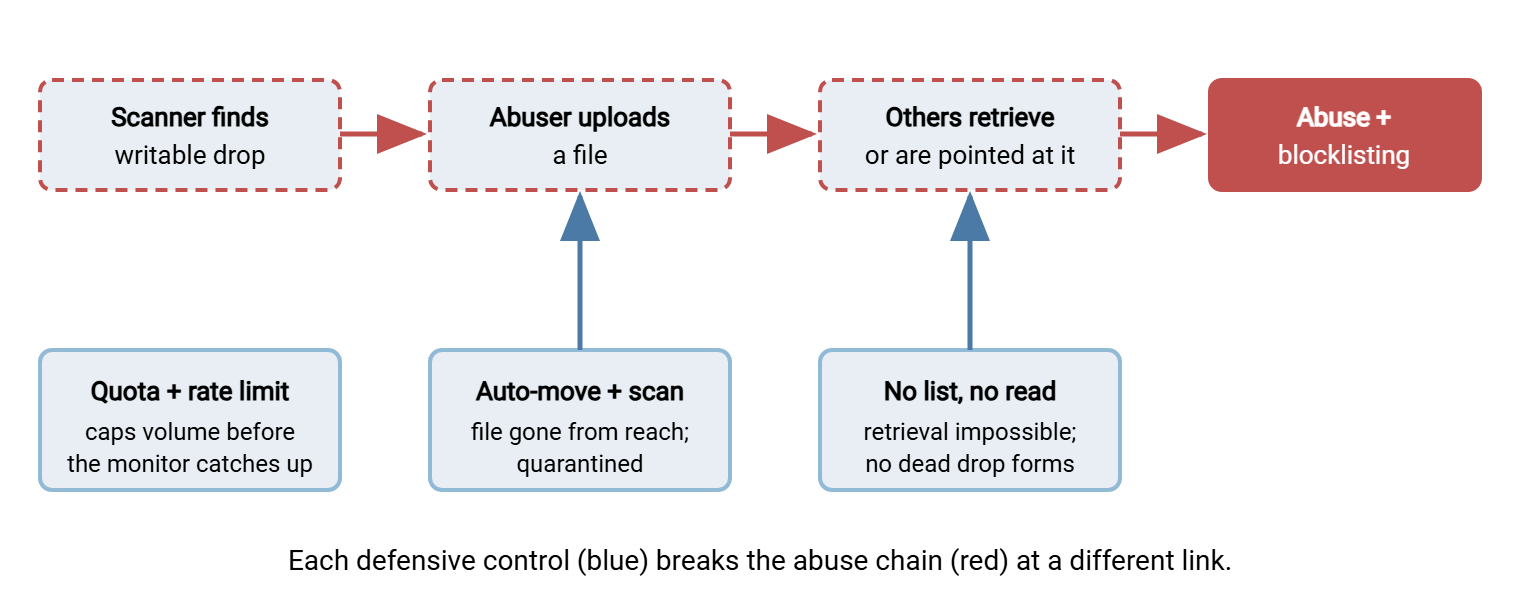
The diagram below traces how an unmanaged drop turns into an abuse channel, and marks the three points where a good design breaks the chain.
If You Must Run a Drop: The Design Checklist
Sometimes an inbound drop is a genuine requirement and cannot be replaced by an HTTPS upload endpoint. If so, build it against every pattern above at once. The checklist below is the design specification. Work through it before a single anonymous byte is accepted. Treat any unchecked line as a reason the drop is not ready:
ANONYMOUS UPLOAD DROP — SAFE-DESIGN CHECKLIST
Drop: ______________________   Owner: ______________

CAPABILITY (the most important section)
[ ] Write only. Anonymous account can create files and NOTHING else.
[ ] No LIST. The directory cannot be listed by the anonymous user.
[ ] No READ / download of any file, including one just uploaded.
[ ] No overwrite, no rename, no delete, no make-directory.
      -> Denies the dead-drop pattern: nothing can be retrieved back.

DRAIN (files must not linger where they land)
[ ] A monitored job moves each arrival OUT of the drop immediately,
      into a staging area the anonymous user cannot see.
[ ] Drop directory is a mail slot, never a mailbox.

SCAN + QUARANTINE (treat every file as hostile)
[ ] Every moved file lands in quarantine, not in a usable location.
[ ] Malware scan runs before anything is released to a human.
[ ] Release requires a named person; the path is logged.

LIMITS (cap the damage a single abuser can do)
[ ] Per-file size limit enforced by the server.
[ ] Total-size cap / disk quota on the drop + staging area.
[ ] Rate limit per source address (uploads per minute/hour).
[ ] Optional: restrict accepted file types to what you expect.

VISIBILITY (know when something is wrong)
[ ] Log every upload: source address, time, size, filename.
[ ] Alert on abnormal volume, rate, or repeated same-source uploads.
[ ] Alert when quota approaches full — before it actually fills.

CONTAINMENT (limit blast radius)
[ ] Drop + staging isolated from all business data and system files.
[ ] Anonymous account jailed to its own root; no path climbs out.
[ ] Reviewed on a schedule; findings feed back into the limits.
The checklist is organized by defensive purpose, and the order is deliberate. Capability comes first because it is the strongest control. An account that can only write, not list or read, cannot host a dead drop, no matter what an abuser tries. Drain and scan-and-quarantine assume something malicious got in and make sure it does not stay or spread. A file that is moved out and quarantined within seconds is gone from the abuser's reach before their tools can even confirm the upload worked. Limits assume abuse volume and cap it. This is the clearest case there is for treating quotas as an operational control. Visibility and containment assume something will eventually go wrong and make sure you find out early and lose little. Every layer assumes the one above it had a bad day.
Remember: the capability section does most of the work. Write-only, no-list, no-read is not one option among several — it is the control that makes the whole pattern of read-write abuse structurally impossible. Everything else on the checklist is defense in depth behind that one decision.
Making the Drain Real: Automation
The "files leave immediately" requirement is easy to write and easy to neglect. A drop where uploads pile up waiting for someone to check the folder is a drop that has quietly become a mailbox. The requirement only holds if a machine enforces it. A folder-monitoring automation tool watches the drop directory and acts the instant a file appears. The tool moves the file to quarantine, launches the scan, and raises an alert. So the landing zone empties continuously without a human in the loop. Sysax FTP Automation is built for exactly this kind of watch-a-folder-and-act workflow. It turns the checklist's drain-and-scan steps from a hopeful intention into something that runs every time a file lands, day or night.
Detecting Abuse When It Slips Through
Even a well-built drop deserves active watching, because controls fail and requirements loosen over time. You are looking for the signatures the abuse patterns leave, and a few are reliable enough to alert on:
- Volume and rate anomalies. A drop meant for occasional submissions that suddenly takes many uploads a minute, or from one source hammering it, is showing the shape of automated abuse. Baseline what normal looks like so abnormal stands out — the approach our transfer logging and audit series develops.
- Quota pressure. A drop filling toward its cap faster than legitimate use explains is a direct signal. Alert before it fills, so you investigate a warning rather than clean up an outage.
- Scanner hits. Malware detections on uploaded files are both a containment success and an intelligence signal. Repeated hits mean your drop is being actively targeted and deserves tighter limits or reconsideration.
- Repeated same-source uploads. Legitimate submitters usually drop a file and leave. A source returning again and again, especially uploading and probing, fits the profile of someone testing what your drop allows.
Northgate Retail ran a supplier submission drop that had been built with write, read, and list, because that was the default and it had seemed harmless. The storage alert fired one Thursday at eighty percent, weeks ahead of any month-end. The upload log showed a handful of addresses returning on a schedule no supplier kept. The team did not wait to work out what the files were. They removed list and read from the anonymous account that morning. They pointed a folder-monitoring job at the drop so every arrival moved straight into quarantine for scanning. They set the per-file size limit and per-address rate limit the checklist had always called for. The suppliers never noticed, because their uploads had only ever needed write. The alert had fired at eighty percent because somebody had set it there a year earlier and been told it was overcautious.
One practical note on where to watch from: the same logs that feed these alerts are also your evidence trail if something does get through. Record enough per upload — source address, timestamp, size, and the filename — that you can later reconstruct what happened. Then, if needed, you can hand a clean record to whoever investigates. On an anonymous drop the source address is nearly all the attribution you will ever have. So capturing it reliably is not a nicety. It is the difference between "we caught this and contained it" and "we have no idea." I have reconstructed an incident from the address column alone; it was enough, barely. Centralizing those logs off the drop server, so an abuser who reaches the box cannot also erase the record, is the tamper-resistance idea our logging series develops.
Watching a writable anonymous endpoint is not optional overhead; it is part of the cost of running one. If that cost feels high, that is the honest signal to revisit whether you need an anonymous drop at all. In that case, compare it with an authenticated upload or an HTTPS endpoint that never presented an anonymous face in the first place. I think most anonymous drops exist because the authenticated version was one meeting away.
The Honest Bottom Line
A writable anonymous drop is the highest-risk shape anonymous access takes, because it hands abusers the three things they want most. Those are free storage, a trusted name, and an untraceable identity. Automated tools hunt for it constantly. The abuse falls into recognizable patterns: free storage and distribution, malware staging, and relay abuse, all leading to disk exhaustion, blocklisting, and reputation damage. You defend against every one of them with a single dominant decision — write-only, no-list, no-read — wrapped in immediate drain, scan-and-quarantine, quotas, rate limits, alerting, and containment. The volume at ninety-four percent was never going to explain itself.
Before you build one, ask once more whether you have to. The legitimate-cases article and the alternatives article both point toward authenticated uploads and HTTPS endpoints that carry far less standing risk. If a genuine anonymous drop survives that scrutiny, run it against the checklist above and watch it like the exposed surface it is. And fold the scanning it requires into the broader practice covered in our malware scanning in file flows series. That is because on an inbound drop, every file really is guilty until proven clean.
Frequently Asked Questions
Why is a writable anonymous directory so much riskier than a readable one?
What single control matters most for a drop I have to run?
How fast do open upload drops actually get found?
Why move uploaded files out of the drop immediately?
What happens to my organization if my server stages malware?
Should I just use an authenticated upload instead?
From the Sysax team: we build secure file transfer software for Windows. Sysax Multi Server is an FTP, FTPS, SFTP, and HTTPS server. Sysax FTP Automation handles scheduled, scripted transfers. Free trials are on the download page.