
Character Encodings for Admins: UTF-8, Code Pages, and Mojibake
A customer list arrives from a partner and the name José shows up as José. A report that opened fine last month now starts with three garbage characters that break the import. A script prints question marks where the accented letters should be. None of these files was corrupted in transit — every byte arrived exactly as sent — and yet the text is wrong. The cause is a disagreement about what the bytes mean. It is one of the most common and least understood problems an administrator deals with.
This article gives you the working knowledge without turning you into a linguist. You will learn what a character encoding is and why UTF-8 and the older code pages read the same bytes differently. You will learn what the byte-order mark is and why it breaks things. You will see how to detect and convert a file's encoding with everyday tools. And — the part most guides skip — you will learn exactly what a file transfer does and does not do to any of it. It is part of our ASCII vs Binary and Encoding Corruption series.
Characters, Code Points, and Bytes
Three ideas do all the work, and keeping them separate is the whole trick. A character is the thing you mean: the letter é, the euro sign, a Chinese ideograph. Unicode is the catalog that gives every character a number, called its code point. This is written with a U+ prefix in hexadecimal: the letter é is U+00E9, the euro sign is U+20AC. The code point is an abstract number, not a byte.
A byte is what a file actually contains: a value from 0 to 255. To store text, a program has to turn code points into bytes, and to display text it has to turn bytes back into code points. The rule it uses for that conversion is the encoding. The same code point becomes different bytes under different encodings. And — the source of every problem below — the same bytes become different characters when decoded with a different rule than the one used to write them.
One encoding is shared by nearly all the others: ASCII, which covers the unaccented English alphabet, digits, and common punctuation using byte values 0 to 127. Almost every encoding you will meet, UTF-8 included, uses exactly those bytes for exactly those characters. That is why a file containing only English text "works everywhere": it is byte-identical under all of them. Problems begin with the first byte above 127 — the first accented name, currency symbol, or curly quote.
Code Pages: One Byte, Many Meanings
The first way computers extended ASCII was the code page: a single-byte table that keeps ASCII in 0–127. It assigns the remaining values, 128 to 255, to whatever characters a particular language community needed. One table for Western European languages, another for Cyrillic, another for Greek, another for the DOS console with its box-drawing characters — each a different assignment of the same 128 spare values.
The one you will meet most on Windows is Windows-1252, the Western European table; a near-identical international standard is called ISO-8859-1 or Latin-1. In both, the letter é is a single byte, E9. But that same byte E9 is the Cyrillic letter й in the Cyrillic code page. The byte is the Greek letter ι in the Greek one, and the Greek capital Θ in the old DOS console table. A file cannot tell you which table it was written with. The byte is just E9; the meaning lives in the reader's assumption.
Windows actually runs two code pages at once, which surprises people. The ANSI code page (typically 1252 in Western locales) is what most desktop programs use. The OEM code page (437 or 850) is what the command-prompt console uses. The chcp command shows and changes the console's page:
C:\> chcp
Active code page: 437

C:\> chcp 65001
Active code page: 65001
Code page 65001 is Windows' name for UTF-8. Switching the console to it is the usual fix when type or a script shows garbage for a UTF-8 file that displays correctly in every other program.
UTF-8: One Encoding for Everything
UTF-8 is an encoding of the entire Unicode catalog. It has become the default for the web, for Linux, for most modern programs, and for nearly all data exchange. Its design is the reason it won. Every ASCII character is one byte, exactly as in ASCII. Every other character is a sequence of two, three, or four bytes, all of them 128 or above. So they can never be mistaken for ASCII. In the example that runs through this article, the word café is five bytes in UTF-8 and four in Windows-1252:
$ printf 'café\n' | xxd            # written in UTF-8
00000000: 6361 66c3 a90a                           caf...

$ printf 'caf\xe9\n' | xxd         # the same word in Windows-1252
00000000: 6361 66e9 0a                             caf..
Three bytes of c a f are identical in both. The é is C3 A9 in UTF-8 and E9 in the code page. The euro sign, which does not exist in Latin-1 at all, is E2 82 AC in UTF-8 and 80 in Windows-1252. Note the practical consequence: a UTF-8 file with accented text is slightly longer than the same text in a code page. Its character count is not its byte count. Fixed-width formats that count bytes need to know this.
You will also meet UTF-16, which stores common characters as two bytes each and is what Windows uses internally. A UTF-16 file of the two letters id looks like 69 00 64 00 in a hex dump. Every other byte is zero — the tell for it. Older PowerShell writes UTF-16 by default from Out-File and redirection. This is a frequent source of "the file is twice the size and full of NUL bytes" reports from Linux consumers.
Mojibake: Why Contents Garble
Mojibake — a Japanese word for garbled characters — is what you get when bytes written under one encoding are decoded under another. The diagram shows the mismatch for café: written as UTF-8, read as Windows-1252.
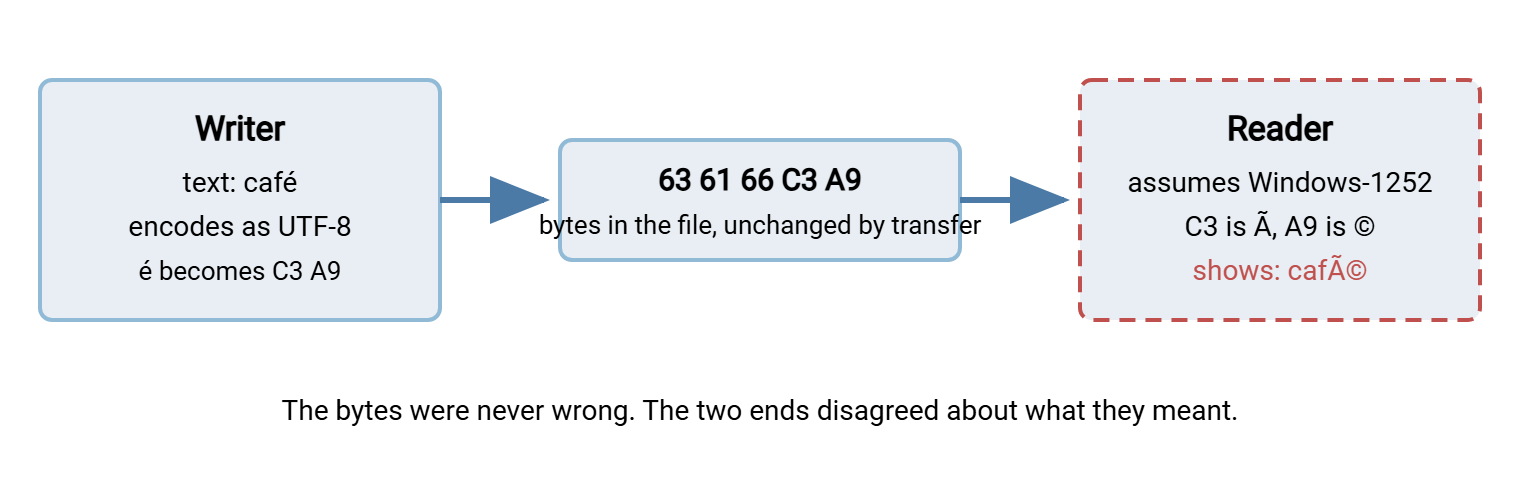
The reader takes C3 and A9 as two separate one-byte characters, because in a code page every byte is a character. In Windows-1252, C3 is à and A9 is ©, so café becomes café. Every accented character in the file turns into a two-character pair, and the file "grows" on screen while the bytes stay the same. The patterns are recognizable once you have seen them, and recognizing them tells you which direction the mistake went:
| You see | What happened |
|---|---|
| café, naïve, Müller — an à or  before each odd character | UTF-8 bytes decoded as a single-byte code page. The file is fine; the reader's assumption is wrong. |
| € where a euro sign belongs, – or ’ for dashes and quotes | Same mistake with three-byte UTF-8 characters, common in text pasted from word processors. |
| caf� or caf? — a replacement symbol or question mark | Code-page bytes decoded as UTF-8. Byte E9 alone is not valid UTF-8, so the reader substituted a placeholder. Information may already be lost if the file was re-saved. |
| café — the garbage is itself garbled | Double encoding: mojibake was saved as UTF-8 and then misread again. Repairable, but only by reversing both steps. |
| Correct text, but a stray  at the start of the file | A UTF-8 byte-order mark read as Windows-1252. See the next section. |
The important thing to internalize: in the first two rows, nothing is wrong with the file. Point the reader at the right encoding and the text is perfect. Only when someone "fixes" the garbled text by re-saving it does the damage become permanent.
The Byte-Order Mark
A byte-order mark, or BOM, is an optional signature at the very start of a text file that announces its encoding. For UTF-16 it also says which of the two bytes of each character comes first — hence the name. The three you will meet:
EF BB BF     UTF-8 BOM
FF FE        UTF-16, little-endian (the Windows flavor)
FE FF        UTF-16, big-endian

$ xxd report.csv | head -1
00000000: efbb bf69 642c 6e61 6d65 0a                ...id,name.

$ file report.csv
report.csv: UTF-8 Unicode (with BOM) text
A BOM is helpful to programs that look for it and invisible in editors that understand it. That is exactly why it causes trouble in the ones that do not. The UTF-8 BOM is three ordinary bytes. Any program that does not know to skip them treats them as the first three characters of the file:
- Scripts: a shell script starting with a BOM no longer begins with
#!. The kernel refuses to use the interpreter line, and bash reports#!/bin/bash: No such file or directoryfor line 1 before running the rest. - CSV and fixed-width imports: the first column header becomes three invisible bytes followed by
id. It looks identical toidand never compares equal to it. Lookups on the first column fail for every row. - JSON, XML, and configuration parsers: many reject a file whose first byte is not the expected opening character.
- Concatenation: joining several BOM-prefixed files puts invisible characters in the middle of the result, one per file boundary.
Who writes them? Older versions of Notepad did by default, and the older Windows PowerShell writes one whenever you ask for -Encoding utf8. The newer cross-platform PowerShell writes UTF-8 without a BOM by default and offers explicit utf8BOM and utf8NoBOM values. Removing one is a one-liner in either world:
# Linux: strip a leading UTF-8 BOM in place (only touches line 1)
$ sed -i '1s/^\xEF\xBB\xBF//' report.csv

# PowerShell: read whatever is there, write UTF-8 with no BOM
$t = [IO.File]::ReadAllText("report.csv")
[IO.File]::WriteAllText("report.csv", $t, [Text.UTF8Encoding]::new($false))
Remember: "UTF-8" and "UTF-8 with BOM" are different files at the byte level, and a partner who says "we send UTF-8" may mean either. Specify "UTF-8 without BOM" in every interface agreement, and check the first three bytes of the first file you receive.
Detecting an Encoding
There is no perfect detector, and it helps to know why. A file of pure ASCII bytes is valid in every encoding at once. A file with bytes above 127 is either valid UTF-8 or it is some single-byte code page. The former is a strong signal, because random code-page text almost never forms valid UTF-8 by accident. For a single-byte code page, nothing in the bytes says which one. Windows-1252, Latin-1, and the Cyrillic and Greek tables all use the same 128 values. To tell those apart you need to know what produced the file, or read the text and see which interpretation makes words. What tools can do reliably is spot a BOM, validate UTF-8, and show you the raw bytes:
$ file -i customers.csv
customers.csv: text/plain; charset=iso-8859-1      # has high bytes, not valid UTF-8

$ file -i orders.csv
orders.csv: text/plain; charset=utf-8              # valid UTF-8 (or has a BOM)

$ file -i readme.txt
readme.txt: text/plain; charset=us-ascii           # no high bytes at all: any encoding fits

# Strict UTF-8 validation: silent on success, names the first bad byte otherwise
$ iconv -f utf-8 -t utf-8 customers.csv > /dev/null
iconv: illegal input sequence at position 3

# Show the lines that contain any byte above 127
$ grep -nP '[\x80-\xFF]' customers.csv | head -3
1:caf�
17:Jos� Mart�nez
Read charset=iso-8859-1 as "single-byte code page, probably Western, exact table unknown" — file cannot distinguish Latin-1 from Windows-1252 and reports the standard name. The iconv validation is the strongest test: a file that passes it is well-formed UTF-8, whatever the producer claims. On Windows, Format-Hex on the first few bytes finds a BOM or UTF-16's telltale zero bytes. The .NET UTF8Encoding class with its strict flag set throws on invalid input, the equivalent of the iconv test.
Converting and Repairing
Conversion is only safe once you know the source encoding; converting from the wrong one produces a new kind of garbage. With that known, iconv does the job on Linux, and the .NET encoding classes do it in PowerShell:
# Windows-1252 to UTF-8, new file
$ iconv -f cp1252 -t utf-8 customers.csv > customers_utf8.csv

# UTF-8 to Windows-1252 for a legacy consumer; -c drops characters the target cannot hold
$ iconv -f utf-8 -t cp1252 -c orders.csv > orders_1252.csv

# Repair double-encoded text (café stored as UTF-8): undo the wrong decode
$ iconv -f utf-8 -t cp1252 mangled.csv > repaired.csv
$ head -1 repaired.csv
café

# PowerShell: read as 1252, write as UTF-8 without BOM
$enc = [Text.Encoding]::GetEncoding(1252)
$t = [IO.File]::ReadAllText("customers.csv", $enc)
[IO.File]::WriteAllText("customers_utf8.csv", $t, [Text.UTF8Encoding]::new($false))
The repair line deserves a second look, because it seems backwards. The mangled file contains the UTF-8 bytes for the characters à and ©, which are C3 83 and C2 A9. Encoding those two characters as Windows-1252 turns them back into the single bytes C3 and A9 — which is the original UTF-8 for é. Reversing the wrong step is the whole repair. The -c flag on the second command is a deliberate loss: any character that Windows-1252 cannot represent is dropped. So use it only when the consumer truly cannot take UTF-8, and say so in the flow's documentation.
Scripts need the same explicitness. Every language has a default encoding for reading and writing text. On Windows that default is often the ANSI code page rather than UTF-8. Pass the encoding on every open, read, and write call — -Encoding in PowerShell, an encoding argument in Python. That way, the script behaves identically on a developer's laptop and the job server. Our PowerShell file operations guide shows the parameter in context.
What the Transfer Layer Touches — and What It Never Does
Here is the part that saves the most troubleshooting time. A file transfer in binary mode — SFTP, SCP, HTTPS, or FTP with TYPE I — copies bytes. It has no idea whether they are UTF-8, Windows-1252, or an image, and it does not care. A server such as Sysax Multi Server stores exactly the bytes it receives and hands back exactly those bytes. The same is true of every well-behaved server and client. The encoding of a file's contents is an agreement between the program that wrote it and the program that reads it. The transfer is not a party to that agreement.
So when text arrives garbled, the transfer is almost never the cause. The proof is quick: hash the file at both ends, as described in verifying transfers end to end. Matching hashes mean the bytes are identical and the disagreement lives in the writer or the reader. That means the export settings of the producing system, the import settings of the consuming one, or an intermediate tool that re-saved the file with its own default.
The exceptions are the ones this series exists to document. FTP's ASCII mode rewrites line-ending bytes and, on some hosts, translates whole character sets — the mainframe case in the ASCII/binary trap. And any pre- or post-processing step that opens the file as text and saves it again will re-encode it with that step's default. That is worth checking whenever a conversion job sits in the pipeline. The discipline for such steps is in validating files before sending. File names are a separate story, because the protocol does carry those as text — that is the subject of filename encoding problems.
The Version to Tell a Colleague
Text is bytes plus a rule for reading them. ASCII bytes mean the same thing under every rule, which is why trouble only starts with the first accented character. UTF-8 is the modern rule and should be the standard for everything you exchange. Code pages are the older single-byte rules, and reading UTF-8 bytes with one of them produces café. A BOM is three bytes at the start of a file that some programs count as text. Detect with file -i and the iconv validation trick. Convert with iconv or the .NET encoding classes once you know the source. And remember that a binary transfer never changes any of this — matching hashes at both ends prove it.
The next article deals with the one place a transfer protocol does handle text — the names of the files — in filename encoding problems on transfer servers. For catching all of these problems before a downstream system does, see detecting corruption early.
Frequently Asked Questions
Is UTF-8 the same as Unicode?
Can the file transfer itself change a file's encoding?
How do I know which code page a file uses?
Should our files have a BOM or not?
Why does the accented text look right on Windows but wrong on Linux?
Can double-encoded text be repaired?
From the Sysax team: we build secure file transfer software for Windows. Sysax Multi Server is an FTP, FTPS, SFTP, and HTTPS server. Sysax FTP Automation handles scheduled, scripted transfers. Free trials are on the download page.