
Filename Encoding Problems on Transfer Servers
A partner in Montréal uploads résumé_dupont.pdf. On your server the listing shows r?sum?_dupont.pdf, or résumé_dupont.pdf. Or — worst of all — it shows a name that looks perfect but which the nightly job cannot open because "no such file". The contents of the file are fine. The name was mangled. Because names are what scripts, listings, and people use to find files, a mangled name is nearly as bad as a mangled file.
This article explains why file names are the one piece of text a transfer protocol actually handles. It shows how FTP and SFTP carry non-ASCII names and what the question marks and boxes in a listing really mean. It explains where the Windows and Linux naming rules differ, and why two names that look identical can be different files. It ends with the safe-name policy that makes all of it someone else's problem. It is part of our ASCII vs Binary and Encoding Corruption series and assumes the vocabulary — bytes, code pages, UTF-8 — from character encodings for admins.
Names Are Text, and the Protocol Carries Them
A file's contents travel through a transfer as opaque bytes; a binary-mode transfer never interprets them. A file's name is different. The client has to send the name as part of a command — STOR résumé.pdf, or an SFTP open request. The server has to turn what it receives into a name its filesystem accepts. Names are text on the wire, and text has an encoding. That is the whole reason names get mangled when contents do not.
Follow a name on its journey and you can see where it can go wrong. The diagram shows the two points at which a name is converted. The client converts it once, from the local system's idea of the name into bytes on the wire. The server converts it once, from wire bytes into a name on its filesystem. The same two conversions happen in reverse for every directory listing.
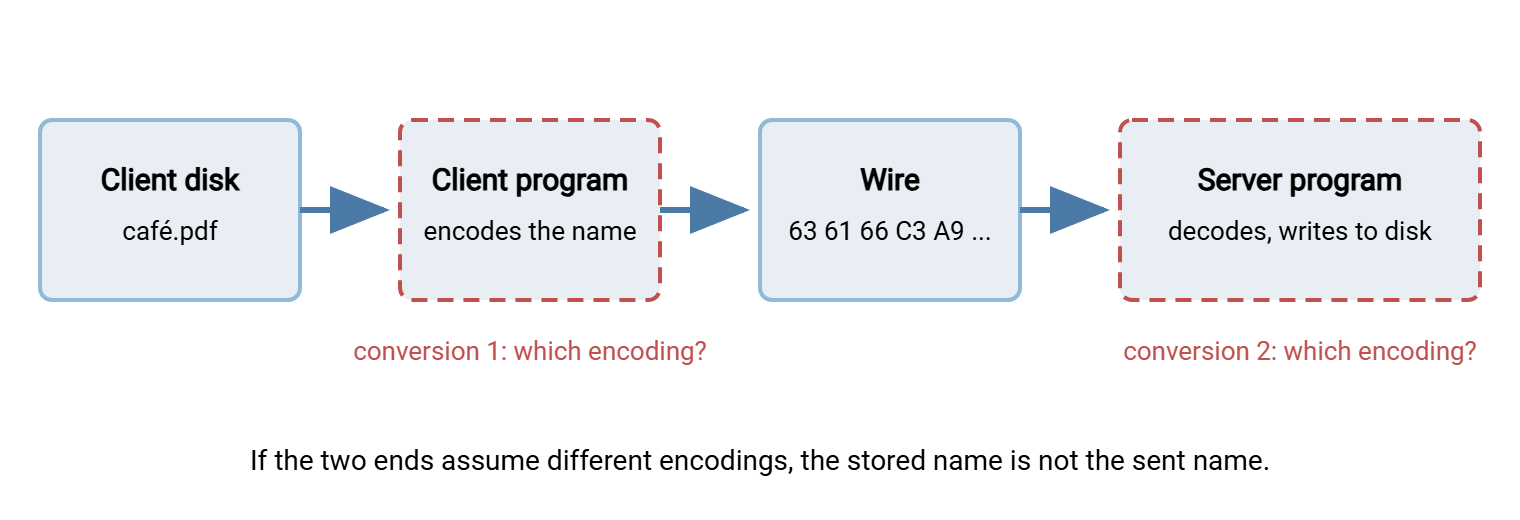
When both conversions use UTF-8, the name survives. Suppose the client encodes with its local code page and the server decodes as UTF-8, or the other way round. You get the same mojibake — garbled characters from an encoding mismatch — that the previous article showed for file contents. Except now it is baked into the filename on disk. And when one end's filesystem cannot hold the character at all, it is replaced or rejected.
FTP: The UTF8 Feature and OPTS UTF8 ON
The original FTP specification predates Unicode and says almost nothing about names beyond ASCII. So for years every client and server simply sent whatever bytes its own system used. A later extension fixed that. A server that handles names as UTF-8 advertises a UTF8 line in its reply to the FEAT command. A client switches the session to UTF-8 names with OPTS UTF8 ON:
Command:  FEAT
Response: 211-Features:
Response:  UTF8
Response:  MLST type*;size*;modify*;
Response:  SIZE
Response:  REST STREAM
Response: 211 End
Command:  OPTS UTF8 ON
Response: 200 UTF8 mode enabled
Command:  STOR résumé_dupont.pdf
Response: 150 Ok to send data
Response: 226 Transfer complete
After the 200 reply, both sides agree that every name on the control connection is UTF-8, and the server converts to whatever its filesystem needs. Some servers reply 200 Always in UTF8 mode instead, meaning they never did anything else. Graphical clients send OPTS UTF8 ON automatically when they see the feature. Most also have a per-site charset setting, typically offering "autodetect", "force UTF-8", and a custom code page. This is for servers that use UTF-8 without advertising it or that genuinely use a legacy page.
Without the feature, the old behavior applies and the two conversions in the diagram use whatever each side's system defaults to. The Windows command-line ftp.exe is the usual offender: it has no UTF-8 support and sends names in the console's OEM code page. So any accented character leaves the client already in a form the server will misread. Scripts built on it should confine themselves to ASCII names, as our honest look at the built-in FTP clients recommends for other reasons too.
What the server does with the decoded name depends on its platform. On Windows, the filesystem stores names as UTF-16. So a server that speaks UTF-8 on the wire converts cleanly, and a name can hold any character Windows allows. A Windows server without UTF-8 support decodes the wire bytes with the system's ANSI code page — usually Windows-1252. Any character outside that page becomes a question mark on disk. On Linux, filesystems store names as raw bytes with no encoding attached, so a server simply writes whatever bytes it received. The name is "correct" as long as everything that later reads the directory assumes the same encoding.
SFTP: Bytes on the Wire, UTF-8 by Convention
SFTP, as commonly implemented, carries names as byte strings, and the near-universal convention is that those bytes are UTF-8. The OpenSSH server passes names between the wire and the Linux filesystem untouched. So on a modern Linux host with a UTF-8 locale everything lines up. The client sends UTF-8, the bytes land on disk, and every listing shows them correctly. Windows SFTP servers convert between UTF-8 on the wire and UTF-16 on disk, which also works cleanly. The SFTP file operations article covers the requests involved.
SFTP's problems are therefore rarer and come from two places. First, consider a Linux server whose files were created under an older, non-UTF-8 locale. Those names are legacy code-page bytes on disk, and the server hands them over as-is. The client — decoding as UTF-8 — shows garbage or refuses to display them. Second, a client that assumes its local code page instead of UTF-8. Graphical SFTP clients usually have a setting for exactly this, named something like "UTF-8 encoding for filenames" with auto, on, and off values. The value "on" is the right answer for any modern server.
What Question Marks and Boxes Mean
A ? or an empty box in a listing is a display program's way of saying "I have bytes here that I cannot turn into a character". That can mean two very different things, and the first diagnostic step is telling them apart:
- The name on disk is wrong. The server stored bytes that are not valid in the encoding everyone now assumes. Every tool shows the same garbage, and a job that expects
résumé_dupont.pdffails with "no such file". - Only the display is wrong. The name is fine, but the terminal, console font, or listing tool cannot render it. The Windows command prompt under a legacy code page does this constantly. Switching it with
chcp 65001or using a modern terminal fixes the display without touching the file.
To see the actual bytes rather than a rendering of them, ask the operating system directly. On Linux, ls -b prints non-ASCII bytes as octal escapes, and piping a listing through od -c shows every byte:
$ ls
café.txt  café.txt  caf?.txt

$ ls -b
caf\303\251.txt  cafe\314\201.txt  caf\351.txt

$ ls | od -c | head -3
0000000   c   a   f 303 251   .   t   x   t  \n   c   a   f   e 314 201
0000020   .   t   x   t  \n   c   a   f 351   .   t   x   t  \n
Three files that all intend to be café.txt, and none of them shares a byte sequence with another. The first, 303 251 in octal, is C3 A9 — proper UTF-8. The second is the letter e followed by 314 201, which is CC 81, a combining accent — the normalization problem covered below. The third is a single byte 351, which is E9: the Windows-1252 é, written by a client that never switched to UTF-8. Only the third displays as a question mark; the first two look identical, which is worse.
On Windows, PowerShell can show the same thing. Names come out of the filesystem as proper Unicode strings, so what you inspect is their code points. What you look for is a replacement character or a decomposed sequence:
PS> Get-ChildItem | ForEach-Object {
>>   "{0,-20} {1}" -f $_.Name, (($_.Name.ToCharArray() | ForEach-Object { "{0:X4}" -f [int]$_ }) -join " ")
>> }
café.txt             0063 0061 0066 00E9 002E 0074 0078 0074
café.txt             0063 0061 0066 0065 0301 002E 0074 0078 0074
caf?.txt             0063 0061 0066 FFFD 002E 0074 0078 0074
Here 00E9 is the composed é, and 0065 0301 is e plus a combining accent. The value FFFD is Unicode's official "replacement character". It is the sign that some earlier step met bytes it could not decode and substituted a placeholder. Once a name contains FFFD, the original character is gone and the file must be renamed by hand or from a known-good source.
Windows and Linux Name Rules Are Not the Same
Even with encodings perfectly aligned, a name that is legal on one system can be illegal, or ambiguous, on the other. Files cross that boundary on every transfer between a Linux host and a Windows server, and these are the rules that bite:
| Rule | Windows (NTFS) | Linux (typical filesystems) |
|---|---|---|
| Case | Insensitive but preserving: Report.csv and report.csv are the same file |
Sensitive: they are two different files |
| Forbidden characters | \ / : * ? " < > | and control characters |
Only / and the NUL byte |
| Reserved names | CON, PRN, AUX, NUL, COM1–COM9, LPT1–LPT9, even with an extension |
None |
| Trailing dot or space | Silently stripped or refused | Allowed |
| Length | 255 characters per name; full path limited to 260 unless long paths are enabled | 255 bytes per name — accented characters use up to four each |
| Leading dot | Ordinary name | Hidden from plain listings |
The practical failures follow directly. Two Linux files differing only in case collide when copied to Windows, and the second silently overwrites the first. A partner's export named Q3 results: final.xlsx is refused by a Windows server because of the colon. A file called nul.txt cannot be created on Windows at all. A long Japanese name that fits comfortably in 255 characters exceeds 255 bytes in UTF-8 and is rejected by Linux. Files land on NTFS when the server is a Windows product such as Sysax Multi Server. So the Windows column is the one that governs every name a client sends to it, whatever system the client runs. The full cross-platform character list is in safe characters across platforms.
Normalization: When Two Identical Names Are Different Files
Unicode allows some characters to be written two ways. The é in café can be a single code point, the precomposed letter U+00E9. Or it can be two code points, a plain e followed by a combining acute accent that is drawn on top of it. Both display identically. The rules for choosing one form consistently are called normalization. NFC is the composed form (one code point where possible). NFD is the decomposed form (base letter plus separate accents). In UTF-8, the composed é is C3 A9 and the decomposed one is 65 CC 81 — different bytes, different name.
This matters because older macOS filesystems stored names in decomposed form, and many macOS clients still send names that way. Linux and Windows store names as given and compare them byte by byte. So a decomposed café.txt from a Mac user and a composed one from a Windows user coexist as two files in the same directory. Each is invisible to a script looking for the other. The listing in the previous section showed exactly that pair.
The fix is to normalize names to NFC at the point of intake, in the job that processes the inbound folder. A rename loop that also repairs legacy code-page names looks like this on Linux; PowerShell has the equivalent .Normalize() method on every string:
#!/bin/bash
# Normalize inbound names: repair Windows-1252 bytes, then compose to NFC.
cd /srv/inbound || exit 1
for f in *; do
    if printf '%s' "$f" | iconv -f utf-8 -t utf-8 >/dev/null 2>&1; then
        n="$f"                                        # already valid UTF-8
    else
        n=$(printf '%s' "$f" | iconv -f cp1252 -t utf-8) || continue
    fi
    n=$(python3 -c 'import sys,unicodedata; print(unicodedata.normalize("NFC", sys.argv[1]))' "$n")
    [ "$f" != "$n" ] && mv -n -- "$f" "$n" && echo "renamed: $f -> $n"
done

# PowerShell equivalent of the normalization step
# Get-ChildItem | Where-Object { $_.Name -cne $_.Name.Normalize([Text.NormalizationForm]::FormC) } |
#     Rename-Item -NewName { $_.Name.Normalize([Text.NormalizationForm]::FormC) }
The first test matters: a name that is already valid UTF-8 must be left alone. Valid UTF-8 bytes are also valid Windows-1252 bytes and would be "converted" into mojibake. The mv -n refuses to overwrite, so a collision between a repaired name and an existing file is reported rather than resolved by deletion.
The Safe-Name Policy That Avoids It All
Everything above is fixable, and none of it needs fixing if the names never contain the characters that cause it. A safe-name policy for transferred files restricts names to the set that every filesystem, protocol, client, and shell treats identically. The usual rule set:
- Characters: ASCII letters, digits, underscore, hyphen, and a single dot before the extension. No spaces, no accents, no punctuation beyond those.
- Case: lowercase only, so case-insensitive and case-sensitive systems agree.
- Structure: no leading dot or hyphen, no trailing dot or space, no Windows reserved names.
- Length: a fixed ceiling — sixty-four or one hundred characters is typical — well under every platform's limit.
- Meaning: carried by the name's structure, such as
orders_acme_YYYYMMDD_001.csv, rather than by a human-readable title.
The policy belongs in three places. In the naming convention your own jobs follow, which naming convention design walks through. In every partner agreement, as a one-line clause next to the encoding and line-ending clauses. And the policy belongs in an intake check at the inbound folder. A file whose name fails the rule is renamed to a safe form or moved to a quarantine folder with an alert. The file is never passed downstream, as described in intake validation and safety. Scheduled-transfer tools with pre- and post-processing steps, such as Sysax FTP Automation, give that check a natural home next to the transfer it protects.
Remember: a filename is data that every system on the path must agree on. A name restricted to lowercase ASCII, digits, underscore, hyphen, and one dot needs no encoding negotiation, no normalization, and no per-platform exceptions. It is the only kind of name a script can rely on.
The Version to Tell a Colleague
File contents travel as bytes; file names travel as text, so they have an encoding and can be garbled. FTP handles non-ASCII names correctly only when the server advertises UTF8 and the client sends OPTS UTF8 ON. SFTP uses UTF-8 by convention and mostly works. Question marks in a listing mean either a bad name on disk or a display that cannot render a good one. The ls -b command and PowerShell's code-point dump tell you which. Windows and Linux disagree about case, forbidden characters, and length, and Unicode lets one name be spelled two ways in bytes. A safe-name policy sidesteps all of it.
Continue with detecting mode and encoding corruption early for checks that catch name and content problems at intake. Continue with the prevention checklist, where the safe-name clause takes its place beside the others. Why names matter so much to automation in the first place is the subject of why file names matter for automation.
Frequently Asked Questions
Why does the file's content arrive fine but its name is garbled?
What does OPTS UTF8 ON actually do?
Does SFTP have the same filename problem?
I can see the file in the listing but the script says it does not exist. Why?
Should I just forbid non-ASCII filenames entirely?
From the Sysax team: we build secure file transfer software for Windows. Sysax Multi Server is an FTP, FTPS, SFTP, and HTTPS server. Sysax FTP Automation handles scheduled, scripted transfers. Free trials are on the download page.