
The ASCII/Binary Trap: FTP's Classic Silent Mangler
A partner uploads a zip archive. The transfer log says 226 Transfer complete. The file sits in the inbound folder with a plausible size. When someone tries to open it, the archive tool says it is damaged. Nothing failed, nobody saw an error, and the file is still wrong. Over FTP, the first suspect is always the same: the transfer ran in ASCII mode instead of binary mode. The protocol quietly rewrote a few bytes on the way through.
This article explains the trap from the bytes upward: what the two modes actually do and why ASCII mode exists. It shows exactly how ASCII mode damages a file that was never text and what the symptoms look like. You will learn how to confirm the diagnosis in a minute with tools you already have. You will also see where the trap is set — mostly in client defaults — and what SFTP does and does not do to protect you. It is the first article in our ASCII vs Binary and Encoding Corruption series, and the others build on it.
Two Modes, One Command: What TYPE A and TYPE I Mean
Start with the smallest unit involved. A byte is a number between 0 and 255, and a file is simply a long sequence of bytes. A text file is one where the bytes are meant to be read as characters — letters, digits, punctuation, and a few invisible controls such as "end of line". A binary file is anything else: a zip archive, a PDF, an image, a program. Its bytes mean whatever the program that wrote it decided, and every one of them has to arrive unchanged.
FTP has a transfer type that the client sets with the TYPE command on the control connection. That is the long-lived conversation where commands travel, as opposed to the data connection that carries the file itself. The two types you will meet are:
TYPE A— ASCII mode. The file is treated as lines of text. Both ends are allowed to rewrite the end-of-line bytes to suit their own operating system. Some clients call this "text mode".TYPE I— Image mode, universally called binary mode. The file is treated as an opaque sequence of bytes. Whatever goes in one end comes out the other, byte for byte.
On the wire, the client sends the command and the server acknowledges with a 200 reply. The wording varies — 200 Type set to I. is the classic form, 200 Switching to Binary mode. another — but the code is always 200:
ftp> binary
200 Type set to I.
ftp> ascii
200 Type set to A.
Here is the fact that makes the trap possible: the protocol's default type is ASCII. A session that never sends TYPE I transfers everything in ASCII mode. Whether a client sends TYPE I for you, sends it only for some files, or never sends it at all depends entirely on the client. That is where the surprises come from. The reply codes themselves are covered in FTP commands and reply codes.
Why ASCII Mode Exists
ASCII mode is not a bug. It solved a real problem: different operating systems mark the end of a line of text with different bytes. Windows and its ancestors use two bytes, CR (carriage return, byte 0D) followed by LF (line feed, byte 0A) — written CRLF. Unix-family systems, including Linux, use a single LF. The next article in this series, line endings across systems, goes into why; for now, hold on to the byte values 0D and 0A.
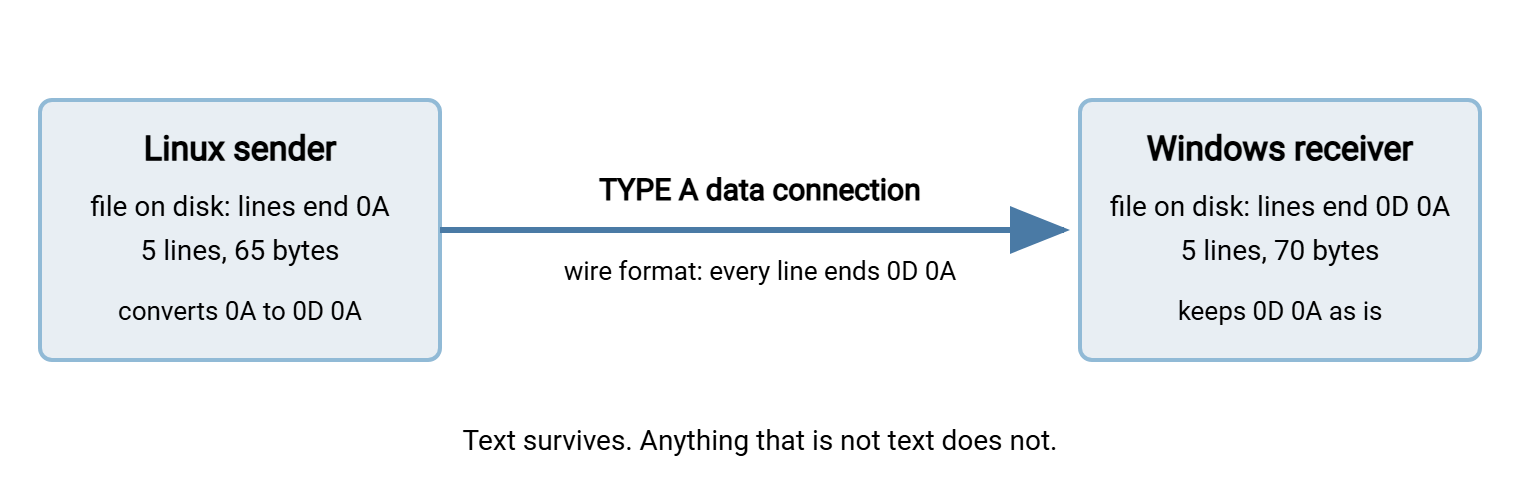
ASCII mode hides that difference. It defines a neutral "wire format" — every line ends in CRLF in transit — and gives each end one job:
- The sender converts its own local line endings to CRLF before putting bytes on the data connection.
- The receiver converts CRLF back to whatever its own operating system uses before writing the file to disk.
The diagram below shows a text file leaving a Linux machine in ASCII mode and arriving on Windows. Each single 0A becomes 0D 0A on the wire, and Windows keeps it that way on disk.
One more thing ASCII mode does matters if you exchange files with a mainframe. Some hosts store text in an older character set called EBCDIC, and their FTP servers translate it to ASCII in ASCII mode. That is the one situation where the mode is necessary — and a reminder that it means "either end may rewrite what it thinks is text".
A Worked Example: The Five-Line File That Grew by Five Bytes
Theory becomes obvious once you look at actual bytes. Here is a small text file, orders.csv, created on Linux, with five lines each ending in a single LF:
$ cat orders.csv
id,name,amount
1,Alice,10.50
2,Bob,7.25
3,Carol,12.00
4,Dan,3.75

$ stat -c %s orders.csv
65

$ xxd orders.csv
00000000: 6964 2c6e 616d 652c 616d 6f75 6e74 0a31  id,name,amount.1
00000010: 2c41 6c69 6365 2c31 302e 3530 0a32 2c42  ,Alice,10.50.2,B
00000020: 6f62 2c37 2e32 350a 332c 4361 726f 6c2c  ob,7.25.3,Carol,
00000030: 3132 2e30 300a 342c 4461 6e2c 332e 3735  12.00.4,Dan,3.75
00000040: 0a                                       .
Reading an xxd dump: the left column is the offset (position in the file) in hexadecimal. The middle shows the bytes, sixteen per row, in pairs. The right column shows the same bytes as characters, with a dot for anything unprintable. Every 0a in the middle column lines up with a dot on the right — those are the five line endings. Fourteen characters plus one LF for the header, and so on down the file, makes 65 bytes.
Now upload that file in ASCII mode to a Windows FTP server and dump the copy that lands there, using PowerShell's Format-Hex:
PS> (Get-Item orders.csv).Length
70

PS> Format-Hex orders.csv

           00 01 02 03 04 05 06 07 08 09 0A 0B 0C 0D 0E 0F
00000000   69 64 2C 6E 61 6D 65 2C 61 6D 6F 75 6E 74 0D 0A  id,name,amount..
00000010   31 2C 41 6C 69 63 65 2C 31 30 2E 35 30 0D 0A 32  1,Alice,10.50..2
00000020   2C 42 6F 62 2C 37 2E 32 35 0D 0A 33 2C 43 61 72  ,Bob,7.25..3,Car
00000030   6F 6C 2C 31 32 2E 30 30 0D 0A 34 2C 44 61 6E 2C  ol,12.00..4,Dan,
00000040   33 2E 37 35 0D 0A                                3.75..
Every 0A has become 0D 0A. Five lines, five extra bytes: 65 became 70. Nothing else changed, and for a genuine text file that is exactly what ASCII mode promised. Transfer it back to Linux in ASCII mode and it shrinks to 65 again. This is the intended use, and for plain text it works.
Remember: ASCII mode changes the file and reports success. There is no error, no warning, and no flag in the log. The only evidence is the byte count, and only if you know what it was supposed to be.
How a Binary File Gets Mangled
The problem is that ASCII mode cannot tell text from anything else. It treats every 0A and every 0D 0A as a line ending, whatever it actually is. In a zip archive, an image, or a PDF, those byte values appear constantly — as compressed data, pixel values, lengths, and offsets. ASCII mode "corrects" them anyway.
The cleanest demonstration is the eight-byte signature at the start of every PNG image. The people who designed the format put line-ending bytes in it deliberately, precisely so that this kind of damage would be detectable:
Original PNG signature (8 bytes):
89 50 4E 47 0D 0A 1A 0A          .PNG....

Received on a Unix-family system in ASCII mode (7 bytes):
89 50 4E 47 0A 1A 0A             the 0D 0A pair collapsed to 0A

Received on Windows in ASCII mode (10 bytes):
89 50 4E 47 0D 0D 0A 1A 0D 0A    each 0A gained a 0D in front of it
Either way, the first check an image viewer makes — "do the first eight bytes match the signature?" — fails. The damage continues throughout the file wherever those byte values occur. The 1A byte guards against a related mistake: very old DOS-era tools treated it as "end of file" when reading text.
How much does a binary file change? In data with no particular structure — archives, encrypted files, most images — any given byte value appears roughly once in every 256 bytes. So a file received on Windows grows by about one byte in 256, roughly four kilobytes per megabyte. One received on a Unix-family system shrinks by however many 0D 0A pairs existed. The differences are small, which is why the size "looks plausible". The consequences by file type:
- Zip and other archives: "unexpected end of archive", "CRC failed", or "not a valid archive" — the offsets stored inside no longer point where they should.
- PDF, images, audio, video: the file will not open, or opens up to a point and stops.
- Programs, installers, database dumps: refuse to run or load, or fail a signature check.
- Encrypted files: decryption fails outright, because one altered byte breaks the mathematics. This bites partners exchanging PGP-encrypted files over ASCII-mode FTP; the encrypt-before-send workflow depends on binary mode.
The Symptoms and How to Confirm It
You rarely see the transfer happen; you get a report that a file is broken after a transfer everyone believes succeeded. These signs separate mode corruption from a truncated file, a different problem covered in why partial files happen:
| What you observe | What it suggests |
|---|---|
| Received file is slightly larger than the source (by a few bytes per kilobyte) | ASCII mode, received on Windows: 0A bytes gained a 0D |
| Received file is slightly smaller than the source | ASCII mode, received on Linux or another Unix-family system: 0D 0A pairs collapsed |
| Received file is much smaller, or a round number of kilobytes | Truncation, not mode — look at connection drops instead |
| Text files arrive fine; archives, images and PDFs arrive broken | Classic ASCII mode. Text tolerates it; binary does not |
| Everything arrives broken, sizes identical | Not mode. Suspect the source file or an encoding problem |
To confirm the diagnosis, count the line-feed bytes in the original. If the received copy is larger by exactly that number, ASCII mode is proven:
$ stat -c %s report.zip
1048576
$ tr -cd '\n' < report.zip | wc -c
4103
# expected size on the Windows side if ASCII mode was used: 1048576 + 4103 = 1052679

$ cmp report.zip report_received.zip
report.zip report_received.zip differ: byte 27, line 1
tr -cd '\n' deletes every byte except line feeds, and wc -c counts what is left. cmp reports the first byte at which two files differ — for mode corruption, usually the first place an 0A occurred. There are two other tells. Verbose client output (curl -v, for example) shows TYPE A before the transfer. Some FTP servers refuse the SIZE command with a 550 reply while in ASCII mode. They cannot know the converted size without reading the whole file. A fuller toolkit is in detecting corruption early.
Where the Trap Is Set: Client Defaults
Because the protocol defaults to ASCII, the mode you get is whatever your client decides to send. The defaults differ, and the differences are the whole trap:
- The Windows command-line
ftp.exedefaults to ASCII mode. This is the single most common cause. A "just use the built-in ftp" script that never typesbinarycorrupts every archive it touches. Our honest look at the built-in FTP clients lists this among its other limitations. - The common Linux command-line client defaults to binary and says so at login:
Using binary mode to transfer files.Typingasciiswitches it, and some old scripts do. - Graphical clients often default to an "auto" mode that picks ASCII or binary per file from a list of extensions. That works until a file's extension lies about its contents. Examples include a
.txtthat is really a proprietary export, or a file with no extension at all. Find the "default transfer type" or "transfer mode" setting and set it to binary. curlandlftpdefault to binary. You have to ask for ASCII explicitly (curl --use-ascii, or an-aflag onlftp'sgetandput), which is the right way round.- Scripting libraries make you choose per call. Python's
ftplibhasstorbinaryandstorlines— the first sendsTYPE I, the secondTYPE A. Using the "lines" variant on a zip file is a bug that runs and reports success.
The fix for ftp.exe is to make binary the first thing every session does. In an unattended script driven by ftp -s:, that means a line in the command file:
REM upload.txt — command file for:  ftp -n -s:upload.txt ftp.example.com
open ftp.example.com
user transfer_svc
binary
cd inbound
put report.zip
quit
The -n switch suppresses the automatic login so the user line can do it. Then binary sets TYPE I before anything is transferred. This still leaves the session unencrypted, one of several reasons this client is best treated as a last resort.
Binary Always: The Rule and the One Exception
The rule that settles the subject is short: transfer every file in binary mode, always. Not "binary for binary files and ASCII for text" — that requires a correct decision per file, forever. A wrong one means a silently corrupted file. Binary mode moves text files perfectly well. It simply does not convert their line endings. A text file with the "wrong" line endings is still complete and can be converted deliberately.
When a flow really does need CRLF at one end and LF at the other, do the conversion as an explicit, visible job step. Use dos2unix, a short script, or a pre- or post-processing action in whatever runs the job. Never ask the transport to guess. The step can be tested, logged, and reviewed; ASCII mode cannot. Our guide to transforming files between systems shows where such a step belongs. Sysax FTP Automation is one example of a scheduled-transfer tool whose pre- and post-processing steps can run that kind of conversion around a scripted transfer. That way, the transfer itself stays binary.
The one documented exception is the mainframe case: a host that stores text in EBCDIC needs ASCII mode to translate it. Write that exception down next to the job, with the list of files it applies to. That way, nobody "fixes" it back to binary and nobody extends it to the archives in the same folder.
Does SFTP Save You?
Mostly, yes. SFTP is a different protocol that runs over SSH. As implemented in practice it has no transfer type at all: no TYPE command, no ASCII mode, no conversion. The bytes read at one end are the bytes written at the other, and the same is true of SCP and HTTPS uploads. If a flow is bitten by ASCII mode repeatedly, moving it from FTP to SFTP removes the mechanism entirely. A server that offers both protocols, such as Sysax Multi Server, lets you do that without changing where the files land. See how SFTP works and SFTP file operations for the mechanics.
Two cautions keep "mostly" honest. First, some graphical clients offer a "text" transfer mode that converts line endings locally, before or after the SFTP transfer. So the same damage can happen without the protocol's help. Check the client's transfer mode setting whatever the protocol. Second, no protocol protects you from the rest of this family. Character-encoding mismatches, byte-order marks, and filename encoding problems happen in the programs that write and read the files, and SFTP carries them faithfully. Those are the subjects of character encodings for admins and the filename encoding article later in this series.
And whichever protocol you use, "the protocol does not convert" is not the same as "the file arrived intact". Proving that — with a size check at minimum and a hash where it matters — is the subject of verifying transfers end to end.
The Version to Tell a Colleague
FTP has two transfer modes. ASCII mode rewrites line-ending bytes to suit each operating system — fine for text, destructive for everything else — and reports success either way. The protocol and the Windows ftp.exe client both default to ASCII, and "auto" modes guess from file extensions. Set binary mode explicitly in every client and script. Convert line endings as a deliberate job step, and confirm suspected damage by comparing byte counts. A file that grew by exactly its number of line feeds was transferred in ASCII mode.
From here, read line endings across systems for the bytes ASCII mode was built to fix. Read the prevention checklist for the settings that keep this from recurring. For the wider method of finding which layer a transfer failed at, start with the systematic troubleshooting series.
Frequently Asked Questions
Does binary mode damage text files?
How can I tell which mode my client is using?
Can a corrupted file be repaired after an ASCII-mode transfer?
Why is ASCII the protocol default if it is so dangerous?
Does SFTP have an ASCII mode?
From the Sysax team: we build secure file transfer software for Windows. Sysax Multi Server is an FTP, FTPS, SFTP, and HTTPS server. Sysax FTP Automation handles scheduled, scripted transfers. Free trials are on the download page.