
Mapping Your Organization’s File Flows: The Transfer Census
"How many file transfer flows do we run?" "About thirty." I gave that answer once, with real confidence, to a person holding a clipboard. The true number was nearer ninety. I met most of the remainder the way everyone does: one at a time, on the day each one broke. Ask any administrator the same question and you will get a confident number. Double it, then add the flows that only surface when they fail. You are getting close. Every organization accumulates file flows the way attics accumulate boxes. Each one made sense to somebody at the time. Few were written down, and the people who created the oldest ones have long since left. The result is an estate nobody can fully describe. Then an auditor asks "show me every way data leaves this company," or a decommissioned server takes an invisible nightly job down with it.
The fix is unglamorous and it works: a transfer census, a deliberate inventory of every recurring file flow you own. It has one row per flow, with enough detail to answer the questions that matter. This article is the field guide. It covers the four families every flow belongs to, where undocumented flows hide and the commands that flush them out. It provides a template for recording what you find, and explains how to turn the finished census into a prioritized cleanup plan. It is part of our File Transfer Fundamentals series. It is where the concepts from the earlier articles get applied in bulk. Bring a pencil, and do not trust anyone's memory, least of all mine.
Why a Census, and Why Now
Three recurring events justify the effort, and one of them is probably on your calendar whether you know it or not:
- The invisible dependency. A server gets rebuilt, a firewall rule gets tightened, or a vendor account gets closed. A week later someone in finance asks why the partner never received month-end files. The flow existed; the knowledge of it did not. Post-incident reviews of file transfer outages almost always contain the sentence "nobody knew that job was running."
- The audit question. Security reviews, customer due-diligence questionnaires, and compliance frameworks all eventually ask a version of these questions. What data crosses your boundary, over what protocols, to whom? How is it protected? Without a census the honest answer is a guess. With one, it is a filtered spreadsheet.
- The migration. Replacing a server, retiring plain FTP, consolidating tools — every transfer-related project starts with "what will this break?" That question is unanswerable without knowing what exists.
A census is not documentation for its own sake. It is the difference between operating your file transfer estate and merely cohabiting with it.
The Four Families of File Flows
Every flow you find will belong to one of four families. Sorting them matters because each family hides in different places and carries different risks:
- Ad-hoc human transfers. People sending files to people: email attachments, one-off uploads to a partner's portal, a file handed over during a support call. Individually trivial, collectively a large share of data leaving the organization — and the family with the least logging. You cannot inventory each event, but you can inventory the habits: which teams routinely send what to whom, and by what means. Our email attachment series covers the biggest habit in this family.
- Scheduled batch transfers. The nightly exports, mirror jobs, and report drops that run on a timer — created by admins and developers, living in task schedulers and scripts. This family is the census workhorse: most business-critical flows live here, and most undocumented ones too.
- B2B partner flows. Recurring exchanges with other organizations: banks, payroll providers, suppliers, customers. These carry contractual weight, involve credentials issued by (or to) outsiders, and fail loudest. They overlap with scheduled batch — the distinguishing feature is the external party and the obligations that come with it.
- Application integrations. Software talking to software: an application that exports to another system's import folder, a device fleet uploading logs, a line-of-business tool with an FTP address buried in its settings. This family hides best of all, because the transfer is configured inside an application rather than in any scheduler an admin reads.
The families also fail differently, which is why the census records which one each flow belongs to. Ad-hoc flows fail by leaking — data going places policy never sanctioned, with no trail. Scheduled batch flows fail silently — the job errors at 2 a.m. and nothing downstream notices for days. Partner flows fail expensively — a missed exchange can carry contractual penalties and always carries an awkward phone call. Integration flows fail confusingly — the symptom appears in the application ("orders stopped importing") three steps away from the transfer that caused it. Knowing the family tells you what kind of trouble a flow can make before it makes it.
What a Finished Map Looks Like
See the destination before you start digging. The diagram below is the shape of a completed census for a small organization. Every arrow is one row in the inventory, labeled with its protocol and trigger, with direction showing who initiates.
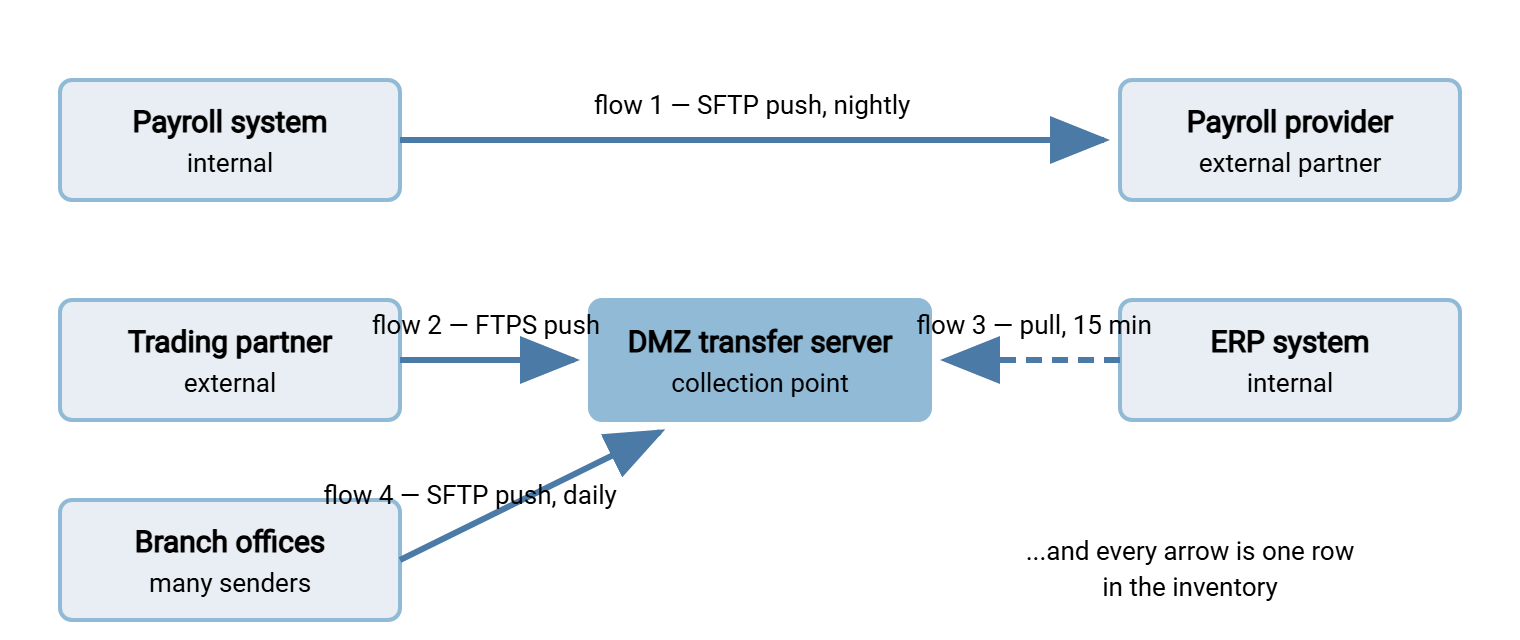
Notice what the picture already reveals: which servers are load-bearing, where the trust boundary gets crossed, and which arrows would sever if any one box disappeared. That is the census paying rent before the spreadsheet is even finished. (The direction of each arrow — who initiates — is exactly the decision covered in push vs pull.)
Where Flows Hide: The Discovery Pass
Undocumented flows leave fingerprints in predictable places. Work through these sources in order; each catches flows the previous ones miss.
1. Task schedulers. The richest seam, and the place flows go to be forgotten. On every server that might move files, list the scheduled work and read what each task actually runs:
# Windows — list scheduled tasks with commands, to a file you can search
schtasks /query /fo LIST /v > tasks.txt

# Linux — per-user and system-wide schedules
crontab -l
ls /etc/cron.d /etc/cron.daily /etc/cron.hourly

# Search scripts and task output for transfer fingerprints
findstr /s /i "ftp sftp winscp psftp curl pscp" C:\Scripts\*.*     (Windows)
grep -rniE "ftp|sftp|scp|curl|lftp" /opt/scripts /etc/cron.d       (Linux)
2. Server logs. Every transfer server you run has an activity log listing accounts, source addresses, and files moved — a ready-made census of one collection point. A server such as Sysax Multi Server records logins and transfers per account. So a month of its log tells you who genuinely uses the server, from where, and for what. That includes the accounts nobody remembered were still active. Accounts do not resign; they just stop being mentioned in meetings.
3. The network itself. Listening ports reveal servers; firewall rules reveal sanctioned paths. netstat -ab on Windows (or ss -tlnp on Linux) shows what is listening on transfer ports like 21, 22, 990, and 443. Run it on servers you suspect. Then read the firewall rulebase for allows on those ports: every such rule was requested for some flow, current or fossilized. DNS is a third witness: names like ftp.yourcompany.com or transfer.partner.com in your zones and proxy logs mark flows by name. For some flows, the firewall rule is the only documentation they ever got.
4. Applications and service accounts. For the integration family, look in application configuration screens for transfer settings. Review directory accounts of the "svc-ftp-something" shape. Each service account with transfer in its name exists to run a flow. Its last-logon time tells you whether that flow is alive.
5. People. Fifteen minutes with each team that handles data beats a day of log spelunking for the ad-hoc family. Three questions suffice: What files do you regularly send or receive outside your team? How? What would break first if the network died for a day? The answers surface the flows that never touch your schedulers. Examples are the weekly upload someone does by hand, the portal a department uses that IT has never heard of. The largest partner flow I have ever inventoried came out of the third of those conversations, not out of any log.
6. The mail system. For attachment habits, ask the mail administrator (possibly yourself) which senders and recipients exchange the largest and most frequent attachments. You are not reading anyone's mail. Aggregate patterns are enough to show, for example, that a finance mailbox sends spreadsheets to the same external domain every week. That is a recurring flow wearing an ad-hoc costume, and usually the first candidate for conversion to a proper transfer.
Remember: during discovery, record — do not fix. The census will surface things that beg for immediate correction (a world-readable folder, a password in a batch file). Note them in the risk column and keep counting. A census that turns into a string of impromptu changes never finishes, and unfinished censuses are how the next unknown flow survives.
The Inventory: One Row per Flow
Record every discovered flow against the same set of fields. These twelve cover the questions that operations, security, and audits actually ask:
| Field | What it answers |
|---|---|
| Flow name / ID | What do we call it in tickets and alerts? |
| Family | Ad-hoc, scheduled batch, B2B partner, or application integration |
| Source → destination | Which systems, which organizations? |
| Direction and initiator | Push or pull — who dials, who must accept inbound? |
| Protocol and port | FTP, FTPS, SFTP, HTTPS — encrypted or not? |
| Trigger | Schedule, folder event, or human hands? |
| Data description & sensitivity | What is in the files — payroll? orders? logs? |
| Owner | Which human answers for this flow? |
| Credentials & storage | What account, and where does its secret live? |
| Failure detection | Who or what notices when it breaks? |
| Verification | Checksums? Atomic renames? Or hope? |
| Last confirmed working | When did a human last verify end-to-end success? |
Here is the header row, ready to paste into a spreadsheet or CSV. A fuller schema for the same inventory, with its own template, is in the transfer inventory:
flow_id,family,source,destination,direction_initiator,protocol_port,trigger,data_sensitivity,owner,credentials_location,failure_detection,verification,last_confirmed,risk_notes
The direction and initiator column applies the framework from push vs pull; the verification column applies the reliability patterns. Expect the verification column to be the emptiest, and the failure-detection column to be the most alarming. For many flows the honest entry is "a user complains eventually." Eventually is not a monitoring interval.
Running It Without Boiling the Ocean
A census fails when it is scoped as "document everything, perfectly, forever." Scope it instead as passes with deadlines:
- Pass one — the crown jewels (a week of part-time effort). Inventory every flow touching the systems whose failure would be a business incident: payroll, billing, partner order exchange. Depth over breadth: fill every column, including verification and failure detection.
- Pass two — the boundary. Everything crossing the organization's edge: partner flows, vendor pulls, anything with an external address. This pass answers the auditor question and usually roughly doubles the flow count.
- Pass three — the interior sweep. Scheduler and script archaeology on remaining servers, application configs, service-account review. Accept that this pass asymptotes; a flow map at 90% is transformatively better than the 30% you started with.
Practical habits keep it moving. Timebox each server or team. When a flow's purpose is unknown, record it as unknown rather than stalling to investigate (the cleanup phase handles those). Capture evidence pointers, the task name, the script path, the log line. That way, the next person can find what you found. The next person is frequently you, six months on, remembering none of it.
What the Census Reveals
Completed censuses tell remarkably similar stories. Expect to find:
- Orphaned flows — owner left the company, purpose forgotten, job still running with valid credentials. These are operational debt and security risk in one.
- Plaintext protocols carrying sensitive data — plain FTP moving payroll or customer data across the boundary. Deciding what those flows should use instead is the subject of our SFTP vs FTPS vs FTP series.
- Credentials in the open — passwords hardcoded in batch files, readable by anyone with access to the scripts folder.
- Duplicate flows — two teams independently moving the same data to the same partner slightly differently, doubling the failure surface.
- Silent flows — no failure detection at all; the "who notices?" column says nobody.
- Single points of failure — one aging server, or one veteran's memory, holding a dozen arrows of the map.
- Fossil flows — jobs faithfully producing files that no process has consumed in years. Pure waste, but delete-with-a-waiting-period rather than assume; fossils occasionally turn out to be somebody's annual report feed.
Northgate Retail's census found its strangest flow through an interview rather than a log. The weekly store-returns file reached the finance system by way of a regional manager's personal laptop. A script on it collected the file from a branch share on Sunday evenings and uploaded it to the finance import folder. The script had done so since a server migration years before, when it was set up as a two-week workaround. Nobody had hidden anything. The manager assumed IT knew. IT assumed the finance system fetched the file itself, and the laptop had never once been switched off on a Sunday. The flow was rebuilt as a scheduled job on a managed server within the week, and the laptop went back to being a laptop.
Expect good news too. Censuses regularly reveal that a feared migration is smaller than assumed (half the flows on the old server were already dead). Or they reveal that one well-run team's pattern is ready to be copied everywhere else — connection profiles in one tool, alerts wired to a shared mailbox. The census is as good at finding practices worth spreading as problems worth fixing.
From Census to Cleanup: A Priority Order
The census is a map; the cleanup is the journey, and sequence matters. A defensible order:
- Kill or adopt the orphans. Every flow with no owner gets one, or gets a documented shutdown with a rollback window. Unowned automation is the riskiest thing on the map.
- Get secrets out of scripts. Move credentials into protected stores or into tools that hold connection profiles encrypted, and rotate anything that sat in plaintext.
- Encrypt the boundary. Migrate external plaintext flows to SFTP or FTPS, prioritized by data sensitivity.
- Add failure detection to silent flows. Retry policies, failure alerts, and absence alarms — the cheap reliability wins.
- Consolidate. Many small ad-hoc servers and script piles converge onto fewer managed points. One hardened server — such as Sysax Multi Server — serves as the boundary collection point with per-partner accounts and logging. Scattered scripted jobs are rebuilt as scheduled, monitored jobs in an automation tool such as Sysax FTP Automation. There, the census's trigger, retry, and alerting columns become visible settings instead of tribal knowledge.
Keeping the Census Alive
A census decays the day it is finished unless new flows have a reason to enter it. Two lightweight hooks do most of the work. Make "add the row" part of any change request that creates or modifies a transfer. The twelve fields double as a design checklist: a proposed flow with no owner or no failure detection is not ready. And schedule a recurring review that compares the inventory against the same discovery sources you used the first time. The article on keeping documentation current covers how often. The second census takes a fraction of the first one's effort, because now you are diffing against a baseline instead of excavating. Archaeology is exciting exactly once.
Give new flows a standard vocabulary too. The request form can ask for the flow's model (transfer, sync, or share) and its initiator. When it does, the design conversation happens before the flow exists. That is the cheapest possible time to have it.
The Map Is the Deliverable
The census produces no new software and changes no packets, yet it changes everything about operating file transfer. Outages become diagnosable ("which arrow broke?"), audits become queries, migrations become checklists, and risk becomes visible enough to rank. If your organization has never done one, pass one (the crown jewels, one week) will justify the rest by itself. The attic will still be full. You will, at least, have a list.
For the concepts the census columns lean on, see push vs pull for direction and initiator. See the anatomy of a reliable transfer for the verification and failure-detection fields. See transfer vs sync vs share for the model column.
Frequently Asked Questions
How long does a transfer census take?
What counts as one flow?
How do I inventory ad-hoc human transfers?
What should I do when I find a flow nobody can explain?
Do I really need to record flows that stay inside the network?
Where should the census itself live?
From the Sysax team: we build secure file transfer software for Windows. Sysax Multi Server is an FTP, FTPS, SFTP, and HTTPS server. Sysax FTP Automation handles scheduled, scripted transfers. Free trials are on the download page.