
Client Certificates and Mutual TLS for Transfers
Everything so far in this series has trust flowing one way. Your server presents a certificate, and clients verify it. Then — only then — the client proves who it is with something weaker, usually a password typed or stored somewhere. That asymmetry is worth noticing. The server's identity is established with cryptographic vouching and an unforgeable key. The client's identity often rests on a string that can be guessed, phished, leaked from a script, or reused from a breached list.
Mutual TLS removes the asymmetry: the server demands a certificate from the client too, and both sides authenticate each other during the handshake itself. For high-value transfer flows — partner automation moving financial files, regulated data crossing organizational lines — it is the strongest authentication most transfer stacks can offer. It is also genuinely more work to run, and pretending otherwise is how mTLS projects stall. This article covers both halves honestly. It explains how the both-directions handshake works and how you decide which client certificates to trust. It covers how mTLS compares with passwords and SSH keys, and how to issue certificates to partners without creating new risks. It covers what the operational bill actually looks like. It is part of our Certificate Management series, building directly on certificates explained for transfer endpoints.
Ordinary TLS Authenticates Only One Side
Recall what a standard TLS connection to your FTPS or HTTPS endpoint establishes. The server presents its certificate; the client checks the chain, the dates, and the name, and the server proves possession of its private key. At the end of the handshake the client knows, with cryptographic confidence, that it reached the genuine ftp.example.com. The server, meanwhile, knows precisely nothing about the client. TLS has done its job — an encrypted channel to a verified server. Identity of the caller is left to the application layer: a username and password over the now-encrypted connection, a token, an API key.
For most situations that division of labor is fine, and it is how the bulk of the internet works. But look at what the application-layer secret implies for a transfer estate. The password exists on the client side as a stored string — in a script, a connection profile, a vault if you are disciplined. It travels to the server on every login, encrypted in transit but present in memory at both ends. It can be phished from a human, scraped from a config backup, brute-forced if weak, and it says nothing about which machine is connecting. Every attacker on the internet is allowed to reach your login prompt and start guessing. Your defenses there are rate limits and lockouts, the subject of our transfer authentication series.
Mutual TLS moves client authentication down into the handshake, where the currency is key possession rather than a transmittable secret. An attacker without a valid client certificate and its private key does not get a login prompt to attack — the connection never finishes forming.
What Mutual TLS Adds: The Handshake in Both Directions
Mutual TLS (mTLS, also "client certificate authentication") is ordinary TLS plus one extra demand. During the handshake, the server asks the client to present a certificate of its own. The client sends it and — the crucial step — proves possession of the matching private key by signing part of the handshake in progress. Each side validates the other against its own trust rules, and the session opens only if both checks pass. The diagram below shows the exchange with the two verification moments called out.
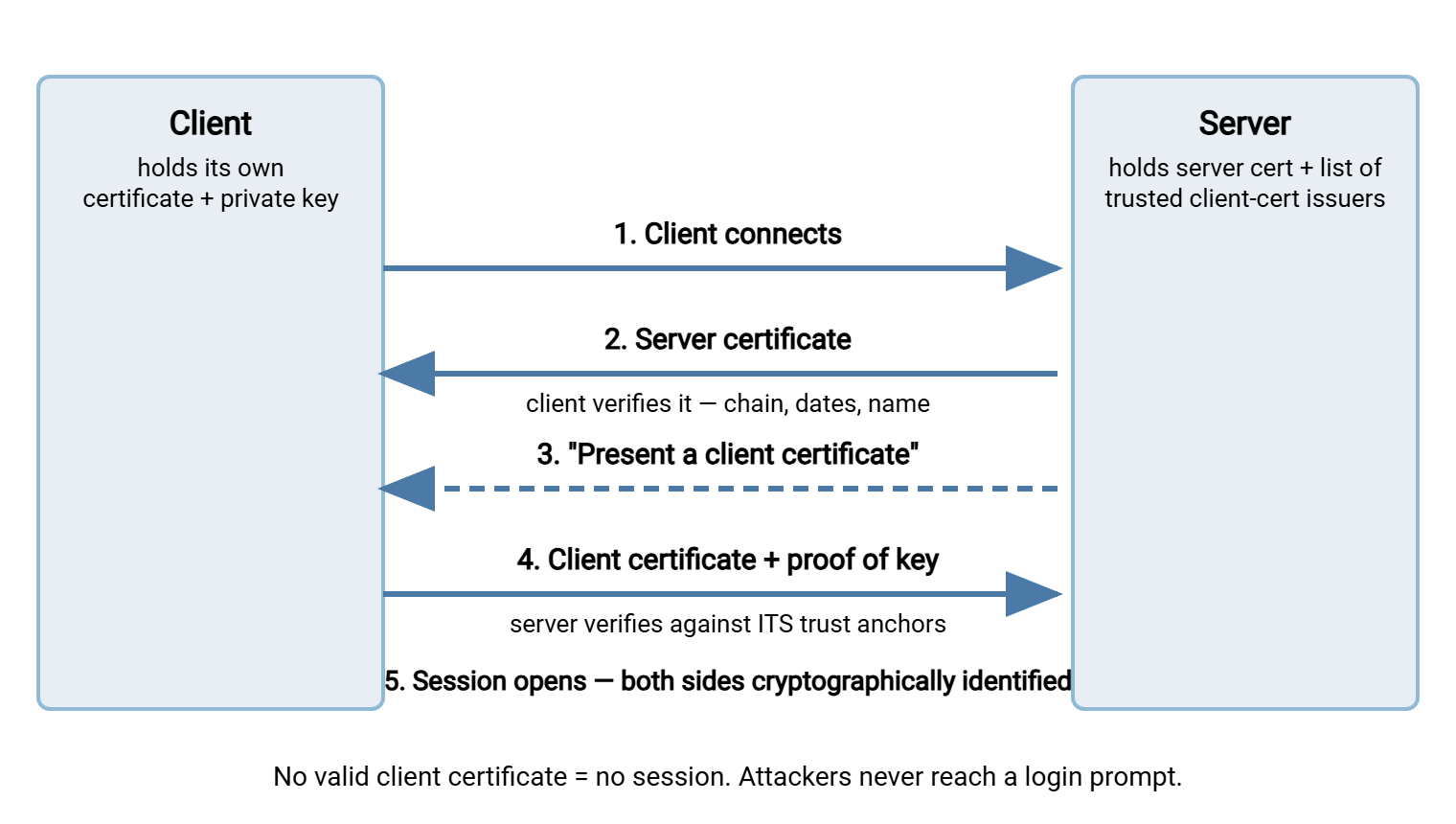
Three properties fall out of this design, and they are the reasons mTLS exists:
- No transmittable secret. The client's private key never crosses the wire — the proof is a signature over handshake data. There is nothing to phish, replay, or intercept that grants access elsewhere.
- Authentication precedes the application. The connection is refused before any command, path, or login banner is exchanged. Credential-guessing campaigns against the endpoint become structurally impossible rather than merely rate-limited.
- Identity is machine-verifiable in both directions. The client knows it reached the real server; the server knows exactly which issued certificate connected. That pairing is what makes the strong audit trail possible.
How the Server Decides Which Client Certificates to Trust
Here is the design decision that shapes everything else. For server certificates, the trust question was answered for you: public CAs, shipped trust stores. For client certificates the public-CA machinery mostly does not apply. You are not trying to let the whole world in; you are trying to let in exactly your partners. So the server is configured with its own, deliberately narrow trust anchors, in one of two patterns:
- You are the issuer. You run a small private CA — one you control, used only for client certificates — and the server trusts client certificates signed by it. Onboarding a partner means issuing them a certificate; offboarding means revoking it. This is the standard pattern, and the mechanics of running such a CA responsibly are covered in self-signed and private CAs done responsibly.
- You pin specific certificates. The server (or the account) is configured to accept one exact certificate, identified by its fingerprint. This is common in B2B setups where each side registers the other's certificate during onboarding, as the AS2 world does.
Whichever pattern you choose, scope the trust anchor narrowly. Suppose the server is told to trust client certificates from a broad, general-purpose issuer. Say it is the corporate internal CA that also issues certificates to every laptop and internal web service. Then every holder of any certificate from that CA can complete a handshake with your transfer endpoint, which is almost never what you meant. The clean design is a dedicated issuing CA (or an explicit pinned list) used for transfer client certificates and nothing else. That way, the set of possible connectors is exactly the set you have deliberately issued to. Narrow trust anchors are also what keep revocation tractable: a short list of live certificates is a list you can actually audit.
Either way, one more mapping completes the picture: certificate to account. The server matches something in the presented certificate — the subject name, a SAN entry, the fingerprint — to a specific transfer account. That way, the connection lands in the right home directory with the right permissions. Keep that mapping one-to-one and documented: "certificate CN=acme-feed-01 maps to account acme01" is an audit answer. A shared certificate mapped to a shared account is the same anti-pattern as a shared password, with better cryptography.
Remember: a valid client certificate answers who is connecting — it does not decide what they may do. Authorization (directories, permissions, quotas) stays its own layer. Never treat "presented a certificate we trust" as "allowed to do everything"; the certificate authenticates, your account model authorizes.
mTLS vs Passwords vs SSH Keys
Transfer estates really choose between three authentication currencies, and the comparison is clearer in a table. SSH keys are included because they are the SFTP world's analogue of client certificates — asymmetric keys proving possession. They differ mainly in that SSH has no CA vouching layer by default. Key distribution and inventory carry the trust, which is its own discipline covered in the SSH key management series.
| Property | Password | SSH key (SFTP) | Client certificate (mTLS) |
|---|---|---|---|
| Secret ever transmitted? | Yes, every login | No — possession proven by signature | No — possession proven by signature |
| Guessable / phishable? | Yes, both | Not guessable; keys can still be stolen from disk | Not guessable; keys can still be stolen from disk |
| Vouching / issuance authority | None — server stores a hash | None by default — trust is per-key, managed by you | Built in — a CA signs, the server trusts the issuer |
| Expiry built in? | Only if policy forces changes | No — keys live until removed | Yes — every certificate carries a validity window |
| Revocation story | Change the password | Remove the key from the account | Revoke at the CA + server checks a revocation list |
| Operational overhead | Lowest | Moderate — key inventory and rotation | Highest — issuance, renewal, revocation infrastructure |
Read the last two rows together and the honest summary appears. Certificates buy you built-in expiry and centralized revocation at the price of running the lifecycle machinery. Those are exactly the lifecycle features password and key estates struggle to retrofit. The comparison across all methods, including multi-factor for human users, is the subject of the transfer authentication series.
Issuing Client Certificates to Partners
The issuing workflow decides whether mTLS makes you more secure or just differently exposed. The one rule that anchors it: the private key is generated by the party who will use it, and never travels. The partner generates their own key pair and sends you a CSR; you (or your client-certificate CA) sign it and return the certificate. If you find yourself generating a key for a partner and emailing them a bundle, stop. In that case, you have created a credential that existed on your systems, their systems, and a mail server in between. Nobody can prove how many copies exist. A checklist worth pasting into your partner-onboarding runbook:
CLIENT CERTIFICATE ONBOARDING — one per partner connection

[ ] Partner generates key pair on THEIR system (key never leaves it)
[ ] Partner sends CSR (public request file - safe over email)
[ ] Verify the request out of band: known contact, expected names
[ ] Sign with the client-cert CA; return the certificate + your chain
[ ] Map certificate -> dedicated transfer account (one-to-one)
[ ] Record in certificate inventory: subject, fingerprint,
    expiry date, partner contact, owner on our side
[ ] Partner tests: handshake succeeds, lands in correct account,
    wrong/absent certificate is refused (test the failure too)
[ ] Calendar the renewal: alert at 30 days before expiry, both sides
[ ] Document the revocation path: who calls whom, how fast it takes effect
Two of those lines deserve emphasis. Test the failure case — an endpoint that quietly accepts connections without a certificate is mTLS in name only. You want to discover that during onboarding, not during an audit. And calendar the renewal. Client certificates expire exactly like server certificates, except the outage lands in your partner's upload job and surfaces as their support ticket. Every issued certificate belongs in the same inventory-and-monitoring system from certificate expiry monitoring, with the partner's contact recorded next to the date.
The Operational Cost, Honestly
Strong authentication is not free, and mTLS charges in predictable places. Budget for them up front:
- Enrollment friction. Every partner must generate keys and install a certificate in their client. That is trivial for a partner with a capable IT team, a multi-week support saga for a small partner whose "FTP person" left. Have a written partner guide with exact steps before you invite anyone.
- Renewal at partner scale. Ten partners means ten renewal conversations per cycle, each with a party whose calendar you do not control. The 30-day alerts and named owners are not bureaucracy; they are what makes this survivable.
- Revocation infrastructure. When a partner reports a compromised machine, you revoke their certificate at your CA. But the server must actually check revocation (via a certificate revocation list or equivalent) for that to mean anything. Verify the check works; a revoked certificate that still authenticates is a silent hole.
- Debugging opacity. mTLS failures happen before the application speaks, so there is no login error to read — just a handshake failure in a transport log. Train the team to reach for handshake-level tools and server TLS logs first, and to ask the three questions. Did the client present a certificate at all? Did it chain to our trusted issuer? Is it within its validity window?
- Client support varies. Mature transfer clients and HTTP tooling handle client certificates well; older or minimal clients may not support them at all. Survey your partners' tooling before mandating mTLS across the board — a phased rollout by partner beats a flag-day everyone remembers.
When is the cost worth paying? The pattern across industries is consistent: machine-to-machine flows with high-value payloads and stable partner lists — financial batches, healthcare feeds, EDI traffic. It is no accident that the AS2 ecosystem made certificates mandatory in both directions; its lifecycle habits are documented in AS2 certificate lifecycles and translate directly to any mTLS estate. Conversely, for a broad population of human users on a web portal, certificate enrollment is usually the wrong friction — strong passwords plus multi-factor serve that crowd better.
Where mTLS Shows Up in Transfer Work
One more entry for the honest ledger: the audit upside, which partially repays the costs above. Because every session begins with a specific issued certificate, your logs can state with cryptographic backing which partner's credential opened every connection. There are no shared passwords muddying attribution, no "someone knew the account password." For flows that face compliance review, that per-certificate attribution, joined with transfer logs, is frequently the feature that justifies the project on its own.
Concretely, you will meet client certificates in four places. In FTPS, the TLS layer wrapping the FTP conversation can carry the client-certificate exchange. The wrapping itself is described in how TLS wraps FTP. The server side of the handshake is the same certificate configuration you built earlier in this series. A Windows server such as Sysax Multi Server serving FTPS and HTTPS presents the server certificate that forms that half of the exchange. HTTPS transfer APIs and internal service-to-service file movement, part of the wider HTTPS file transfer picture. AS2 and B2B messaging, where certificates authenticate transport and also sign and encrypt payloads. And not SFTP — worth repeating, because vendors mix the vocabulary: SFTP rides SSH, and its client-side equivalent is the SSH user key, not an X.509 certificate.
The Version to Tell a Colleague
Ordinary TLS proves the server to the client and leaves the client's identity to a password inside the tunnel. Mutual TLS runs the certificate check in both directions. The server demands a client certificate during the handshake. The client proves it holds the matching private key, and the session never opens for anyone who cannot. You define which client certificates count — usually by running a small CA of your own or pinning known certificates. You map each certificate to one account, because the certificate authenticates while your account model authorizes. Mutual TLS is the strongest client authentication in the transfer toolbox, with built-in expiry and real revocation. It charges for those features in enrollment, renewal, and debugging effort. Use it where machines exchange valuable files with machines; use simpler methods where humans log in.
The natural companions from here include self-signed and private CAs done responsibly for the issuing side you now need. Read certificate expiry monitoring so the certificates you issue never become your partners' surprise outage.
Frequently Asked Questions
What is mutual TLS in one sentence?
Do client certificates come from the same public CAs as server certificates?
Does mutual TLS replace user accounts and permissions?
Can I use mutual TLS with SFTP?
A partner's connection suddenly fails with a handshake error. Where do I look?
What happens when I revoke a partner's certificate?
From the Sysax team: we build secure file transfer software for Windows. Sysax Multi Server is an FTP, FTPS, SFTP, and HTTPS server. Sysax FTP Automation handles scheduled, scripted transfers. Free trials are on the download page.