
Certificates Explained for Transfer Endpoints
If you run an FTPS or HTTPS endpoint, you own at least one certificate — and sooner or later it will demand your attention. A partner's client refuses to connect and the log says unable to verify certificate. A renewal email arrives for something called a "leaf." A vendor asks you to send "the full chain, but not the private key." You would rather not guess which of the five similarly named files on the server that means.
This article is the foundation for all of that. By the end you will know exactly what a certificate asserts, who vouches for it and why anyone believes them. You will know how the chain of root, intermediate, and leaf fits together, and which checks a connecting client actually runs. Everything is explained with transfer endpoints — FTPS servers, HTTPS file drops, partner automation — rather than abstract textbook diagrams. It is part of our Certificate Management series. The later articles on requesting, installing, and monitoring certificates all build on the vocabulary established here.
The Problem a Certificate Solves
Start with what encryption alone cannot do. TLS — Transport Layer Security — is the protocol that puts the S in HTTPS and FTPS. It is excellent at scrambling traffic so nobody in the middle can read it. But encryption has a blind spot: it protects the conversation without, by itself, telling you who you are talking to. An attacker might redirect your connection through a poisoned DNS answer, a compromised router, a hostile Wi-Fi network. That attacker can happily speak flawless TLS with you. The tunnel would be perfectly encrypted, and perfectly encrypted to the wrong party. That trick is called a machine-in-the-middle attack, and the mechanics are covered in our encryption in transit series.
A certificate closes the blind spot. In one sentence: a certificate binds a name to a public key, and a third party you already trust vouches for that binding. Unpack the three parts:
- A name — usually a DNS hostname like
ftp.example.com, the name your clients type or your scripts have configured. - A public key — one half of a key pair. The server holds the matching private key and proves it during the TLS handshake. Only the true holder of the private key can complete a handshake against that certificate.
- A voucher — a certificate authority (CA). This organization's job is to check that whoever requested the certificate really controls the name, then sign the binding so nobody can alter it.
The passport analogy holds up well. A passport binds a name to a photograph, is issued by an authority that verified the person, carries anti-tamper features, and expires. Border control does not know you; it trusts the issuing authority and checks the document. A TLS client does not know your server; it trusts the CA and checks the certificate. And just as a passport does not make you a good person, a certificate does not make a server safe. It only tells you the server is who it claims to be. Identity, not virtue.
What Is Actually Inside a Certificate
A certificate is a small structured file. You will meet it as .crt, .cer, or .pem, and the readable form is a few dozen lines. The fields worth knowing:
- Subject — who the certificate is about: the name being vouched for.
- Subject Alternative Name (SAN) — the list of hostnames the certificate is valid for. This list, not the subject line, is what modern clients actually match against. More on that below.
- Public key — the key being bound to those names.
- Issuer — who signed it: the CA vouching for the binding.
- Validity window — a not-before and not-after timestamp. Outside that window the certificate is simply invalid, no matter how correct everything else is. This single field causes more real-world outages than every other field combined. That is why expiry monitoring gets a full article of its own later in this series.
- Signature — the issuer's cryptographic signature over all of the above. Change one byte of the certificate and the signature no longer verifies. This is the anti-tamper feature.
- Key usage and extensions — flags saying what the certificate may be used for (a server identity, a client identity, signing other certificates).
You can read any certificate yourself, and it is worth doing once so the file stops being a black box. With the OpenSSL toolkit, which is available on practically every platform:
openssl x509 -in server.crt -noout -text

Certificate:
    Data:
        Version: 3 (0x2)
        Serial Number: 4c:11:5d:2f:...
        Signature Algorithm: sha256WithRSAEncryption
        Issuer: C=US, O=Example Trust Services, CN=Example Issuing CA
        Validity
            Not Before: (issue timestamp)
            Not After : (expiry timestamp)
        Subject: CN=ftp.example.com
        Subject Public Key Info:
            Public Key Algorithm: rsaEncryption
                Public-Key: (3072 bit)
        X509v3 extensions:
            X509v3 Subject Alternative Name:
                DNS:ftp.example.com, DNS:files.example.com
            X509v3 Extended Key Usage:
                TLS Web Server Authentication
Read it top to bottom and the sentence structure appears. Example Issuing CA (issuer) vouches that whoever holds the private key matching this public key is entitled to answer to ftp.example.com and files.example.com (SANs). That applies between these two moments (validity), for the purpose of being a TLS server (key usage). That is the whole document. Everything else in this series — requesting, chaining, renewing — is logistics around that one assertion.
One thing is deliberately absent from the file: the private key. The certificate is public by design — it is shown to every client that connects, and there is no harm in emailing it around. The private key is the opposite: it lives only on your server, and anyone who copies it can impersonate your endpoint. Keeping the two straight matters constantly in practice, and the installation article covers how to handle each.
Who Vouches: Certificate Authorities and Trust Stores
The signature raises the obvious next question: why would a client believe the signer? The answer is the trust store — a curated list of CA certificates that ships with the client's platform. Operating systems maintain one, browsers maintain their own, and many language runtimes carry a bundled copy. When your FTPS client or your transfer script validates a server certificate, it checks whether the certificate ultimately leads back to an entry in that local list.
This is the quiet foundation under all of it: trust is pre-installed. Nobody asks the user whether to trust a given CA at connect time; the platform vendors decided long ago, and the client machine arrived with those decisions baked in. A publicly trusted CA is simply one whose root certificate sits in the common trust stores. That is why a certificate from one "just works" for strangers, and why a certificate you sign yourself does not. The self-signed case has legitimate uses and real dangers, and gets its own article on self-signed certificates and private CAs.
A detail that saves real debugging time: one machine holds several trust stores. The operating system has one; a browser may carry its own; a scripting language may bundle yet another. This is why a server can look fine in a browser while a scheduled transfer script on the same machine rejects it. The two are consulting different lists. When a certificate problem appears in one client and not another, ask "whose trust store?" before anything else.
The Chain of Trust: Root, Intermediate, Leaf
In practice, the CA whose name appears as your certificate's issuer is almost never the one in the client's trust store. Between your certificate and the trusted list stands a chain, and understanding it prevents the single most common certificate misinstallation.
Three tiers, from top to bottom:
- Root certificate — the CA's crown jewel, self-signed, distributed inside trust stores. Because a stolen root key would be catastrophic, CAs keep root keys offline and use them as little as possible.
- Intermediate certificate — a working CA certificate, signed by the root. Day-to-day issuance happens here. If an intermediate key is ever compromised, the CA can revoke and replace it without touching the root that the world's trust stores contain.
- Leaf certificate — yours. The end of the chain (also called the end-entity certificate), signed by an intermediate, naming your endpoint. It signs nothing further.
The diagram below shows the chain as a client sees it. Your server presents the leaf and the intermediate. Validation succeeds only if the path ends at a root the client already holds in its trust store.
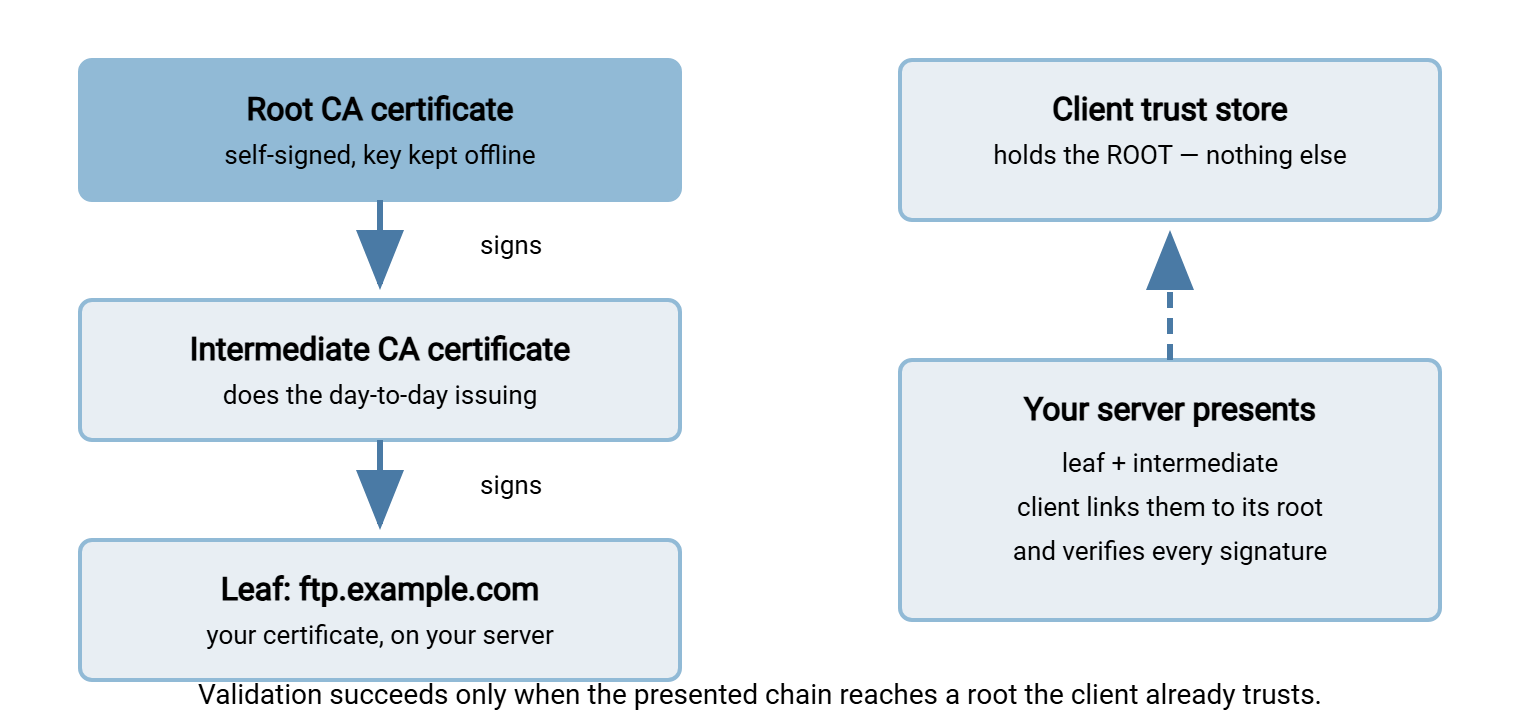
Why the split? Risk isolation. Trust stores update slowly across billions of devices, so the certificates inside them must be stable for years. That means their keys must almost never be exposed to daily use. Intermediates absorb the operational risk. The design is invisible when everything works. But it has one sharp practical consequence for you as a server administrator: the client only holds the root. It needs the intermediate to connect your leaf to that root. The TLS protocol expects your server to send it along with the leaf. Forget to install the intermediate and some clients fail with "unknown issuer" errors while others — mostly browsers, which cache and fetch missing pieces — work fine. That "works in the browser, fails in the transfer client" pattern is the classic chain misinstall. Diagnosing it is a centerpiece of installing certificates and getting the chain right.
Names: Why SAN Beats CN
The binding is to a name, so name matching is a first-class check. The client compares the hostname it was told to reach against the names in the certificate. Connect to ftp.example.com and the certificate must say ftp.example.com. Not "the same server," not "the same IP address" — the same name, textually.
Historically the name lived in the subject's Common Name (CN) field. That design had problems — CN is free-form text and holds only one value. So the industry moved to the Subject Alternative Name extension. It is an explicit, structured list of every DNS name (and, if needed, IP address) the certificate covers. Modern validators match against the SAN list and many ignore CN entirely. The practical rules that fall out of this:
- Every name clients use must appear in the SAN list. If some partners connect to
ftp.example.comand others tofiles.example.com, both belong in the certificate. That holds even if both names point at the same machine. - Connecting by IP address usually fails validation, because certificates rarely list IPs. Give automation a DNS name to connect to; it also frees you to move the service later without touching every partner's configuration.
- A wildcard like
*.example.commatches one label deep (ftp.example.com, but nota.b.example.com). Convenient, with tradeoffs around key sprawl discussed in getting certificates.
Name mismatch is the failure mode where everything is genuinely valid — real CA, current dates, intact chain — and the connection still correctly fails. That is because vouching for www.example.com says nothing about ftp.example.com. The error text varies by client: "hostname mismatch," "certificate is not valid for this name," or an unhelpfully generic verification failure. When a certificate error appears on a brand-new endpoint that reuses an existing certificate, suspect the name first.
The Checks a Client Runs, in Order
Put the pieces together and you can predict exactly what any validating client does the moment your server presents its certificate during the TLS handshake:
- Build the chain. Take the presented leaf and intermediates and link them, issuer to subject, up to a root in the local trust store. No path to a trusted root: fail.
- Verify every signature. Each certificate in the chain must be validly signed by the one above it. A forged or tampered certificate dies here.
- Check the validity window. Every certificate in the chain must be current — expired or not-yet-valid anywhere in the chain fails the whole chain.
- Match the name. The hostname the client intended to reach must appear in the leaf's SAN list.
- Check revocation, where supported. CAs publish lists of certificates withdrawn before expiry (a stolen key, a mistaken issuance). Clients vary widely in how strictly they check; treat revocation as a safety net, not a guarantee.
- Confirm key possession. Woven through the handshake itself: the server must prove it holds the private key matching the certificate's public key. A copied certificate without the key is useless to an attacker.
Each check maps to a family of error messages, which is why a certificate error is rarely mysterious once you know the list. "Unknown issuer" is step 1 or 2, "expired" is step 3, and "hostname mismatch" is step 4. The habit to build is reading the error as a pointer to the failed check rather than as generic noise.
Remember: a certificate failure means "I could not confirm who I am talking to." The encryption itself would work just as well against an impostor. That is precisely why the identity check exists, and why the correct response to a failure is to investigate, never to switch verification off.
Transfer Endpoints Are Not Browsers
Most certificate education is written for the web, and transfer infrastructure differs in ways that change your job. Three differences matter.
First: no click-through. A browser shows a scary interstitial and, buried behind it, an override. A scheduled transfer job has no human at 2 a.m. to click anything — a failed validation is a failed transfer, full stop. This is stricter, and strictness here is a feature: unattended automation is exactly where a silent impostor would do the most damage. The corollary is that your certificates must be genuinely correct, because automation grants no grace. When an unattended client such as Sysax FTP Automation runs a nightly FTPS job, the server certificate at the far end gets validated on every single run. The practical upside is that a certificate problem announces itself in the job log instead of being waved through.
Second: your clients are diverse and not yours. An HTTPS file portal might see browsers, curl in partner scripts, mobile apps, and library code from a half-dozen languages. Each has its own trust store and validation quirks. Partner FTPS clients range from modern GUIs to elderly appliances with trust stores frozen at manufacture. You cannot patch other people's clients; you can only present a flawless, complete, current chain and remove every reason to fail.
Third: one certificate often serves several protocols. TLS is the common wrapper — FTPS is FTP inside TLS, HTTPS is HTTP inside TLS. So a server offering both can present the same certificate on each, provided the names match what clients use. A multi-protocol product such as Sysax Multi Server serves FTPS and HTTPS from the certificate you configure. That keeps the estate small: fewer certificates, fewer renewals, fewer 2 a.m. surprises. How FTPS layers TLS over the FTP conversation — and the explicit-versus-implicit wrinkle that affects which port the handshake happens on — is covered in how TLS wraps FTP and explicit vs implicit FTPS.
Where Certificates Appear Across a Transfer Estate
A quick tour of the places this knowledge applies, with pointers to the deeper material:
- FTPS servers. The server certificate secures the control connection and the data connections. The FTPS-specific view — issuance paths, the five classic errors, protocol wrinkles — lives in our FTPS certificates article; this series is the general version that applies across protocols.
- HTTPS file transfer. Web-based upload portals, download links, and REST endpoints all stand on an ordinary server certificate — the HTTP and HTTPS file transfer series covers those flows.
- B2B protocols. AS2 and similar EDI transports use certificates not only for the transport but for signing and encrypting the payloads themselves. That makes their lifecycles a partner-coordination problem — see AS2 certificate lifecycles.
- Client certificates. Everything above has the server proving itself to clients. TLS can also run the check in reverse, with the server demanding a certificate from the client. That is the strongest authentication most transfer stacks offer, explored in client certificates and mutual TLS.
- What certificates are not. SFTP does not use certificates at all. It authenticates servers with SSH host keys and users with SSH keys or passwords. That is a different trust model with its own management discipline covered in the SSH key management series. If a vendor asks for "the SFTP certificate," a gentle clarification saves everyone a confusing week.
The Version to Tell a Colleague
A certificate binds a name to a public key, and a certificate authority you already trust vouches for the binding by signing it. Trust flows down a chain. An offline root in every client's trust store signs a working intermediate, which signs your leaf. Your server must present the leaf plus the intermediate so clients can link it to their root. Clients check the chain, the signatures, the dates, and the name (against the SAN list, so every hostname in use must be listed). The server proves it holds the private key. None of this makes the encryption stronger; it makes the encryption land on the right party, which is the entire point.
From here, the path through the series is practical. The article on getting certificates walks through generating a key and certificate request and choosing an issuer. The article on installing and chaining turns the issued files into a correctly configured endpoint that verifies cleanly from the outside.
Frequently Asked Questions
Is the certificate the same thing as the private key?
Does a certificate make the encryption stronger?
Why does my client trust some certificates automatically?
What is the difference between an SSL certificate and a TLS certificate?
Why does the server send the intermediate certificate instead of the client just having it?
Does SFTP need a certificate?
From the Sysax team: we build secure file transfer software for Windows. Sysax Multi Server is an FTP, FTPS, SFTP, and HTTPS server. Sysax FTP Automation handles scheduled, scripted transfers. Free trials are on the download page.