
How TLS Wraps FTP: Control Channel, Data Channel, and the Session-Reuse Wrinkle
Most client software reduces FTPS to a single checkbox: "use encryption." Tick it, connect, done. That checkbox hides a genuinely layered machine. Encryption is negotiated separately for commands and for file contents, and a session can be half-encrypted on purpose. The data connection must sometimes prove it belongs to the same client as the control connection. When that machinery misfires, you get the strangest tickets in file transfer. Logins succeed, followed by directory listings that die with a TLS error. Or transfers work from one client and fail from another against the identical server.
This article opens the checkbox. You will learn exactly what gets encrypted when, and what the PBSZ and PROT commands negotiate. You will learn why TLS session reuse is both a security control and the single most common FTPS compatibility problem. And you will learn what the CCC command trades away when it "fixes" a firewall issue. This article is part of our FTPS In Depth series and builds directly on the explicit vs implicit article. That article covers how the encryption gets started in the first place.
One Session, Two Channels, Separate Wrappers
Everything in this article rests on one fact about FTP that survives unchanged in FTPS: a session is not one network connection but two kinds. The control connection is the long-lived conversation carrying commands and replies — login, "change directory," "send me this file." The data connection is a short-lived, separate TCP connection created for each file transfer or directory listing, used once, then closed. If that split is new to you, our active vs passive FTP explainer walks through it patiently.
Here is the part people miss: TLS wraps each connection individually. FTPS does not build one big encrypted tunnel and push everything through it. The control connection gets its own TLS handshake and its own encrypted wrapper. Then every single data connection gets its own TCP setup and its own TLS handshake as well. A session that lists a directory and downloads three files performs five TLS handshakes: one for control, four for data.
An analogy that holds up well: the control connection is a phone call to a warehouse and each data connection is a delivery truck. Plain FTP is an open phone line and unlocked trucks. FTPS encrypts the phone call, and — only if you ask — armors each truck separately. The asking is done with two commands you will meet in every FTPS session log: PBSZ and PROT.
TLS on the Control Channel
The control channel is where encryption begins. In explicit mode the client sends AUTH TLS on port 21 and the handshake follows. In implicit mode the handshake is simply the first traffic on port 990. Either way, the TLS handshake does two jobs. The server presents its certificate so the client can verify it is talking to the right machine and not an impostor. And the two sides agree on the secret keys that will encrypt the conversation. (Certificates deserve — and have — their own article: certificates for FTPS.)
Once the control channel is wrapped, everything traveling on it is protected: your username and password, every command, every reply. And — worth noticing — every filename and directory name is protected. Those travel inside commands like RETR invoice.pdf and inside directory listings' commands. An eavesdropper on the network path sees that a TLS session exists and roughly how much traffic flows. But they cannot see who logged in or what was asked for.
What the control-channel wrapper does not automatically protect is the payload. File contents never travel on the control connection, and encrypting one connection does nothing for a different one. That is the next negotiation.
PBSZ and PROT: Choosing What Happens to Data
After login, an FTPS client that intends to protect its transfers sends two commands. They look cryptic in logs, but each is simple:
PBSZ 0— "protection buffer size zero." The FTP security extensions were written to support several security mechanisms, and some of them needed data chopped into buffered blocks of a negotiated size. TLS is a streaming wrapper and needs no such buffering, so for TLS the value is always0. The command survives purely as a required formality: the standard saysPBSZmust come beforePROT. So clients dutifully sendPBSZ 0and servers dutifully accept it.PROT— "protection level," the command that actually decides the data channel's fate. It takes one letter.PROT Cmeans clear: data connections stay unencrypted, plain FTP style.PROT Pmeans private: every data connection must be wrapped in TLS. (The standard also definesSandElevels for other mechanisms; with TLS they are unused, and servers typically reject them.)
Now the detail that catches nearly everyone: the default is clear. The security extensions specify that a session starts at protection level C. A client that performs AUTH TLS, logs in over a beautifully encrypted control channel, and then never sends PROT P will transfer every file in plaintext. The login looks secure, the log says TLS, and the payload — the actual sensitive cargo — crosses the network naked.
Remember: AUTH TLS by itself encrypts commands and passwords, not files. Only PROT P encrypts the data channel. Modern clients send it automatically, but the honest fix is server policy. Configure the server to refuse transfers until the session is at protection level P. That way, a lazy or ancient client fails loudly instead of leaking quietly.
What PROT P Actually Does on the Wire
With PROT P in force, here is the full sequence for a single passive-mode download. It is worth reading once slowly, because every FTPS firewall and compatibility problem lives somewhere in this list:
- The client asks for a passive data connection (
PASVor its modern cousinEPSV— see the four data-connection commands). The server replies, over the encrypted control channel, with a port from its passive range. - The client sends
RETR report.pdfon the control channel. - The client opens a new TCP connection to the given port.
- On that fresh connection, client and server perform a new TLS handshake. No FTP commands travel here — this connection exists only to carry the file, wrapped in its own encryption.
- The file's bytes flow through the TLS wrapper.
- The server finishes with a proper TLS shutdown message (a
close_notify). Then the TCP connection closes. The server confirms226 Transfer completeon the control channel.
Step 6 hides a small gift: TLS announces its own orderly shutdown. Because of that, a truncated transfer — a connection cut by a failing network — is cryptographically distinguishable from a completed one. Plain FTP data connections just stop, and the client must trust the 226. A TLS wrapper that ends without its shutdown message is a red flag clients can act on.
Step 4 hides the wrinkle that fills support forums, and it needs its own section.
The Session-Reuse Wrinkle
Think like an attacker for a moment. The passive port the server opened in step 1 sits on the network waiting for a TCP connection. The server cannot know which arriving connection is the real client. Under NAT, it cannot even rely on the source IP address matching the control connection's. If an attacker guesses or observes the port and connects first, the server might hand them the file (or accept their upload). That would happen with full TLS encryption... to the wrong party. Encrypting a stolen data connection encrypts the theft.
TLS offers an elegant fix. The handshake supports session resumption. With this mechanism, a new connection presents proof that it already shares secrets from an earlier TLS session. Instead of negotiating from scratch, it gets an abbreviated handshake. Resumption was invented as a performance feature, but it doubles as an identity check — only the party holding the original session's secrets can resume it.
So FTPS servers turned it into a security control: require that each data connection's TLS handshake resumes the control connection's TLS session. A data connection that resumes the session provably belongs to the same client that logged in. A data connection that arrives with a fresh handshake could be anyone — so the server refuses it. This is commonly labeled "require TLS session reuse," and on well-run servers it is on.
The diagram below shows the arrangement: one control channel with a full handshake, and each data connection presenting the same session to earn its abbreviated handshake.
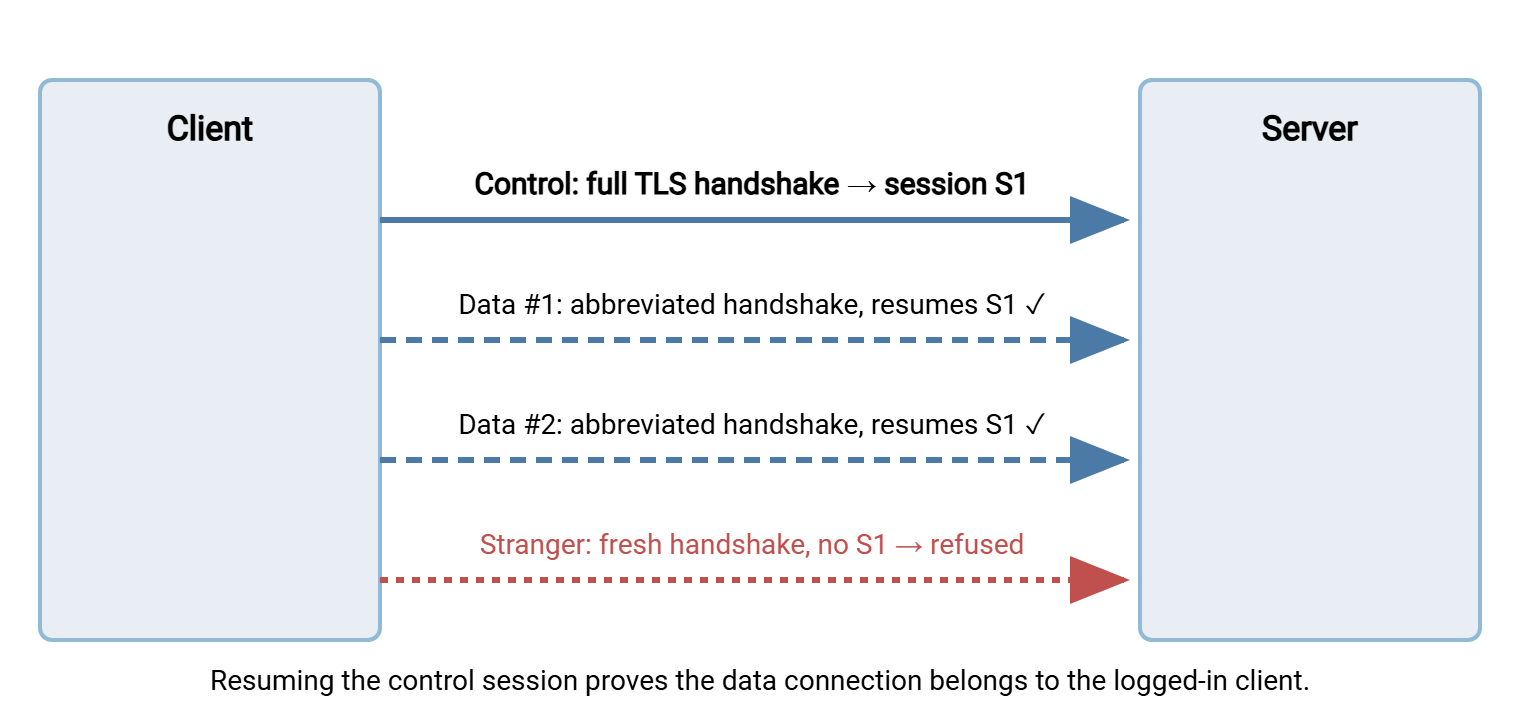
The wrinkle is that nothing forces clients to cooperate. A TLS library used naively treats every connection as independent and performs a fresh handshake each time. The result is the classic FTPS failure signature: login succeeds, then the first directory listing or transfer dies. Typically, you get a 425 Can't open data connection, a 522, or a server message along the lines of "TLS session of data connection has not resumed." The client's TLS is working perfectly; it is simply not proving continuity, and the server, as designed, refuses the anonymous data connection.
What should you do about it as an administrator?
- Keep the requirement on wherever you can. It closes a real attack — data-connection hijacking on your published passive range — at zero operational cost with modern clients.
- Recognize the failure fast. Successful login plus failing
LISThas two usual causes: firewalls (see FTPS through firewalls and NAT) and session reuse. The server log distinguishes them — a reuse refusal is logged explicitly, while a firewall problem shows a data connection that never arrives. - Fix the client, not the server, when possible. Current versions of mainstream clients and libraries support reuse; the failures cluster in old versions and hand-rolled scripts. The client compatibility matrix maps which categories of client can and cannot comply.
- Relax it only as a documented exception — per listener or per account if your server allows, never silently for everyone.
CCC: Dropping the Armor After Login
One more command completes the picture, and it runs in the opposite direction: CCC, Clear Command Channel. After authenticating over TLS, the client sends CCC. If the server permits it, both sides shut down the TLS wrapper on the control connection and continue the command conversation in plaintext. Data connections keep whatever PROT level was negotiated — usually still encrypted.
Why would anyone volunteer to remove encryption? Firewalls. Network devices have long "helped" FTP by reading the control conversation, spotting PASV and PORT exchanges, and opening the negotiated data port automatically. That is the helper behavior described in why firewalls block active FTP. TLS blinds those helpers completely: they see ciphertext where the port numbers used to be. CCC restores their sight by re-exposing the commands, while leaving the actual file contents encrypted. Credentials stay safe too, since login happened before the drop.
That sounds like a tidy compromise, and occasionally it is. But understand what rides in the clear after CCC: every filename, every directory path, every command — and, critically, the session itself becomes tamperable. An attacker positioned on the path can now inject or alter commands (delete this file, rename that one, redirect a transfer). Or they can simply reset the connection, because nothing authenticates the plaintext stream anymore. You keep confidentiality of payloads and lose integrity of control. Many hardened servers refuse CCC outright. The safe default is to leave it refused unless a specific, documented device forces your hand. The durable fix for the firewall problem is a pinned passive range with static rules. That is covered in configuring passive port ranges.
What Is Protected, Configuration by Configuration
The table below summarizes the combinations you will actually meet, from bare FTP to fully wrapped FTPS with the CCC compromise alongside.
| Configuration | Password | Commands & filenames | File contents | Firewall helper can read PASV? |
|---|---|---|---|---|
| Plain FTP | Exposed | Exposed | Exposed | Yes |
FTPS, PROT C |
Encrypted | Encrypted | Exposed | No |
FTPS, PROT P |
Encrypted | Encrypted | Encrypted | No |
FTPS, PROT P + CCC |
Encrypted (sent before CCC) | Exposed after CCC, tamperable | Encrypted | Yes |
Read the second row twice. "FTPS with PROT C" is what a careless configuration quietly gives you: a session that authenticates securely and then ships payloads in the clear. It is arguably more dangerous than plain FTP, because it looks secure in every dashboard.
Reading a Full Session Log
Here is a healthy explicit-mode session with data protection, the way you will see it in a client log. Every line now has meaning:
Response: 220 FTP server ready
Command:  AUTH TLS
Response: 234 Proceed with negotiation
Status:   TLS handshake OK (control channel encrypted)
Command:  USER alex
Response: 331 Password required
Command:  PASS ********
Response: 230 Login successful
Command:  PBSZ 0
Response: 200 PBSZ=0
Command:  PROT P
Response: 200 Protection set to Private
Command:  PASV
Response: 227 Entering Passive Mode (203,0,113,10,195,87)
Command:  RETR report.pdf
Response: 150 Opening data connection
Status:   Data TLS handshake OK (session reused)
Response: 226 Transfer complete
Compare that with the two failure shapes this article equips you to recognize. If PROT P draws a 536 or is never sent and the server refuses the transfer, you are looking at a data-protection policy mismatch. If everything succeeds up to 150 and then the transfer aborts with a TLS complaint or 425, suspect session reuse first and the firewall second.
Putting It Into Practice
On the server side, this whole article compresses into four policy decisions. Require TLS before login. Require PROT P before transfers. Require TLS session reuse on data connections, and refuse CCC. A Windows server such as Sysax Multi Server speaks FTPS alongside FTP, SFTP, and HTTPS. It handles encryption and user authentication in its configuration interface. On such a server, enforcing encryption is a settings decision rather than a scripting project. The same four-point policy applies whatever server you run. The hardening pass later in this series extends it to protocol versions and ciphers.
On the client side, the equivalent discipline is explicitness. Interactive users can rely on a modern client's defaults. But unattended transfers should pin every choice — explicit or implicit, PROT P, certificate verification on — in the job's connection profile. A scheduled-transfer tool like Sysax FTP Automation stores those choices per connection. So the 2 a.m. run negotiates exactly what the test run negotiated, every time.
The Version to Tell a Colleague
FTPS wraps each FTP connection in its own TLS layer. AUTH TLS (or implicit mode's port) encrypts the control channel — commands and passwords. PBSZ 0 is a required formality; PROT P is the command that actually encrypts file transfers, and without it data flows in the clear. Each data connection handshakes separately. Because of that, good servers demand it resume the control channel's TLS session to prove the same client is on both. It is a strong control that old clients fail, producing the famous "login works, listing fails" symptom. And CCC strips encryption off the control channel after login to appease firewall helpers, at the price of exposed, tamperable commands. Know those four commands and every FTPS log you ever read will make sense.
Next in the series: certificates for FTPS covers the trust half of the TLS handshake. And FTPS through firewalls and NAT picks up the blinded-helper story where CCC left off.
Frequently Asked Questions
Does AUTH TLS encrypt my file transfers?
What does PBSZ 0 mean in my session log?
Why does login succeed but directory listing fail with a TLS or 425 error?
Is TLS session reuse a performance feature or a security feature?
Is the CCC command safe to use?
Does FTPS encrypt filenames?
From the Sysax team: we build secure file transfer software for Windows. Sysax Multi Server is an FTP, FTPS, SFTP, and HTTPS server. Sysax FTP Automation handles scheduled, scripted transfers. Free trials are on the download page.