
Protecting Keys and Certificates for Recovery
WARNING: REMOTE HOST IDENTIFICATION HAS CHANGED! The rebuilt server is up. The configuration is back, the accounts are back, and the folders have their permissions. The first partner job of the morning has just connected and aborted with that line, in capitals, as if it were shouting. The next one does the same, and the one after that. Every automated client that ever connected to your SFTP server has a record of its host key. The restored server is presenting a different one. You have not recovered the service. You have launched a stranger with the same name. I have watched that warning fill a job log forty lines deep before anyone in the room understood why.
Keys and certificates are the one part of a transfer platform that cannot be recreated from memory, from documentation, or from installation media. This article covers escrow for them — keeping a protected copy of every piece of key material. The rules let an authorized person recover it, and nobody else. You will see which keys exist on a transfer platform and how to export each kind. You will see how to encrypt the escrow itself and split custody of its passphrase. You will also see when a disaster means the escrowed keys must be rotated rather than restored. This article is part of our Disaster Recovery for Transfer Workflows series. The lifecycle of certificates (obtaining, renewing, chaining) is a separate subject covered in our certificate management series. This article is only about not losing them, which turns out to fill an article.
Why Key Material Is Not Just Configuration
Key material means the private keys, certificates, passphrases, and secrets that make encryption and authentication work. A private key is a large random number; its matching public key is derived from it and shared with the world. The world trusts you because you, and only you, can prove possession of the private half. That is what makes key material different from a port number or a folder path: a port number can be typed back in, a private key cannot. Lose it and there is no way to regenerate the same one; the only option is a new key, which the world does not yet trust. There is no "forgot my key" link.
Key material has two opposite failure modes, and a DR plan has to handle both. Loss — the only copy was on the server that died — is solved by keeping copies. Exposure — a copy fell into the wrong hands — is made worse by keeping copies, unless those copies are locked harder than the original. Escrow is the discipline of keeping copies that solve the first problem without creating the second. Many plans manage exactly one of the two.
The Key Inventory: What Exists on a Transfer Platform
Most teams underestimate this list by half; I underestimated mine by more than that. Walk it for every server and every automation host:
| Item | Where it usually lives | Who depends on it | If restored differently |
|---|---|---|---|
| SSH host key (private + public) | /etc/ssh/ssh_host_*_key, C:\ProgramData\ssh\, or the SFTP product's own store |
Every SFTP client that ever connected | Every automated partner job aborts |
| TLS server certificate + private key | Windows certificate store, or PEM files | FTPS and HTTPS clients | Clients that pin the certificate fail; others need a valid replacement |
| Client certificates for mutual TLS | Certificate store on the job host | Partners that require them from you | Your outbound jobs are refused |
| Your SSH client keys | Service account's .ssh folder or the automation product's profile store |
Partners whose servers you log in to | Your outbound jobs are refused until each partner installs a new public key |
| Partner public keys and pinned host keys | authorized_keys per account; known_hosts on the job host |
Inbound partner logins; your outbound verification | Partners cannot log in; your jobs cannot verify partners |
| PGP secret and public keyrings | The service account's GnuPG home folder | Every encrypted file in the archive; every partner who encrypts to you | Archived files become unreadable forever |
| API tokens and job passwords | Password manager or secrets vault (ideally) | Jobs and scripts | Jobs fail to authenticate |
Notice the last-but-one row. The PGP secret key is the only item whose loss is permanent for data, not just for connectivity. Partners can be re-taught to trust a new host key, but a file encrypted to a lost PGP key is gone. Our PGP key management article covers that key's whole life; here we only make sure it is in the escrow. Forever is a long time to be unable to read your own archive.
The Host Key: Why a New One Breaks Every Partner
When an SFTP client connects for the first time, the server presents its host key. The client records the key's fingerprint — a short hash of the public key — in a file called known_hosts. On every later connection the client compares what the server presents against what it recorded. A mismatch is, by design, treated as a possible impersonation. Interactive users see the warning above, and automated clients configured with strict checking refuse to connect outright. That is exactly the behavior you want from a security feature. It is exactly the behavior that turns a rebuilt server with a fresh key into a total partner outage. The mechanism is explained in full in host keys and known_hosts. The feature is working as designed. That is the whole problem.
The fix is not to ask forty partners to update their known_hosts. The fix is to restore the same host key. On a Linux server running OpenSSH, the keys are a handful of files, and their fingerprints are what you record in the escrow register:
$ sudo ls -l /etc/ssh/ssh_host_*
-rw------- 1 root root  411 ssh_host_ed25519_key
-rw-r--r-- 1 root root   96 ssh_host_ed25519_key.pub
-rw------- 1 root root 2602 ssh_host_rsa_key
-rw-r--r-- 1 root root  568 ssh_host_rsa_key.pub

$ ssh-keygen -lf /etc/ssh/ssh_host_ed25519_key.pub
256 SHA256:Uq3nR8b0Yp2vT6kLm9xWc4dJf1sHa7eQz5tNo3iBg0M root@sftp01 (ED25519)

$ sudo tar cf hostkeys-sftp01.tar /etc/ssh/ssh_host_*_key /etc/ssh/ssh_host_*_key.pub
On restore, the files go back to /etc/ssh/, owned by root. The private keys have mode 600 and the public keys have mode 644. Then the SSH service is restarted. On Windows, OpenSSH keeps the same files under C:\ProgramData\ssh\. A Windows SFTP server product such as Sysax Multi Server keeps its own SSH host key. Find where the manual says it is stored. That file — not a freshly generated one — is what the restored server must present. Whichever server you run, verify from outside after the restore that the fingerprint partners see matches the register:
$ ssh-keyscan -t ed25519 sftp.example.com 2>/dev/null | ssh-keygen -lf -
256 SHA256:Uq3nR8b0Yp2vT6kLm9xWc4dJf1sHa7eQz5tNo3iBg0M sftp.example.com (ED25519)
ssh-keyscan fetches the public host key the server presents; piping it to ssh-keygen -lf - prints its fingerprint. If that line matches the escrow register, every partner's known_hosts is still valid.
Remember: the host key is the server's identity. Escrow it before anything else, restore it before opening the firewall, and verify its fingerprint from outside before telling a single partner the service is back.
Exporting Each Kind of Key
Each item on the inventory has its own export method. The commands below produce the files that go into the escrow archive.
TLS certificates with their private keys
A certificate file alone is public and useless for recovery. The escrow needs the certificate and its private key together, which on Windows is a PFX file. First find the certificate's thumbprint — its unique identifier in the store:
PS> Get-ChildItem Cert:\LocalMachine\My | Select-Object Subject, Thumbprint, HasPrivateKey

Subject              Thumbprint                               HasPrivateKey
-------              ----------                               -------------
CN=sftp.example.com  A1B2C3D4E5F60718293A4B5C6D7E8F9012345678          True
Then export it, protected by a passphrase you will keep separately:
PS> $pw = Read-Host -AsSecureString "PFX passphrase"
PS> Export-PfxCertificate -Cert Cert:\LocalMachine\My\A1B2C3D4E5F60718293A4B5C6D7E8F9012345678 `
      -FilePath D:\Escrow\sftp-example-com.pfx -Password $pw -ChainOption BuildChain
-ChainOption BuildChain bundles the intermediate certificates too, so the restored server presents a complete chain. The classic tool does the same job in one line: certutil -p "passphrase" -exportPFX My A1B2C3D4E5F60718293A4B5C6D7E8F9012345678 D:\Escrow\sftp-example-com.pfx. On Linux, where the certificate and key are usually PEM files, openssl pkcs12 -export -in server.crt -inkey server.key -certfile chain.crt -out sftp-example-com.pfx builds the same bundle.
One trap: a private key that was generated or imported without the exportable flag cannot be exported by any of these commands. The export fails with an error about the key's state. Find that out now, not during recovery. If it applies, the escrow copy must come from the original PFX you received when the certificate was issued. In that case, every future import should use Import-PfxCertificate ... -Exportable. Verify an escrowed PFX without printing anything sensitive:
$ openssl pkcs12 -in sftp-example-com.pfx -nokeys -clcerts | openssl x509 -noout -subject -fingerprint -sha256
subject=CN = sftp.example.com
sha256 Fingerprint=3F:9A:...:C2
Client keys, partner keys, and known hosts
Your SSH client keys are plain files in the service account's .ssh folder, or inside the automation product's profile store. Copy the private key file and its .pub. Partner public keys live in each account's authorized_keys file — public, but part of the escrow because rebuilding them means chasing every partner. The known_hosts file on the job host is the one everybody forgets. It holds the fingerprints of every partner server you connect to. Without it your restored jobs will refuse to verify partners just as partners refuse to verify you. Client certificates for mutual TLS export exactly like server certificates.
PGP keyrings
Export the secret keys, the public keyring, and the trust database — all three. A restored keyring with the right keys but no trust settings will refuse to encrypt to partners without prompting:
gpg --list-secret-keys --keyid-format long
gpg --export-secret-keys --armor transfer-ops@example.com > D:\Escrow\pgp\transfer-ops-secret.asc
gpg --export --armor > D:\Escrow\pgp\public-keyring.asc
gpg --export-ownertrust > D:\Escrow\pgp\ownertrust.txt
You will be prompted for the secret key's passphrase. The exported file stays protected by it, but it still belongs inside the encrypted escrow, not beside it. On restore: gpg --import each .asc file, then gpg --import-ownertrust ownertrust.txt.
Tokens and passwords
These should already live in a password manager or secrets vault. The escrow does not duplicate them. It records which vault entries the platform depends on. The vault's own backup and break-glass procedure becomes a dependency in the runbook. If you find a token in a script or a spreadsheet during this inventory, move it into the vault — job credentials storage shows how.
Encrypting the Escrow Itself
The exported files are now the most sensitive objects in the organization. Bundle them and encrypt the bundle with a strong passphrase that is not stored anywhere near it:
tar cf escrow-sftp01-YYYYMMDD.tar hostkeys/ pfx/ pgp/ authorized_keys/ known_hosts register.txt
gpg --symmetric --cipher-algo AES256 escrow-sftp01-YYYYMMDD.tar
sha256sum escrow-sftp01-YYYYMMDD.tar.gpg > escrow-sftp01-YYYYMMDD.sha256
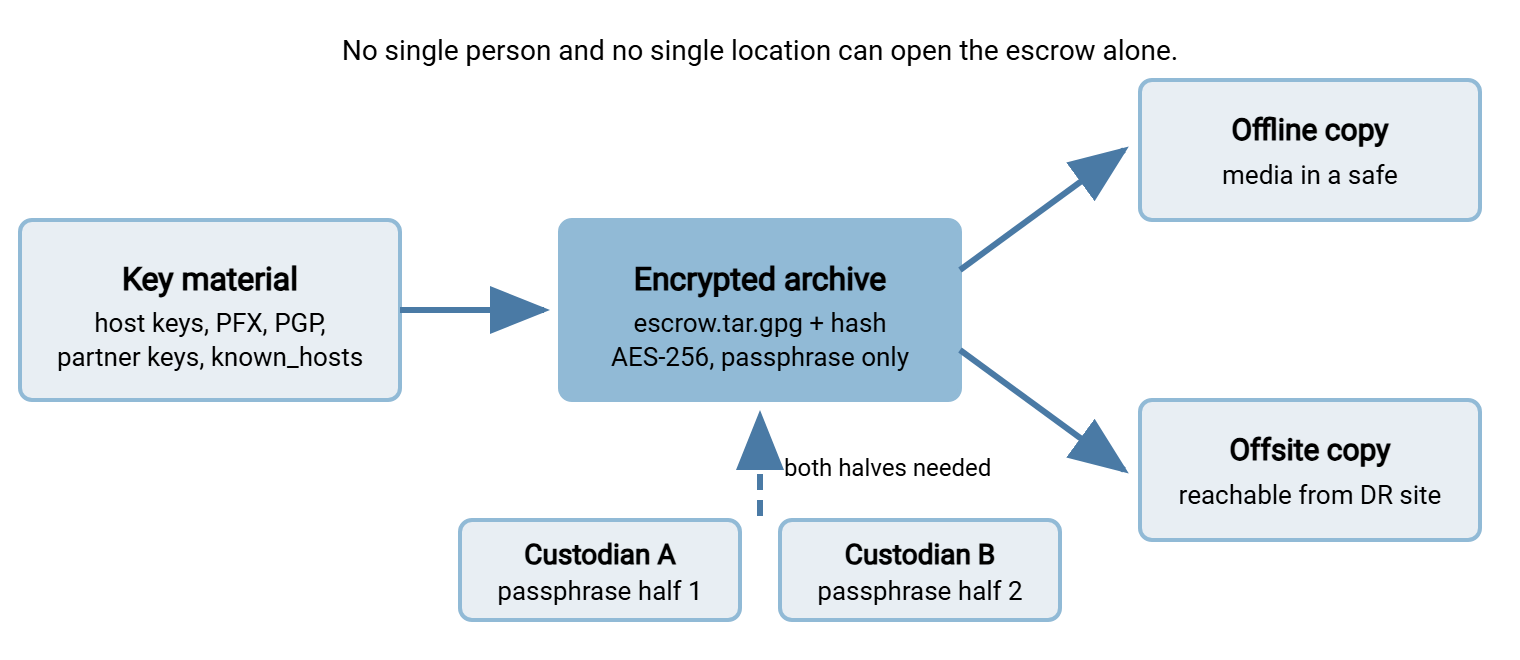
gpg --symmetric encrypts with a passphrase rather than a key — the right choice here. An escrow encrypted to a PGP key would depend on a key that might itself be in the escrow. The command produces one .tar.gpg file; the unencrypted tar is then deleted. On recovery, gpg --output escrow.tar --decrypt escrow-sftp01-YYYYMMDD.tar.gpg reverses it. The hash file travels with the archive so the copy at the recovery site can be checked before anyone types the passphrase.
The diagram below shows where the pieces end up. The archive is in two places, and the passphrase is split between two people. Nothing lets one person or one location open it alone.
Split Custody and the Break-Glass Procedure
Split knowledge means that no single person holds everything needed to use a secret. In the simplest form, the escrow passphrase is two long halves, generated separately. Each is written in a sealed envelope held by a different custodian — one in IT, one outside it. Opening the escrow requires both, which protects against a rogue administrator as much as against a lost envelope. A stronger form uses a secret-sharing scheme in which any two of three holders can reconstruct the passphrase. So a single custodian's holiday does not block recovery.
The break-glass procedure is the written rule for opening it. It says who may request it and who must approve. It says how the custodians are contacted at three in the morning and what gets logged. Keep it short, and keep the custodians' phone numbers on the DR contact sheet described in The Transfer Disaster Recovery Runbook. Then — and this is the part most plans skip — test it. Twice a year, have both custodians produce their halves, decrypt the archive on an isolated machine, verify the hashes, and re-seal. An escrow whose passphrase has never been reassembled is a hope, not an escrow.
Acme's first escrow reassembly drill lasted eleven minutes and found the plan's largest hole. Custodian A's envelope held a half that matched the register. Custodian B's held a half from the previous archive. Custodian B's envelope had been sealed before a certificate rotation had prompted a new escrow and a new passphrase. Only one envelope had been reissued. The archive would not decrypt, on an isolated machine, with nothing at stake. That is the best possible place for an archive not to decrypt. Both halves were regenerated and re-sealed that afternoon, and "reissue both envelopes" became a line in the rotation procedure.
Access to the archive files themselves is controlled separately from the passphrase. The offline copy sits on removable media in a physical safe. The offsite copy sits on storage that the recovery site can reach, restricted to the recovery team's accounts, with access logged. Neither copy should be on the general backup share, because the general backup share is readable by everyone who does restores.
When the Disaster Is a Compromise: Rotate, Don't Restore
Everything so far assumes the disaster destroyed the keys. Some disasters expose them instead. The server may have been lost to ransomware, an attacker may have had administrative access, or the escrow media itself may have gone missing. In those cases, the escrowed keys may be in someone else's hands. Restoring them would restore the attacker's ability to impersonate you. The decision looks like this:
| What happened | Host key and TLS key | Client keys and tokens | PGP secret key |
|---|---|---|---|
| Hardware, storage, or site loss | Restore from escrow | Restore | Restore |
| Ransomware with no sign of data theft | Restore, then rotate on a planned schedule | Rotate promptly | Restore; rotate soon |
| Confirmed intrusion or stolen escrow media | Rotate before going live; notify every partner | Rotate before going live | Restore to decrypt the archive; generate a new key for all new files |
Rotation during a disaster is the worst time to do it. That is why the procedures should already exist from ordinary operations: key rotation and inventory for SSH keys, and the certificate series for TLS. The PGP row is the odd one out. You always restore the old secret key, because it is the only thing that can read the files already encrypted to it. You stop using it for new files, and that is all.
The Escrow Register
The register is the index of the escrow: a plain text file, kept both inside the archive and outside it. It lets the recovery team confirm what they have restored. One line per item:
ESCROW REGISTER — sftp01 transfer platform

Item                        Identifier (fingerprint / thumbprint)              Custody           Verified
SSH host key ed25519        SHA256:Uq3nR8b0Yp2vT6kLm9xWc4dJf1sHa7eQz5tNo3iBg0M  archive + safe    drill Q2
SSH host key rsa            SHA256:pL0wXk3...                                  archive + safe    drill Q2
TLS sftp.example.com PFX    A1B2C3D4E5F60718293A4B5C6D7E8F9012345678           archive + safe    drill Q2
Client key svc_payroll      SHA256:9tQ2mV7...  (installed at First Example Bank) archive           drill Q2
PGP transfer-ops secret     fingerprint 4F2A 91C0 ... 7E3D                     archive + safe    drill Q2
authorized_keys (all)       hash of tarball c4d9e0...b118                       archive           drill Q2
known_hosts (JOBS01)        hash 7c11b2...9a06                                  archive           drill Q2
Vault entries               TRANSFER/svc_transfer, TRANSFER/api-claims          vault break-glass drill Q2

Passphrase custody: half 1 — IT operations lead (contact sheet C-01)
                    half 2 — finance systems manager (contact sheet C-02)
Archive copies:     safe (server room), offsite storage (recovery-team access only)
Rotation trigger:   any confirmed intrusion; any loss of archive media
Every identifier in the register is public information — fingerprints and thumbprints reveal nothing about the private half. So the register can be printed and kept with the runbook. During recovery, the verifier reads a fingerprint from the restored server and checks it against this sheet. A match at every line means the service has come back with its identity intact. The same identifiers migrate with the platform when it moves, which is why migrating keys and certificates reads like a cousin of this article.
Bringing It Together
Key material is the part of a transfer platform that installation media, documentation, and memory cannot recreate. It is the part partners use to decide whether the restored server is really you. Escrow it all — host keys first, then TLS bundles, client and partner keys, known_hosts, PGP keyrings, and the register of vault entries. Use an encrypted archive with split custody of the passphrase, copies in two places, and a break-glass procedure that has been rehearsed. Know in advance which kinds of disaster mean rotating instead of restoring. That decision is cheap in advance and expensive at three in the morning.
With the escrow in place, the general backup described in Backing Up Transfer Configuration, Keys, and Jobs can stay free of secrets. With that escrow in place, the runbook has a clear step — restore keys, verify fingerprints — between restoring configuration and opening the firewall. How that step fits into the whole sequence is the subject of The Transfer Disaster Recovery Runbook.
Frequently Asked Questions
What is key escrow, in plain words?
Why can't I just generate a new host key when I rebuild the server?
What is split knowledge and why does the escrow need it?
My certificate's private key won't export. What now?
Should I restore keys after a ransomware attack?
From the Sysax team: we build secure file transfer software for Windows. Sysax Multi Server is an FTP, FTPS, SFTP, and HTTPS server. Sysax FTP Automation handles scheduled, scripted transfers. Free trials are on the download page.