
The Transfer Disaster Recovery Runbook
"Where is the runbook?" "On the wiki." "Where is the wiki?" A pause. "On the server." It is twenty past two in the afternoon. The storage array behind the transfer server has failed in a way the vendor describes as "unrecoverable." The payroll file has to be at the bank by six, and the person who built the platform left the company last spring. What happens in the next four hours depends almost entirely on whether a document exists, somewhere the array did not take with it. It must say in order what to do. The outcome also depends on whether the person reading it can follow it without having to understand why.
That document is the runbook: a step-by-step procedure written for a specific task, so that someone other than its author can carry it out under pressure. This article is a complete transfer DR runbook, built around the restore order that dependencies force. First come network and DNS, then the server, then configuration, keys, accounts, data, jobs, and finally partner verification. Every step has a check that must pass before the next begins. The article ends with a skeleton you can copy and fill in. It is part of our Disaster Recovery for Transfer Workflows series and assumes the backups and escrow described in the earlier articles exist. It also assumes you are reading it before twenty past two.
What Makes a Runbook Different From Notes
Three ideas separate a runbook from a page of reminders. A verification gate is a concrete check — a command and the output that counts as a pass — placed between steps. You do not continue past a gate that fails. A decision point is a place where the procedure branches on a fact you can only learn at the time ("is the backup older than the RPO?"). Each branch is written out. And a communications track is a parallel set of steps for telling people what is happening. Someone who is not doing the restore runs it, so that the restorer is never interrupted to answer "how long?" It gets asked every ten minutes regardless; the track means someone can answer.
The runbook is also a document that must survive the disaster it describes. A copy on the transfer server's wiki is worthless when the server is gone. Print it; keep a copy in the same safe as the escrow media; keep another in the offsite location with the backups. The recovery time objective (RTO) and recovery point objective (RPO) it works against are four hours and one day in this article's worked example. They come from the per-flow scoping done in the first article of this series. Paper, whatever else is said about it, has never failed to boot.
Phase 0: Declare
A disaster is declared, not discovered. Until someone with authority says "this is a disaster," the team is troubleshooting an outage. Outage troubleshooting — restarting, patching, waiting for the vendor — can eat the entire RTO without anyone deciding to. The runbook therefore starts with who may declare and on what grounds. Outage troubleshooting has no natural end; it has to be given one.
The test is two questions. Is the environment lost or untrustworthy, rather than merely down? And can it plausibly be back within one hour? If the answer to the first is yes and the second is no, declare. It is at twenty past two, with a four-hour RTO and a six o'clock cutoff, that this rule earns its keep. The temptation to "give the vendor thirty more minutes" is exactly what it exists to override. I have given the vendor thirty more minutes, twice, in the same afternoon, and the second thirty was not better than the first. Declaring does three things at once. It starts the clock — write the time down. It starts the communications track — the first partner notice goes out within the hour, using the template in Partner Communication During a Disaster. And it authorizes the break-glass procedure for the key escrow.
Phase 1: Assemble
Four roles, which may be four people or two people wearing two hats each. The recovery lead owns the clock and the decision points. The restorer executes the technical steps and nothing else. The verifier runs each gate and records the result. This is a different person from the restorer, because the person who just typed a command is the worst judge of whether it worked. The communicator runs the communications track. Then gather the artifacts before touching anything:
- The newest configuration snapshot and its manifest, from the offsite copy.
- The newest data backup, and the exact time it was taken — this is your real recovery point.
- The escrow archive, its hash file, and both passphrase custodians on the phone.
- Installation media for the operating system and the transfer product, plus license details.
- The escrow register, the scope worksheet, and the DR contact sheet, on paper.
The contact sheet is the piece most often missing. The shape is below; fill it in now, not on the day:
DR CONTACT SHEET — transfer platform          (keep a printed copy with the escrow)

Ref   Role / party                    Name              Phone (out of hours)   Alternate
C-01  Recovery lead                   ____________      ____________           ____________
C-02  Restorer                        ____________      ____________           ____________
C-03  Verifier                        ____________      ____________           ____________
C-04  Communicator                    ____________      ____________           ____________
C-05  Escrow custodian — half 1       ____________      ____________           ____________
C-06  Escrow custodian — half 2       ____________      ____________           ____________
C-07  DNS / firewall administrator    ____________      ____________           ____________
C-08  Backup system administrator     ____________      ____________           ____________
C-09  Business owner — payroll flow   ____________      ____________           ____________
B-01  First Example Bank file desk    ____________      ____________   cutoff 18:00, allowlists our IP
B-02  Claims partner (Acme Mutual)     ____________      ____________   resends on request only
B-03  Agency (Example Creative)       ____________      ____________   weekly pickup, low priority

Sites: primary DC address / access code ____   recovery site address / access code ____
Backups: offsite path ____   escrow offsite path ____   safe location ____
Phase 2: Restore in Dependency Order
The order is not a preference; it is forced by what depends on what. Keys cannot be verified before the server runs. Accounts cannot be tested before keys are in place. Jobs must not be enabled before data is verified, or they will act on an empty inbox. The diagram shows the eight steps and the gate after each one.
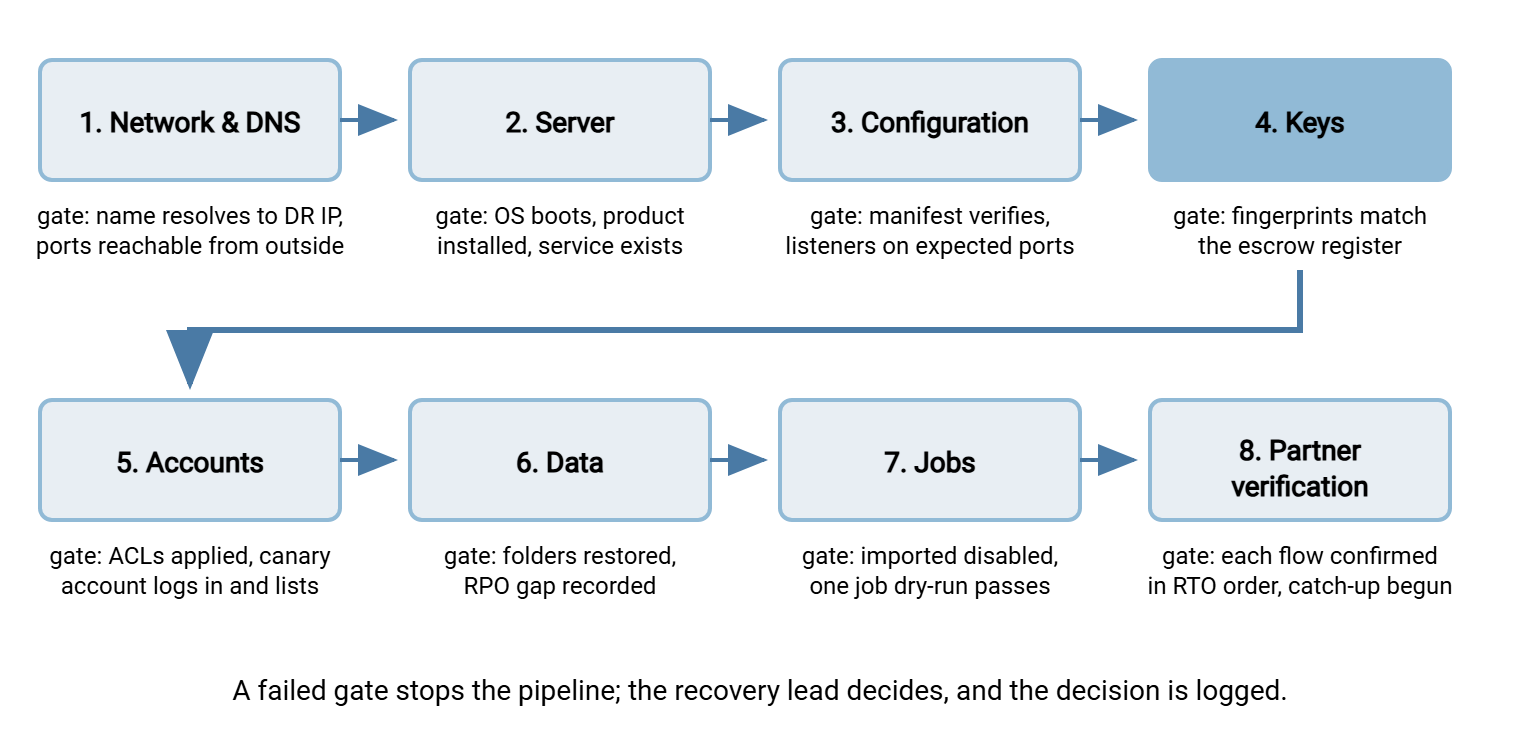
Step 1: network and DNS
Partners reach the service by name. If the recovery site has a different address, the firewall administrator publishes the listeners to the new address. Those are port 22, the FTPS control port and passive range, and the HTTPS port. In that case, the DNS record for sftp.example.com is changed to point at it. The record's time-to-live decides how long partners keep resolving the old address, so the runbook should already have lowered it. If partners allowlist your address, the communicator tells them the new one now, because their firewall changes take longer than your restore. Gate: from a machine outside your network, Resolve-DnsName sftp.example.com returns the recovery address. The command Test-NetConnection sftp.example.com -Port 22 reports TcpTestSucceeded : True. Or, before the service is up, a refused connection rather than a timeout proves the path exists.
Step 2: the server
Either a bare-metal restore from the system image or a fresh operating system install followed by the transfer product from media — whichever is faster given what you have. Do not restore configuration yet, even if the image contains it; the next step replaces it with the newest snapshot. Gate: the machine boots, the transfer product's service exists (Get-Service lists it), and it is stopped. The firewall in front of it is still closed to partners.
Step 3: configuration
Verify the snapshot against its manifest before using it. Then copy the configuration tree back to its live location, import the registry export, and check the product's configuration export if one exists. The Windows shape is the restore direction of the backup job from Backing Up Transfer Configuration, Keys, and Jobs:
robocopy D:\Restore\YYYYMMDD\config C:\ProgramData\TransferServer /E /COPY:DATSO /R:2 /W:5
reg import D:\Restore\YYYYMMDD\transferserver.reg
Gate: start the service and confirm it listens where it should — Get-NetTCPConnection -State Listen shows the expected ports. Then stop it again if the keys are not yet in place.
Step 4: keys
Both custodians produce their passphrase halves. The restorer checks the escrow archive's hash, decrypts it on the recovery machine, and installs each item. Host key files go to their location with correct ownership and permissions. The PFX bundle is imported into the machine store, and PGP keyrings are imported. The files authorized_keys and known_hosts go back where they belong. The detail of each import is in Protecting Keys and Certificates for Recovery. Gate: with the service started, the verifier runs the fingerprint checks from outside and compares every line to the escrow register:
$ ssh-keyscan -t ed25519 sftp.example.com 2>/dev/null | ssh-keygen -lf -
256 SHA256:Uq3nR8b0Yp2vT6kLm9xWc4dJf1sHa7eQz5tNo3iBg0M sftp.example.com (ED25519)   # matches register

$ openssl s_client -connect sftp.example.com:21 -starttls ftp </dev/null 2>/dev/null | openssl x509 -noout -fingerprint -sha256
sha256 Fingerprint=3F:9A:...:C2                                                   # matches register
A mismatch here is a hard stop. Either the wrong key was restored or the escrow is stale. In the compromise case, this is the point at which the decision to rotate rather than restore is executed. Never open the firewall to partners with an unverified host key; our host keys and known_hosts article explains what they would see.
Step 5: accounts and permissions
If accounts are local to the product, they arrived with the configuration; confirm the count matches the scope worksheet. If they come from a directory, confirm the recovery machine has joined it and can resolve the mapped groups. Recreate the data folder tree if it is not part of the data restore. Then apply the saved permissions with icacls D:\ /restore D:\Restore\YYYYMMDD\transfer-acls.txt, run against the parent folder. Gate: a canary account — a dedicated test account that exists only for this purpose — logs in from outside and lists its home folder:
$ echo ls | sftp -b - -o BatchMode=yes -o StrictHostKeyChecking=yes -i ~/.ssh/drtest_key drtest@sftp.example.com
sftp> ls
canary.txt
-b - reads batch commands from standard input, BatchMode=yes forbids interactive prompts, and strict host key checking makes the login itself a second check of step 4.
Step 6: data
Restore the in-flight folders from the data backup — inbox first, because partners are waiting on it — then outbox and archive. Then measure the RPO gap: the interval between the backup's timestamp and the moment of the disaster. If the newest backup was taken at one in the morning and the array died at twenty past two in the afternoon, the gap is thirteen hours. Every file that arrived in that window is missing. Write the window down; it becomes the catch-up request to partners. Files restored from backup have a custody question of their own — see hashes as custody evidence for how to document that the restored copies are the originals. Gate: folder tree matches the scope worksheet, sample files verify against any checksums you keep, and the gap is recorded.
Step 7: jobs
Import every scheduled task from its XML, supplying service account passwords from the vault — and import them disabled. A task restored enabled with its "run as soon as possible after a missed start" option set will fire the moment it exists. It fires against whatever the inbox contains. That is precisely what surviving reboots and misfires warns about:
schtasks /Create /XML D:\Restore\YYYYMMDD\tasks\PayrollPush.xml /TN "\Transfer\PayrollPush" /RU svc_transfer /RP *
schtasks /Change /TN "\Transfer\PayrollPush" /DISABLE
Copy scripts and profiles back. If the jobs live in an automation product such as Sysax FTP Automation, restore its job store the same way. Its scheduled tasks and scripts are as much part of the platform as Task Scheduler's. They too should stay disabled until data is verified. Gate: one low-risk job, run by hand against a test endpoint or in a dry-run mode, completes and logs correctly. Jobs are then enabled one flow at a time during step 8, in RTO order, never all at once.
Step 8: partner verification and catch-up
Open the firewall. Work down the scope worksheet in RTO order — payroll first, with its six o'clock cutoff. For an outbound flow, enable its job and run it, or run the transfer by hand if the deadline is closer than the schedule. For an inbound flow, ask the partner to send a test file or watch for their next scheduled delivery. For each, the communicator confirms with the partner that the file arrived and was correct. Then the catch-up: the partner is given the RPO window and asked to resend what fell inside it, using the duplicate-safe process in catch-up after failures. Gate: every flow on the worksheet is marked verified, or has a named reason and a time it will be.
Remember: the four-hour clock is against the payroll flow being verified with the bank, not against the server booting. A server that is "up" at four o'clock with jobs disabled and keys unverified has not met the RTO.
Decision Points
These are the branches the recovery lead owns. Write the answer and the time next to each in the log.
| Question | If yes | If no |
|---|---|---|
| Is this a compromise (intrusion, ransomware, lost media)? | Rotate host and TLS keys at step 4; notify partners of new fingerprints; involve security | Restore keys from escrow |
| Does the recovery site have a different public IP? | Tell allowlisting partners at step 1; expect their changes to be the long pole | DNS change only |
| Is the newest data backup older than the RPO? | Record the true gap; escalate to business owners; widen the catch-up request | Proceed |
| Will the tightest-RTO flow miss its cutoff? | Run that transfer by hand from the upstream system, outside the platform if necessary | Continue in order |
| Did a gate fail with no fix in sight? | Stop, log it, decide between workaround and escalation — do not skip the gate | Continue |
The Communications Track
Alongside the eight steps, the communicator runs a fixed sequence. An internal notice goes out at declaration, and the first partner notice goes out within the hour. An update goes to partners and internal stakeholders every two hours, or sooner when a fact changes. A specific notice goes to allowlisting partners at step 1. In the compromise case, a notice of new fingerprints goes out at step 4. A per-flow "verified" message goes out at step 8. The all-clear goes out only when catch-up is complete. Every message goes into the log with its time. A communicator who is also the restorer will do neither job well, which is why the roles are split even on a two-person team. Two people, two hats each, and nobody typing while talking.
The Copyable Skeleton
Paste this into your own document and replace the placeholders. Every line with a blank is a fact you should be able to write in before any disaster happens.
TRANSFER PLATFORM DR RUNBOOK — sftp01                        RTO: 4 h   RPO: 1 day
Declared by: ______  at: __:__      Recovery lead: ______   Log kept by: ______

0  DECLARE   criteria: environment lost/untrusted AND not back within 1 h
             [ ] time logged   [ ] comms track started   [ ] break-glass authorized

1  NETWORK   [ ] listeners published to recovery IP ______   [ ] DNS changed (TTL ____)
             [ ] allowlisting partners told new IP (B-01, ____)
             GATE: Resolve-DnsName -> recovery IP; Test-NetConnection port 22 -> path exists

2  SERVER    [ ] image restore OR fresh install from media ______   [ ] product installed
             GATE: boots; service exists and is STOPPED; firewall still closed

3  CONFIG    [ ] snapshot ______ verified against manifest   [ ] tree restored   [ ] reg imported
             GATE: service starts; listens on ports ______; stop again

4  KEYS      [ ] escrow hash OK   [ ] custodians C-05 + C-06 present   [ ] host key   [ ] PFX
             [ ] PGP   [ ] authorized_keys   [ ] known_hosts (job host)
             DECISION: compromise? -> rotate instead, notify partners of new fingerprints
             GATE: ssh-keyscan / s_client fingerprints match register — ALL lines

5  ACCOUNTS  [ ] account count = worksheet   [ ] directory reachable   [ ] icacls /restore
             GATE: canary account logs in and lists home folder from outside

6  DATA      [ ] inbox   [ ] outbox   [ ] archive   backup time: __:__   disaster time: __:__
             RPO gap: ____ h   DECISION: gap > RPO? -> escalate to business owners
             GATE: tree matches worksheet; sample checksums OK; gap recorded

7  JOBS      [ ] tasks imported DISABLED   [ ] passwords from vault   [ ] scripts + profiles
             GATE: one dry-run job completes and logs

8  PARTNERS  [ ] firewall opened   per flow, in RTO order:
             flow ______  enabled __:__  verified with partner __:__  catch-up window ______
             flow ______  enabled __:__  verified with partner __:__  catch-up window ______
             GATE: every flow verified or has a reason and a time

CLOSE        [ ] all-clear sent   [ ] log archived   [ ] findings to next drill
What the Runbook Buys You
A restore done from memory takes as long as the slowest thing someone forgets. A restore done from this runbook takes as long as the steps take. That is because the order is fixed by dependencies. Each step ends with a check that either passes or stops the line. The branches are decided by whoever owns the clock. The people who need to hear from you hear from someone who is not busy typing. The skeleton is the same one the platform migration series uses for its cutover night, which is not a coincidence — a planned migration is a disaster you scheduled. The main difference is who chose the date.
Bluewater Bank's runbook referred, in step 3, to a restore share on a host called BACKUP02. In their first tabletop the restorer read the line aloud. The backup administrator said that BACKUP02 had been retired the previous autumn and its share now lived on a newer host. There was a short silence around the table. The runbook had been correct when it was written and had been wrong for months without anyone touching it. That is the failure keeping documentation current exists to prevent. The line was fixed on the spot, along with two others found by the same question. The drill log recorded all three as findings closed during the drill. It had cost two hours around a table. The alternative would have cost the first hour of a four-hour RTO, spent looking for a server that no longer existed.
A runbook that has never been run is a draft. The next article, Restore Drills: Proving the Plan Works, is about running it against the clock on an isolated network, and turning what breaks into edits. And because the communications track is half of the job, Partner Communication During a Disaster supplies the templates it uses.
Frequently Asked Questions
What is a runbook, exactly?
Why does the restore order matter so much?
What is a verification gate?
Why import scheduled jobs disabled?
When should we declare a disaster rather than keep troubleshooting?
From the Sysax team: we build secure file transfer software for Windows. Sysax Multi Server is an FTP, FTPS, SFTP, and HTTPS server. Sysax FTP Automation handles scheduled, scripted transfers. Free trials are on the download page.