
DLP for File Transfers, Explained for Admins
"It stops sensitive data from ever leaving the building." The slide says so, in a font large enough to count as a promise, and the box in the diagram looks very sure of itself. The acronym on the slide is DLP, data loss prevention, and the promise, taken literally, is nonsense. Underneath the marketing, though, there is a genuinely useful idea. A junior administrator who understands the real mechanics can get most of the value long before anyone signs a purchase order. The box is not magic. It is a clerk with a rulebook, and the rulebook is yours to write.
This article strips DLP down to what it does. DLP looks at data and the situation the data is in. It compares both against a written rule about what is allowed to leave. Nothing more mystical than that. By the end you will know what "inspecting content" really means. You will know why egress, data on its way out, is the whole game for file transfers. You will know how to read a vendor brochure without being sold a miracle. This is the opening article in our Data Loss Prevention series, and everything after it builds on these ideas.
What DLP Actually Is
Strip away the branding and DLP is a decision made about a piece of data at a moment of movement. Every time a file is about to go somewhere, a DLP system asks three questions and acts on the answers:
- What is this data? Is it an ordinary marketing PDF, or does it contain the kind of content your policy protects — customer records, payment numbers, source code, contracts?
- What is the context? Who is sending it, from which account, to which destination, over which channel, at what time, in what volume?
- Does policy allow it? Given the answers to the first two questions, is this movement permitted, permitted-with-conditions, or forbidden?
That is the entire model. A DLP product is a machine for answering those three questions quickly and at scale. It then either records the answer, warns someone, or blocks the transfer. The reason DLP feels complicated is that each question is hard to answer accurately by machine. But the shape of the thing is simple. Holding that shape in your head keeps you grounded when a vendor demo starts sparkling.
The critical word in question three is policy. DLP does not invent rules; it enforces rules you wrote. A DLP tool with no clear policy behind it is a very expensive random-alarm generator. That is why a later article in this series argues, at length, that policy comes before tooling — the rule has to exist before the machine can check anything against it.
The Three Places Data Can Be Watched
DLP vendors slice their world into three "states" of data, and the labels are worth knowing. They explain why file-transfer DLP is a specific, narrower job than the all-seeing platform on the slide.
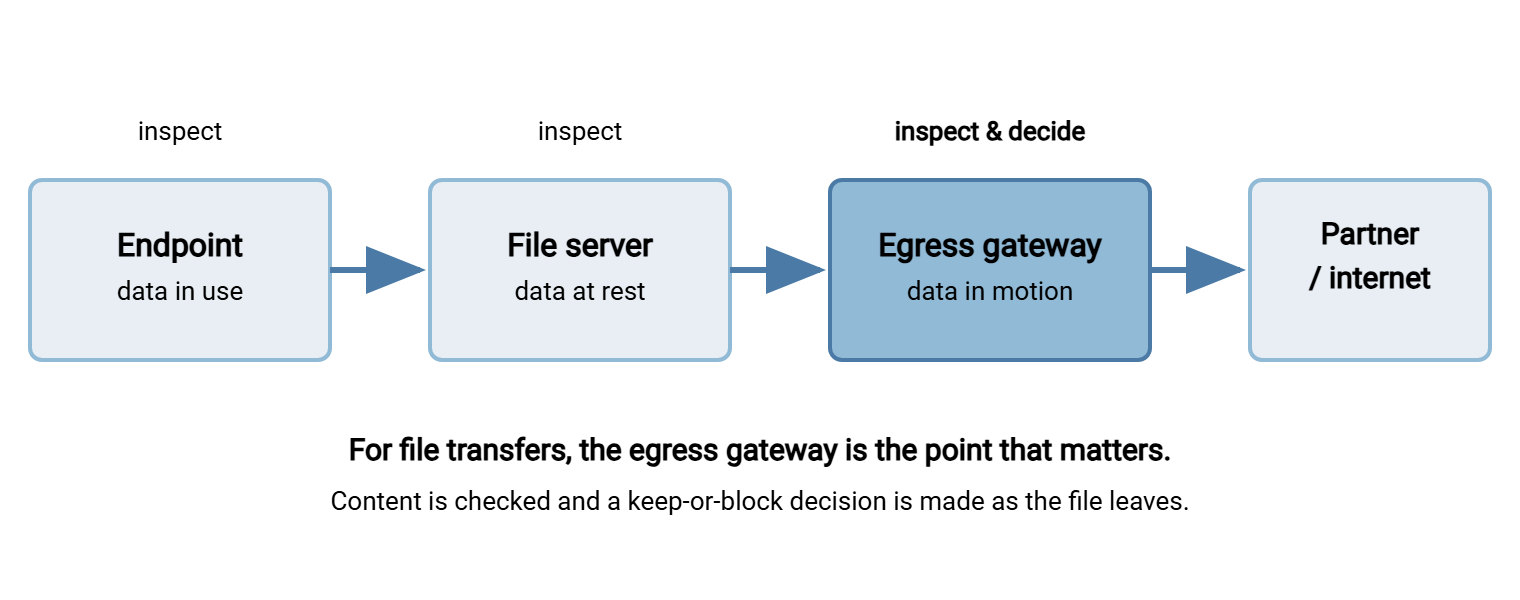
- Data in use — on an endpoint, open in an application, being copied to a USB stick or pasted into a browser. Watching this needs software installed on every laptop.
- Data at rest — sitting in a file share, a database, or a cloud bucket. Watching this means scanning storage to find where sensitive content already lives.
- Data in motion — crossing the network, which for our purposes means leaving over a transfer channel. Examples are an SFTP upload to a partner, an HTTPS post, an email attachment, or a file dropped to cloud storage.
File-transfer DLP lives almost entirely in that third state, at the moment data moves outward. The diagram below shows the three inspection points and highlights the one this whole series cares about.
This narrowing is good news. You do not need to boil the ocean. If you can see and govern what leaves through your transfer channels, you have covered the exposure that matters most for a file-transfer estate. You have done it without deploying agents on every desktop. The laptops, for their part, will not miss another agent.
What "Inspecting Content" Really Means
"Content inspection" sounds like the tool reads a document and understands it. It does not. It applies a handful of concrete matching techniques, each with clear strengths and equally clear blind spots. The common ones, in plain terms:
- Pattern matching — looking for text that fits a known shape, such as a sixteen-digit card number or a national ID format. This is the workhorse, and it is the subject of our article on pattern-based controls. It catches structured, predictable data well and unstructured secrets poorly.
- Keyword and dictionary matching — flagging documents that contain terms like "confidential," a project codename, or a list of protected words. Simple, and noisy without tuning.
- Exact data matching / fingerprinting — the tool is given a copy of the specific records it must protect (say, your customer table). It alerts when those exact values appear in an outbound file. More precise, but it needs a feed of the sensitive data to compare against.
- Classification labels — files carry a tag ("Internal," "Restricted") applied by a person or an earlier system. The DLP acts on the tag rather than re-reading the content.
Notice that every one of these needs something defined in advance: a pattern, a word list, a data feed, a label scheme. No technique "knows" what is sensitive on its own. The intelligence lives in the definitions you supply, which is why a DLP deployment is mostly a data-classification project wearing a software costume.
Context is the other half of the decision, and it is often the more powerful half. The same customer file might be perfectly fine going to the payroll processor you send it to every night and a serious problem going to a personal webmail address. DLP that weighs destination, account, channel, time, and volume alongside content makes far better decisions than content matching alone. A lot of context is available even without a fancy tool, straight from your transfer logs. The logs have been trying to tell you this for years.
Remember: DLP does not understand your data. It matches patterns, words, fingerprints, and labels you define, then weighs them against context you specify. The tool is only ever as smart as the definitions and policy behind it.
Why Egress Is the Whole Game
Data loss is, almost by definition, a story about data going out. A file that stays inside your control was not lost. That is why, for transfers, DLP focuses relentlessly on egress — the outbound direction — and treats inbound as a different problem handled by different tools.
Inbound files are certainly a risk, but the risk is malware and tampering. The defense is scanning and validation, covered in our companion pillar on malware scanning in file flows. Outbound files carry the risk DLP exists to address: your organization's own sensitive content ending up somewhere it should not. Every upload to a partner, every push to cloud storage, every attachment, every scripted nightly job is an egress event. Each is a place data can slip out — by malice, by mistake, or by a misconfigured automation nobody has looked at in two years.
Framed that way, the first practical task is not buying anything. It is finding out what actually leaves today, which is exactly what the next article, finding out what data actually leaves your network, walks through. You cannot govern egress you have never measured, and I have yet to meet an estate that had measured it before someone asked.
Following a File Out the Door
The three questions become concrete when you follow a single file. Picture a routine, unglamorous transfer: a nightly job exports a customer report and uploads it to a partner over SFTP. Here is that file passing through a DLP decision, step by step.
- The file is assembled. An export process writes
customers_2xxx.csvto an outbound folder. It contains names, addresses, and account numbers — protected data by any reasonable policy. - Content is inspected. As the file heads for the wire, the DLP checkpoint reads it and finds thousands of rows matching an account-number pattern. Question one — what is this data? — is answered: regulated customer records.
- Context is weighed. The sending account is the partner-integration service account. The destination is the partner's known SFTP host. The channel is encrypted. The time is 02:00, the usual window; the volume matches last night's. Question two — what is the context? — says: this is the expected flow.
- Policy is matched. The written rule says regulated customer data may leave to this named partner, over SFTP, under the standing data-sharing agreement. Question three — is it allowed? — returns yes. The transfer proceeds and the decision is logged.
Now change one detail and watch the decision flip. It is the same file, with the same content — but the destination is a personal cloud-storage account. Or the time is 3 p.m. on a Saturday, or the volume is ten times normal. Content did not change; context did, and the policy match now returns "block and alert." That is the entire value of DLP in one example: the machine noticing that a familiar kind of data is going somewhere the policy never blessed. It is also why context-blind, content-only matching produces so much noise. The legitimate nightly job and the suspicious weekend upload look identical if you only read the rows. The rows do not know what day it is.
The Brochure Versus Reality
DLP is genuinely useful, and the marketing oversells it in the same few ways every time. A peer rather than a salesperson can tell you which ways, so here they are. Keep this table handy the next time you sit through a demo.
| The brochure says | The honest reality |
|---|---|
| "Stops data exfiltration." | Stops obvious, unencrypted, policy-defined patterns. A determined insider who renames, compresses, or encrypts a file walks past most content matching. |
| "Sees all your data." | Sees the channels it is deployed on, in the formats it can parse. Encrypted payloads and unusual file types are opaque to it. |
| "Works out of the box." | Ships with generic patterns that fire constantly. Real value comes after weeks of tuning against your data and false positives. |
| "Understands sensitive content." | Matches definitions you supply. It has no judgment; a policy gap is invisible to it. |
| "Deploy and you're compliant." | A tool is evidence of a control, not the control itself. Auditors want the policy, the ownership, and the response process too. |
None of this means DLP is a scam. It means DLP is a well-tuned instrument, not an autopilot. The organizations that get value from it are the ones that already knew what they were protecting and used the tool to enforce decisions they had made deliberately. The ones that bought a box hoping it would tell them what to worry about got expensive noise. I have been in the second group, and the noise was very thorough.
Monitor First, Block Later
One more concept separates people who succeed with DLP from people who cause an outage with it: the difference between monitor mode and enforce mode.
In monitor mode (sometimes called audit or detect mode), the system watches egress and records what would have tripped a rule, but lets everything through. In enforce mode, it actually blocks. The temptation is to switch straight to enforce because blocking feels like the point. The discipline is to run in monitor mode first — for weeks — and read what it catches. You will discover that your "sensitive data leaving" alerts are ninety percent legitimate business flows. Those include the nightly file to the payroll vendor, the invoices to the bank, and the reports your partners depend on. Your company, it turns out, is the biggest exporter of your company's data.
If you had blocked on day one, you would have broken those flows and taught everyone that security is the department that stops work. I have watched that lesson get taught in a single morning. Monitor first, learn your own traffic, tune the rules, and only then enforce the handful of cases that genuinely matter. That sequence is the difference between a control people trust and a control people route around.
Acme ran its first DLP rule in monitor mode for six weeks, mostly because the change board was slow. The delay turned out to be the best decision in the project. The account-number rule fired every night at two, on the statements file. That file had gone to the print vendor for longer than anyone on the security team had worked there. Nobody had written that flow into a transfer inventory; the rule found it. They named the vendor as an allowed destination in the policy, then switched to enforce. The first genuine block came months later: a spreadsheet on its way to a personal cloud folder by mistake. It was stopped before it left, and returned to its owner with a quiet note rather than a meeting.
Where DLP Fits Among Your Other Controls
DLP is not a standalone fortress; it is one layer that only works because other layers are doing their jobs. Seeing those relationships keeps you from asking DLP to do things better handled elsewhere.
- Threat modeling tells you which data and which flows are worth protecting in the first place. Without that ranking, DLP has no idea where to point. Start with transfer threat modeling and let it prioritize your egress controls.
- Logging and audit supply the context DLP reasons over and the evidence you need after a hit. Much of the "who sent what, where, and when" that a DLP weighs is already sitting in your transfer logs. Our pillar on transfer logging and audit covers capturing it well.
- Permissions and least privilege shrink the problem before DLP ever runs. If an account cannot read a sensitive share, it cannot leak it, and no content inspection is needed. The file server permissions pillar is the structural half of loss prevention.
- Zero trust reframes every outbound flow as something to verify explicitly rather than trust by default. That mindset makes egress control feel natural instead of bolted on. See zero trust for file transfer.
Read together, these say something reassuring: a lot of "data loss prevention" is just good file-transfer hygiene you may already be building. DLP tooling adds content awareness on top of a well-run estate. It is a poor substitute for one.
Questions to Take Into Any DLP Conversation
Whether you are evaluating a product or building controls yourself, the same short list keeps you honest. Copy it and answer each item before anyone spends anything:
1. What are the three or four data types we actually must not lose?
2. Where does each of those types live, and which channels can carry it out?
3. What is our written rule for each type: may it leave, to whom, and who approves?
4. Which of our egress channels can this tool even see (and which are encrypted to it)?
5. Will we run in monitor mode first, and who reads the alerts?
6. When it fires, what is the response process — and who owns it?
7. What breaks if this control has a bad day? What is the fallback?
If you cannot answer items 1 through 3, no product will save you — those are policy questions, and the tool cannot invent the answers. If you can answer them, you may find you have already done the hard part. You may also find that a great deal of protection is available with the controls you already own. We develop that theme in DLP effects without a DLP suite.
Where This Series Goes Next
DLP, demystified, is a small set of ideas: inspect content, weigh context, match policy, focus on egress, expect false positives, monitor before you block. Hold those and the slide loses its magic and most of its font size, and gains its proper, useful shape: a clerk with a rulebook you wrote.
From here, the natural path is to measure your own egress in finding out what data actually leaves your network. Then build the two cheapest, highest-value controls: pattern-based checks on your own outbound pipelines and a written egress policy. For the wider security picture, this pillar sits alongside transfer threat modeling and transfer logging and audit. They supply the risk ranking and the raw evidence that make DLP decisions sane.
Frequently Asked Questions
Is DLP the same thing as antivirus or a firewall?
Why does DLP focus on outbound rather than inbound files?
Can DLP read encrypted files?
Do I need to buy a DLP product to prevent data loss?
What is the difference between monitor mode and enforce mode?
Will DLP stop a determined insider from stealing data?
From the Sysax team: we build secure file transfer software for Windows. Sysax Multi Server is an FTP, FTPS, SFTP, and HTTPS server. Sysax FTP Automation handles scheduled, scripted transfers. Free trials are on the download page.