
Pattern-Based Controls: Blocking the Obvious Leaks
The spreadsheet had eleven columns. Ten of them were the monthly sales summary the partner had asked for. The eleventh was the payment card number behind each order, left in by an export nobody had opened since the day it was written. The file was thirty seconds from the partner's inbox. Not every data leak is a clever heist. A great many are exactly this: a column nobody meant to include, mailed or uploaded to a partner who was never supposed to receive it. Those leaks share a helpful quality: the sensitive content is structured. A card number looks like a card number, and an identity number follows a fixed shape. Structured data is exactly what a simple pattern check can catch before the file leaves. This article is about building that check for your own outbound files.
Everything here is defensive. You are screening traffic your own systems are about to send, to honor a contract or a regulation. It is the digital equivalent of a clerk glancing at a form before dropping it in the mail. None of it is about finding data to take; it is about catching data that should not be on a given flow and stopping it before it goes. By the end you will know what pattern matching catches and how to wire a pre-send screen into an automated job. You will know how to tune it so it does not cry wolf. This is a hands-on chapter of our Data Loss Prevention series. It assumes you have already built an egress census so you know which flows are worth screening. The eleventh column is the whole reason the clerk exists.
What Pattern Matching Is Good At — and Bad At
Pattern matching earns its keep on data that follows a predictable format. Give it a rule that describes the shape of a payment card number or a national identity number. It will reliably find text that fits, no matter which document the text is hiding in. That covers a surprising share of the data organizations are legally bound to protect:
- Payment card numbers — a fixed length, a recognizable structure, and a built-in checksum that makes validation easy.
- National identity and tax numbers — country-specific but rigidly formatted, often with separators in known positions.
- Bank account and routing numbers — structured, and often paired with recognizable neighboring text like "account" or "IBAN."
- Other fixed-format identifiers — policy numbers, member IDs, anything your organization issues to a template.
Structured data like this is unusually common in file transfers, which is what makes pattern controls such a good fit for the job. Transfers are dominated by exports, batch files, and reports — a nightly CSV of transactions, a settlement file, a membership roster. These are machine-generated, column-shaped, and full of exactly the fixed-format identifiers a regex handles well. The messy, unstructured documents that pattern matching struggles with tend to travel as email attachments or ad-hoc uploads rather than scheduled transfer jobs. So the flows you most want to screen are also the flows pattern matching suits best. A rare case of the problem and the tool agreeing.
What pattern matching is bad at is anything unstructured. It cannot recognize that a paragraph describes an unreleased product, that a contract is confidential, or that a design document is a trade secret. Those have no fixed shape to match. Pattern controls are therefore a tool for the obvious structured leak, not a general-purpose secret detector. Knowing that boundary is what keeps your expectations honest. It catches the accidental column of card numbers; it will not catch the deliberate theft of an idea.
Remember: pattern matching finds data with a predictable shape — card numbers, identity numbers, account numbers. It is blind to unstructured secrets like confidential prose or designs. Deploy it for what it is good at and cover the rest with policy and least privilege, not with more regexes.
Choosing Which Flows to Screen
You do not screen everything, and trying to is how the project stalls. Screening costs processing time and generates alerts someone has to read, so you spend that budget where the risk lives. This is precisely why the egress census comes first: it hands you a classified list of flows. The ones marked regulated — outbound paths that carry personal, payment, or contractually protected data — are your screening candidates.
A short way to prioritize: screen a flow if a leak on it would be a reportable incident, and skip it if the worst case is a shrug. The nightly export to a payment processor, the file to a healthcare partner, the report containing customer records — these earn a screen. The public price list going to your own website does not. That risk-ranked thinking is the same discipline you apply in transfer threat modeling. It keeps a do-it-yourself control focused on the handful of flows that actually matter instead of drowning you in checks on data nobody cares about. Screening the public price list protects it from the public.
The Idea of a Pre-Send Screen
A pre-send screen is a checkpoint you place in your own outbound pipeline, between the moment a file is ready and the moment it actually leaves. Its job is narrow. It reads the file, looks for the patterns your policy forbids on this flow, and decides whether to let it pass or hold it for a human. It is the software version of "measure twice, cut once."
The natural home for such a screen is a post-processing hook — a step that runs automatically as part of a transfer job. It runs after the file is prepared but before the upload. The diagram below shows the flow: a file arrives at the screen, and one of two things happens.
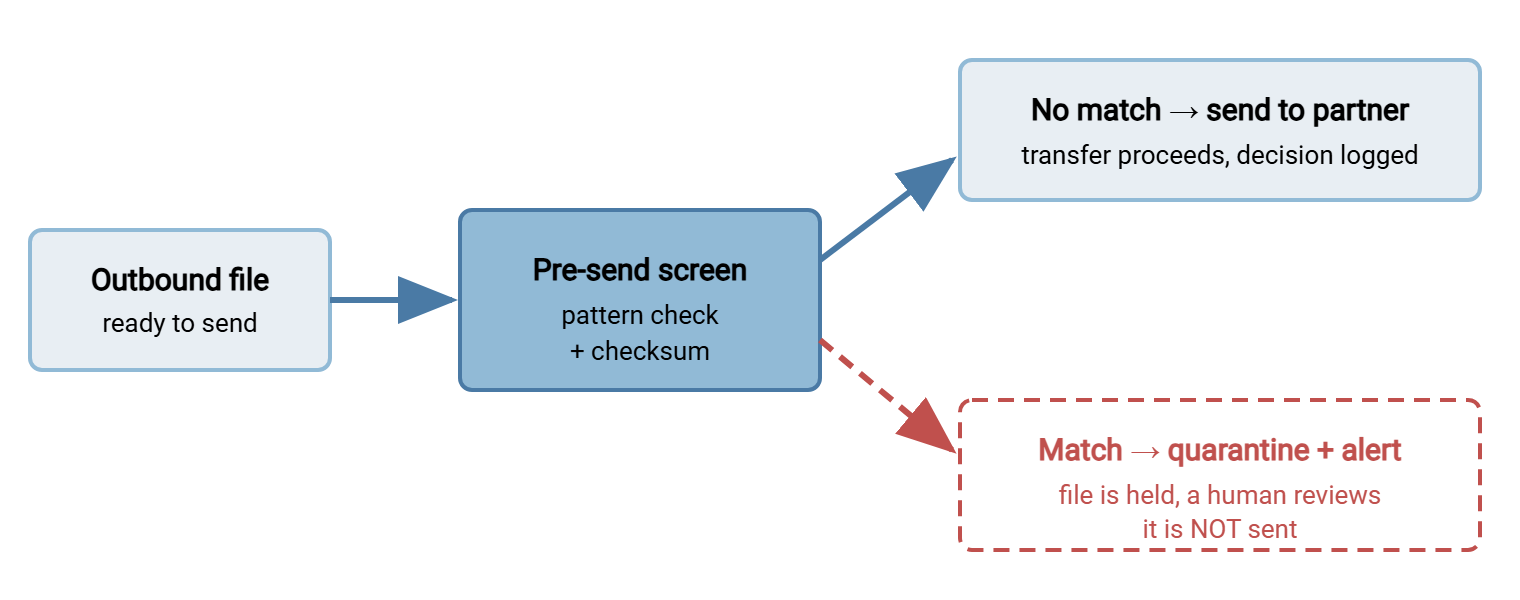
The important design choice is what happens on a match. The screen should fail closed: on a match, it does not send. It moves the file to a quarantine area and alerts a human, who decides whether the match is a real problem or a false alarm. Failing closed means a screening bug or an ambiguous match delays a file rather than leaking it. That is the safe direction to err for a control whose entire job is preventing loss.
Regexes for the Obvious Patterns
A regular expression (regex) is a compact way to describe the shape of text you want to find. Here are defensive patterns for the two most common structured types, written to screen your own outbound files. They are deliberately generic — treat them as starting points to adapt to the exact formats your data uses.
# PAYMENT CARD SHAPE: 13-19 digits, optionally split by spaces or dashes.
# This intentionally OVER-matches; the Luhn check below removes most noise.
CARD_RE      = \b(?:\d[ -]?){13,19}\b

# NATIONAL IDENTITY SHAPE (example: a 3-2-4 grouped identifier used in
# some countries). Formats vary by country - use the one(s) that apply
# to the data YOUR flows carry, not a blanket pattern.
NATIONAL_ID_RE = \b\d{3}-\d{2}-\d{4}\b

# The regex only finds candidates. Validate card candidates with Luhn
# so that random 16-digit strings (order numbers, IDs) don't fire.
function passes_luhn(number):
    digits = strip_non_digits(number)
    sum = 0
    double = false
    for d in reverse(digits):
        if double: d = d * 2; if d > 9: d = d - 9
        sum = sum + d
        double = not double
    return (sum mod 10) == 0
Two things make these patterns usable rather than maddening. First, the card pattern is paired with the Luhn check — a simple arithmetic test that every real payment card number satisfies. Most random sixteen-digit strings (order numbers, internal IDs) fail Luhn, so validating candidates cuts your false positives dramatically without any risk of missing a genuine card. Second, the identity pattern is scoped to a specific format rather than "any digits with dashes." A blanket pattern matches phone numbers, dates, and part numbers; a specific one matches the thing you actually protect.
Getting to Readable Text First
The pseudo-code hides a practical wrinkle behind one tidy call, extract_text(). A regex can only match text, and files do not always arrive as plain text. A CSV or a log file is easy. A PDF, a word-processor document, or a spreadsheet needs a conversion step to pull its text out first. An archive needs unpacking before you can see what is inside. Your screen is only as complete as its ability to reach readable content. Handed a spreadsheet's raw bytes, a regex will search them thoroughly and find nothing, quickly.
Handle this deliberately. Decide which file types a given flow legitimately carries, and make sure your extraction step covers them. Cover text and CSV directly, common document and spreadsheet formats through a converter, and archives by unpacking one level. Then decide what to do with types you cannot read: an encrypted file, an unknown binary, a password-protected archive. The safe default for a high-risk flow is to treat "cannot inspect" as a hold, not a pass. If the screen cannot see inside, a human should decide whether the file goes. Otherwise "we could not read it" quietly becomes "so we sent it," which is the opposite of what the control is for.
Wiring the Screen Into an Automated Job
The screen is only useful if it runs every time, without a human remembering to trigger it. That means embedding it in the transfer job itself, as a step that must succeed before the send step runs. In plain pseudo-code, the pre-send hook looks like this:
# PRE-SEND HOOK - runs on files YOUR job is about to upload.
# Purpose: honor policy that says these numbers must not leave on this flow.

for each file in outbound_queue:
    text  = extract_text(file)          # csv, txt, extracted from pdf, etc.
    hits  = 0

    for candidate in CARD_RE.findall(text):
        if passes_luhn(candidate) and candidate not in ALLOWLIST:
            hits = hits + 1

    for candidate in NATIONAL_ID_RE.findall(text):
        if candidate not in ALLOWLIST:
            hits = hits + 1

    if hits >= THRESHOLD:                # e.g. THRESHOLD = 1 for strict flows
        move(file, QUARANTINE_DIR)      # FAIL CLOSED: do not send
        alert(flow_owner, file, hits)   # a human now decides
        log("HELD", file, hits)
    else:
        send(file)                      # clean: proceed with the transfer
        log("SENT", file)
Where does a hook like this physically live? In a scheduled transfer tool such as Sysax FTP Automation, the pre- and post-processing stages of a job are exactly the place a screening step belongs. The job prepares the file and runs your screening script as a pre-send step. It only proceeds to the upload if the script returns a clean result. To be clear, that is you supplying the screening logic and wiring it into a processing step. The product provides the pre/post-processing hook and the fail-on-error behavior, not a built-in data classifier. The value is that the check becomes part of the unattended job and runs on every file at 2 a.m. whether anyone is watching or not.
A few implementation notes save pain later. Make the send step depend on the screen's success, so a non-zero result actually stops the upload rather than merely logging a complaint. Log both outcomes — held and sent — because the clean sends are your evidence that the control ran. An auditor will want that as much as the catches. Keep the screening script and its patterns in version control. That makes a change to what you consider sensitive a reviewed, dated edit rather than a mystery. Roll it out the way you would any other transfer change. And make the script handle its own errors defensively: if the extraction step crashes, the file should be held, not silently sent. A screen that fails open is worse than no screen, because it gives you false confidence.
Taming False Positives
The fastest way to get a screening control switched off is to make it fire constantly on things that are fine. A raw regex on real business data will do exactly that. Tuning is not optional; it is the difference between a control people trust and one they route around. The techniques that matter most:
| Technique | What it fixes |
|---|---|
| Checksum validation (Luhn) | Rejects random digit strings that merely look card-shaped. The single biggest false-positive reducer for card numbers. |
| Proximity / context words | Only counts a match when nearby text says "card," "account," or similar — a lone number in a log line is likely noise. |
| Allowlists | Known test values (the famous test card numbers), sample data, and specific approved identifiers stop firing. |
| Match thresholds | One stray match may be noise; fifty is a data dump. Setting a threshold per flow separates accidents from incidents. |
| Field / column scoping | On structured files, check only the columns that could hold protected data, not every cell — fewer places to go wrong. |
| File-type scoping | Run the screen where protected data plausibly lives (data exports) and skip types that never carry it, to cut noise and cost. |
Tuning is iterative, and this is where monitor mode earns its place again. Run the screen in log-only mode first — record what it would hold, but keep sending — and read the results for a couple of weeks. You will learn which flows are clean, which throw predictable false positives you can allowlist, and which genuinely need holding. Only after that do you flip the highest-risk flows to fail-closed enforcement. Enforcing a noisy, untuned rule on day one is the classic way to lose the goodwill a control depends on. The first rule I wrote caught every phone number in the building and no cards.
Northgate Retail ran its card screen in monitor mode and nearly declared victory too early. For a month the log showed one hit per invoice, on every invoice, to every customer, and for a while that looked like diligence rather than a defect. It was a defect: the invoice template carried a well-known test card number in the payment-instructions box. The test number had been placed there years earlier as an illustration, and it passed Luhn because test numbers are built to. Nobody had sent a real card number anywhere. The fix was an allowlist entry, a template with the illustration removed, and a habit of reading the monitor log for shape rather than volume. Had the rule been enforcing from day one, the first invoice run would have gone to quarantine instead of to customers.
Keep a short record of every tuning decision, too. When you allowlist a value or raise a threshold, note why. Six months later, someone may ask whether the screen could have caught a particular leak. That log tells you whether you deliberately excluded something or never saw it. It stops a future administrator from quietly loosening the rule without understanding what the original tightness was protecting against. Thresholds only ever drift upward when nobody writes down why.
What Pattern Controls Cannot Do
Honesty about limits is what separates a useful control from security theater. A pattern-based pre-send screen has real, permanent blind spots, and pretending otherwise sets you up for a false sense of safety:
- It cannot read encrypted or compressed content. If a file is PGP-encrypted or zipped with a password before the screen sees it, there is nothing to match. The screen must sit at a point in the pipeline where content is still readable, and even then a deliberately encrypted payload is opaque.
- It is defeated by trivial obfuscation. Someone determined to evade it can split numbers across cells, insert characters, or transform the data. Pattern controls stop accidents and lazy leaks, not a motivated insider.
- It says nothing about unstructured secrets. A confidential strategy memo has no pattern to catch. That exposure belongs to classification, access control, and policy.
- It only sees the flows you put it on. A screen on your managed transfer jobs does nothing about a file mailed from a laptop. Coverage is a function of where you place the checkpoint.
These limits are not reasons to skip pattern controls; they are reasons to treat them as one layer. They pair naturally with a written egress policy that defines what may leave on each flow. They also pair with the structural controls in DLP effects without a DLP suite that shrink the problem before any content is inspected. A pattern screen catches the obvious; the other layers catch what the obvious misses.
Putting It Together
A pattern-based pre-send screen is the highest-value piece of do-it-yourself DLP a small team can build. It is cheap, it runs unattended, and it stops the single most common real-world leak: structured, regulated numbers accidentally riding a flow that should never carry them. Build it defensively, on your own outbound traffic. Pair every regex with a checksum or a scoped format. Fail closed to a quarantine, and tune in monitor mode before you enforce.
Do that and you have converted a category of frightening accidents into a logged, reviewable event that a human handles calmly. When one does fire, the right response is careful and non-accusatory — the subject of handling DLP hits without a witch hunt. And because a screen is only as good as its placement, revisit your egress census whenever flows change. That keeps the checkpoint where the sensitive data actually travels. Re-test the screen alongside the job it guards, the way you would regression-test any transfer job. The clerk from the intro is still glancing at every form. That was the idea.
Frequently Asked Questions
Is screening my own outbound files the same as spying on users?
Why add a Luhn check instead of just matching sixteen digits?
Where should the screening step actually run?
What should happen when the screen finds a match?
Can a determined insider get around a pattern screen?
How do I keep the screen from annoying everyone with false alarms?
From the Sysax team: we build secure file transfer software for Windows. Sysax Multi Server is an FTP, FTPS, SFTP, and HTTPS server. Sysax FTP Automation handles scheduled, scripted transfers. Free trials are on the download page.