
Finding Out What Data Actually Leaves Your Network
"What leaves your network on a normal day?" "The nightly file to the bank, and, uh, some partner uploads." The "uh" is doing a lot of work in that answer. Push a little and the confidence fades entirely. The honest truth in most organizations is that nobody has a complete list of what routinely goes out, to whom, and why. That gap is not a moral failing; it is work nobody scheduled. This article schedules it.
What we are building is an egress census: a deliberate, written inventory of everything that leaves your network, assembled mostly from logs you already have. It is the single most valuable thing you can do for data loss prevention. It costs nothing but attention, which is the one budget line nobody has to approve. Once you can see your egress, every later decision, what to screen, what to restrict, what policy to write, becomes concrete instead of guesswork. This is the measurement step in our Data Loss Prevention series. It builds directly on the broader file flow census from our fundamentals library. If you have done that general inventory, you are already halfway here.
Egress Is Not the Same as Your Asset Inventory
An asset inventory and an egress census answer different questions. An asset inventory lists what you have: servers, shares, databases, the data that lives on them. An egress census lists what moves out: the flows that carry data across your boundary to the outside world. For data loss prevention the second one matters more.
You can own a hundred sensitive datasets and lose none of them if none ever leaves. You can own one and lose it badly if it flows out nightly to the wrong place. Loss happens at the boundary, in motion, so the census follows the motion. The guiding question for every entry is not "is this data sensitive?" but "does this data leave, and if so, by what path to whom?"
This framing also keeps the project finishable. A full asset inventory across every share and database can run for months and is never truly done. An egress census is bounded by something much smaller — the number of paths out of your network. Those paths are far fewer than the data behind them. You are inventorying the doors, not cataloging everything in the building, and there are only so many doors.
Remember: the census tracks movement, not ownership. A dataset that never crosses your boundary is out of scope here; a boring-looking file that leaves every night to an outside address is exactly what you are hunting for.
Start From the Logs You Already Have
You do not need new tooling to begin. Every outbound flow leaves footprints in logs you are probably already keeping. Gather these four sources first:
- Transfer-service logs. Your FTP/FTPS/SFTP/HTTPS servers and your automation clients record uploads, destinations, accounts, filenames, and sizes. This is the richest source, and getting it right is the subject of our transfer logging and audit pillar.
- Firewall and proxy logs. These show outbound connections by destination address and port — useful for catching flows that bypass your managed transfer servers entirely.
- Mail gateway logs. Email is an egress channel people forget. Attachment records here reveal a whole shadow category of data leaving as messages.
- Cloud and SaaS activity logs. If you use managed cloud storage or a file-sharing service, its audit log lists what was shared out and with whom.
Start with the transfer logs because they are the most detailed and cover your deliberate, high-volume flows. The others fill in the edges. You are not trying to achieve perfection in week one; you are trying to turn "I think so" into a written list you can improve. Perfection can wait, and usually does.
The Egress Census, Step by Step
Here is the method itself, small enough for one person to run over a few afternoons. Copy it and work down the list.
THE EGRESS CENSUS METHOD

1. GATHER  Collect the last 30-90 days of transfer, firewall, mail,
           and cloud logs into one place you can read.

2. FILTER  Keep only OUTBOUND events - uploads, sends, shares, pushes.
           Drop inbound and internal-only traffic for now.

3. EXTRACT For each outbound event capture six fields:
           when | which account | direction | destination | file/type | size

4. GROUP   Collapse thousands of events into a handful of FLOWS.
           A flow = same source + same destination + same purpose.
           (500 nightly uploads to the bank = ONE flow.)

5. NAME    Give each flow a plain-language owner and purpose:
           "Nightly AR file -> Acme Bank, billing team, per contract."

6. SAMPLE  For each flow, look at ONE representative file (see below)
           to learn what the data actually is.

7. CLASSIFY Tag each flow: Public / Internal / Regulated (see below).

8. RECORD  Write every flow into the egress register (template below).
           Unknown owner or unknown purpose = a finding to chase down.
The magic is in step 4. Raw logs are overwhelming — tens of thousands of lines — but they collapse into a surprisingly short list of flows. Most organizations discover they have somewhere between ten and fifty real outbound flows, not thousands. Once you are looking at flows instead of events, the whole problem becomes human-sized. Forty thousand lines is a wall; thirty flows is a meeting.
Steps 5 through 8 are where a raw list becomes an inventory you can act on. Naming forces you to find a human who owns each flow, and a flow with no owner is itself a finding. Sampling and classifying tell you how much each flow matters. Recording puts it all in one place. Do not skip the naming step to save time. A destination address without an owner and a purpose is just a mystery you have written down more neatly. Mysteries are precisely what the census exists to resolve.
Building the Census From Transfer Logs
Transfer logs vary by product, but the shape of the work is the same everywhere: isolate the outbound operations, pull the fields you care about, and count. Here is the pattern in generic terms — adapt the field positions and keywords to your own log format.
# 1. Keep only outbound operations (uploads / sends).
#    In FTP-family logs these are STOR; other services log
#    "upload", "PUT", or "sent". Adjust the pattern to yours.
grep -Ei "STOR|upload|PUT|sent" transfer.log > outbound.log

# 2. Reduce each line to: account, destination host, filename, bytes.
#    Field numbers depend on your log layout - check one line first.
awk '{ print $6, $9, $11, $12 }' outbound.log > outbound_fields.tsv

# 3. Collapse to unique account -> destination -> filetype rows,
#    with a count, so repeated jobs become a single flow.
sort outbound_fields.tsv | uniq -c | sort -rn > flows.tsv

# 4. Read flows.tsv top-down. The high-count rows are your
#    routine automated flows; the long tail is worth a closer look.
The output is a ranked list of flows. The biggest, most frequent ones are at the top (usually your scheduled jobs). A scattered tail of one-off sends is at the bottom. Both ends are interesting. The top tells you where your bulk data goes. The tail is where surprises hide — the manual upload someone did once to an address nobody recognizes. The tail is short, quiet, and where I would start reading.
A Worked Example: One Afternoon of Census
Abstract methods land better with a concrete run. Imagine a small operations team at a mid-size firm sitting down with ninety days of logs. Here is roughly how their afternoon goes.
They start with the transfer server. The raw log has about forty thousand lines. After filtering to uploads and collapsing by account and destination, forty thousand events become eleven flows. Nine are obvious the moment they see them. Those include the nightly accounts-receivable file to the bank and weekly reports to three named partners. They include a payroll export to the processor and a handful of internal system pushes. Two are not obvious. One is a daily upload to a hosting provider nobody in the room recognizes. The other is a weekly send to an address that turns out to be a former contractor's.
Next they pull the mail gateway. Attachment records surface a pattern the transfer log never could: a manager forwards a spreadsheet to a personal webmail account most Friday afternoons. Not malicious — she works weekends — but it is regulated data leaving on an unmanaged channel, and now it is written down.
By the end of the afternoon the team has thirteen flows on a single sheet. Eleven have clear owners and purposes. Two are marked CHASE. Nobody bought anything, nobody installed an agent, and the organization went from "I think so" to a defensible, written picture of its egress. That is a realistic first pass, and it is enough to start making decisions.
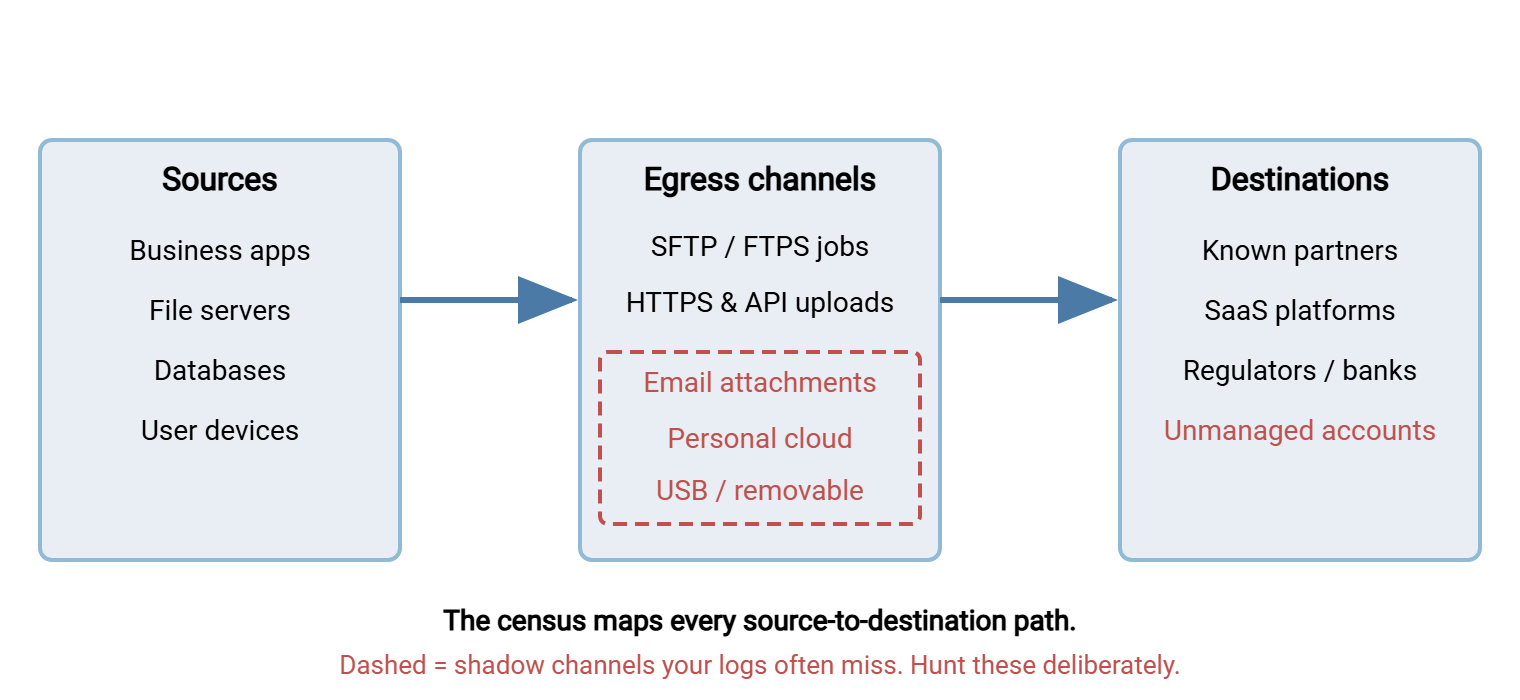
The diagram below shows what the finished picture looks like. Sources are on the left, the channels that carry data out are in the middle, and destinations are on the right. The channels that logs tend to miss are drawn as dashed problem paths.
Responsible Sampling of Content
Step 6 asks you to look at a representative file so you know what a flow actually carries. This is where care matters, because you are about to read data that may be sensitive. Doing it carelessly turns a good-hygiene project into its own privacy problem. A few rules keep it responsible:
- Sample, do not trawl. One representative file per flow tells you the data type. You do not need to read thousands of records; you need to know "this flow carries customer account numbers," which one file reveals.
- Minimize who looks. Keep the census to a named, small group. The point is to reduce exposure, not create a new set of people who have seen everything.
- Get authorization. Looking at production content, even to classify it, should be a sanctioned activity with a manager's sign-off, not something you do quietly. Write down that you have permission.
- Prefer metadata when it is enough. Filenames, folder paths, and the receiving system often tell you the data type without opening anything. A
payroll_exportgoing to the payroll processor needs no file-reading to classify. - Leave a trail. Note that you sampled, when, and why. If a flow is ever disputed, a clean record of a careful classification exercise is worth a great deal.
Handled this way, sampling is a small, bounded, defensible activity. The goal is understanding, not surveillance, and the distinction is worth stating out loud to anyone who asks what you are doing and why.
Lightweight Classification a Small Team Can Finish
Elaborate classification schemes with seven tiers and a taxonomy committee never get finished. A three-bucket scheme does, and three buckets are enough to drive every DLP decision that follows. Tag each flow with one:
| Class | What it covers | If it leaks |
|---|---|---|
| Public | Already published or intended for anyone — brochures, price lists, public releases. | No harm. These flows need almost no control. |
| Internal | Business data not meant for outsiders — internal reports, project files, most operational documents. | Embarrassing or competitively costly. Control the destination. |
| Regulated | Data a law or contract protects — personal, health, or payment information, and anything under a data-sharing agreement. | Reportable incident, fines, breach of contract. Tightest control. |
When in doubt, classify up. A flow marked regulated that turns out to be merely internal costs you a slightly stricter control; the reverse costs you an incident. Once every flow has an owner, a purpose, and a class, you have a register. The register is the deliverable that makes the rest of DLP tractable.
The Egress You'll Miss: Shadow Channels
The census done only from your managed transfer servers will be clean, tidy, and incomplete, because the riskiest egress often avoids those servers entirely. Deliberately go looking for the shadow channels:
- Email attachments. The most common shadow egress by far — a spreadsheet mailed to a personal address "to work on at home," a report forwarded to an outside contact. Our pillar on email attachments covers why this channel leaks and how to wean flows off it.
- Personal cloud storage. Files dropped into a personal sync folder or an unmanaged sharing link leave your control the moment they upload. Proxy and firewall logs are your window into this.
- Removable media. USB drives leave no network log at all. You infer them from endpoint controls or, honestly, from asking people how they move files today.
- Ad-hoc scripts and old automation. The scheduled task a former employee wrote, still faithfully uploading somewhere every night. These are found by auditing scheduled jobs, not by watching traffic.
You will not eliminate shadow channels in the census — you will discover them, which is the whole point. Every shadow flow you surface and write down is one that stops being invisible. Some you will migrate onto a managed path; some you will document and accept with eyes open. Either way, they are now on the list. A known risk you have decided to live with is a completely different thing from a risk you never knew existed. The first is a management decision; the second is the incident report waiting to be written.
Acme's first census turned up a nightly upload to a hosting provider nobody in the room could place. The account belonged to a marketing tool retired two years earlier; the scheduled task that fed it had outlived the tool, the contract, and the person who wrote it. Every night for two years it had exported the product catalog and tried to upload it, and every night the login had failed. The transfer log recorded that faithfully. Nobody read the log, because nothing depended on the task. Nothing had leaked. The task was deleted, and the flow went into the register as retired. The team added a walk through the scheduled jobs to every census after that.
What a Finished Census Buys You
The payoff deserves naming, because the work only continues if people see the return. A completed egress register earns its keep in four concrete ways.
- It answers the questions you dread. When an auditor, a customer, or a regulator asks "what personal data leaves your systems, and to whom?", you have a one-page answer instead of a week of frightened archaeology.
- It makes anomalies visible. Once "normal" egress is written down, abnormal egress stands out. A new destination, a flow that suddenly triples in size, an upload at the wrong hour — you can only notice these against a known baseline. The register is that baseline.
- It sets priorities honestly. With every flow classified, you can point your limited effort at the regulated, high-volume, externally destined flows first. You avoid spreading attention evenly over things that do not matter. This dovetails with the ranking work in transfer threat modeling.
- It turns policy from theory into a checklist. The moment you have a list of real flows, writing a rule for each one becomes a finite, finishable task rather than an abstract debate. Each rule says whether the flow may leave, to whom, and with whose approval.
None of these require a product. They require a list, kept current, that reflects reality. That modest artifact is the highest-leverage thing a small team can produce for data loss prevention, and everything downstream gets easier once it exists. It is, in the end, a spreadsheet, and I mean that as praise.
Turn the Census Into a Living Register
A census done once and filed away decays within months as new flows appear and old ones change. The version that keeps paying off is a short, living egress register — a single sheet, one row per flow. You revisit it on a schedule, the same way a transfer inventory stays alive. Its columns are exactly the fields you gathered:
EGRESS REGISTER (one row per flow)

Flow name | Source | Destination | Channel | Data class | Owner | Approved? | Last reviewed
----------+--------+-------------+---------+------------+-------+-----------+--------------
Nightly AR file | Billing app | Acme Bank SFTP | SFTP | Regulated | J. Ruiz | Yes (contract) | 2xxx-mm-dd
Weekly report   | Reporting  | Partner portal | HTTPS | Internal  | Ops    | Yes         | 2xxx-mm-dd
Ad-hoc export   | Analyst PC | unknown gmail  | Email | UNKNOWN   | ???    | NO - CHASE  | 2xxx-mm-dd
The rows marked UNKNOWN and CHASE are your work queue. Every one you resolve — by finding the owner, confirming the purpose, and approving or shutting down the flow — shrinks your unknown egress. That is measurable progress you can show leadership, and it is the raw material for everything that follows in this series.
With a register in hand, you are ready to act. The next steps are writing the rules in DLP policy before DLP tooling and screening the high-risk flows with pattern-based controls. They include hardening the whole estate structurally in DLP effects without a DLP suite. The census is the foundation all three stand on.
One last piece of encouragement, because this kind of work is easy to keep postponing. The census does not have to be perfect to be useful. A rough first pass that captures your ten biggest flows and two shadow channels is already worth more than the polished document you never start. Write down what you can see today, mark what you cannot, and improve it next quarter. A living, imperfect register beats a perfect one that exists only as a plan, every single time. "The nightly file to the bank, and, uh, some partner uploads" was a first draft. Write the second.
Frequently Asked Questions
How is an egress census different from the file flow census?
Do I need a DLP product to build an egress census?
Isn't reading users' files to classify them a privacy problem?
What counts as a single "flow" versus many events?
How often should I refresh the census?
What if I find an outbound flow nobody can explain?
From the Sysax team: we build secure file transfer software for Windows. Sysax Multi Server is an FTP, FTPS, SFTP, and HTTPS server. Sysax FTP Automation handles scheduled, scripted transfers. Free trials are on the download page.