
DLP Effects Without a DLP Suite
"What is our DLP story?" the new security lead asked. The administrator said "we don't have one," which was modest rather than accurate. Each partner account could read exactly one folder. Regulated files left by one SFTP job with a name check bolted to the front of it. Somebody read the outbound log every Friday. That is a DLP story; it just does not have a logo. The uncomfortable secret of data loss prevention is that most of its benefit comes from architecture, not from a product. A well-structured file-transfer estate leaks very little with no suite installed, because the sensitive data cannot reach the wrong place. A poorly structured one leaks freely no matter how expensive the tool bolted on top. For a small team on a small budget, that is genuinely good news. The highest-value controls are things you can build with what you already own.
This article lays out the structural controls that produce DLP-like effects without a DLP purchase. They are least-privilege egress, dedicated outbound paths, type and naming controls, and a review cadence. The article ends with a checklist you can work through this quarter. It also names the honest signs that you have outgrown the manual approach and a real suite would now pay for itself. This is the pragmatic, do-it-yourself chapter of our Data Loss Prevention series. It assumes you have done the egress census and written an egress policy. Those two steps make everything here targeted rather than guesswork.
Why Structure Beats Scanning
There are two ways to stop data from leaking. You can detect it leaving and react — the scanning model a DLP suite embodies. Or you can prevent it from being able to leave in the first place — the structural model. For a small team, prevention wins on almost every axis that matters.
Prevention is cheaper: a permission setting costs nothing per file, while scanning costs processing and a queue of alerts to read. Prevention is more reliable. A control that makes the wrong action impossible cannot be evaded the way content matching can be evaded by encryption or obfuscation. And prevention scales without headcount. Suppose a regulated dataset can only be reached by one account and can only leave by one channel. Once that is true, it stays that way whether you send ten files a day or ten thousand, with no analyst in the loop. Scanning is not useless — it catches things structure misses — but it is the expensive top layer, not the foundation. Build the foundation first, and you may find the top layer optional.
Remember: a DLP suite mostly detects leaks after the fact. Structural controls prevent them by making the wrong path impossible. Prevention is cheaper, harder to evade, and scales without staff. So it is where a small team should spend its first effort, not last.
Least-Privilege Egress
The earliest and strongest egress control is access itself. An account that cannot read a sensitive dataset cannot leak it, by any channel, ever — no content inspection required. That makes least privilege the cornerstone of budget DLP. Give every account, human and machine, the narrowest access that still lets it do its job.
For transfers this means a few concrete habits. Each partner-facing service account reaches only that partner's data, not the whole share. No shared "everyone" account exists that can read everything and send anywhere. Read-only accounts stay read-only; an account that only needs to fetch files has no business writing or sending. The mechanics of building this — per-partner roots, isolation, effective-permission audits — are the subject of our file server permissions pillar. The mindset behind it, treating every access as something to justify rather than assume, is zero trust for file transfer. Access that was right on the day it was granted drifts as people change roles. So permission creep deserves its own periodic look.
The payoff is that you shrink the problem before any DLP question is even asked. The universe of "data that could leak through this account" becomes small and known, which is exactly the outcome an expensive suite is trying to approximate after the fact. It is easier to have no door than to guard one.
Least privilege also fails safe in a way scanning never can. If a scanner is misconfigured or a rule has a gap, the data flows and you find out later. If a permission is too tight, the worst case is that a legitimate job breaks loudly. In that case, someone widens the access deliberately, with a record of having done so. Erring toward too little access produces a support ticket; erring toward too much produces an incident. For a control you cannot watch every minute, that asymmetry is worth a great deal. It means your mistakes tend toward inconvenience rather than exposure. Inconvenience files a ticket; exposure files a report.
Dedicated Outbound Paths
The second structural control is to give sensitive data one blessed road out and close the others. When regulated data can only leave through a single managed, encrypted, logged channel, an enormous amount of policy enforces itself. There is no need to inspect email for regulated content if regulated content structurally cannot reach the email path. Email, relieved of the duty, will find other ways to be a problem.
Practically, that looks like this. Route each data class to a specific channel — the managed SFTP job, the HTTPS portal. Configure the environment so other paths are unavailable for that class. Block personal webmail and personal cloud storage as destinations for regulated data. Those are the most common shadow-egress routes. Our email attachments pillar covers why they leak and how to wean flows off them. Where your network allows it, allowlist outbound connections to known partner addresses, so an unfamiliar destination is refused rather than merely noticed.
A dedicated path also concentrates your visibility. One channel to watch, log, and secure is far more tractable than a dozen. Every flow you pull onto the blessed road is a flow you can actually see. Every alternative road you close is a category of leak you no longer have to chase. The effort you spend hardening a single channel compounds, because it protects every flow that uses it. By contrast, effort spread across a dozen ad-hoc paths protects each one only a little. Nobody has ever hardened twelve paths evenly. I have tried.
Type and Naming Controls
The third control is cheap, underused, and surprisingly effective: constrain what kind of file may travel each flow, and enforce a naming convention. Most automated flows carry one or two predictable file types with predictable names — settlement_YYYYMMDD.csv, not "whatever someone dropped in the folder." Turning that expectation into an enforced rule catches a whole class of mistakes.
- File-type allowlists. If a flow should only ever carry CSVs, reject the stray PDF or ZIP. An unexpected type is either a mistake or something worth a look — either way, holding it is correct.
- Naming conventions. Enforce the expected name pattern. A file that does not match is flagged before it leaves, which catches the wrong file being placed in the right folder.
- Size sanity checks. A flow whose files are normally a few megabytes suddenly producing a multi-gigabyte file is worth holding. Size is a crude but excellent anomaly signal for a bulk data dump.
- Pre-send pattern screen. On regulated flows, add the content screen from our pattern-based controls article, failing closed on a match.
These checks live naturally in the transfer job's processing steps. In a scheduled tool such as Sysax FTP Automation, the checks live in the pre- and post-processing stages. A type check, a name check, a size check, or a pattern screen runs there before the upload proceeds. You supply the checks as processing logic, and the job refuses to send anything that fails them. None of this is a built-in classifier. It is ordinary validation wired into the pipeline so that the expected file is the only file that ever leaves.
Review Cadence
Structural controls prevent; a review cadence is how you notice what prevention missed and how reality has drifted. It is the human backstop, and it costs nothing but a recurring calendar entry. A workable rhythm for a small team:
- Regularly, read the outbound log. Not every line — scan for the unexpected: new destinations, off-hours sends, volume spikes. The habit of looking is most of the value. Getting these logs captured and centralized is covered in transfer logging and audit.
- Alert on first-seen destinations. A file going somewhere it has never gone before is the single most useful cheap signal you can wire up. It turns "we found out months later" into "we knew that afternoon."
- Periodically, walk the egress register. Confirm each flow still exists, still has an owner, still matches policy. Retire dead flows; document new ones.
The cadence is what keeps a one-time hardening effort from decaying. Estates drift — new partners, new jobs, a script someone added quietly. A light, regular review catches the drift while it is still small. That is the same discipline as keeping the flow documentation current. Skip it and your careful structure slowly becomes fiction. We learned that the slow way, one quietly added script at a time.
Meridian Parts built its first DLP from two things. One was a rule that the supplier outbox accepted only files named like po_YYYYMMDD.csv. The other was a nightly report listing every outbound send with its destination and size. It was mailed to one administrator who read it with the first coffee. For months the report was dull, which is what a good report looks like. Then one morning it showed a held file: a full customer extract, forty times the usual size. A new reporting script had written it into the supplier outbox because two folder paths differed by one word. The name rule had held it, the report had surfaced it, and the script was pointed at the right folder before lunch. Nobody bought anything. The folder rule and the coffee did the whole job.
The Budget-DLP Checklist
Here is the whole approach as a checklist. Work down it, tick what is true, and turn the blanks into your task list. None of it requires a DLP purchase.
BUDGET-DLP CHECKLIST  (no suite required)

LEAST-PRIVILEGE EGRESS
[ ] Each transfer account reaches only its own data
[ ] No shared "everyone" account can read all and send anywhere
[ ] Service accounts are per-job or per-partner, least privilege
[ ] Read-only stays read-only; send rights are granted, not assumed

DEDICATED OUTBOUND PATHS
[ ] Regulated data has ONE approved channel; others are closed to it
[ ] Personal email and personal cloud blocked for regulated data
[ ] Outbound allowlisted to known partner hosts where the network allows

TYPE & NAMING CONTROLS
[ ] Only expected file types leave each flow (allowlist)
[ ] Naming convention enforced; off-pattern names are held
[ ] Size sanity check - a file far larger than normal is held
[ ] Pre-send pattern screen on regulated flows, failing closed

VISIBILITY & REVIEW
[ ] Outbound transfers logged: account, destination, file, size, time
[ ] Logs shipped off the box so they survive it
[ ] First-seen destinations raise an alert
[ ] Egress register walked on a cadence; dead flows retired

GOVERNANCE
[ ] A two-page egress policy exists and has a named owner
[ ] New flows pass approval before their first send
[ ] Someone specifically owns reading the alerts
You will not finish this in a day, and you do not need to. Start with least privilege on your regulated flows, because it removes the most risk per hour spent, then work outward. Every box you tick is a category of leak that becomes structurally harder. The whole list is achievable by one determined administrator over a few weeks (determined is the load-bearing word).
What Each Control Stands In For
These free controls map onto the features a suite sells. Seeing the map tells you what you are actually giving up — and, honestly, how little of it matters for most small estates.
| Budget control | The suite feature it substitutes for |
|---|---|
| Least-privilege egress | Access-based prevention — but structural and always on, not a policy the tool checks. |
| Dedicated outbound paths | Channel control and destination allowlisting. |
| Type, naming, and size controls | File-type and anomaly policies. |
| Pre-send pattern screen | Content inspection for structured data. |
| Log review + first-seen alerts | Egress monitoring and dashboards. |
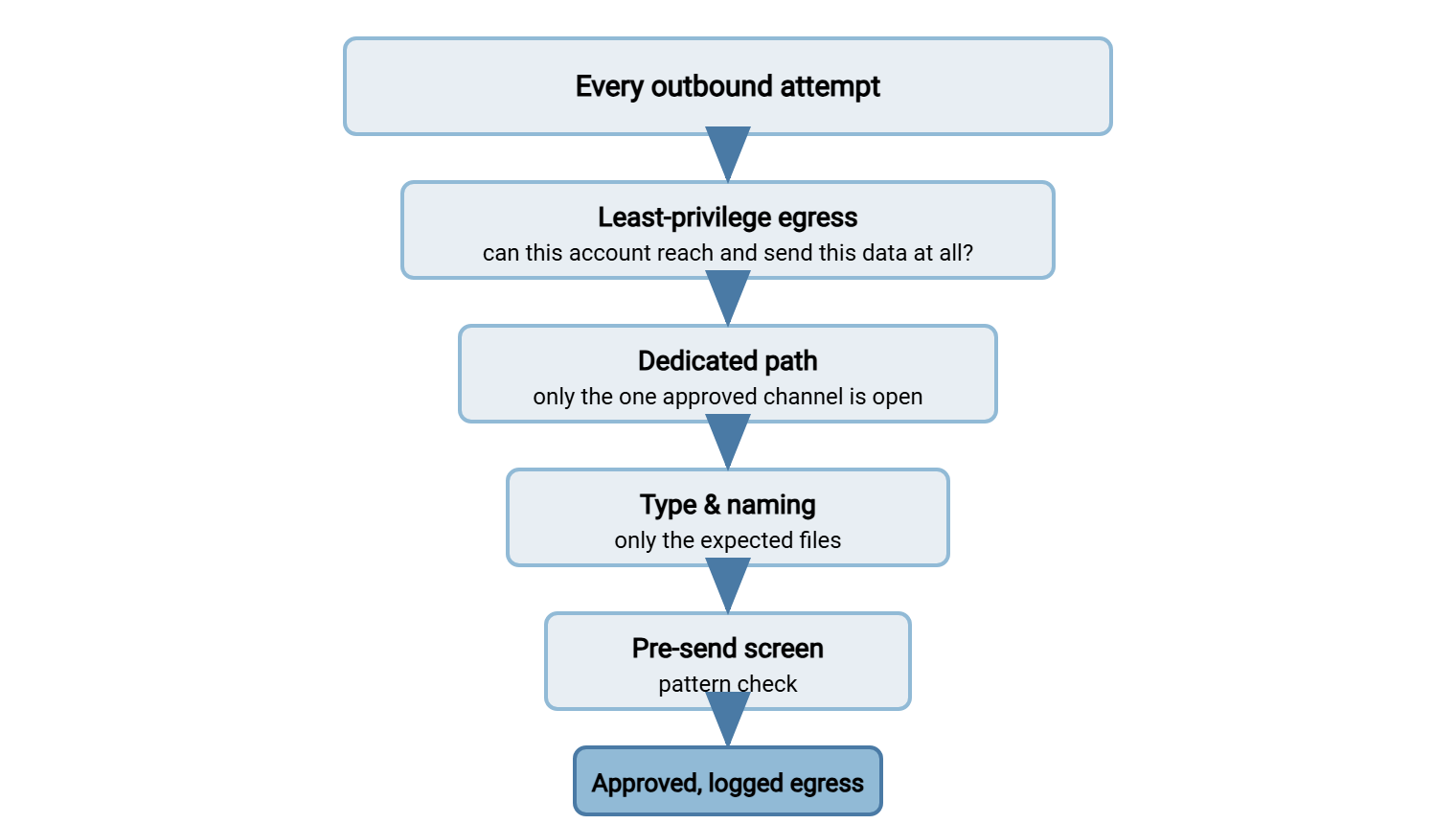
What a suite adds beyond this is mainly scale, breadth of channels (endpoint agents, deep content parsing), and centralized reporting. Real advantages — but advantages that only matter once your estate is big enough to need them, and useless without the structural foundation underneath. The diagram below shows how the budget controls layer into a funnel that narrows every outbound attempt down to approved, logged egress.
A Small Estate That Barely Leaks
Put the controls together and picture the result. A mid-size firm runs perhaps a dozen outbound flows. Each partner-facing job uses its own service account that can read only that partner's outbox — least privilege. Regulated data leaves exclusively over managed SFTP jobs. The firewall refuses outbound connections to anything but the known partner hosts. Personal webmail and cloud storage are blocked as destinations for those systems — dedicated paths. Each job accepts only its expected file type and name pattern, and holds anything unusually large. It runs a Luhn-validated pattern screen on the regulated flows — type, naming, and screening. Every send is logged off-box, and a first-seen destination raises an alert the same day.
Now imagine the accidents this quietly prevents. An analyst drops the wrong file into a partner's outbox — held, because the name does not match. A misconfigured export balloons to ten times its usual size — held, for review. Someone tries to email a regulated spreadsheet to a personal address — the channel is not available to that data, so it never leaves. A script starts uploading to an unfamiliar host — the connection is refused and the attempt is flagged. Not one of these required a DLP suite, an analyst on watch, or a content-scanning license. The estate barely leaks because the leaks have nowhere to go. That is the whole thesis of budget DLP in one picture: make the wrong path impossible, and you rarely have to catch the wrong action. No logo required.
Signs You've Outgrown the Manual Approach
Budget DLP is the right starting point for nearly everyone, but it does have a ceiling. Be honest about when you hit it, because past a certain size the manual approach quietly stops covering the risk. The signs:
- Too many flows to review by hand. When the egress register runs to hundreds of active flows, a human cadence cannot keep up and you need automated monitoring.
- Channels you cannot control structurally. If a lot of sensitive data legitimately moves through email, chat, and web apps by many users, endpoint and network DLP see places your transfer-side controls never will.
- Content you cannot express as a pattern. When "sensitive" means unstructured intellectual property rather than card numbers, you need fingerprinting and classification a suite provides.
- A compliance regime that requires the tooling. Some audits and contracts expect a named DLP capability with reporting. Sometimes the deliverable is the product itself, fairly or not.
Reaching these is not a failure of the budget approach; it is the budget approach having done its job and taken you as far as structure alone can go. And here is the crucial part: a suite bought after you have built the foundation lands on solid ground. Your data is classified, your flows are known, your policy is written — so the tool has something to enforce and tunes quickly. That is the opposite of the tool-first disaster, and it is why this article comes before any purchase, not instead of one. Buying first is the same invoice, arriving a year early and enjoyed less.
Start Where the Risk Is
Most of data loss prevention is not a product; it is a well-run transfer estate. The controls include least privilege on the source, one dedicated road out per data class, and simple checks on type and name and size. They also include a pattern screen where content matters and the habit of reading your own logs. Together these produce the effect a suite promises, at a fraction of the cost. They cannot be evaded the way scanning can. Start with your regulated flows, work the checklist, and let the structure do the heavy lifting.
When a control does hold something back, the response is as important as the control. Handle it with triage and good faith, not accusation — the subject of handling DLP hits without a witch hunt. And keep the foundation honest by revisiting the egress census and policy as your estate changes. Do that, and whether or not you ever buy a suite, your data goes where it is supposed to and nowhere else.
Frequently Asked Questions
Can I really get DLP benefits without buying a DLP product?
Which budget control should I build first?
Where do type, naming, and pattern checks actually run?
Isn't structural prevention just less capable than a real suite?
How do I know when I've outgrown the manual approach?
If I do buy a suite later, is the budget work wasted?
From the Sysax team: we build secure file transfer software for Windows. Sysax Multi Server is an FTP, FTPS, SFTP, and HTTPS server. Sysax FTP Automation handles scheduled, scripted transfers. Free trials are on the download page.