
When DLP Fires: Investigation Without the Witch Hunt
The alert reads: rule account-number matched thousands of rows; sender: reporting-team analyst; destination: not on approved list; action: BLOCKED. It is a quarter past nine on a Tuesday, and your pulse has noticed. What you do in the next few minutes shapes whether this becomes a well-handled non-event, a quiet fix, or a needless disaster. Such a disaster damages a colleague and teaches everyone to fear and route around your controls. The difference is almost entirely discipline: resisting the urge to leap to a conclusion. The tool has already leapt; that is its job. Yours is to walk.
This article is a calm playbook for that moment. The core idea is short enough to hold onto: an alert is a question, not a verdict. Most hits turn out to be false positives or honest mistakes. A few reveal a process to fix, and only rarely is there any malice at all. Handling them well means gathering context before conclusions and having a human conversation instead of an interrogation. It means distinguishing mistake from malice honestly and feeding every lesson back into your rules. This is the closing article of our Data Loss Prevention series. It is the one that determines whether all the earlier work earns trust or resentment.
An Alert Is a Hypothesis, Not a Verdict
The hit may have come from a bought suite or the simple pattern screen you built yourself. Either way, the tool has done exactly one thing: it noticed that something matched a rule. It has not established intent, context, or even that a real problem exists. It has raised a hypothesis — "this might be data leaving where it should not" — and handed it to you to test. The tool is, at this point, very pleased with itself.
Treating the hypothesis as a conclusion is the original sin of DLP response. It leads to confronting someone before you understand the facts, to escalating a false positive to management, to accusations that cannot be walked back. Once you have implied to a colleague that they are a suspect, no amount of "sorry, it was a glitch" fully repairs it. So the first rule is a mindset: the alert bought you a reason to look, nothing more. Everything else in this article is about looking well before you conclude anything.
The tool is built to be sensitive on purpose. A screen tuned to catch the obvious leak will also catch the test file and the sample data. It will catch the sixteen-digit order number that is not a card, and the legitimate flow it was never told about. Sensitivity is the price of catching real problems, and false alarms are not a malfunction — they are the expected exhaust of a working control. The alert that looks most frightening at first glance is, statistically, the one most likely to have a dull explanation once you read the facts. I have opened dozens with my pulse up and closed nearly all of them with a shrug.
Triage First: Gather Context
Before you contact a single person, assemble the facts. Triage is quiet, desk-based work that turns a scary alert into a described situation. Most of what you need is already in your logs. The value of good transfer logging and audit shows up precisely here, when you need to reconstruct exactly what happened. Work this checklist:
DLP HIT - TRIAGE CHECKLIST  (do this BEFORE contacting anyone)

CAPTURE THE FACTS
[ ] Which rule fired, and how confident is that rule?
[ ] What is the file - name, type, size?
[ ] Which account or user sent it?
[ ] Where was it going - a known partner or an unknown destination?
[ ] When did it happen, and is that time normal for this flow?
[ ] Was it BLOCKED or only logged? (Did data actually leave?)

ADD CONTEXT
[ ] Is this a known, approved flow in the egress register?
[ ] Has this rule thrown false positives before?
[ ] Does the volume look like an accident or a bulk dump?
[ ] Is there an obvious innocent explanation from the facts alone?

DECIDE THE NEXT STEP  (a step, NOT a verdict)
[ ] False positive          -> tune, close, note it
[ ] Ambiguous but low-risk   -> a calm, curious conversation
[ ] Serious signs + real loss -> escalate via the AGREED process
                                (do not confront or investigate solo)
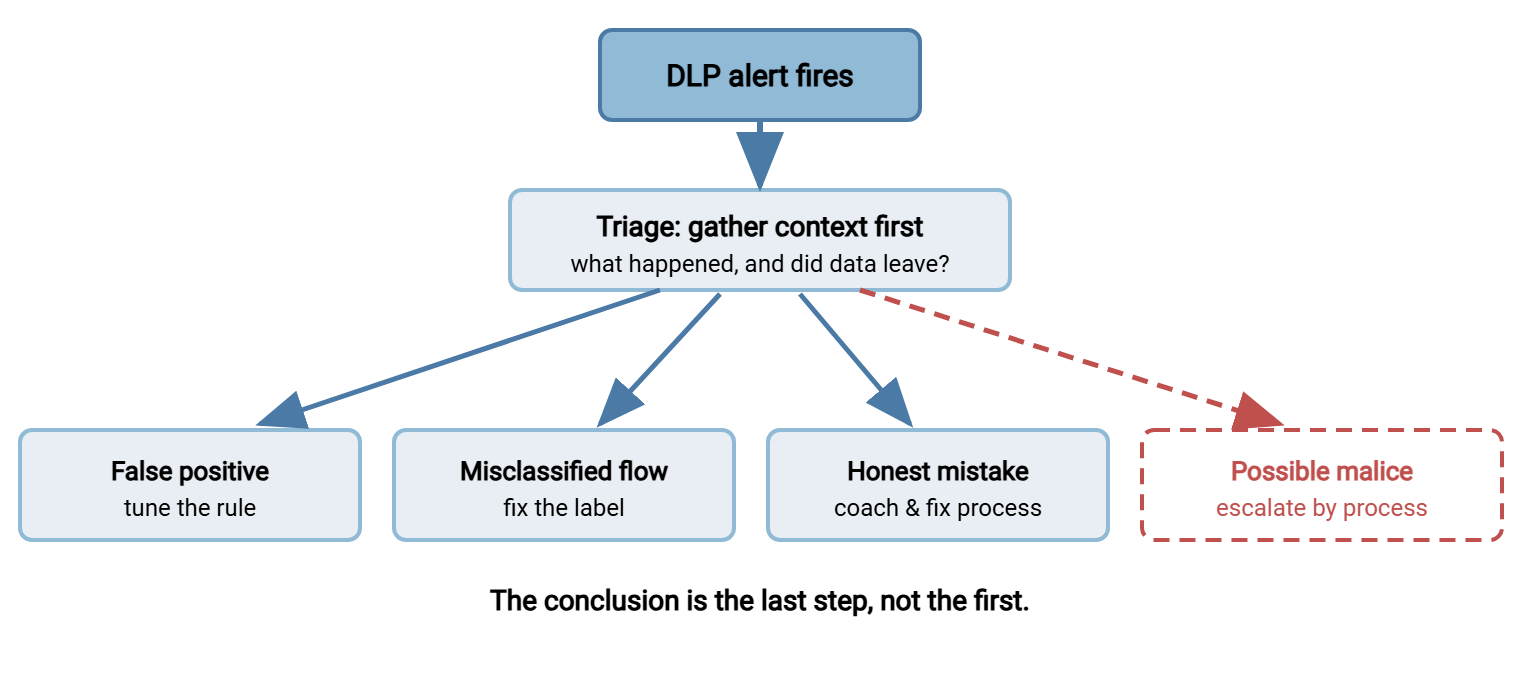
Notice that the last section decides a next step, not a judgment of the person. Triage sorts the alert into "close it," "have a chat," or "invoke the process" — and most alerts sort into the first two. A single stray match on an approved flow that was blocked anyway is a false positive to note and move on from, not a case to open.
Remember: the first question is not "who did this and why?" It is "what actually happened, and did any data even leave?" A blocked transfer on a known flow is a tuning task. Reserve your adrenaline for the rare hit that survives triage with real data loss and no innocent explanation.
Know the Base Rates
Calibration keeps you fair. If you know roughly how often each kind of hit occurs, you will not treat the common case as if it were the rare one. Across most organizations, DLP hits sort into these buckets, in rough order of frequency:
| What the hit turns out to be | How common | First move |
|---|---|---|
| False positive — rule matched harmless data | Very common | Tune the rule; close the alert. |
| Approved-but-mislabeled — a legitimate flow the rule did not know about | Common | Add it to the register; adjust the rule. |
| Honest mistake — wrong file, wrong recipient, good intent | Occasional | A kind conversation; fix the process. |
| Policy gap — allowed by habit, never actually decided | Occasional | Decide the policy; document it. |
| Genuine malice — deliberate exfiltration | Rare | Escalate via the agreed process; do not act alone. |
The shape of that table is the whole point. The bottom row — the one your imagination jumps to when the alert fires — is the least likely. Start every investigation assuming you are somewhere in the top three rows, because you almost always are. Let the facts move you down only if they genuinely demand it. Imagination is a poor triage analyst. The diagram below shows the same logic as a flow: triage sorts the hit, and the conclusion comes last.
A Hit, Start to Finish
Walk one realistic alert through the whole process to see how rarely it needs to become dramatic. The screen fires: an analyst's account tried to send a file matching thousands of customer account numbers to a destination not on the approved list. On its face, alarming.
Triage, quietly, first. The log shows the transfer was blocked — no data left. The file is the usual weekly customer report. The account belongs to a named analyst on the reporting team. The destination is a partner domain that is almost right — one transposed letter away from the approved partner address the report normally goes to. The time is Tuesday mid-morning, exactly when this report always runs. Every fact points the same way: a typo, not a heist.
Now the conversation, framed as help: "The report bounced off our screen this morning because the address looked slightly off — can you check the recipient?" The analyst looks, groans, and confirms a fat-fingered domain. Two minutes. No manager, no accusation, no fear. The fix writes itself: correct the address and confirm the approved partner entry. Then — the real prize — note that a mistyped destination nearly sent regulated data astray. That argues for storing partner addresses in the job configuration rather than retyping them. One blocked alert just bought you a permanent improvement, and a colleague who trusts that security will treat their mistakes as mistakes.
The Human Conversation
When triage lands on "have a chat," how you open it matters more than any tool. On the overwhelming balance of probability, the person on the other side falls into one of two cases. They are a colleague who made a mistake, or did something perfectly legitimate that your rule did not understand. Talk to them that way.
- Assume good faith, out loud. Open with curiosity, not accusation: "Our system flagged a file heading to an address I didn't recognize — can you help me understand what it was?" That invites an explanation; "why did you send customer data outside?" invites defensiveness and fear.
- Ask, do not tell. You are gathering the last piece of context — the human one — that the logs could not give you. Let them explain before you form a view. Half the time the answer is instantly reassuring.
- Keep it private and low-key. A quiet direct message or a desk-side word, not a cc to their manager. If it turns out to be nothing, you have cost no one their dignity.
- Listen for the fixable. Very often the explanation reveals a process problem — a confusing folder, a missing approved channel, an unclear instruction. That is gold: it is a fix that prevents the next ten hits.
People remember how you treated them when the system pointed a finger. Handle the false alarms and honest mistakes with grace and your colleagues become allies who report their own slips early. Handle them like a prosecutor and you teach everyone to hide problems and avoid your controls — which makes you less safe, not more. The prosecutor's office is quiet because nobody calls it.
Mistake or Malice?
Sometimes triage and a conversation do not fully settle it, and you have to weigh whether you are looking at an accident or intent. Do this carefully, because the signals lean but never prove, and treating a lean as proof is exactly how good people get wrongly accused.
Some patterns lean toward mistake: a single file, a plausible recipient (a misspelled partner address), or an immediate "oh no, I'll fix that" when asked. Other such patterns are a first occurrence, normal working hours, and cooperation. Some patterns lean toward concern: repeated attempts after being told to stop, or deliberate evasion such as renaming or encrypting to dodge a screen. Other such patterns are large volumes staged over time, activity timed to an impending departure, and destinations that make no business sense. Insider-risk signals like these are covered in depth under transfer threat modeling, which treats the topic without paranoia.
Two rules keep this honest. First, signals are evidence, not conclusions. Every one of the "concern" patterns has innocent explanations, and a person under suspicion deserves the benefit of them. Second, if the picture becomes serious, stop investigating alone. The moment real data loss meets genuine intent indicators, this stops being an IT triage. It becomes a matter for a pre-agreed process involving the right people — a manager, HR, legal, or security leadership, per your organization's plan. Your job at that point is to preserve the evidence and hand off, not to play detective, confront the person, or dispense consequences yourself.
Remember: you are an administrator, not a prosecutor. Preserve the facts, follow the agreed escalation path, and let the accountable people make judgment calls about intent and consequences. Solo confrontation and vigilante investigation hurt the innocent and can wreck a legitimate case against the guilty.
Feed the Lesson Back Into the Rules
Every hit, whatever it turns out to be, is free intelligence about your controls. The teams that get good at DLP are the ones that close the loop — each alert makes the next month quieter. Route the lesson by category:
- False positive? Tune the rule — add a checksum, a context word, an allowlist entry — using the techniques in pattern-based controls. An untuned rule that keeps crying wolf trains people to ignore real alarms.
- Approved flow the rule missed? Add it to the egress register and adjust the rule so it stops flagging a blessed path. Your register should get more complete with every one of these.
- Honest mistake from a bad process? Fix the process, not the person. If people keep grabbing the wrong file, the folder layout or the naming is the culprit. That calls for a policy and usability fix, the kind discussed in DLP policy before DLP tooling.
- A real gap the rule caught by luck? Close it structurally so you are not relying on detection next time — the least-privilege and dedicated-path moves from DLP effects without a DLP suite.
This is what turns DLP from a nag into a system that genuinely improves. Rules get sharper, the register gets truer, processes get less error-prone, and flows get structurally safer. A hit handled and fed back is worth more than a hit merely closed. Keep a light record of each one and its resolution, too. Over a few months that record becomes both a tuning history and quiet proof, for any auditor who asks. It proves that your control is watched and acted upon rather than blinking unattended. An unvisited control is furniture.
Bluewater Bank's screen held a spreadsheet of account numbers one Thursday, bound for a domain nobody in security recognized. Triage took ten minutes. The file was blocked, the sender was on the finance team, and the destination belonged to the external auditors. The auditors had been engaged the week before by email and never added to the egress register. The sender had done exactly what the audit letter asked. The conversation was one message long and ended with a thank-you in both directions. The register gained an entry. The onboarding checklist gained a line about new external recipients. The rule, which had done its job perfectly, was left alone.
Why the Witch Hunt Backfires
The accusatory reflex is not just unkind; it is counterproductive, a security own-goal rather than a manners problem, and it is worth being blunt about why.
A culture that treats every alert as a manhunt destroys the reporting you depend on. People who fear being hauled up over a mistake stop admitting mistakes. They hide the misdirected file instead of flagging it, and you lose your best early-warning system — your own honest colleagues. That culture also drives shadow IT. When the sanctioned path comes with an interrogation, people invent unsanctioned ones you cannot see. That is the mechanism behind most shadow sharing, which is the exact opposite of what a control should achieve. And it burns trust that does not come back cheaply; a single public false accusation can poison a team's relationship with security for years. The zero trust principle of verifying everything is about systems and access, never about presuming your coworkers are criminals. The technical posture is suspicious so the human one does not have to be.
The organizations that handle data loss best are not the ones with the twitchiest response. They are the ones where an alert triggers a calm, competent, fair process that people actually respect. That is because people know that if they slip, they will be treated as a professional who made an error, not a suspect. That reputation is a security asset, and you build it one well-handled hit at a time. I have watched a team's whole opinion of security turn on a single such conversation.
The Calm That Comes From a Process
When DLP fires, the antidote to panic is process. Triage the facts before you talk to anyone. Calibrate against the base rates, where false positives and honest mistakes dominate and malice is rare. Open the human conversation with good faith. Weigh mistake against malice carefully, and the moment it turns serious, hand off to the agreed path instead of going it alone. Then feed the lesson back so the next month is quieter. None of that requires courage or confrontation — only discipline. Discipline, unlike courage, is available before coffee.
That discipline is what makes every earlier step in this series pay off. The census, the policy, the screening, and the structural controls only earn their keep if the moment they fire is handled with judgment rather than adrenaline. Get that moment right, consistently, and you end up with the rarest thing in security: controls that people trust and help you improve. That is the alternative to controls they resent and evade.
Frequently Asked Questions
What should I do the moment a DLP alert fires?
How do I tell a false positive from a real problem?
How should I approach the person who triggered the alert?
When does a hit become something I escalate?
Why not just treat every alert as a potential insider threat?
How do hits make my controls better over time?
From the Sysax team: we build secure file transfer software for Windows. Sysax Multi Server is an FTP, FTPS, SFTP, and HTTPS server. Sysax FTP Automation handles scheduled, scripted transfers. Free trials are on the download page.