
Keeping Data and Credentials Out of the DMZ
A DMZ protects your interior network by standing between it and the internet. But the protection has a blind spot that catches many teams: whatever you place inside the DMZ stands on the wrong side of the wall. The buffer zone shields everything behind it and nothing within it. Suppose your edge server quietly accumulates six months of partner files and a saved password into the interior. Then the architecture diagram says "contained" while the reality says "jackpot."
This article is about the discipline that makes a DMZ worth having. The discipline keeps the two things attackers actually want — data and credentials — out of the buffer zone. Or it moves them through so quickly that capturing the edge captures almost nothing. We will compare the two ways files can cross the edge, shrink the time they rest there, and walk the credential rules that have no safe exceptions. It is part of our DMZ and gateway architecture series and pairs naturally with the patterns article, which introduced the shapes these rules apply to.
The Edge Assumption: Plan as if the Box Is Already Lost
Everything in this article follows from one planning stance, so let's state it plainly. The edge host is the machine strangers can reach, which makes it the machine most likely to fall. Assume-breach thinking means designing as though that fall has already happened. When you decide what may live on the edge host, imagine an attacker reading its disk, its memory, and its configuration right now. Ask what they would learn.
This is not pessimism; it is arithmetic. The edge host absorbs continuous password guessing, faces every newly discovered flaw in its exposed software, and accepts connections from anyone on earth by design. You defend it vigorously — that is the hardening program covered later in the series — but you never bet the company on the defense holding. The bet you make instead: even a successful attacker finds nothing worth the effort.
Two categories decide whether that bet pays. Data: the business files flowing through. Credentials: anything — passwords, keys, tokens, trust relationships — that opens another door somewhere else. An edge host stripped of both is a dead end for an intruder. An edge host with either is a stepping stone.
Two Ways Files Cross the Edge
Files must traverse the DMZ; the question is how they behave while doing it. There are exactly two answers, and every product and pattern is built from one of them.
Store-and-forward means the file lands on the edge host's disk and pauses. The partner uploads to the edge; some time later, a job on the interior connects outward, collects the file, deletes the edge copy, and delivers it home. The edge briefly stores, then the pull forwards. This is how the standalone DMZ server pattern works.
Streaming pass-through means the file never rests at the edge at all. A gateway in the DMZ terminates the partner's session and relays the data block by block, through memory, to a server in the interior. When the transfer finishes, the edge holds nothing — there was never a file on its disk to steal, only bytes in flight.
The diagram shows both, with the risk point marked. In the top lane there is a moment — the pause on the edge disk — when the file exists in the DMZ. The entire store-and-forward discipline exists to shrink that moment.
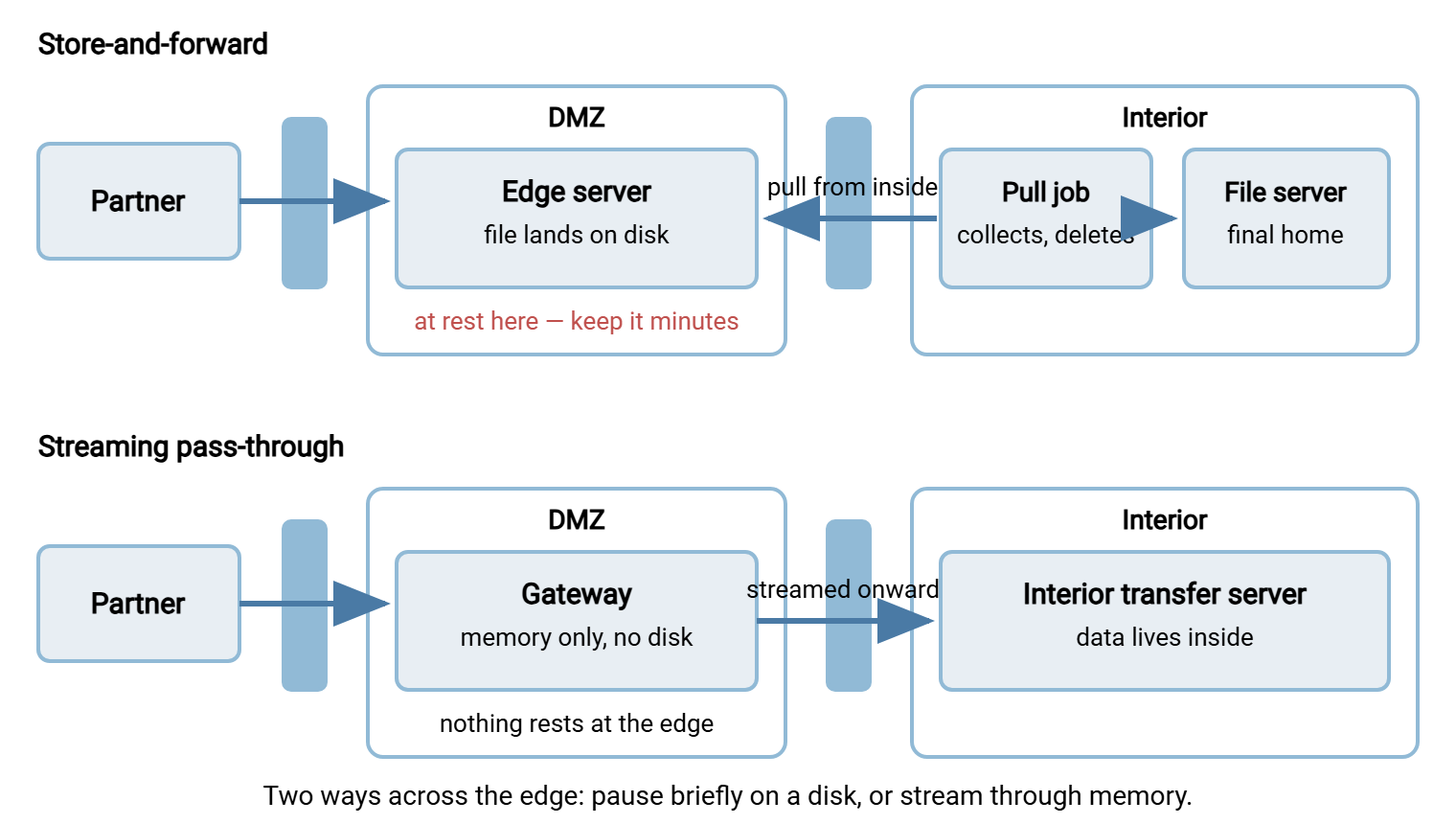
Pass-through is the stronger property and the more expensive one — it needs gateway software, protocol awareness, and a live interior at all times. Store-and-forward is simpler, cheaper, and queues gracefully when the interior is down — but it converts the security question into a time question: how long do files dwell at the edge? For most small and mid-size shops running the standalone pattern, that time question is the whole game, so let's answer it properly.
Shrinking Dwell Time to Minutes
Dwell time is the interval between a file arriving at the edge and the moment no copy of it exists there anymore. Unmanaged, dwell time stretches silently. The pull job runs hourly because that felt reasonable. Failed files never get cleaned up. Someone disables the job during an incident and forgets to re-enable it. A year later the edge disk is an archive of everything every partner ever sent. Managed, dwell time is minutes, and here is what managing it looks like.
Pull often. The interior job that collects arrivals should run every few minutes, not every few hours. Collection is cheap when there is nothing to collect, so frequency costs almost nothing and buys a shorter exposure window. On Windows networks this is a natural fit for a scheduler like Sysax FTP Automation running on an interior machine. It can watch on a tight schedule and collect new arrivals over SFTP or FTPS. It can run a post-transfer step that removes the edge copy after a verified download.
Delete after verified collection, every time. "Copy then delete" must be one atomic habit, and the delete must depend on the copy having succeeded — size or checksum verified. A pull job that copies but leaves the original behind is quietly building the archive you are trying to prevent.
Sweep for stragglers. Failed uploads, partner mistakes, and interrupted transfers leave orphan files that the normal pull may not recognize. A scheduled sweep that flags — and after review, removes — anything older than your dwell limit keeps the edge honest.
Alarm on the oldest file. The single most useful edge metric is the age of the oldest file in the transfer folders. If your dwell target is fifteen minutes and the oldest file is four hours old, the pull job is broken and nobody noticed. That alarm catches every failure mode of the pipeline at once.
The same rules run in reverse for outbound files. Push them to the edge as close to partner pickup time as the workflow allows. Expire anything the partner has not collected within a defined window rather than letting pickup folders grow indefinitely.
Dwell-time discipline - the working rules
1. Pull interval:        minutes, not hours (5-15 min suits most flows)
2. Delete condition:     only after the inward copy is verified
3. Straggler sweep:      daily; flag anything older than the dwell limit
4. Oldest-file alarm:    alert when any edge file exceeds the limit
5. Outbound expiry:      uncollected pickup files removed after N days
6. Incident rule:        if the pull stops, uploads stop mattering less -
                         fix the pull before reopening the tap
Remember: in a store-and-forward DMZ, dwell time is your real exposure. The architecture caps what an attacker can reach; the pull schedule caps how much of your data is sitting there when they arrive.
Credentials: The Rule With No Exceptions
Data theft from the edge is bounded by dwell time. Credential theft is not bounded by anything — a stolen secret keeps working until someone notices, and it works from wherever the attacker likes. That is why the credential rule is absolute: nothing in the DMZ may hold any credential that opens an interior system. Not encrypted, not "just for the migration," not temporarily. The edge must be a place where there is nothing to steal that unlocks anything else.
In practice the rule decomposes into habits:
- No directory membership. The edge host does not join the Windows domain and holds no directory service account. Domain membership plants interior authentication material on the box and requires opening directory ports inward through the inner firewall — two violations in one convenience.
- Local accounts only. Partner logins are accounts local to the transfer software on the edge, each confined to its own folder. A Windows edge server such as Sysax Multi Server maintains its own user list with per-account home folders. That is exactly the shape you want: the account list exists nowhere but the edge, and unlocks nothing but the edge.
- Passwords stored as hashes. The edge service should store verifier hashes of partner passwords, never recoverable plaintext. If your edge software can show you a partner's current password, so can an attacker who owns the box.
- No stored interior secrets of any kind. Keep no saved RDP sessions into interior hosts, no SSH private keys that interior machines accept, and no API tokens for interior services. Keep no backup jobs that authenticate inward and no configuration files with interior connection strings. Each of these has appeared, in the wild, as the reason a DMZ compromise became an interior compromise.
The discipline has a direction, and the direction is the whole point: secrets point outward, never inward. The interior pull job holds a credential for the edge server. That is fine, because that secret lives on a protected interior machine and unlocks only the box you already assume is capturable. The reverse — the edge holding a secret for the interior — hands your attacker the bridge you built the DMZ to deny. One-way trust, enforced without exception, is what makes the inside-initiated pull pattern in the flow-direction article safe end to end.
Keys and Certificates the Edge Must Hold
The edge host cannot be entirely secret-free. To speak SFTP it needs its own host key (the key pair that proves the server's identity to connecting clients). To speak FTPS or HTTPS it needs a TLS certificate and its private key. These are unavoidable — and manageable, under two rules.
Edge material must be unique to the edge. Never reuse an interior server's certificate, a wildcard certificate that also protects interior names, or a host key shared with any other machine. Unique material means a compromise is contained: what leaked is what the edge was, nothing more.
Assume edge material is burned when the edge is. If the edge host is ever compromised, its host key and certificate private key travel with the attacker — enabling convincing impersonation of your transfer service. Rebuilding the box means new keys, a revoked and reissued certificate, and partners notified of the new host key fingerprint. Because the material was unique, the rebuild touches nothing else you run.
Logs Are Data Too
One category slips past most edge-contents reviews: the logs. A transfer log is metadata about your business. It shows which partners you work with, what the files are called, how big they are, when they move, and which addresses connect. Six months of logs on an edge host tells an attacker who your customers are and when your payroll runs. That holds even if every actual file was long since swept. And logs kept only at the edge have a second failure: the first act of a competent intruder is editing them. So the copy on the compromised box is exactly the copy you cannot trust.
The rule follows the same shape as everything else in this article: logs are generated at the edge but do not live there. Ship each event off the box to a collector as it happens, and let local copies rotate away quickly. They are a debugging convenience, not the record. The mechanics of shipping, retention, and making logs audit-worthy fill our transfer logging and audit series. The edge-specific alarms worth wiring up are in the DMZ hardening article.
When Even Minutes Are Too Long
Some file classes are too sensitive to rest in a DMZ at all — payroll batches, medical records, anything a regulator or contract says must never sit in a semi-trusted zone. You have two honest options, and they compose.
The architectural option is streaming pass-through: adopt the gateway pattern from the patterns article for that lane, so the sensitive flow crosses the edge without landing. The cryptographic option is file-level encryption. The sender encrypts the file itself — OpenPGP is the usual tool — before it leaves their interior. The file is decrypted only after reaching yours. Then whatever dwells at the edge is ciphertext, unreadable to an attacker who steals it. Belt and suspenders is a respectable look for a payroll file: encrypted content, streamed through, decrypted inside.
The Edge-Contents Test
Everything above compresses into a checklist you can run against your own edge host this week. Anything in the left column is fine; one item from the right column is a finding.
MAY exist on the DMZ transfer host          MUST NOT exist there
------------------------------------        ------------------------------------
Transfer service + minimal OS                Domain membership or directory accounts
Local partner accounts, hashed passwords     Any credential that opens an interior box
Files younger than the dwell limit           Files older than the dwell limit
Edge-unique host key and TLS key             Keys or certs shared with the interior
Logs in transit to an off-box collector      The only copy of any log
Config for THIS box's service                Interior hostnames, shares, or secrets
                                             Backups or archives of anything
Run the test by walking the machine as an attacker would: open the file system, the service configuration, the credential stores, the scheduled tasks. Every discovery should be either disposable or already known to be public. The moment you find something whose theft would hurt beyond this one box, you have found this quarter's most valuable cleanup task. The follow-on habit — monitoring that the clean state stays clean — belongs to hardening and watching the DMZ transfer host.
The Discipline in One Paragraph
Treat the edge host as a room you have already lost. Files may pass through the room but never live there. Minutes of dwell are enforced by a frequent inside-initiated pull, verified deletes, sweeps, and an oldest-file alarm. No secret in the room may open any other room: local accounts only, hashed passwords, no domain join, no interior keys, unique edge-only certificates. Secrets point outward, never inward. Sensitive lanes stream through or travel encrypted. An attacker who captures a box run this way gets a short-lived snapshot of in-flight traffic and a list of accounts that unlock nothing else. That is a poor return on a hard break-in, which is precisely the outcome the DMZ was built to offer. This thinking — grant nothing implicitly, verify every path — is also the on-ramp to our zero trust file transfer series. The series extends it beyond the perimeter.
Frequently Asked Questions
Isn't a file sitting at the edge for ten minutes still a risk?
Why is joining the DMZ server to the domain such a problem?
The pull job needs a password for the edge server. Doesn't that break the credential rule?
Can I keep an archive of exchanged files for compliance?
What should I do first if I find old files and a saved interior password on our edge server today?
If a gateway keeps files in memory only, can an attacker still see them?
From the Sysax team: we build secure file transfer software for Windows. Sysax Multi Server is an FTP, FTPS, SFTP, and HTTPS server. Sysax FTP Automation handles scheduled, scripted transfers. Free trials are on the download page.