
DMZ Patterns for File Exchange, Simple to Advanced
Once you accept that internet-facing file transfer needs a buffer between strangers and your interior network, the next question is practical. What shape should that buffer take? Nearly every real-world build is one of three recognizable patterns. It may be a plain port forward or a standalone transfer server in the DMZ. Or it may be a reverse gateway that relays sessions without storing anything at the edge. The patterns differ enormously in what an attacker gains by compromising the exposed piece, and in how much money and effort they demand from you.
This article walks through the three patterns one at a time, with a diagram and an honest assessment of each. Then it puts them side by side so you can choose by size and risk rather than by habit. It is part of our DMZ and gateway architecture series. If the phrase "blast radius" is new to you, read why file transfer services live in a DMZ first. This article builds directly on it.
The Job Every Pattern Must Do
Strip away the details and every pattern is solving the same problem. Outsiders must be able to upload and download files. You must limit what their access — or an attacker riding on it — can reach. A quick refresher on the vocabulary, because all three diagrams use it. The DMZ is a small buffer network between the internet and your interior, with a firewall boundary on each side. The edge host is whatever machine in that buffer accepts connections from strangers. The interior is everything you actually care about: file servers, directories, databases, people.
The three patterns place the transfer service differently relative to those zones:
- Pattern 1 — port forward: no buffer at all. The firewall forwards the transfer port straight to a server on the interior network.
- Pattern 2 — standalone DMZ server: a complete transfer server lives in the DMZ, files pause there briefly, and an interior job pulls them inward.
- Pattern 3 — reverse gateway: a relay lives in the DMZ, stores nothing, and forwards each session to a real transfer server that stays inside.
Each is a legitimate engineering choice in the right circumstances — including, for some very small shops, the first one, provided its risks are understood and compensated. Let's take them in order.
Here is a note on reading the diagrams, here and throughout the series. Solid blue arrows are connections the design deliberately allows, drawn from the side that initiates them. Red dashed arrows are paths the design blocks or that exist only as uncontained risk. The direction of each arrow matters as much as its presence — a theme that gets its own article later in the series.
Pattern 1: The Port Forward
The port forward is where nearly everyone starts, because it is one rule on the firewall you already own. The firewall watches the internet-facing address. Anything arriving on the transfer port — say port 22 for SFTP — is passed through to the transfer server's private address on the LAN. Partners connect, transfers work, and the whole thing took ten minutes.
The diagram shows what those ten minutes bought. The exposed server sits on the same network as everything else you run.
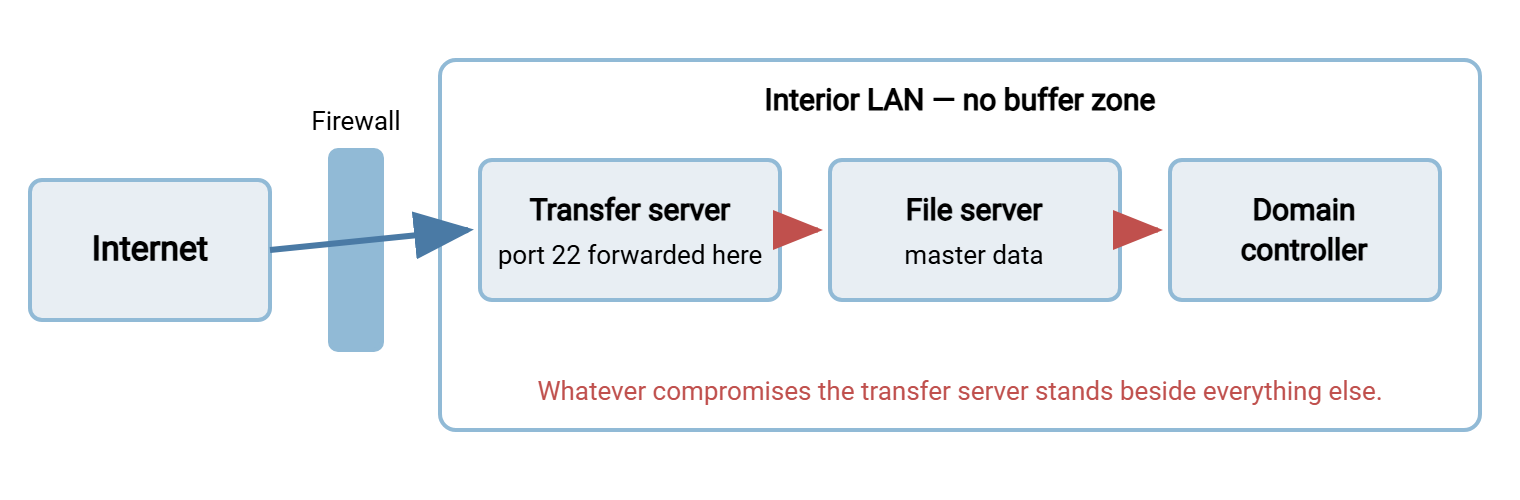
Call this what it is: not a DMZ pattern but the absence of one. The exposed server usually holds partner credentials, accumulates transferred files on its disk, and — worst of all — sits with unrestricted reach to every interior system. Compromise it and the attacker has skipped the perimeter entirely.
Almost nobody chooses this pattern deliberately; it accretes. A one-off exchange with a single partner became permanent, and the "temporary" forward was never revisited. Three years later the box is carrying a dozen partner flows nobody fully remembers. That history matters, because the fix is rarely urgent-feeling — the setup works every day right up until the day it becomes the incident report.
Is it ever acceptable? Honestly: sometimes, briefly, at the small end. A shop with one server, no sensitive data flowing, strong authentication, aggressive patching, and a plan to grow out of it is taking a measured risk. But the compensations are doing all the work, and the pattern gives you nothing to contain a failure. If this diagram is your network, your highest-value next read is DMZ on a budget, because real separation is cheaper than most people assume.
Pattern 2: The Standalone DMZ Server
The standalone pattern is the workhorse of mid-size file exchange. A complete transfer server — its own accounts, folders, and logging — runs on an edge host in the DMZ. Partners connect to it exactly as they would in pattern 1; from the outside, nothing looks different. The difference is everything around it: the outer firewall admits only the transfer ports, and the inner firewall admits nothing from the DMZ at all.
Files arriving from partners land on the edge host's disk and pause there. On a short schedule, a job running on an interior machine connects outward to the edge host. It collects the new arrivals, deletes them from the edge, and files them where the business needs them. Outbound files ride the mirror image: an interior job pushes them out to the edge, where partners collect. This is called store-and-forward — the file is stored briefly at the edge, then forwarded by a second hop.
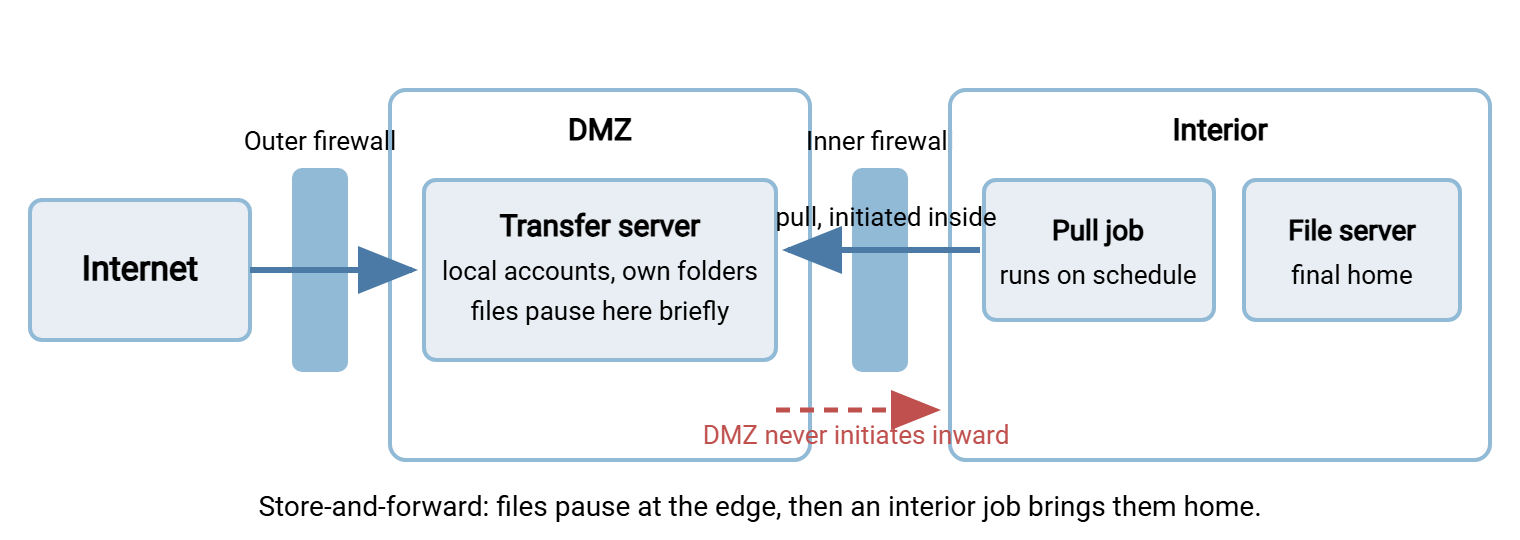
The strengths are substantial. The pattern is simple enough to run without specialist staff. It is resilient: if the interior side is down for maintenance, partners can still upload, and the backlog drains when the pull job resumes. Partner-facing behavior is completely standard, so nothing special is asked of the other side. And a compromise of the edge host yields only what the edge holds. If you run it with discipline, that is a handful of local partner accounts and whatever files arrived in the last few minutes.
The weaknesses are the mirror of that "if." Files do touch the edge disk, so dwell time must be kept short and the cleanup honest. That is the discipline described in keeping data and credentials out of the DMZ. There is a second hop, so files reach the interior minutes after arrival rather than instantly. And it is one more server to patch and watch. On Windows networks, the edge role is commonly filled by a transfer server product such as Sysax Multi Server. It provides SFTP, FTPS, and HTTPS on one box with per-account folders and activity logging. The interior pull runs on a scheduler such as Sysax FTP Automation from a machine inside. The two never share credentials: the interior knows how to log into the edge, never the reverse.
Pattern 3: The Reverse Gateway
The third pattern removes even the brief pause at the edge. A reverse gateway — a specialized relay, sometimes called a reverse proxy when it speaks web protocols — lives in the DMZ. It terminates each partner connection: the partner's TLS or SSH session ends at the gateway. The gateway authenticates or forwards the authentication. Then it opens its own connection to the real transfer server sitting safely in the interior. Every block of file data streams through the gateway's memory and onward. Nothing is written to an edge disk, and no partner ever holds a network session that reaches the interior directly.
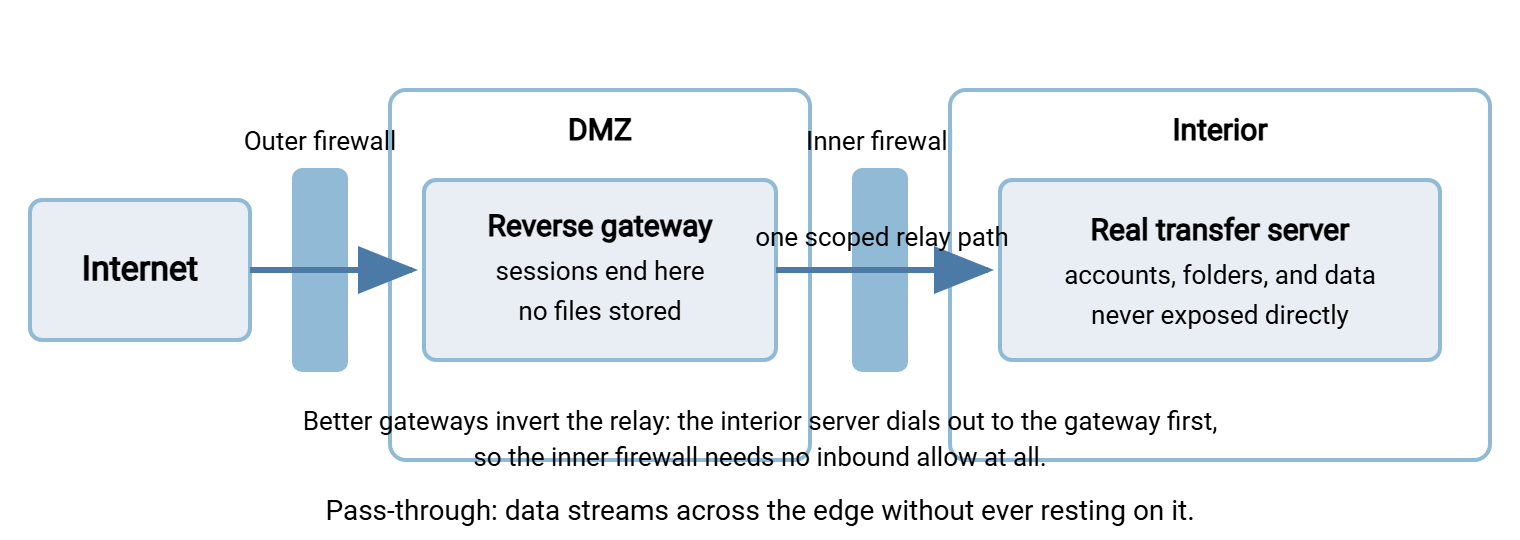
The security win is obvious: capture the gateway and there are no stored files to steal, and — in a well-built deployment — no reusable credentials either. But be precise about the cost, because the diagram hides a subtlety. The gateway must talk to the interior server. The naive way to allow that is an inner-firewall rule permitting the gateway to connect inward on one port. That is a narrow, single-destination exception to the "nothing inbound from the DMZ" rule. It is vastly better than a flat network, but a real exception that must be scoped and monitored. More sophisticated gateway designs invert the arrow. The interior server establishes an outbound control channel to the gateway and holds it open. Sessions ride back across it, and the inner firewall keeps its perfect record of zero inbound allows. When you evaluate gateway products, this is the question to ask first.
There are other honest costs. A protocol-aware relay is more complex than a file server. FTP and FTPS relaying in particular is fussy. Data connections and passive ports must be handled by something that understands the protocol. That is the same machinery discussed in FTP through load balancers and proxies. Gateway products sit at the expensive end of the transfer market. This pattern earns its keep in regulated industries, at high partner counts, and wherever policy simply forbids business data at rest in a DMZ.
Two configuration habits make the standalone pattern dramatically safer in practice. First, every partner account on the edge is local to the transfer software — not a directory account — and is locked into its own folder. So one leaked partner password exposes one folder, not the server. Second, the edge host authenticates nobody and nothing toward the interior. The pull job inside holds a credential for the edge, while the edge holds no credential for anything. If those two habits sound like the whole trick, they nearly are, and they cost nothing but discipline.
Side by Side: What a Compromise Reaches
The clearest way to compare the patterns is to ask the assume-breach question of each: if the exposed piece falls, what does the attacker hold?
| Question | 1. Port forward | 2. Standalone DMZ server | 3. Reverse gateway |
|---|---|---|---|
| What the exposed box can reach | The whole interior | Nothing inward | One scoped relay path, or nothing if inverted |
| Files at rest at the edge | Yes — and it is the interior | Briefly, if dwell is disciplined | No |
| Partner credentials at the edge | Yes, on an interior box | Yes — local, edge-only accounts | Minimal or none |
| Cost and complexity | Lowest | Moderate — one extra host and a pull job | Highest — specialized software and skills |
| Survives interior downtime | No | Yes — edge queues uploads | No — relay needs the interior live |
| Typical fit | Stopgap at the very small end | Most small and mid-size exchanges | Regulated or high-volume environments |
Notice a subtlety in the middle column: the standalone server queues uploads while the interior is down, which the gateway cannot do. This is a rare case where the cheaper pattern is operationally more robust. Architecture choices are tradeoffs all the way down, which is why "advanced" should never be read as "always better."
Choosing by Size and Risk
The right pattern falls out of a handful of questions about your data, your partners, and your team. Work through this list honestly:
Choosing a DMZ pattern - six questions
1. How sensitive is the data in flight?     regulated/PII -> lean pattern 3
2. Could you tolerate files resting minutes
   at the edge if it is swept and watched?  yes -> pattern 2 is enough
3. How many partners connect?               a handful -> 2; hundreds -> 3
4. Who runs this? one generalist admin?     favor 2 - it fails simply
5. Must uploads keep working during
   interior maintenance windows?            yes -> favor 2 (edge queues)
6. Is there budget for gateway software
   and the skills to operate it?            no -> a disciplined 2 beats a sloppy 3
For most readers of this series — a small-to-mid-size shop, a generalist admin, a moderate partner list — the answers converge on pattern 2. That means a hardened standalone server in a real DMZ, short dwell times, an inside-initiated pull, and logs shipped off the edge. It delivers most of the gateway's containment at a fraction of its complexity, and every part of it can be built from ordinary components you already understand.
Move toward pattern 3 when a regulator or customer contract says data must never rest in the DMZ. Also move toward it when partner counts grow into the hundreds, or when you need central policy across many internal endpoints. Move away from pattern 1 as soon as you can move anywhere at all. If you are stuck with it for now, compensate with strong keys or passwords, aggressive patching, tight per-account folder locks, and honest monitoring. Then plan the migration.
Remember: a disciplined pattern 2 beats a sloppy pattern 3. The attacker does not care how advanced your architecture diagram looks — only what the exposed box actually reaches, holds, and leaks when it falls.
Details That Decide Success in Every Pattern
Whichever shape you pick, four cross-cutting details do more for security than the choice of pattern itself.
Direction of initiation. In patterns 2 and 3 the entire benefit rests on connections crossing the inner boundary from the safe side. The per-leg rules say what each boundary should allow, in which direction, and nothing else. They are worked through with copyable rule sets in designing inbound vs outbound flows.
Protocol and port surface. SFTP exposes one port at the edge. FTPS exposes its control port plus a passive data range that the outer firewall must admit and the server must publish correctly. The fewer holes in the outer wall, the easier every audit becomes. The comparison is laid out in the firewall's view of the protocols. The passive-range mechanics are in configuring passive port ranges.
Logging off the edge. Every pattern puts some machine where strangers can hammer it. That machine's logs must leave it immediately, so a successful attacker cannot rewrite history. Our transfer logging and audit series covers the how.
Hardening the exposed piece. Gateway or server, the exposed software must be minimal, patched, and configured with assume-breach paranoia. The DMZ-specific checklist comes later in this series. The general program lives in our hardening transfer servers pillar.
Name Your Pattern, Then Improve It
Look at your own network and name what you have. A forwarded port into the LAN is pattern 1 — plan your exit. A transfer server in a buffer zone with an interior pull is pattern 2. Tighten dwell time, direction rules, and monitoring until a compromise of the edge would be a bad afternoon instead of a bad quarter. A relay that keeps files off the edge entirely is pattern 3. Verify the relay path is scoped or inverted, because a gateway with a wide-open inner allow is pattern 1 wearing a suit.
The next articles in the series deepen each piece: keeping data and credentials out of the DMZ for the discipline that makes pattern 2 safe, and inbound vs outbound flow design for the firewall rules every pattern stands on.
Frequently Asked Questions
Is a port forward ever an acceptable long-term design?
Does the standalone DMZ server pattern slow transfers down?
Is a reverse gateway the same thing as a load balancer?
Which pattern does a compliance auditor expect to see?
Can I combine the patterns?
Do these patterns apply to HTTPS file exchange too?
From the Sysax team: we build secure file transfer software for Windows. Sysax Multi Server is an FTP, FTPS, SFTP, and HTTPS server. Sysax FTP Automation handles scheduled, scripted transfers. Free trials are on the download page.