
Hardening and Watching the DMZ Transfer Host
The DMZ transfer host is the one machine in your estate that you expect to be attacked. It accepts connections from anyone on earth, around the clock, because that is its job. Most hardening advice is written for servers that shouldn't be exposed; this machine is exposed on purpose, which changes the posture entirely. You are not building a box that cannot fall. You are building a box that is hard to take, worth almost nothing once taken, and impossible to take quietly.
This article is the practical program for that posture. It covers shrinking the machine until there is little to attack and stripping it of anything worth stealing. It covers shipping every log off the box the moment it is written. It covers wiring alarms to the handful of paths that reveal a breach in minutes instead of months. It is part of our DMZ and gateway architecture series and assumes the zone layout and flow rules from the earlier articles. The checklist near the end ties the whole series together in one page you can print.
Assume Breach, Then Work Backward
Assume-breach is a design stance, not a mood. It means you plan the edge host's configuration as though a capable attacker will eventually run code on it. You judge every decision by three questions. How much attack surface does this add — does it give the intruder a way in? How much value does this add — does it give the intruder something worth taking? How much noise would misuse make — would we see it happen?
Those three questions sort everything that follows into three streams of work. Shrink the machine so the way in is narrow. Strip it so the win is small. Watch it so the timeline is short. A DMZ host that scores well on all three converts the worst day into a contained, well-documented afternoon. That worst day is a successful compromise of your internet-facing server. The attacker lands in a nearly empty room, finds no doors and no valuables, and trips an alarm on the way in.
None of this replaces the general server hardening program — OS baselines, account policy, patch discipline — covered in our hardening transfer servers series. This article is the DMZ-specific delta: the extra paranoia the exposed position demands.
Shrink the Box
Attack surface is everything on the machine that could be a way in: listening services, installed software, enabled features, privileged accounts. On an interior server, extra software is clutter. On the edge host, it is unlocked windows in a building you have told the world about. The shrinking rules:
One job per box. The edge host runs the transfer service. Not the company intranet, not a test database, not someone's convenient script host. Every additional role multiplies ways in and reasons for more firewall holes — and gives an intruder more to work with once inside.
Minimal install, then subtraction. Start from the smallest OS footprint you can operate. Then remove or disable everything the transfer service does not need: extra network services, file sharing, unneeded management agents. No browsers, no mail clients, no office software — those exist to open content from strangers, which is precisely what this machine must never do.
Write down every listening port. Run a listening-port inventory (netstat or its modern equivalents). Record what should be listening and why: the transfer ports, the management port, and little else. That written inventory becomes your drift detector. Any port that appears later without a matching change is either a mistake or an intruder, and both deserve immediate attention.
Least privilege for the service itself. The transfer service should run as a low-privilege local account that owns its folders and nothing else. If the service is ever exploited, the attacker inherits the service's permissions — make that inheritance as poor as possible.
Host firewall as a second wall. Configure the host's own firewall to mirror the per-leg network rules from the flow-direction article. Allow inbound only on service and management ports, outbound only to the named log path. Now a mistake on the network firewall no longer silently exposes the host — two independent walls must fail the same way at the same time.
Guard the management path hardest of all. The admin session is the one legitimate way to fully control this box, which makes it the attacker's favorite target. Accept management connections only from named interior hosts — ideally a single jump host — never from the internet. Put multi-factor authentication on that path. An admin password alone, phished or reused, should not be enough to own your edge.
Strip It of Value
The second stream is the discipline from keeping data and credentials out of the DMZ, compressed here because it is half of what "hardened" means at the edge. The host is not domain-joined. Partner accounts are local to the transfer service, one per partner, each jailed to its own folder. No password, key, token, or connection string on the box opens anything in the interior — secrets point outward, never inward. Files dwell for minutes under a pull-and-delete schedule with a straggler sweep. The host key and TLS certificate are unique to this box, so losing it burns nothing else.
The transfer service's own configuration is part of stripping, too. Enable only the protocols you actually offer — if partners use SFTP, turn the others off and shrink both the attack surface and the firewall rules. Enforce strong authentication and lockouts. Disable anonymous access unless a deliberate, reviewed decision created it. On a Windows edge host running Sysax Multi Server, this shape is straightforward to express. Each partner gets a local account confined to its home folder. Each protocol is enabled or disabled per your actual offering. The built-in activity logging records every session and transfer — which feeds directly into the next section.
Remember: hardening the edge host is only half configuration — the other half is subtraction. Every service you remove, credential you refuse to store, and file you sweep away is a thing the attacker cannot use, steal, or read. That holds no matter how good their exploit is.
Make Every Move Visible
Now the third stream, and the one most often shortchanged: visibility. A hardened but unwatched edge host fails silently — the breach is discovered months later, from the outside, which is the most expensive way to learn anything. The edge host must produce a complete record of its own activity, and that record must leave the machine immediately.
Record, at minimum, every authentication attempt, success and failure, with the source address and account. Record every upload and download with account, file name, size, and result. Record every administrative logon, every configuration change, and every service start and stop. Transfer server software generates most of this natively; the OS supplies the rest. What matters is that the events exist and are structured enough to alert on. The full craft of reading and retaining them lives in our transfer logging and audit series.
Concretely, the stream arriving at your collector should read something like this — terse, structured, and complete enough that each line can drive an alarm on its own:
auth  FAIL   203.0.113.77   acct=acme-inc    reason=bad-password   (14th in 60s -> alarm)
auth  OK     198.51.100.9   acct=north-mfg
xfer  UPLOAD 198.51.100.9   acct=north-mfg   file=orders_batch7.csv  bytes=48211  result=ok
admin LOGON  10.20.0.15     acct=edgeadmin   src=jump-host           window=ok
cfg   CHANGE acct=edgeadmin item=passive-range               change-record=present
Two supporting details make streams like this trustworthy. Keep the edge host's clock synchronized from an approved time source, because alarms and investigations both live or die on accurate timestamps. And resist the urge to log less to save space — storage is cheap next to the cost of a question you cannot answer after an incident.
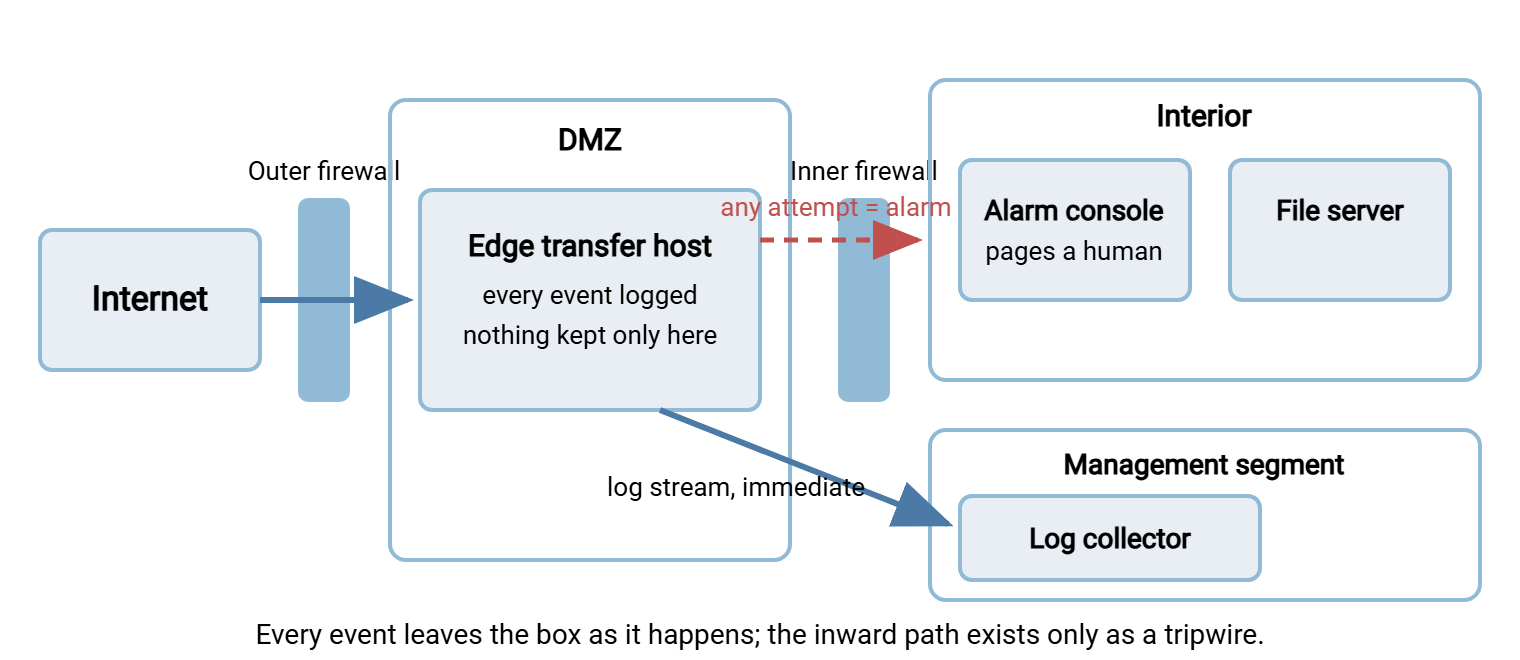
Ship logs off-box as events occur — not nightly, not hourly. The reason is blunt: a competent intruder's first act is editing the local logs. So the copy on a compromised host is exactly the copy you cannot trust. Events streamed to a collector at write time are beyond the intruder's reach. Whatever happens to the edge afterward, the record of how it happened survives. That off-box copy is the difference between an incident you can reconstruct and one you can only guess about.
The diagram shows the visibility posture. Everything the host does streams outward to a collector in a protected segment. The one path that should never carry traffic — edge toward interior — is wired as an alarm rather than a mere log line.
Alarms on the Paths That Matter
Collected logs are potential; alarms are kinetic. The art is choosing a short list of conditions that almost never fire falsely and almost always mean trouble. The edge host's position makes this easier than usual, because several things about it should never happen — and never-events make perfect tripwires.
- Any connection attempt from the DMZ toward the interior. The inner firewall denies these anyway; the alarm is the point. Legitimate DMZ hosts never initiate inward, so a single denied packet on that leg means misconfiguration or an intruder probing for doors. Highest severity, page a human.
- Any outbound attempt from the edge to the internet beyond the named exceptions. Same logic: the edge dials out to nobody, so an attempt is an attacker fetching tools or exfiltrating.
- Authentication-failure bursts. A steady trickle of failures is internet weather. A burst against many accounts, or a spray across accounts from one source, is an attack in progress worth watching in real time.
- Administrative logon outside expected hours or sources. Admin sessions come from named interior hosts during working windows. Anything else is worth a page.
- A new listening port, new local account, or configuration change with no corresponding change record. Compare against your written inventory; the diff is the alert.
- Oldest-file age beyond the dwell limit. The data-discipline alarm from the store-and-forward pattern: if files are aging at the edge, the pull pipeline is broken and your exposure is growing quietly.
- Silence. If the collector stops hearing from the edge host — logs stopped flowing, heartbeat missed — treat it as an incident until proven otherwise. Attackers who cannot edit shipped logs will try to stop the shipping.
Seven alarms, none exotic, all wirable with a basic syslog collector and its alerting rules. Together they cover the attacker's whole playbook against this host. The moves are: get in (auth bursts), move (inward attempts), take (outbound attempts), persist (new ports and accounts), and hide (silence).
Then test them, because an alarm that has never fired is a hypothesis. From the edge host, attempt one connection toward an interior address and confirm the page arrives. Stop the log forwarder for ten minutes and confirm the silence alarm trips. Fail a login fifteen times and watch the burst rule catch it. Fifteen minutes of deliberate noise, run quarterly, converts "we should be alerted" into "we were" — and it doubles as training for whoever answers the page.
The DMZ-Host Checklist
Everything above, in a form you can print, hand to a colleague, or run down quarterly. It doubles as a build sheet for the next edge host you stand up.
DMZ TRANSFER HOST CHECKLIST

Build small
[ ] One job: the transfer service, nothing else on the box
[ ] Minimal OS install; unneeded services disabled or removed
[ ] No browsers, mail clients, or productivity software
[ ] Listening-port inventory written down, each port justified
[ ] Service runs as a low-privilege local account
[ ] Host firewall mirrors the network per-leg rules

Strip value
[ ] Not domain-joined; local per-partner accounts, folder-jailed
[ ] No interior passwords, keys, tokens, or hostnames on disk
[ ] Unused protocols disabled in the transfer service
[ ] Host key and TLS certificate unique to this box
[ ] Dwell limit set; pull-and-delete and straggler sweep scheduled

Watch everything
[ ] Auth successes and failures logged with source address
[ ] Every upload and download logged: account, file, size, result
[ ] Admin logons, config changes, service restarts logged
[ ] All logs shipped off-box as events occur
[ ] Seven alarms wired: inward attempt, outbound attempt, auth burst,
    odd admin logon, unexplained change, stale files, log silence

Operate like it's disposable
[ ] Documented build or image can recreate the box from scratch
[ ] Patch cadence defined; the exposed service patched first
[ ] Quarterly external port scan compared against the inventory
[ ] Quarterly direction tests run FROM this host (all must fail inward)
[ ] Incident plan written: isolate, preserve off-box logs, rebuild, rotate keys
Operate It Like It's Disposable
The final habit is treating the edge host as cattle, not a pet. Keep a documented build — a scripted install or a maintained image — that can recreate the machine from nothing in an hour. This changes your options everywhere. Patching is less scary because a botched update means a rebuild. Drift is detectable because there is a definition to diff against. Compromise response becomes decisive.
Decisive matters most on the bad day. If the edge host is ever seriously suspect, do not spend a week trying to clean it. A cleaned host is a host you hope is clean. Isolate it at the firewall, keep it powered for evidence if your process calls for that, and stand up the replacement from the documented build. Because you stripped the box, the rebuild loses nothing of value; because you shipped the logs, the investigation proceeds without the machine. Rotate the host key and reissue the certificate — they left with the attacker — and notify partners of the new fingerprint. The whole response inherits its calm from decisions made months earlier.
Between bad days, verify. Scan the host from outside on a schedule and compare open ports against the inventory. Re-run the direction tests from the host itself. Walk the checklist. Hardening is not a state you reach; it is a state you re-confirm, and the confirmation is cheap once the pieces above are in place.
The Posture in One Sentence
Build the edge host so an attacker faces a narrow way in and finds nothing worth taking. Make sure the attacker cannot open a single door inward, or move without ringing a bell you will actually hear. The zone design around this box is covered in why file transfer services live in a DMZ. The rules it lives behind are in the flow-direction article. The small-network version of all of it is in DMZ on a budget.
Frequently Asked Questions
Why rebuild a compromised host instead of cleaning it?
Isn't keeping logs on the server and reviewing them weekly enough?
What does "assume breach" actually change in practice?
How quickly should the edge host be patched?
Do I need a commercial SIEM to watch one DMZ host?
From the Sysax team: we build secure file transfer software for Windows. Sysax Multi Server is an FTP, FTPS, SFTP, and HTTPS server. Sysax FTP Automation handles scheduled, scripted transfers. Free trials are on the download page.