
Designing Inbound vs Outbound Flows Across the DMZ
Two firewalls and a handful of rules decide what a DMZ is actually worth. Draw the zones perfectly and harden the edge host beautifully. Even then, one careless "allow" from the DMZ into the interior quietly turns the whole design back into a flat network with extra steps. The difference between a DMZ that contains a breach and one that merely delays it comes down to a single question. At every boundary, ask: who is allowed to start the conversation?
This article is about that question. You will learn why the initiator of a connection matters more than the traffic it carries. You will walk the four legs every DMZ design must rule on. You will see the pull-from-inside pattern that moves files without ever letting the edge speak first. You will leave with per-leg firewall rule sets you can adapt directly. This article is part of our DMZ and gateway architecture series; the zones themselves are introduced in why file transfer services live in a DMZ.
Initiation vs Response: The Idea That Unlocks Everything
Modern firewalls are stateful: they remember the connections they have allowed. When a rule permits machine A to connect to machine B, the firewall tracks that session. It automatically lets B's replies travel back to A within that session. You never write a rule for the replies. You only ever write rules about who may initiate — who may send the first packet that starts a new conversation.
This is why direction dominates DMZ design. A connection is a two-way street once established, but only one side got to open it. The firewall's entire policy is a statement about who opens what. Suppose the interior may initiate to the DMZ but the DMZ may never initiate to the interior. Then files can still flow both ways — uploaded files ride inward as responses on a session the interior opened. The data moves; the trust never reverses.
An everyday analogy helps this stick. Think of a security desk that follows one rule: staff may phone out to anyone, but no outside call ever rings through to a staff desk. A staff member who calls a supplier can still hear everything the supplier says — conversation flows both ways. But the supplier can never make a staff phone ring on their own initiative. Replace "phone call" with "TCP connection" and you have stateful DMZ design: responses ride the session; initiation is the privilege being controlled.
The security payoff is concrete. An attacker who captures the edge host inherits its network position, meaning: the attacker can start conversations only where the edge host can start them. If the answer is "nowhere inward," a captured edge is a room with no inside doors — the attacker can wait and listen, but cannot knock. Every rule in this article exists to keep that answer intact.
The Four Legs
Traffic around a DMZ crosses four possible legs: in from the internet, inward toward the interior, outward from the interior, and out to the internet. A complete design rules on all four explicitly — the ones people forget are exactly the ones attackers look for. The diagram shows the healthy state: two legs allowed with narrow scope, two denied by default.
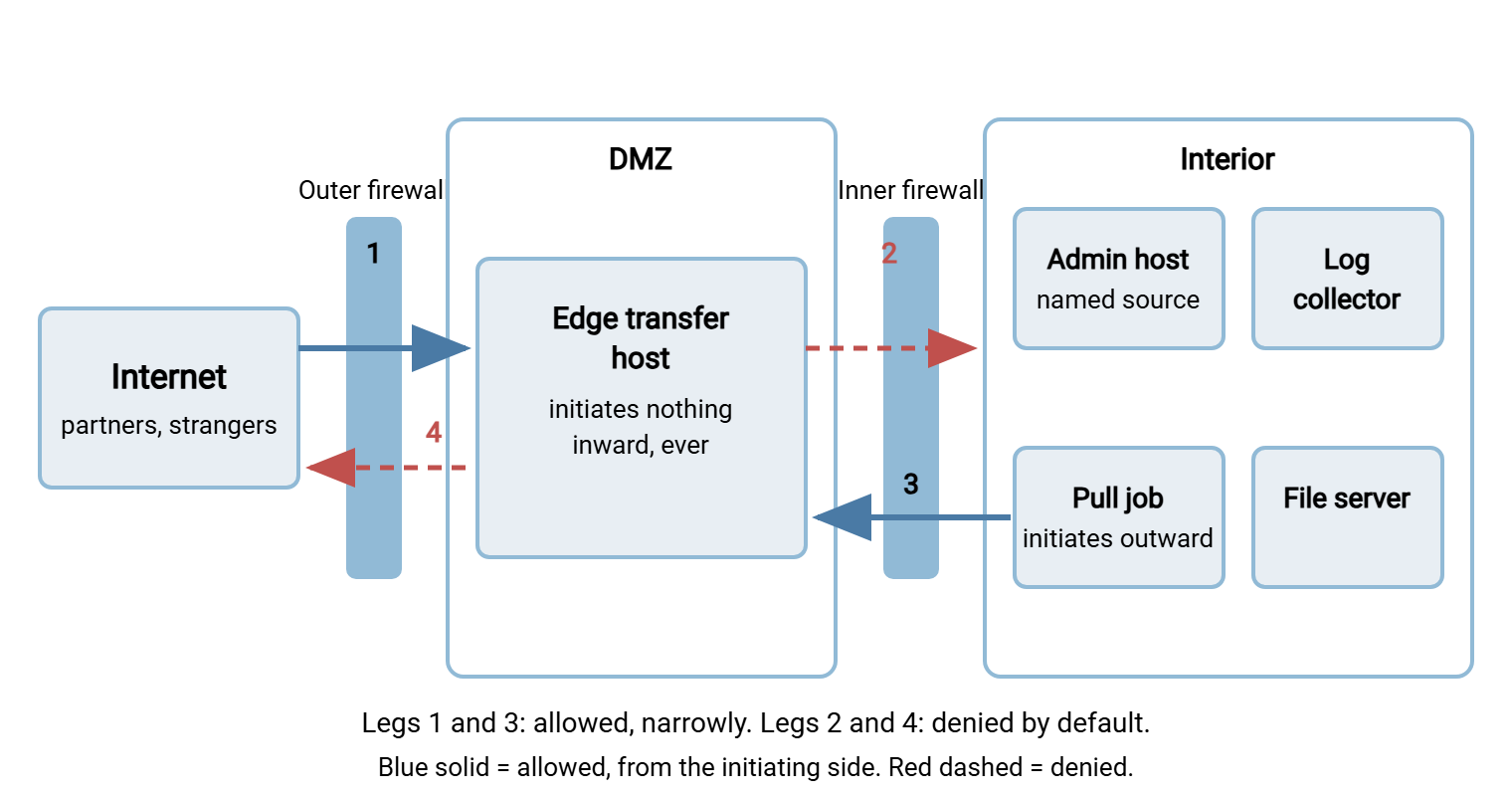
- Leg 1 — internet into the DMZ: allowed, but only the transfer ports, and only to the edge host's address. This is the front door, open exactly as wide as the service requires.
- Leg 2 — DMZ into the interior: denied. Completely. This single rule is most of the DMZ's value, and holding it at zero exceptions is the discipline the rest of this article defends.
- Leg 3 — interior into the DMZ: allowed for specific, named sources: the pull job's host, the admin subnet, a monitoring host. Not "the interior network" — named machines, named ports.
- Leg 4 — DMZ out to the internet: denied by default, and this is the one people forget. A transfer edge host serves connections; it has almost no reason to dial out. Leaving this leg open hands an attacker on the edge a free exfiltration channel and a path to fetch tools. Deny it, then add single named destinations only if something genuinely requires them.
The Golden Rule: Files Move Inward, Trust Never Does
Here is the inbound file journey with the golden rule intact, step by step. A partner connects to the edge host on port 22 (leg 1) and uploads an invoice into their drop folder. The file now rests at the edge. Minutes later, a scheduler on an interior machine — a tool like Sysax FTP Automation — runs a routine scheduled job. It opens a connection outward to the edge host (leg 3). It lists the drop folders, downloads the invoice, verifies it, deletes the edge copy, and closes the session. The file has crossed both boundaries and landed on the interior file server. Yet no connection was ever initiated from the less-trusted side toward the more-trusted side.
Contrast the tempting alternative: install an agent on the edge host that pushes arrivals inward the moment they land. Faster delivery, and it feels tidier — but it requires leg 2 to open, and it plants a credential for an interior system on the edge box. Now a captured edge can knock on the interior door and holds a key to it. The pull pattern costs a few minutes of latency and in exchange keeps the answer to "what can a captured edge reach?" at nothing. That trade is nearly always right. The companion discipline — what may live on the edge host — is covered in keeping data and credentials out of the DMZ.
Outbound files mirror the pattern exactly. The interior job pushes the outgoing report to a pickup folder on the edge (leg 3 again — interior initiates). The partner connects in from the internet to collect it (leg 1). Every arrow that crosses a boundary still starts on the safer side.
Remember: data can flow in any direction over a connection, but trust flows only in the direction of initiation. Design every DMZ crossing so the safer side dials — then a captured edge host can answer the phone but never place a call.
Per-Leg Rule Sets You Can Adapt
Below are the four legs as concrete rule sets, in vendor-neutral syntax you can translate into any firewall's interface. Replace the capitalized names with your own objects. The FTPS lines assume a defined passive port range — the block of high ports FTPS data connections use. It must match what the server itself is configured to offer. In a Windows edge server such as Sysax Multi Server that range is an ordinary server setting. Sizing it is covered in configuring passive port ranges. If you run pure SFTP at the edge, delete the FTPS lines and enjoy the shorter wall. The single-port story is one of SFTP's quiet advantages, as the firewall's view of the protocols explains.
# OUTER FIREWALL
# ---- Leg 1: Internet -> DMZ (inbound service traffic) ----
allow tcp  any           -> EDGE_HOST : 22            # SFTP
allow tcp  any           -> EDGE_HOST : 21            # FTPS control (only if used)
allow tcp  any           -> EDGE_HOST : 50000-50100   # FTPS passive range (match server)
deny  any  any           -> DMZ_NET   : any     log   # nothing else reaches the DMZ

# ---- Leg 4: DMZ -> Internet (outbound from the edge) ----
deny  any  DMZ_NET       -> any : any           log   # the edge dials out to nobody
# If something is truly required (OS updates via a named proxy, CRL checks),
# add ONE rule per named destination. Never "allow any outbound".
# INNER FIREWALL
# ---- Leg 2: DMZ -> Interior ----
deny  any  DMZ_NET       -> INTERIOR_NET : any  log   # zero exceptions by default
# Every packet matching this rule is a serious alert, not just a log line:
# legitimate DMZ hosts never initiate inward, so any attempt is a tripwire.

# ---- Leg 3: Interior -> DMZ ----
allow tcp  PULL_HOST     -> EDGE_HOST : 22            # scheduled pull/push job
allow tcp  ADMIN_HOSTS   -> EDGE_HOST : 3389          # RDP administration (or 22 for SSH)
allow tcp  MONITOR_HOST  -> EDGE_HOST : 22            # health checks, if separate
deny  any  INTERIOR_NET  -> DMZ_NET   : any     log   # nothing else wanders in
One detail worth noticing in leg 1: there is no rule anywhere letting the edge server open data connections out to clients. That is exactly what active-mode FTP would demand, since in active mode the server dials the client back for every transfer. That callback is leg 4 traffic, and leg 4 is closed. Run the edge in passive mode only, so all data connections arrive inbound on the published range. Then the deny-by-default outbound posture survives contact with FTP's quirks.
Three habits make these rules durable. Give every rule a comment naming its purpose and owner, so the next admin can tell load-bearing from leftover. Use named objects (PULL_HOST, not a bare address) so a server replacement is a one-line change instead of a hunt. And log the deny rules, not just the allows — the denies are where attacks and misconfigurations first become visible.
The Awkward Cases, Handled Honestly
Every clean model meets a few real-world needs that seem to demand exceptions. They deserve straight answers rather than quiet any-any rules.
Management access. Admins must reach the edge host to run it. That is leg 3 traffic — interior initiates — so it fits the model. Allow RDP or SSH from named admin workstations or a jump host only. Never allow it from the whole interior, and absolutely never from the internet. Strong authentication on that path is non-negotiable; the broader program lives in our hardening transfer servers series.
Log shipping. Logs must leave the edge immediately — but the collector usually sits inside, and edge-initiated syslog toward the interior is leg 2 traffic. You have three honest options. Best: place the collector in a separate management segment rather than the general interior, so edge logs cross into a zone that holds nothing else. Purist: have the interior pull logs on a tight schedule alongside the files. Pragmatic: permit exactly one rule — edge to collector, one port, syslog only — and treat it as the single documented exception, with the collector hardened accordingly. Any of these beats logs that stay on the edge; the tradeoffs are explored further in the DMZ hardening article.
DNS and time. The edge host should not query interior DNS — that is leg 2, and pointing it at your domain controllers leaks your internal namespace outward. Point it at the firewall's resolver or a public resolver via a named leg 4 allow, and serve time the same way. The edge needs to resolve almost nothing anyway.
OS and application updates. A permanently open outbound leg for updates is an exfiltration channel wearing a badge. Options: allow a named update source through a proxy; or fetch updates from inside and apply them over the management path during maintenance windows. Either keeps leg 4 at deny-by-default the rest of the month.
Rule Rot: How Good Policies Decay
Nobody designs a bad rule set; they inherit one. The decay follows familiar scripts, and naming them is the best vaccine.
The pull job fails one busy afternoon, and someone "temporarily" adds an allow from the edge inward so files keep moving. Leg 2 now has a hole, and temporary rules retire more slowly than the people who write them. A new backup agent gets installed on the edge and needs to reach the interior backup server. That quietly recreates the exact bridge the DMZ exists to deny. Someone joins the edge host to the domain for easier management, which silently demands a bouquet of directory ports inward. A troubleshooting session ends with an any-any rule between zones "just to rule out the firewall," and it works, so it stays.
The countermeasures are boring and effective. Review the rule base on a calendar, not on inspiration, and challenge every allow to justify itself. Alert on rule-base changes so nothing is added unnoticed. And keep the tripwire mindset. Because leg 2 should see zero legitimate traffic, its deny counter should read zero at every review. Any other number is either an incident or a misconfiguration, and both deserve attention today.
Prove the Directions Hold
Rules on paper drift from rules in force. Testing the directions takes minutes and belongs on a recurring schedule, not just at build time.
# From the EDGE HOST - these must all FAIL (timeout, not refused-by-host)
Test-NetConnection FILE_SERVER  -Port 445     # SMB into the interior
Test-NetConnection DC_HOST      -Port 389     # LDAP toward the directory
Test-NetConnection 203.0.113.50 -Port 443     # arbitrary internet destination (leg 4)

# From an INTERNET vantage point - only published ports may answer
nmap -Pn transfers.example.com                # expect 22 (plus FTPS ports if used)

# From the PULL HOST - exactly the allowed path works
Test-NetConnection EDGE_HOST    -Port 22      # expect success
The first block is the one that catches real trouble: run it from the edge host itself, because that is the attacker's seat. Every connection that times out is the architecture working. If one succeeds that should not, you have found tomorrow morning's first task. In that case, if your firewall logged the attempt and raised the leg 2 alarm, you have also just tested your monitoring for free.
Put the test on a calendar and keep the results. A quarterly run, saved with its date and outcomes, does two jobs at once. It catches rule rot while the drift is small. It gives you dated evidence for auditors that the boundary you describe is the boundary that exists. When a test result changes between quarters, the diff points straight at whichever change request — or undocumented tweak — moved the wall.
Direction Is the Design
Strip away the diagrams and the rule syntax, and DMZ flow design is three sentences. The internet may speak only to the edge host, only on the service ports. The interior may speak to the edge host from named machines for named purposes. The edge host speaks first to no one. Hold those three lines — against convenience, against deadlines, against "temporary" fixes — and a compromised edge stays a contained problem instead of a company-wide one.
From here, hardening and watching the DMZ transfer host covers the box these rules protect, and DMZ on a budget shows how to enforce the same directions with small-network gear.
Frequently Asked Questions
If the DMZ can't initiate inward, how do uploaded files ever reach the interior?
Doesn't blocking replies from the DMZ break the pull connection?
Why deny the DMZ's outbound internet access? The edge isn't protecting anything out there.
Is edge-to-collector log shipping a violation of the no-inbound rule?
How does the edge host get patches with outbound access denied?
Should the edge host use our internal DNS servers?
From the Sysax team: we build secure file transfer software for Windows. Sysax Multi Server is an FTP, FTPS, SFTP, and HTTPS server. Sysax FTP Automation handles scheduled, scripted transfers. Free trials are on the download page.