
Where Duplicate Files Actually Come From
A duplicate file turns up in a pipeline — the same settlement batch loaded twice, the same order file in two folders. The first instinct is to hunt for a culprit. Someone must have clicked twice, or the partner must have fumbled an export. Occasionally that is true. But most duplicates are not anyone's mistake. They are the predictable output of mechanisms working exactly as designed: retries that make transfers reliable, resends that make partners responsive, failover paths that keep flows alive. Duplicates are the exhaust fumes of reliability.
That reframing matters because it changes the fix. If duplicates were mistakes, the answer would be training and blame. Since they are structural, the answer is engineering. Know the handful of ways duplicates are born, and put a specific, cheap defense in front of each one. This article — part of our duplicate detection and idempotency series — is the catalog. By the end you will be able to look at any duplicate incident and name its source in a minute. You will have a defense-per-source table you can apply to your own flows.
The Rule Behind Every Source: Uncertainty Gets Resolved by Sending Again
All the sources below share one root. At some moment, some party — a client, a sender, a scheduler, a human — was uncertain whether a file had been delivered or processed. The only safe way to resolve the uncertainty was to send or run again. Networks lose confirmations. Logs are ambiguous. Colleagues are unreachable at midnight. Faced with "maybe it made it, maybe it didn't," every sane actor errs toward sending again. That is because a missing file is usually a worse failure than an extra one.
That instinct is correct, and you should not fight it. A pipeline that depends on nobody ever re-sending is a pipeline that loses files instead of duplicating them — a strictly worse trade. The goal of this series is to make the re-send harmless, so that everyone can keep erring toward delivery. With that lens, let's meet the sources.
Source 1: The Retry After a Timeout That Actually Succeeded
This is the most important duplicate source to understand precisely, because it looks like a contradiction until you see the mechanics. It also generates duplicates with no human involved at all.
Here is the sequence. An automated client uploads settle_YYYYMMDD.csv to a server. Every byte arrives; the server writes the file and considers the transfer complete. The server then sends its success confirmation back to the client — and that confirmation never arrives. Maybe the connection dropped in the gap between the last byte and the reply. Maybe a firewall quietly killed an idle-looking session. Maybe the reply is simply slower than the client's configured timeout. Whatever the reason, the client is left waiting for an answer that will never come.
Now put yourself in the client's position. It has no way to distinguish "the upload failed" from "the upload succeeded but the confirmation was lost." The information available on the client side is identical in both cases: no confirmation. So the client does the only defensible thing — it records a failure and retries. The retry uploads the file again, and the server, which already has a perfectly good copy, receives a second one. If the destination overwrites by name, the visible cost is a re-upload and a confusing pair of log entries. Suppose anything downstream grabbed the first copy before the second arrived — a watch folder, a fast loader. In that case, the pipeline has now processed the same file twice.
The diagram below shows this timeline: the upload that succeeds, the confirmation that dies on the way back, and the honest retry that creates the duplicate.
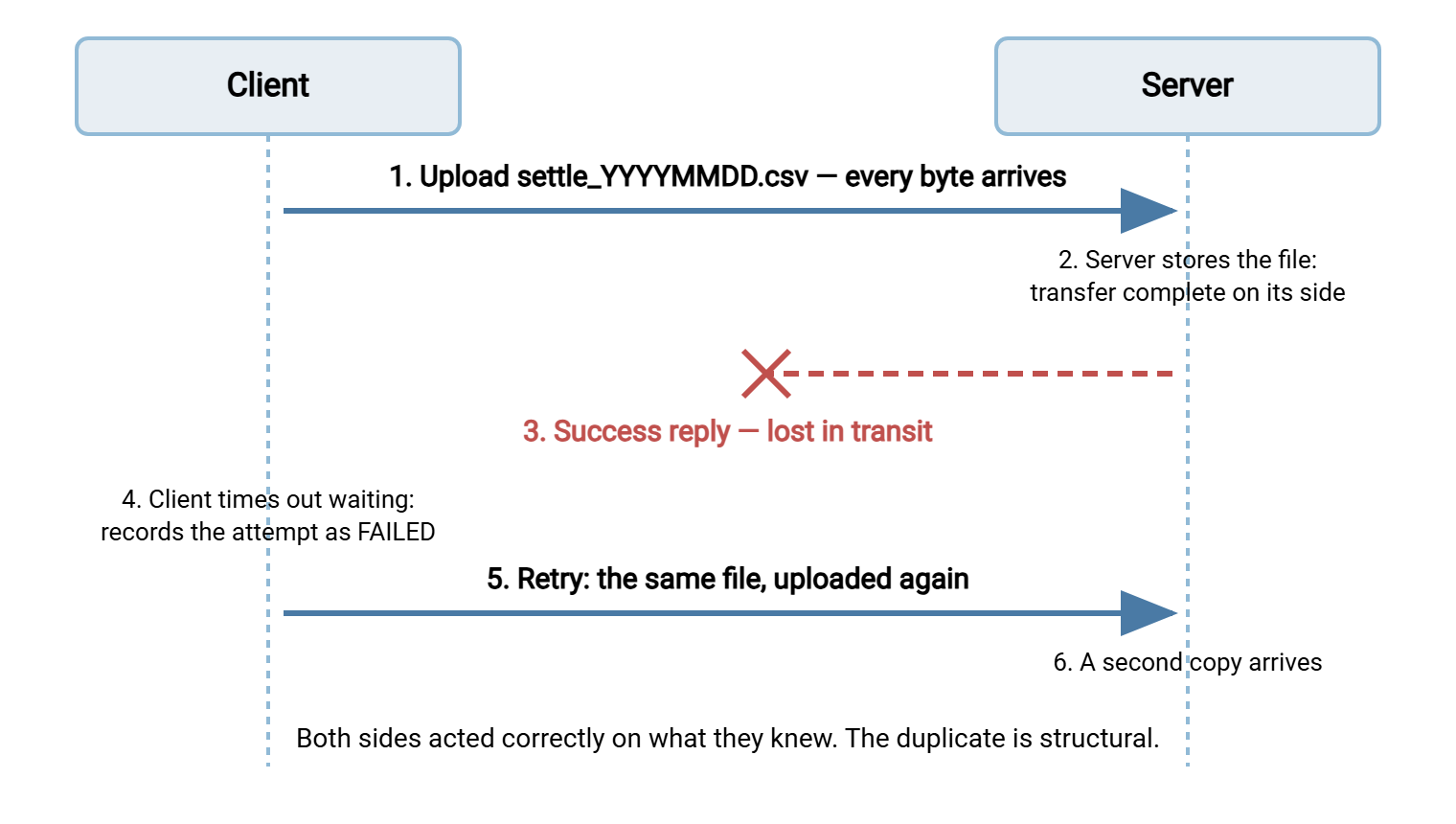
Sit with the key insight for a moment: nobody made an error. The server correctly stored the file. The client correctly treated silence as failure — treating silence as success would be far worse, because then lost confirmations would mean lost files. The duplicate is the unavoidable price of resolving uncertainty in the safe direction. This is why "just fix the retry logic" is not a fix. Retry behavior like this is exactly what our retry and error handling series tells you to build. Tools do it for you. Sysax FTP Automation, for instance, retries failed scheduled transfers and emails you when errors persist. That is precisely the behavior an unattended job needs. The defense lives on the receiving side. Use stable filenames so the retry overwrites rather than accumulates, and a processed-files ledger so downstream work happens once. The protocol-level details of where confirmations can die mid-session are covered in our tour of FTP failure modes.
Source 2: Sender Resends
The previous source was a machine resolving uncertainty; this one is people and partner systems doing the same thing on a longer timescale. The forms are familiar:
- The "just to be safe" resend. Your partner's operator is not sure yesterday's export ran, cannot quickly tell, and re-runs it. Their caution is your duplicate.
- The answered question. Someone asks the sender a question about last Tuesday's file. The easiest way for them to be helpful is to send it again — often with a fresh timestamp in the name.
- The sender's own retry loop. The partner's automation had its own timeout-that-succeeded moment and re-sent. From your side it is indistinguishable from a deliberate resend.
- The full-refresh habit. Some senders periodically transmit the complete history "to make sure you have everything," burying three hundred already-processed files around the three new ones.
You cannot configure other people's systems, so defenses here are about your intake. First, agree on naming. If the file for a given business day is always called orders_YYYYMMDD.csv, a resend collides with the original by name. Your pipeline can recognize that collision instantly. This is one of the quiet payoffs of the conventions in our file naming and datestamping series. Second, treat "already seen this content" as a normal, non-alarming event: log it, skip it, move on. Third, when a sender's habits are genuinely disruptive, raise it with data in hand. "You sent this file four times last month" lands better than a vague complaint, and your server's transfer log can produce that number.
Source 3: Backfills That Go Wide
A backfill is a deliberate re-transfer of historical files — after an outage, after onboarding a new consumer, after discovering a gap. Backfills are legitimate and necessary. The duplicate problem is that they routinely fetch more than intended:
- The request was "re-pull last week," but the wildcard was
settle_*.csvand the remote folder still held the whole quarter. - A date filter had an off-by-one boundary, so the backfill included one day that was already processed. That is the worst kind of overlap, because it is small enough to miss.
- The backfill script was a hand-edited copy of the nightly job, and the edit missed one path. So the files landed in the live intake folder and the regular pipeline ate them a second time.
The defenses are procedural and cheap. Scope every backfill with an explicit file list, not a pattern — generate the list first, read it, then transfer it. Run the listing as a dry run before any bytes move. Land backfilled files in a separate folder, never the live intake. And above all, give your pipeline a real reprocess mode so that backfills go through a designed door instead of a hand-edited script. That mode is the entire subject of safe reprocessing.
Source 4: Multiple Delivery Paths
Sometimes the same file arrives twice because two routes both work. This source is easy to create and easy to forget:
- Primary plus failover. The primary transfer stalls, a failover path fires, and then the primary recovers and completes. Both succeed; you receive two copies.
- Migration overlap. During a cutover, the old flow and the new flow run in parallel "temporarily." Every file now arrives through both until someone remembers to turn the old one off.
- Two intake mechanisms. A watch folder reacts to a file's arrival, and a scheduled sweep job later picks up the same folder as a safety net. Without coordination, safety net and primary both process the file. That coordination problem is explored in our watch folders and event-driven transfer series.
- Helpful humans. The partner uploads to the server, and also emails the file to an operator, who dutifully drops it into the intake folder.
The structural defense is to funnel every path into one point of ingest that keeps one record of what has been handled. Copies may arrive by many roads, but a single ledger keyed on the file's identity decides, once, whether the content is new. You may suspect two paths are live and be unsure what each is delivering. In that case, comparing their landing folders settles it quickly. The task wizard in Sysax FTP Automation includes a folder compare task type for exactly this kind of side-by-side check. A one-off comparison of "old flow folder" versus "new flow folder" will show you the overlap in seconds.
Source 5: The Pipeline Duplicating Its Own Work
The last source is the pipeline itself. No external party is involved; the flow re-consumes its own input:
- Overlapping runs. Tonight's job is still grinding through a large batch when tomorrow's scheduled run fires and picks up the same unprocessed files. Locking and overlap prevention — covered in our bash and cron automation series — is the direct fix.
- Processed files left in the intake folder. Suppose the job reads the intake folder but only marks files as done in its own memory. A crash between "process" and "move to archive" then leaves a processed file sitting where the next run will find it.
- Files put back by hand. An operator investigating something copies a file out of the archive into the intake folder "just to look at it." The watch folder looks too.
The defense pattern here is move-after-process plus a durable record. A file leaves the intake folder the moment it is handled. The handling is recorded somewhere that survives crashes, and the processing step checks that record before acting. If that sounds like the idempotency machinery from the plain-words article, it is. The pipeline protecting itself from itself uses the same tools as the pipeline protecting itself from the outside world.
The Taxonomy on One Page
Here is the whole catalog with a primary defense per row. Pin this next to your incident notes; when a duplicate appears, finding its row tells you which defense was missing.
| Source | How the duplicate is born | Primary defense |
|---|---|---|
| Timeout that succeeded | Upload completes, confirmation is lost, client honestly retries | Stable names so retries overwrite; ledger before downstream work |
| Sender resend | Partner re-exports or re-sends to resolve their own uncertainty | Agreed naming; treat "already seen" as a normal logged skip |
| Backfill gone wide | Historical re-pull catches more than intended | Explicit file lists, dry-run listing, separate landing folder, reprocess mode |
| Multiple delivery paths | Failover, migration overlap, or two intakes each deliver a copy | One point of ingest; one ledger keyed on file identity |
| Pipeline self-duplication | Overlapping runs, crash between process and archive, files put back by hand | Run locks; move-after-process; durable processed record |
Two patterns run down the defense column. Nearly every row leans on stable file identity: names first, content hashes when names cannot be trusted — see hashing explained. Nearly every row also leans on a durable record of what has been processed. Those two mechanisms, done once, defend against every source at the same time. That is why the next article in this series, detecting duplicates, spends its whole length on exactly those layers.
Remember: you cannot pick which duplicate sources you get. Any pipeline that runs long enough will eventually see all five. Defenses aimed at one source ("we talked to the partner about resends") leave the other four open; the identity-plus-ledger pair covers them all.
What Duplicates Actually Cost
It is tempting to shrug at duplicates — storage is cheap, and an extra file sitting in a folder harms nobody. The cost is real, but it lives downstream of the folder:
- Double-counted business data. The classic outcome: a file of transactions loaded twice inflates revenue, inventory, or payroll numbers. The error often surfaces weeks later in a reconciliation, when the cleanup requires identifying every affected report and decision made in the meantime.
- Double-fired actions. If files trigger actions — invoices issued, notifications sent, orders placed — a duplicate file means the action happens twice. Some actions are much harder to un-do than a database row.
- Eroded trust in the pipeline. After one double-posting incident, people start manually checking the pipeline's output. The labor cost of that checking, forever, dwarfs the cost of the original incident.
- Investigation time. Even harmless duplicates burn hours, because each one looks like a possible incident until someone proves it is not.
The asymmetry is what makes prevention worth it: a ledger check costs milliseconds per file; a double-posting cleanup costs days. Very few controls in transfer automation pay for themselves as fast.
Reading the Evidence When a Duplicate Appears
When a duplicate does surface, the taxonomy turns investigation into a short checklist. Ask three questions, in order:
- How many times did the content actually arrive? The receiving server's transfer log is the ground truth. A server that records every transfer with timestamp, account, source address, and result gives you the arrival history directly. Sysax Multi Server logs every transfer to both its log file and a database. So "list every upload of settle files this week, with times and source addresses" is a query, not an archaeology project.
- Did copies arrive on one path or several? Same account and address twice in quick succession points to a retry (source 1). Different accounts, addresses, or arrival folders point to multiple paths (source 4). Hours or days apart points to a resend or backfill (sources 2 and 3).
- Did the pipeline process it once or twice? Your own job logs answer this — if they record each file handled, per run, by name. If they do not, that is the first fix to schedule.
The skill of walking logs like this is general-purpose, and our guide to reading transfer logs builds it properly. The point here is narrower: every duplicate source leaves a distinctive fingerprint in the logs. So naming the source is usually five minutes of reading — once you know the five candidates.
The Version to Tell a Colleague
Duplicate files are not accidents; they are the structural byproduct of resolving uncertainty safely. When a client cannot tell whether an upload succeeded, it retries. The nastiest case is the timeout that actually succeeded. The file arrived, the confirmation died, and the honest retry delivers a second copy. Add sender resends, backfills that fetch too much, multiple delivery paths, and pipelines re-eating their own input, and you have the complete catalog. Every source is defeated by the same pair of mechanisms: stable file identity and a durable record of what has been processed.
From here, read detecting duplicates: names, sizes, hashes, and ledgers to build those mechanisms. Read idempotency in plain words if you want the rerun-safety foundation this catalog rests on. To see the defenses installed in a real flow end to end, jump to the worked example.
Frequently Asked Questions
How can a transfer time out and still succeed?
Should I turn off retries to prevent duplicates?
Are duplicates always exact copies of the same file?
What is the single most common duplicate source?
How do I find out which source produced a specific duplicate?
From the Sysax team: we build secure file transfer software for Windows. Sysax Multi Server is an FTP, FTPS, SFTP, and HTTPS server. Sysax FTP Automation handles scheduled, scripted transfers. Free trials are on the download page.