
Hashes Explained: Fingerprints for Files
You copy a 4 GB database backup across the network, the transfer says "complete," and now you have to trust it. Did every byte arrive? Did a flaky disk flip a bit on the way out? Did the file get truncated when the connection stuttered? Staring at the file size tells you almost nothing — two files can be the same size and still differ. What you need is a way to reduce any file, of any size, to a short value you can actually compare. That is exactly what a hash does.
A hash is the single most useful tool in file integrity work. Once it clicks, a whole category of "did this arrive intact?" problems becomes answerable in seconds. This article explains what a hash really is and the two properties that make it trustworthy. It explains how to compute one on Windows and on Linux. It also explains — just as important — the one thing a matching hash does not prove. This is part of our Integrity Verification series, and it is the foundation every other article here builds on. If you have read our Group I overview of reliable transfer and integrity, this is the deep dive that piece pointed toward.
What a Hash Actually Is
A hash function is an algorithm that takes an input of any size — a one-line text file, a 50 GB disk image, anything. It produces a fixed-size output called a digest (also called a hash, a hash value, or loosely a checksum). No matter how big the input, the digest is always the same length for a given algorithm. Feed SHA-256 a single character or an entire film, and you get back exactly 256 bits either way, normally written as 64 hexadecimal characters.
Think of it like a fingerprint. A person is large and complicated; their fingerprint is small and fixed-size, yet it identifies them with near-certainty. You cannot rebuild the person from the fingerprint — and you cannot rebuild the file from its digest either. The digest is a compact identity for the exact bytes that went in.
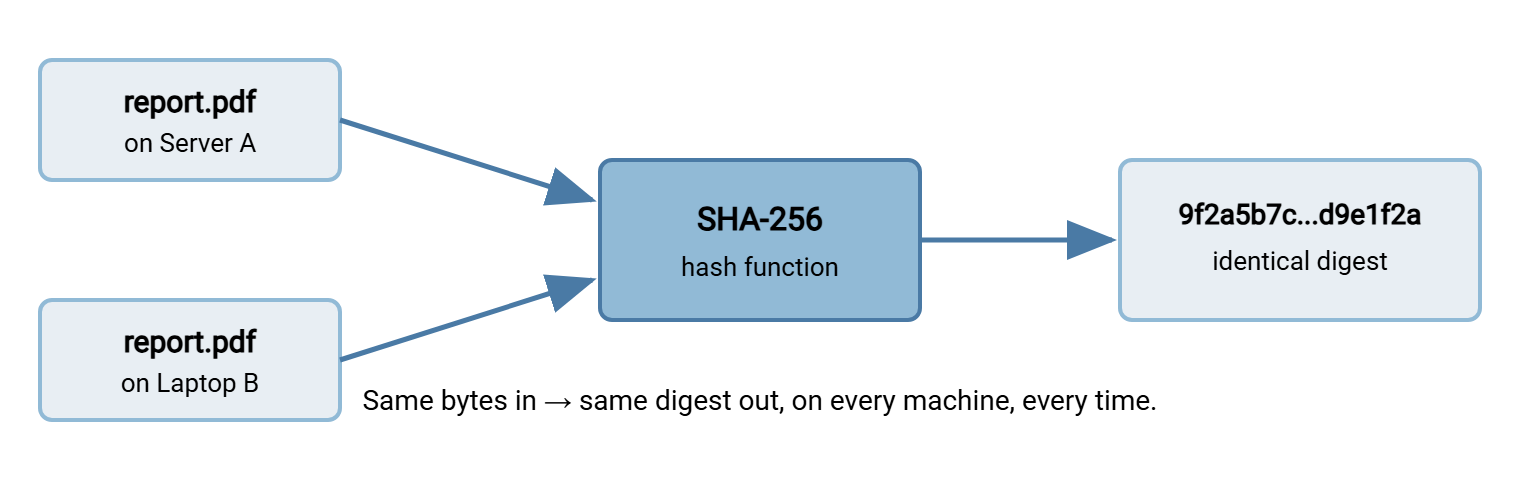
Here is the property that makes it useful for verification: the hash is deterministic. The same bytes, run through the same algorithm, always produce the same digest. That holds on your laptop, on the server, today, next year, on any operating system. If two files anywhere in the world produce the same SHA-256 digest, you can treat them as byte-for-byte identical. If their digests differ by even one character, the files are not the same.
The diagram below shows that determinism. The same file, copied to two different machines, produces the identical digest on each. That is precisely why comparing digests is a valid way to ask "are these two files the same?"
The Second Property: One Changed Bit Changes Everything
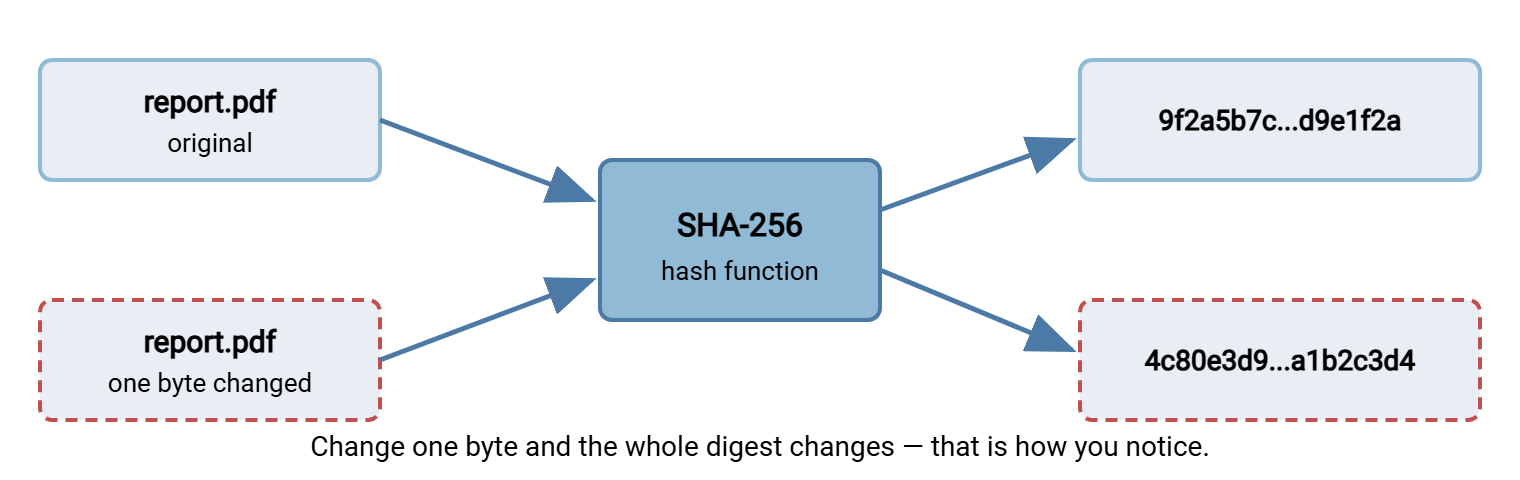
Determinism alone is not enough. A file size is deterministic too, but it is a terrible integrity check, because countless different files share the same size. What makes a cryptographic hash special is the second property: tiny input changes produce a completely different digest. Flip a single bit anywhere in a multi-gigabyte file — corrupt one byte, drop one character, truncate the last block. The new digest looks nothing like the old one. Not "mostly the same with one character off." Utterly different.
Cryptographers call this the avalanche effect: a one-bit change cascades through the algorithm until roughly half of the output bits flip. It is what lets you detect damage you cannot see. A corrupted PDF might still open. A truncated CSV might still import its first ten thousand rows. A backup with a few scrambled bytes might sit quietly until the day you need to restore it. The bytes lie. The digest does not.
The diagram below shows the avalanche effect. The original file and a copy with a single byte changed produce digests with nothing in common. That is exactly how a comparison catches the corruption.
The reverse question matters too: could two different files ever accidentally produce the same digest? In theory, yes — there are only so many possible 256-bit outputs and infinitely many possible files, so overlaps must exist somewhere. Such an overlap is called a collision. But for a strong modern algorithm the number of possible digests is astronomically large (2 to the 256th power). It is so large that stumbling onto a collision by chance is effectively impossible. You would search longer than the age of the universe. For everyday integrity checking, "different files always have different digests" is a safe working assumption.
Remember: a matching hash means the bytes are identical; a differing hash means something changed. That is the entire promise of hashing, and it is enough to catch every kind of accidental corruption a file transfer can inflict.
Computing a Hash on Windows
Windows gives you two built-in tools, no installation required. Use whichever matches how you work.
certutil (works everywhere, including old systems)
The certutil command has shipped with Windows for a long time and runs in any Command Prompt or PowerShell window. The syntax is certutil -hashfile <path> <algorithm>:
C:\data> certutil -hashfile report.pdf SHA256
SHA256 hash of report.pdf:
9f2a5b7c1d3e4f6a8b0c2d4e6f8a1b3c5d7e9f0a2b4c6d8e0f1a3b5c7d9e1f2a
CertUtil: -hashfile command completed successfully.
The middle line is the digest — that is the part you compare. certutil also accepts MD5, SHA1, SHA384, and SHA512 in place of SHA256. It prints a header and a footer line around the digest. That is fine for reading by eye but slightly annoying to script. The PowerShell option below is cleaner for automation.
Get-FileHash (the PowerShell way)
In PowerShell, Get-FileHash is purpose-built and defaults to SHA-256, so you can often skip the algorithm entirely:
PS C:\data> Get-FileHash report.pdf

Algorithm  Hash                                                              Path
---------  ----                                                              ----
SHA256     9F2A5B7C1D3E4F6A8B0C2D4E6F8A1B3C5D7E9F0A2B4C6D8E0F1A3B5C7D9E1F2A   C:\data\report.pdf
To pull out just the digest string — useful in scripts — reach into the .Hash property:
PS C:\data> (Get-FileHash report.pdf -Algorithm SHA256).Hash
9F2A5B7C1D3E4F6A8B0C2D4E6F8A1B3C5D7E9F0A2B4C6D8E0F1A3B5C7D9E1F2A
Notice that PowerShell prints the digest in uppercase while certutil prints it in lowercase. The bytes are identical; only the display case differs. This trips people up constantly, so it is worth internalizing now: when you compare two digests, compare them case-insensitively. Never conclude that two files differ just because one hash is uppercase and the other is lowercase.
Computing a Hash on Linux and macOS
On Linux, the sha256sum command is almost always already installed:
$ sha256sum report.pdf
9f2a5b7c1d3e4f6a8b0c2d4e6f8a1b3c5d7e9f0a2b4c6d8e0f1a3b5c7d9e1f2a  report.pdf
The output is the digest, two spaces, then the filename. That two-space format is not decorative — it is a small standard. The companion command sha256sum -c reads exactly that format back to verify files. We cover this in the article on checksum files and manifests. Sibling commands cover the other algorithms: md5sum, sha1sum, and sha512sum all work identically.
On macOS the tool is spelled a little differently — shasum with an explicit algorithm flag — but behaves the same:
$ shasum -a 256 report.pdf
9f2a5b7c1d3e4f6a8b0c2d4e6f8a1b3c5d7e9f0a2b4c6d8e0f1a3b5c7d9e1f2a  report.pdf
The valuable takeaway is that a digest is portable across all of these tools. Hash a file with Get-FileHash on a Windows server. Hash the copy with sha256sum on a Linux box, and lowercase both. If the strings match, the files are identical — regardless of which operating system, tool, or year produced them. The algorithm is a fixed mathematical recipe; the platform is irrelevant.
Reading and Comparing Digests Without Going Cross-Eyed
A SHA-256 digest is 64 hex characters, and comparing two of them character by character is a recipe for missing the one that differs. A few habits make it reliable:
- Compare the ends first. Corruption changes the whole digest, so if the first six and last six characters match, the middle almost certainly does too. Glancing at
9f2a5b...d9e1f2aon both sides catches the vast majority of mismatches instantly. - Normalize the case. Lowercase both digests before comparing, so an uppercase-vs-lowercase difference never masquerades as a real mismatch.
- Let the computer compare. For anything important, do not eyeball it at all — feed both digests to a tool that reports match or no-match. The verification commands in the end-to-end verification article do exactly this.
- Watch the length. If a digest you were handed is 32 characters, it is MD5, not SHA-256 — you cannot compare across algorithms. Both sides must use the same algorithm for the comparison to mean anything.
The Algorithm Families, and Which to Choose
You will meet several hash algorithms in the wild. They fall into three groups, and the practical guidance is short.
| Family | Examples | Digest length | When to use |
|---|---|---|---|
| Modern cryptographic | SHA-256, SHA-512 (the SHA-2 family), SHA-3, BLAKE2/BLAKE3 | 256–512 bits (64–128 hex chars) | Your default for everything — integrity and security alike |
| Older cryptographic | SHA-1, MD5 | 160 / 128 bits (40 / 32 hex chars) | Legacy compatibility only; avoid where tampering is a concern |
| Non-cryptographic checksums | CRC32, Adler-32 | 32 bits (8 hex chars) | Fast accidental-error detection inside protocols, not a tamper check |
The SHA-2 family — usually SHA-256 — is the sensible default. It is fast, universally supported by the tools above, and strong enough that nobody has ever demonstrated a practical way to force a collision. If you need extra margin or you are already on a 64-bit platform, SHA-512 is just as available. Newer families like SHA-3 and BLAKE3 are excellent and worth knowing, but SHA-256 remains the lingua franca that every partner and every tool understands.
The older algorithms, MD5 and SHA-1, are still everywhere because they were the default for decades. You will keep seeing them in download pages and legacy scripts. For catching accidental corruption they still work fine — a flipped bit changes an MD5 just as visibly as a SHA-256. The problem is deliberate tampering: researchers have shown how to construct two different files that share the same MD5 or SHA-1 digest on purpose. That makes them unsafe for any situation where someone might want to slip a substitute past your check. Prefer SHA-256; treat an MD5 you were handed as "better than nothing," not as proof against an adversary. The integrity vs authenticity article picks up this thread in detail.
The non-cryptographic checksums like CRC32 live inside protocols and archive formats to catch transmission glitches automatically. They are fast and fine for that narrow job. But they are trivially easy to fool on purpose and short enough to collide by accident on large data sets. Do not reach for CRC32 when you mean to verify a file — reach for SHA-256.
What a Matching Hash Proves — and What It Doesn't
This is the most important section in the article, because it is where people most often overreach. A matching hash proves exactly one thing: the bytes are identical to the bytes that produced the reference digest. That is a genuinely powerful guarantee, and it answers the question this whole pillar exists to answer — did the file arrive intact?
But notice what it does not say. A matching hash tells you nothing about who produced the file, or whether the reference digest you compared against is itself trustworthy. Picture an attacker who intercepts a download, swaps in a malicious file, and also swaps the published digest to match their malicious file. Now the hash "verifies" perfectly — you computed the digest of exactly the bytes the attacker wanted you to have. Integrity was preserved; you got precisely the file whose fingerprint was advertised. It was simply the wrong file, vouched for by the wrong fingerprint.
The gap is this: a hash protects the file, but nothing protects the hash. Anyone who can change the file can change the digest that travels with it. Closing that gap requires authenticity — a way to prove the digest came from the party you expect and was not swapped. That is the job of a digital signature. It cryptographically binds a digest to a private key an attacker does not hold. We draw that line carefully in integrity vs authenticity, and the mechanics live in our Digital Signatures and Non-Repudiation series.
The one-sentence version: a hash proves the bytes match, not who sent them. Use hashing to defeat accidents; add a signature when you need to defeat an adversary.
Where Hashing Fits in Your Day
Now that the concept is solid, here is where you will actually reach for it:
- After a big transfer. Hash the source, hash the destination, compare. That three-step ritual is the backbone of end-to-end verification, and it turns "I think it copied" into "I know it copied."
- Across a whole batch. When you send a partner two hundred files, you do not want to compare two hundred digests by hand. A manifest — one file listing every filename and its digest — lets a single command verify the lot. We show this in checksum files and manifests.
- Inside automation. A scheduled job can hash each file after it lands and refuse to mark the transfer "done" until the digests agree. A Windows automation tool such as Sysax FTP Automation can run that hash check as a post-processing step. So the verification happens the moment the file arrives rather than the day you discover it was broken. Designing that safely is the subject of building integrity checks into automated jobs.
- When something looks wrong. A digest that keeps coming out different on the receiving side is a clue, not a nuisance. It tells you corruption is happening and points you toward the cause. That may be transfer-mode mangling, truncation, or a failing disk.
The Version to Tell a Colleague
A hash is a fixed-size fingerprint of a file's exact bytes. The same bytes always produce the same digest, and changing even one bit produces a completely different one. So comparing digests is a fast, reliable way to ask "are these two files identical?" Use the SHA-256 family; skip MD5 and CRC32 for anything that matters. Compute digests with certutil -hashfile or Get-FileHash on Windows and sha256sum on Linux, and compare them case-insensitively. And keep the one caveat in mind: a matching hash proves the bytes match, not who sent them — for that you need a signature.
From here, the natural next step is verifying a transfer end to end, which turns the hash into a repeatable workflow. For the wider context of why intact delivery matters at all, our Group I piece on reliable transfer and integrity sets the scene.
Frequently Asked Questions
Is a checksum the same thing as a hash?
Which algorithm should I use — MD5, SHA-1, or SHA-256?
Why do Windows and Linux show the hash in different cases?
Can two different files ever have the same hash?
Does a matching hash mean the file is safe?
How long does it take to hash a huge file?
From the Sysax team: we build secure file transfer software for Windows. Sysax Multi Server is an FTP, FTPS, SFTP, and HTTPS server. Sysax FTP Automation handles scheduled, scripted transfers. Free trials are on the download page.