
Detecting Duplicates: Names, Sizes, Hashes, and Ledgers
Knowing where duplicates come from is half the battle. The other half is recognizing one when it lands in your intake folder at two in the morning. No human is awake to squint at it. Detection sounds simple — "check if we already have the file." Then you try to write the check and discover that "the file" is a slippery idea. Same name? Names get reused and changed. Same size? Coincidences happen. Same bytes? Now you are reading entire files to answer a yes/no question. Each signal has a cost and a blind spot.
The practical answer, refined by every team that has built this more than once, is to layer the checks from cheap to certain. Check names first, then sizes, then content hashes. Underneath, a durable processed-files ledger remembers everything the pipeline has ever handled. Cheap layers dispose of the easy cases in microseconds. The expensive layer runs only when it is needed. The ledger turns the whole stack from "compare against whatever files happen to still be around" into "compare against everything we have ever seen." This article — part of our duplicate detection and idempotency series — builds that stack layer by layer. It includes honest notes about performance, locking, and how long to keep the ledger.
First, Decide What "Duplicate" Means
Before any code, settle the definition, because the layers exist precisely because there are three different questions hiding inside "have I seen this before?":
- Same name? A file called
orders_YYYYMMDD.csvarrived, and a file by that exact name has been processed already. This catches straight resends under a naming convention. - Same bytes? The content is identical to something already processed, regardless of what it is called. This catches renamed resends — the same export sent again under a fresh timestamp.
- Same business content? The partner regenerated the file: one whitespace difference, same thousand orders inside. The bytes differ; the meaning does not. No generic layer catches this — it needs business keys inside the data, which is a load-time concern, not a transfer-time one.
Transfer-level detection can fully answer the first two questions, and this article covers both. Be explicit with your team that the third exists and lives in the loader. Pretending byte-level detection catches regenerated files is how double-loads sneak past a "protected" pipeline. As covered in where duplicates come from, resends arrive in all three flavors.
Layer 1: Name Checks — Fast, and Right Most of the Time
The cheapest question you can ask about an arriving file is whether its name has been seen before. Suppose your flows follow a naming convention — one file per business day, named settle_YYYYMMDD.csv. That is the discipline our file naming and datestamping series argues for. In that case, a name collision is a strong duplicate signal. The check is a single lookup: does this name exist in the archive folder, or in the ledger?
Know the two blind spots. First, a renamed resend slips straight through. The sender's tooling stamps each export with its generation time or attempt number. So the same content arrives once as orders_YYYYMMDD_HHMMSS_0042.csv and again later with a fresh stamp as orders_YYYYMMDD_HHMMSS_0043.csv — different names, identical bytes. Second, a name match does not guarantee identical content. The partner may have regenerated the day's file with corrections. In that case, the second arrival is not a duplicate at all but a revision you probably want. A name hit means "suspect," never "confirmed." That is why there are more layers.
Where the name check shines is volume. In a pipeline receiving hundreds of files a day under good naming, it resolves nearly everything instantly. It flags a handful of suspects for closer inspection. Cheap, imperfect, and in front — exactly where it belongs.
Layer 2: Size and Metadata — Narrowing the Suspects
For a suspect that passed the name gate, the next cheapest evidence is the file's size in bytes. It is available from a directory listing without reading the file. The logic is asymmetric, and the asymmetry is the whole point: different sizes prove different content; identical sizes prove nothing. If today's settle_YYYYMMDD.csv is 51,876 bytes and the archived one is 48,211, they are definitely not the same file. In that case, treat the new arrival as a revision and route it to a human or a revision policy. If both are 48,211 bytes, they are probably identical. But "probably" is doing real work in that sentence: two different exports can coincide in length.
A word about timestamps, because juniors reach for them next: modification times are nearly useless for duplicate detection across transfers. Many transfer methods stamp the file with its arrival time at the destination, some preserve the source time, and some let configuration decide. Two identical copies routinely carry different mtimes, and two different files can share one. Use timestamps to reason about arrival order, never about identity.
You may want a quick human-scale version of layers 1 and 2. Say you are checking whether an old flow and its replacement delivered overlapping files during a migration. Comparing two folders' contents side by side answers it fast. The task wizard in Sysax FTP Automation includes a folder compare task type for exactly this. Point it at two folders and see what exists in one, the other, or both. That is the name-and-size comparison done for you across whole directories.
Layer 3: Content Hashing — The Certainty Layer
When names and sizes leave doubt, the file's content settles it. A cryptographic hash is a short, fixed-length fingerprint computed from every byte of a file. Identical content always produces the identical fingerprint. Any change to the content — one byte, one bit — produces a completely different one. Comparing two files' hashes therefore compares their entire content. Storing a file's hash lets you compare against it forever without keeping the file handy. How hash functions pull this off, and which ones to trust, is its own subject. Our hashing explained article covers the mechanics. But using hashes for duplicate detection needs only the fingerprint idea plus a standard algorithm like SHA-256. Computing one is built into every platform:
# Windows, PowerShell
Get-FileHash -Algorithm SHA256 .\settle_YYYYMMDD.csv

# Windows, built-in certutil
certutil -hashfile settle_YYYYMMDD.csv SHA256

# Linux
sha256sum settle_YYYYMMDD.csv
Honest notes, because hashing is where detection costs start to show:
- Hashing reads every byte. For a 2 GB file, computing the hash costs roughly one full read of the file. That is fine as a once-per-arrival cost; it is ruinous as a compare-everything-against-everything habit. The rule: hash each file once, on arrival, and store the hash in the ledger. Future comparisons are then string lookups, not re-reads.
- Hash only complete files. A hash computed while the file is still being written fingerprints a half-file. Detection must wait for the arrival to be genuinely finished. The settle checks and atomic-rename patterns in our partial-file safety series are the prerequisite here.
- Accidental collisions are not a real risk. With a modern hash like SHA-256, the chance that two different files coincidentally share a fingerprint is remote. It is so remote that no operational plan needs to account for it. If two files hash the same, treat them as identical content.
- Hashes also verify transfer integrity. The same fingerprint that detects duplicates confirms the file survived the trip uncorrupted, especially when senders publish hashes alongside files. See checksum files and manifests. One computed hash, two jobs done.
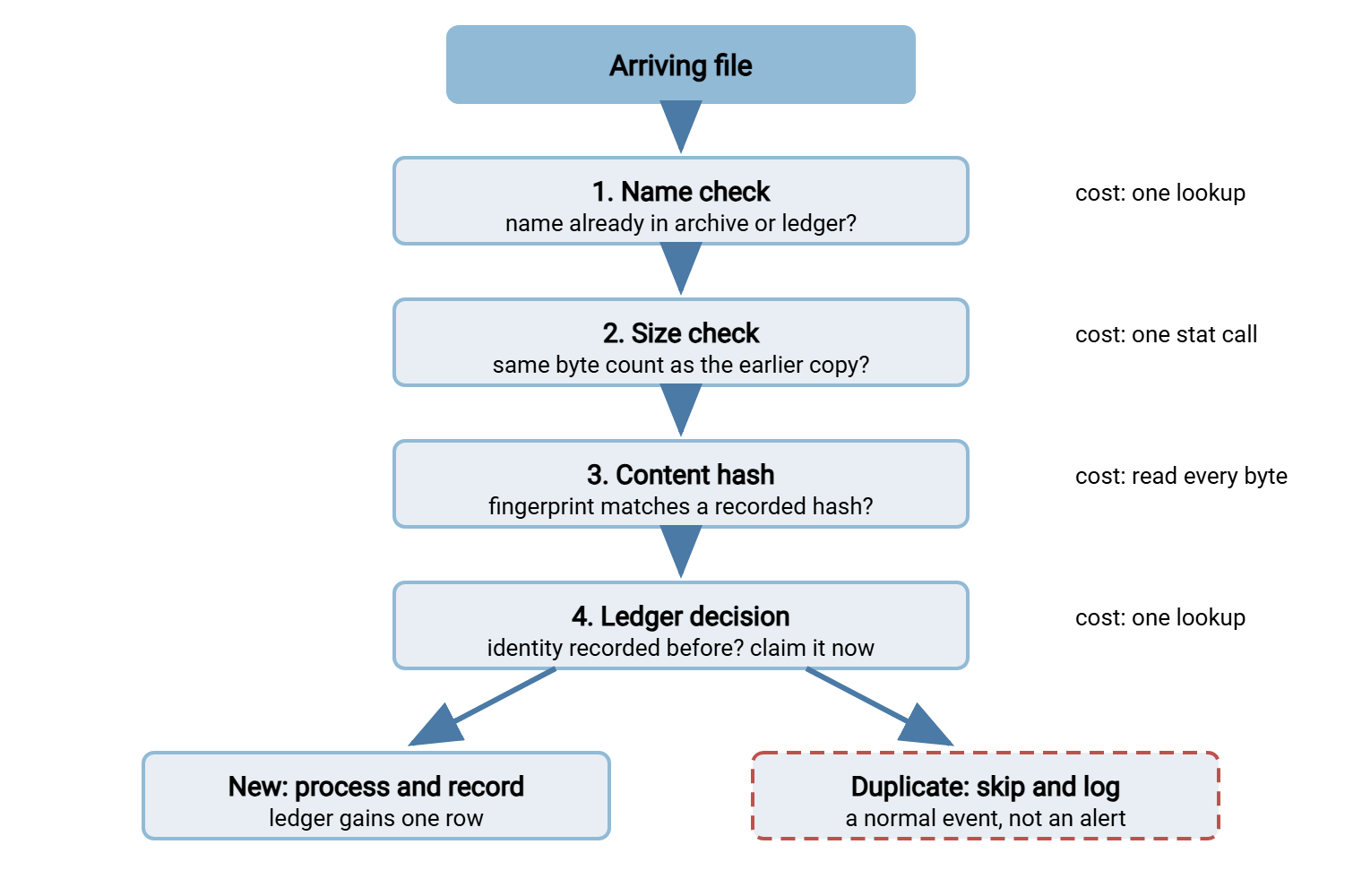
The diagram below shows the full stack in action. Each arriving file falls through the layers, most stopping early, and the ledger records the verdict either way.
Layer 4: The Processed-Files Ledger — Memory That Survives
The first three layers compare an arrival against files you still have. But archives get pruned, and folders get cleaned, and a resend can arrive months after the original was processed and deleted. The processed-files ledger fixes that. It is a durable record — one row per file the pipeline has ever handled. It holds the file's name, size, hash, when it was processed, and what happened to it. With a ledger, detection stops depending on the archive's contents; the pipeline remembers everything it has done, in a few hundred bytes per file.
A ledger does not require exotic infrastructure. The two honest options:
Option A: a flat file. An append-only text file, one line per processed file. Trivially readable, greppable, backed up with everything else:
# processed.ledger — one line per file, append-only
# processed_at | file_name | size | sha256 (first 12 shown) | run | result
Mar 14 02:10:31 | settle_YYYYMMDD.csv | 48211 | 9f86d081884c | run_0042 | loaded
Mar 14 02:10:44 | orders_YYYYMMDD.csv | 10993 | 60303ae22b99 | run_0042 | loaded
Mar 15 02:10:29 | settle_YYYYMMDD.csv | 48211 | 9f86d081884c | run_0043 | skipped-duplicate
Option B: a database table. A single table in an embedded database (SQLite is the usual choice) or any database server you already run:
CREATE TABLE processed_files (
    file_name    TEXT    NOT NULL,
    size_bytes   INTEGER NOT NULL,
    sha256       TEXT    NOT NULL,
    processed_at TEXT    NOT NULL,   -- "Mar 14 02:10:31"
    run_id       TEXT    NOT NULL,   -- "run_0042"
    result       TEXT    NOT NULL,   -- loaded | skipped-duplicate | reprocessed
    UNIQUE (file_name, sha256)       -- the duplicate gate, enforced atomically
);
Now the part most write-ups skip: locking and atomicity. A ledger that two processes can corrupt is worse than no ledger. The danger is the check-then-act race. Process A checks the ledger, sees nothing, and begins work. Process B (a retry, an overlapping run) checks a moment later, also sees nothing, and both process the file. The check and the claim must be one indivisible step.
- Flat file: wrap the check-and-append in an exclusive OS lock —
flockon Linux, an exclusive file open on Windows. Hold that lock from before the read until after the append. Never edit lines in place; append only. And be honest about network shares: file locking over SMB or NFS is unreliable. It is unreliable enough that a shared flat-file ledger should live on one machine's local disk, with one process writing it. - Database: let the
UNIQUEconstraint do the work. Do not check-then-insert; insert first. If the insert succeeds, this process owns the file — proceed. If it fails on the constraint, some other run already claimed it — skip. The database makes the claim atomic so you do not have to. - Claim before processing, finalize after. Insert the row (result
claimed) before the load begins, update it toloadedafter. A crash mid-load leaves a visibleclaimedrow — a truthful record that says "started, never finished, investigate" instead of a silent gap.
Remember: the ledger check must be atomic — one step that both asks and claims. If your ledger code checks in one statement and records in another with no lock between them, two simultaneous runs will both pass the check. This race is the most common flaw in home-grown dedup, and it only fires under exactly the retry conditions you built the ledger for.
Putting the Stack Together
Assembled, the per-file logic reads like this — pseudocode you can translate into any language your pipeline speaks:
for each completed file F in intake:
    h = sha256(F)                       # hash once, on arrival
    try: ledger.claim(F.name, h)        # atomic insert; UNIQUE enforces
    except AlreadyRecorded:
        log "SKIP duplicate", F.name, h
        move F to duplicates/           # keep for inspection, out of the flow
        continue
    process(F)                          # load, transform, forward
    ledger.finalize(F.name, h, "loaded")
    move F to archive/
Note what the cheap layers became: the ledger's key covers name and hash together, so layers 1 and 3 merged into the claim. Sizes and name-only checks still earn their keep as pre-filters and diagnostics. A same-name-different-hash event, for instance, deserves its own log line ("revision received"), because it is not a duplicate and not routine. Note also where the skipped file goes: a duplicates/ folder, not deletion. Someone will eventually want to inspect one, and the folder costs nothing.
Two placement decisions matter more than they look. First, run the check at the last gate before irreversible work. That means immediately in front of the load or forward step, not merely at the front door. A check at intake alone leaves a window where a duplicate arriving mid-run slips behind the earlier scan. Second, make the skip line as informative as the process line. A good skip entry records the name, the hash, which earlier run originally handled the content, and where the skipped copy went. When someone audits the pipeline later, those lines are the proof that duplicates were seen and handled rather than silently lost. Our guide to what to log treats this evidence question in full.
Ledger Care: Retention, Rebuilds, and the Server's Own Records
A ledger is a small operational asset and deserves three habits. Retention: keep entries at least as long as a resend could plausibly arrive. For most business flows that is comfortably over a year. Since rows are tiny, the simplest honest policy is "keep everything until the ledger's size is an actual problem." Document that alongside your other data-lifetime decisions as covered in retention basics for admins. Pruning the ledger to thirty days quietly re-opens the door to the six-week-later resend. Backup: the ledger is state; lose it and the pipeline forgets what it has done. Back it up with the same seriousness as the data it protects. Rebuildability: know how you would reconstruct it — from the archive folder (re-hash everything) plus the transfer server's own logs for arrival times.
That last point deserves emphasis, because your transfer server has been keeping a related record all along. A server that logs every transfer holds the arrival half of the story. Sysax Multi Server writes each one to its log file and to a database. The record shows what came in, when, from which account and address, and whether it completed. That is not a processing ledger (it cannot know what your pipeline did with the file afterward, and it is not a dedup feature). But as a queryable record of arrivals, it is exactly the raw material you need to rebuild history or investigate a suspected duplicate. You can also cross-check the ledger's claims against reality. Ledger says processed once; server log says arrived twice; together they tell you the skip logic worked.
The Version to Tell a Colleague
Duplicate detection is a stack, not a single check. Names catch straight resends for the cost of a lookup. Sizes disprove identity for the cost of a stat. Hashes prove content identity for the cost of one full read — computed once on arrival and remembered. Underneath, a processed-files ledger records everything ever handled. The check-and-claim against it must be atomic — a unique constraint or a file lock, not a check followed by a write. Skips are logged, duplicates are kept in a side folder, and the ledger is retained, backed up, and rebuildable.
With detection in hand, the next questions are architectural. The article exactly-once thinking explains why this ledger-plus-retry combination is the correct end state rather than a compromise. And safe reprocessing shows how the same ledger lets you deliberately run old files again without lying to it. To watch the whole stack get retrofitted onto a live pipeline, read the series' closing worked example.
Frequently Asked Questions
Do I really need hashing, or are name checks enough?
Which hash algorithm should I use for duplicate detection?
Is a flat file honestly good enough for a ledger?
What should happen when a duplicate is detected?
How long should the ledger keep entries?
From the Sysax team: we build secure file transfer software for Windows. Sysax Multi Server is an FTP, FTPS, SFTP, and HTTPS server. Sysax FTP Automation handles scheduled, scripted transfers. Free trials are on the download page.