
Testing File Transfer Integrations
File transfer code has a treacherous property: it is trivially easy to demo and genuinely hard to trust. The upload works on the developer's machine against the developer's assumptions, and everyone moves on. But transfer code lives at a boundary — your application on one side, somebody else's server, network, and disk on the other. Boundaries are where assumptions go to die. The bugs that matter are not "the code calls the wrong function." They are "the code has never met a changed host key, a full remote disk, or a connection that dies at ninety percent. Production will introduce them."
This article is a practical testing program for embedded transfer code, written in plain words for developers. It is also for the administrators who will be asked to help build the test environment. As you will see, that is a genuinely joint project. It covers why mocks cannot carry the load alone, and how to stand up a real test server and stock it with deliberately hostile accounts. It covers the fixture files worth keeping, and a copyable test matrix with failure-injection ideas for every row. It explains what continuous integration means for transfer tests, and the staging endpoint arrangement that keeps partners friendly. It is part of our Embedding Transfers in Applications series and picks up where using transfer libraries inside your application left off.
Why Mocks Are Not Enough
A mock is a stand-in object that plays the transfer client's role in a test. The test tells it how to behave ("succeed," "throw a timeout"), and the code under test cannot tell the difference. Mocks are excellent at what they actually do — testing your logic around the transfer. Does a transient failure schedule a retry? Does the job record update correctly? Is the remote name generated right? These tests run in milliseconds with no environment, and you should have plenty of them.
What a mock cannot do is disagree with you. It implements your beliefs about how a server behaves. So it can never catch the bugs that live in the gap between belief and protocol reality:
- Host keys. The mock never presents an unknown or changed key. So the code path that must refuse that key has never executed until it executes in production. That path is discussed in host keys and known_hosts.
- Permissions. The mock happily "writes" anywhere. A real server refuses the upload directory, refuses the rename, or lets you write but not list. Each produces a different error your handler has never seen.
- Timeouts. A mock throws a tidy timeout exception instantly. A real stalled socket makes you discover whether you ever actually set the timeout — the classic gap, since many libraries default to waiting forever.
- Partial writes. Kill a real transfer midway and there is a half-file on a real disk with a real name. Whether that name was a temporary one — the discipline from making in-app transfers reliable — is exactly what needs proving.
- Server semantics. Renaming over an existing file, listing order, how the server reports a full disk — behavior varies by server and is documented nowhere your mock can read.
So the program has layers: mocks for logic, a real server for reality, and a staging endpoint for the partner's particular flavor of reality.
The Three Tiers, and Where Each Runs
The diagram shows the arrangement worth building. Fast mocked tests run on every build, with integration tests against a lab server you control on every merge. Occasional verification runs against staging endpoints shared with partners.
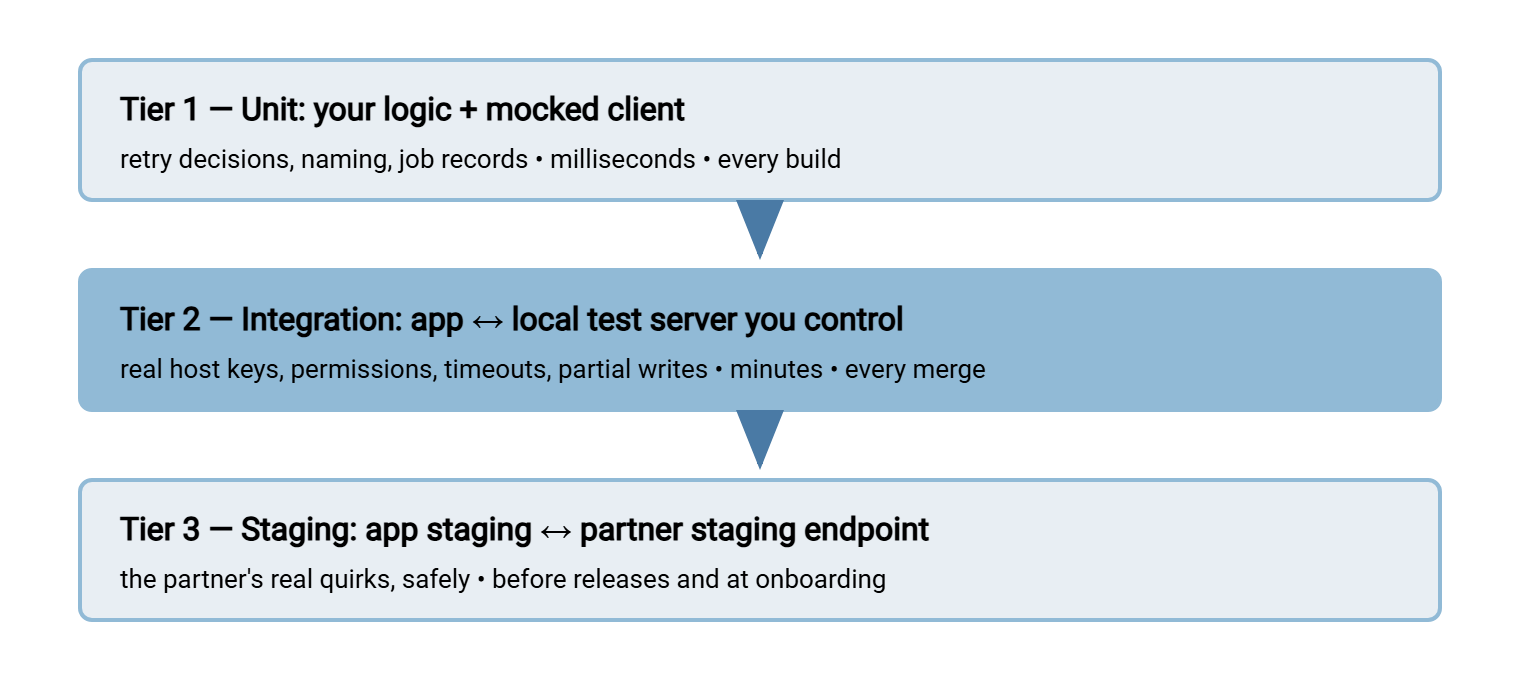
Each tier catches what the one above cannot, and each is slower and scarcer than the one above. The art is keeping every tier honest about its job. Logic bugs should die in tier one, protocol surprises in tier two, and partner-specific quirks in tier three — never in production.
Your Own Real Test Server
The heart of tier two is a transfer server that your team fully controls. It runs on a lab VM, a spare box, or the developer's own Windows machine. Full control is the feature: you can create accounts, break permissions, fill disks, swap host keys, and stop the service mid-transfer. None of those are things any shared server will let you do. If you have never set up a small lab like this, our lab setup guide walks through the general craft. Any real server your team can operate will serve.
On Windows, a convenient concrete option is Sysax Multi Server: the free trial installs a full SFTP, FTPS, FTP, and HTTPS server. Its per-account authentication — built-in accounts, Windows and Active Directory users, and public keys — lets you mirror whatever authentication shape production uses. That includes key-based logins for testing exactly the code path your app will run. Just as valuable for testing is its activity logging to file and database. Every test failure has two sides, and the server's log is the other half of the conversation. It tells you whether your library authenticated, what it uploaded, and when the connection dropped. That regularly settles in one minute an argument that client-side logs alone cannot.
Stock the server with deliberately hostile accounts, because each one is a reusable failure scenario:
Test server account roster
--------------------------
xfer-good      normal account, full access to its own folder
               -> happy paths, fixtures, idempotency re-runs
xfer-readonly  may list and download, may not write
               -> permission-denied handling on upload and rename
xfer-full      home folder on a tiny, nearly full volume (or quota)
               -> remote disk full mid-write
xfer-badpass   valid name, but tests present a wrong password
               -> auth-failure classification (never retried!)
xfer-keyonly   accepts only public-key auth
               -> key handling, passphrase and path bugs
Two cautions from the field. Give the bad-password tests their own throwaway account so lockout protections trip on xfer-badpass and never on the account your other tests need. And treat the test server's host key as a managed fixture. Record it in the test configuration the same way production records the partner's key, because that config path is itself code under test.
Treat the server itself as rebuildable, not precious. Script or document its setup — accounts, folders, permissions, the tiny volume — so a fresh instance can be stood up in half an hour. Reset its folders between suite runs so no test inherits another's leftovers. A lab server that accumulates mystery state for a year becomes a second production system: something everyone depends on and no one dares touch. That is the opposite of what a test environment is for.
Fixture Files That Earn Their Keep
A fixture is a known file the tests use repeatedly. Resist the temptation to test with one cheerful test.txt; a small deliberate set flushes out different bugs:
- The empty file — zero bytes. Perfectly legal, regularly mishandled: some code paths treat empty as "nothing to do," some as an error, and the two halves disagree.
- The tiny file — a few hundred bytes for fast happy-path runs; most of the suite uses this one.
- The large file — big enough to cross buffer boundaries and take real seconds (hundreds of megabytes is usually plenty). This is the one that exposes whole-file-in-memory mistakes and gives kill-mid-transfer tests something to interrupt. Generate it at test time rather than storing it in version control.
- The awkward names — spaces, apostrophes, non-ASCII characters, a name at the length limit, mixed case. Filename handling is a classic silent corrupter across systems.
- Business samples — one valid instance of each real file type the flow carries, plus deliberately malformed siblings, so validation logic gets exercised alongside movement.
Fixtures serve both directions. For download tests, the suite seeds the server first — placing known files in the test account's folder over the same connection. Then it fetches them through the code under test and compares bytes. Seeding through a second, independent path (a plain script rather than your library code) is worth the extra few lines. When upload and download are tested only against each other, a symmetrical bug — the same corruption in both directions — cancels itself out and passes.
The Test Matrix
Here is the copyable core of the program: the scenarios every transfer integration should prove. It covers how to provoke each against your lab server, and what "passing" means. The right-hand column is the part teams skip — decide the expected behavior before running the test, or every outcome looks acceptable.
| Scenario | How to provoke it | What the app must do |
|---|---|---|
| Happy path, up and down | Normal account, each fixture file | Bytes identical end to end; temp name used; job marked done only after verification |
| Connection timeout | Firewall rule that silently drops packets to the port | Fail within the configured timeout — not hang — classify transient, schedule retry |
| Connection refused | Stop the server service; or use a closed port | Immediate clean failure, transient classification, retry with backoff |
| Bad credentials | The xfer-badpass account | Permanent classification: no retry, loud alert — retrying is self-inflicted brute force |
| Host key changed | Point config at a wrong expected key (or regenerate the lab server's key) | Refuse to connect, send nothing, alert distinctly — never auto-accept |
| No write permission | The xfer-readonly account | Permanent classification with the path in the error; no half-file left behind |
| Remote disk full | The xfer-full account's tiny volume, large fixture | Detect the failed write, clean up the temp file, classify (retry later is fair), alert if persistent |
| Dropped mid-transfer | Kill the server (or the connection) during the large fixture | No final-named partial visible; retry produces exactly one complete file |
| Worker crash mid-job | Kill your own worker process during a transfer | On restart, the job recovers and completes; no duplicate, thanks to idempotent naming |
| Duplicate run | Execute the same job twice on purpose | Same end state as one run — one file, one ledger entry, no _2 twin |
Failure Injection Without Special Tools
Everything in the matrix can be provoked with equipment you already have; failure injection is just arranging for the bad day on purpose:
- Firewall rules are your network fault kit. A rule that silently drops packets produces a timeout (the connection attempt just dangles). A rule that actively rejects produces connection-refused instantly. The two exercise different code paths and different error messages — test both, and learn to recognize each in your logs.
- The service control panel is your outage generator. Stopping the server service mid-transfer is the truest simulation of a remote crash, and restarting it mid-backoff proves recovery actually drains the queue.
- A tiny volume or quota is your full disk. Provision the test account's folder on a deliberately small volume and the large fixture fills it on cue.
- Accounts are your permission faults — readonly, key-only, wrong-password, as rostered above.
- Killing your own process is your crash test. Terminate the worker ungracefully during the large fixture and watch what startup recovery does. This single test has paid for more design fixes than any other in the matrix.
Remember: your code should first meet a changed host key, a full disk, or a dropped connection in the lab. There, you scheduled it. In production, it schedules you. A test suite that has never seen a failure has not tested the part of the code you will meet at 2 a.m.
Continuous Integration, in Plain Words
Continuous integration (CI) means a machine automatically builds your application and runs its tests every time someone submits a change. That catches breakage in minutes rather than discovering it downstream. No mystique — it is a robot that refuses to look away. For transfer code, the practicalities:
- Split the tiers. Unit tests run on every change, always. Integration tests — which need the lab server — run on merges or on a schedule. They are marked clearly so a missing environment skips them loudly rather than passing them silently. A silently skipped suite is how "all green" and "never tested" become the same color.
- Give CI its own server and accounts. The same server install can host a
ci-account set, but keep humans out of CI's folders. Tests should assume nobody else touches their space. - Make every run self-contained. Each run works under a unique remote directory (a run identifier in the path), creates what it needs, asserts, and cleans up. So two runs never collide and a failed run's debris is obvious and disposable.
- Chase flakiness, do not tolerate it. A transfer test that fails "sometimes" is reporting a real race — usually a settle assumption or a missing wait. That race is in the test or, worse, in the code. Retrying the suite until green teaches the team to ignore the only alarm that was telling the truth.
- Run the slow suite nightly. Large fixtures, kill-mid-transfer, full-disk — schedule the expensive matrix rows nightly. Your CI runner may genuinely be unable to reach a server. If so, a scheduled job can run the integration suite from a machine that can — even driven by the ordinary task scheduler. That beats not running it at all.
Test credentials follow the same rules as production ones, scaled down but not suspended: the CI system's stored-secret mechanism holds them, the repository does not. Lab passwords leak into muscle memory and then into other systems. A repo that "only" exposes test credentials still hands an attacker a map of your hostnames, folder layouts, and conventions.
The Staging Endpoint Your Partner Will Thank You For
Tier three exists because your lab server, however hostile, is still not the partner's server. Their folder rules, naming expectations, and rejection behaviors are learned nowhere else. The cardinal rule: never test against a partner's production endpoint. Production landing folders feed production automation; your "test" invoice file gets ingested by their billing run, and the cleanup conversation is long and humbling. At onboarding, ask three questions. Is there a test or staging endpoint? Are its credentials distinct from production (they must be — and your config layering from the credentials article keeps them apart)? Does test data land where their production automation cannot see it?
Offer the same courtesy inbound: a staging area on your own server where partners can send test files during their development. Give it its own accounts and folders, far from production watch folders. And when your flow is delegated rather than embedded, staging is where you test the handoff. Drop a file into the staging watch folder and verify the transfer layer carries it. With a tool like Sysax FTP Automation monitoring the folder, its retry behavior and email notifications make the staging run observable end to end. That is precisely the rehearsal you want before the production folder goes live.
Trust Is Built in the Lab
The program in one paragraph: mocks prove your logic, fast and often. A real server you control proves your code against protocol reality, on every merge. It is stocked with hostile accounts, awkward fixtures, and a firewall rule or two. A staging endpoint proves the partner's particulars before production does. Work the matrix until every row has a decided expectation and a passing test. Then the transfer integration stops being the part of the system everyone quietly distrusts.
If you arrived here mid-series, this article leans on two others. The first is using transfer libraries inside your application, where the timeout and host-key settings under test are chosen. The second is making in-app transfers reliable, where the retry, idempotency, and recovery behaviors in the matrix's right-hand column are designed.
Frequently Asked Questions
Can't we just test carefully by hand before each release?
What should we use as a test server?
How do we test timeout handling without waiting forever?
Our tests pass locally but fail in CI. Where do we look first?
The partner has no test endpoint. What then?
From the Sysax team: we build secure file transfer software for Windows. Sysax Multi Server is an FTP, FTPS, SFTP, and HTTPS server. Sysax FTP Automation handles scheduled, scripted transfers. Free trials are on the download page.