
Checksum Files and Manifests for Batches
Verifying one file is easy: hash it here, hash it there, compare. But real transfers are rarely one file. You send a partner two hundred CSVs overnight, or receive a folder of images, or push a directory tree of firmware to a fleet of devices. Comparing two hundred digests by hand is not verification — it is a data-entry job nobody will do twice. What you need is a way to verify a whole batch with one command. You need to prove not just that each file is intact but that the right set of files arrived. That is what checksum files and manifests do.
This article scales the three-step ritual from a single file up to batches. You will learn the sidecar checksum file and the manifest format that every partner's tooling already understands. You will learn the exact commands to create and verify manifests on Windows and Linux. You will also learn the conventions that keep manifests working as batches grow. This is part of our Integrity Verification series and builds directly on verifying a transfer end to end. The manifest is simply that check, applied to many files at once.
The Sidecar: One Checksum File for One Data File
Start with the simplest artifact, which you already met in the end-to-end article. A sidecar checksum file is a tiny text file that holds the digest of one data file and travels beside it. By convention it takes the data file's name plus an algorithm suffix:
export.csv          ← the data
export.csv.sha256    ← the sidecar, holding one line:

9f2a5b7c1d3e4f6a8b0c2d4e6f8a1b3c5d7e9f0a2b4c6d8e0f1a3b5c7d9e1f2a  export.csv
That one line is the standard GNU format: the digest, two spaces, then the filename. The two spaces are not decoration — the verify command parses on them. Ship both files together, and the receiver verifies with a single command that reads the sidecar, re-hashes the data, and compares:
$ sha256sum -c export.csv.sha256
export.csv: OK
A sidecar per file is perfect when files arrive one at a time and independently. But once a batch is a logical unit — this night's delivery, this release, this partner drop — you want one artifact that covers the whole set. That is a manifest.
The Manifest: One File, Many Digests
A manifest is just a checksum file with more than one line — one line per file in the batch, each holding a digest and a filename:
9f2a5b7c1d3e4f6a8b0c2d4e6f8a1b3c5d7e9f0a2b4c6d8e0f1a3b5c7d9e1f2a  sales-jan.csv
4c80e3d9a1f05b26c7d8e90a1b2c3d4e5f6071829304a5b6c7d8e9f0a1b2c3d4  sales-feb.csv
7b1e0a92c34d56e78f90a1b2c3d4e5f60718293a4b5c6d7e8f90a1b2c3d4e5f6  sales-mar.csv
e3a71c9f2b4d6081a3c5e7092b4d6f8103a5c7e90b2d4f6183a5c7e9f0b2d4f6  README.txt
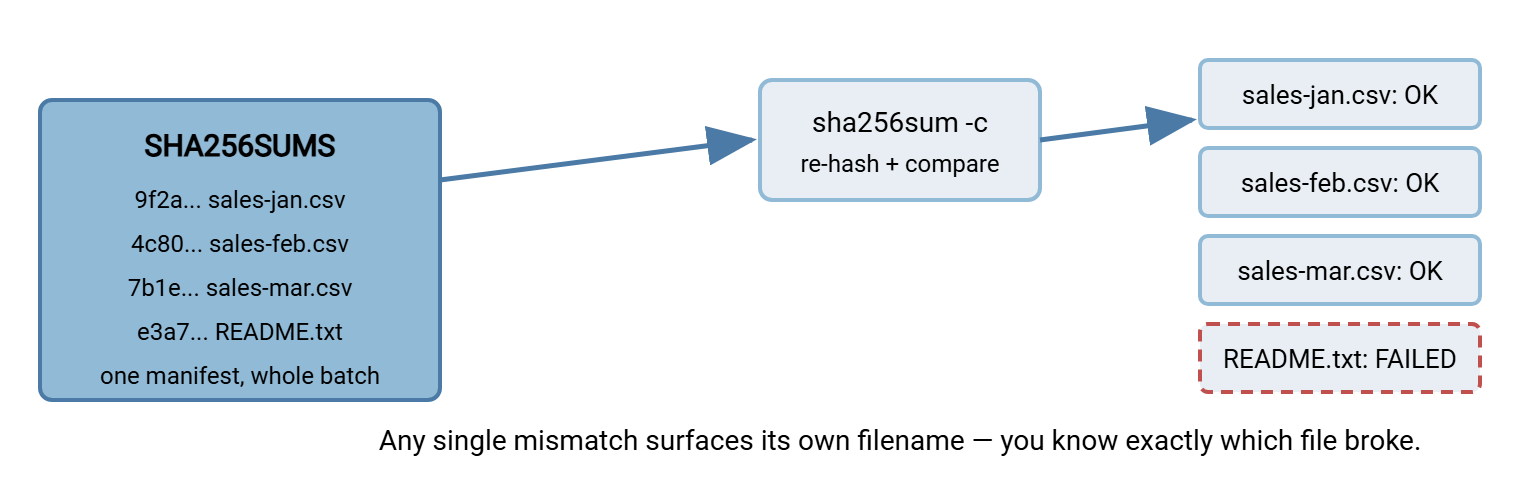
By convention this file is named SHA256SUMS, or manifest.sha256, or something equally obvious. It lives in the same folder as the files it describes. One manifest, one command, whole batch verified. Notice what the manifest also gives you for free: an explicit, authoritative list of which files belong to this delivery. That list is as valuable as the digests. Without it, "the batch" is a fuzzy notion — whatever happened to be in the folder. You cannot tell a missing file from one that was never sent. The manifest pins the set down, so both sides agree on exactly what a complete delivery contains. The diagram below shows the relationship: a single manifest stands in for the entire batch. One verify pass checks every file against its recorded digest.
Creating a Manifest
On Linux
The sha256sum command accepts many files at once, so a manifest for every CSV in a folder is one line. Redirect its output into the manifest file:
$ sha256sum *.csv > SHA256SUMS

$ cat SHA256SUMS
9f2a5b7c1d3e4f6a8b0c2d4e6f8a1b3c5d7e9f0a2b4c6d8e0f1a3b5c7d9e1f2a  sales-jan.csv
4c80e3d9a1f05b26c7d8e90a1b2c3d4e5f6071829304a5b6c7d8e9f0a1b2c3d4  sales-feb.csv
For a whole directory tree, let find feed every file to sha256sum, which records each path relative to where you run it:
$ find . -type f ! -name SHA256SUMS -exec sha256sum {} + > SHA256SUMS
The ! -name SHA256SUMS keeps the manifest from trying to list itself — a small but real gotcha, since a manifest cannot contain its own final digest.
On Windows
PowerShell has no manifest command, but Get-FileHash plus a little formatting produces the same GNU-format file that Linux tools read. This pipeline hashes every CSV, lowercases the digest, and writes "digest, two spaces, filename":
PS C:\batch> Get-FileHash *.csv -Algorithm SHA256 |
  ForEach-Object { "{0}  {1}" -f $_.Hash.ToLower(), (Split-Path $_.Path -Leaf) } |
  Set-Content -Encoding ASCII SHA256SUMS
Writing it in plain ASCII (or UTF-8 without a byte-order mark) matters. A manifest saved as UTF-16, which some Windows tools default to, will confuse sha256sum -c on the far side. Keep manifests in simple, boring text.
Verifying a Manifest
On Linux, the same -c flag that checks a sidecar checks a manifest — it walks every line, re-hashes each named file, and reports per file:
$ sha256sum -c SHA256SUMS
sales-jan.csv: OK
sales-feb.csv: OK
sales-mar.csv: OK
README.txt: FAILED
sha256sum: WARNING: 1 computed checksum did NOT match
The command exits non-zero if anything fails, so a script can branch on success without parsing the text. Two flags sharpen it. The flag --quiet prints only the failures (silence means all-clear). The flag --strict makes malformed manifest lines an error rather than a warning.
On Windows, loop over the manifest lines and compare each. This reads the GNU format, strips an optional binary-mode asterisk from the filename, and reports match or mismatch:
PS C:\batch> Get-Content SHA256SUMS | ForEach-Object {
  $expected, $name = ($_ -split '\s+', 2)
  $name = $name.TrimStart('*').Trim()
  $actual = (Get-FileHash $name -Algorithm SHA256).Hash
  if ($actual -eq $expected) { "OK   $name" } else { "FAIL $name" }
}
OK   sales-jan.csv
OK   sales-feb.csv
OK   sales-mar.csv
FAIL README.txt
Remember: a manifest turns "did all 200 files arrive intact?" into a single yes/no you can script on. The moment a batch is a unit — one delivery, one release — give it a manifest and stop trusting file counts.
What a Manifest Catches That a File Count Doesn't
Counting files tells you how many arrived, not which ones or whether they are whole. A manifest is stronger on three fronts, and it is worth knowing the exact edges:
- Corrupted files — any file whose content changed shows up as
FAILED, named individually. So you fix the one broken file instead of resending the batch. - Missing files — a file listed in the manifest but absent on disk reports
FAILED open or read. A raw file count can hide this if some other stray file made the total look right. - The wrong content at the right name — a placeholder or truncated stub sitting where the real file should be passes a count and a name check. But it fails its digest instantly.
There is one honest gap: sha256sum -c verifies that every listed file is present and correct. But it does not flag extra files that are on disk yet absent from the manifest. Catching unexpected additions may matter — say a drop folder that should contain exactly the batch and nothing else. If so, compare the directory listing against the manifest's filename column as a separate step. The manifest guarantees the named set; it does not police what else wandered in.
Formats Partners Actually Understand
You will meet two manifest styles in the wild. Knowing both prevents a partner's file from looking "broken" when it is merely written in the other dialect.
| Format | A line looks like | Typically written by | Verify with |
|---|---|---|---|
| GNU / coreutils | 9f2a... file.csv |
sha256sum on Linux |
sha256sum -c |
| BSD / tagged | SHA256 (file.csv) = 9f2a... |
shasum --tag, macOS/BSD |
shasum -c |
The GNU format is the common tongue — most tools read it, and it is what Linux writes by default. The BSD tagged format names its algorithm on every line, which some partners prefer because a line is self-describing. Both encode the same information; you can convert between them with a little text processing if a partner insists on one. When you set up a new exchange, agree on the format and the algorithm up front. Write it into the partner runbook so nobody guesses.
Here is why this small agreement matters more than it looks. A mismatched format is the single most common reason a perfectly good batch appears to "fail" verification on first contact with a new partner. The files are fine and the digests are correct. But one side's tool cannot parse the other side's lines, so it reports errors that look like corruption. Ten minutes spent agreeing on GNU-or-BSD and SHA-256 at onboarding saves an afternoon of chasing a phantom integrity problem later. Treat the manifest format as part of the interface contract, on the same footing as the hostname and the folder path.
One Fingerprint for the Whole Batch
Sometimes you want a single value that stands for the entire delivery. You want one string to log, to quote in a ticket, or to hand to a signature. Because the manifest is itself just a file, you can hash it. The digest of the manifest is a fingerprint of the whole batch:
$ sha256sum SHA256SUMS
b8d1f0a37c92e4650f81a2b3c4d5e6f70819a2b3c4d5e6f70819a2b3c4d5e6f7  SHA256SUMS
Change any file in the batch and its line in the manifest changes; change any manifest line and the manifest's own digest changes. It is the avalanche effect one level up: a single altered byte anywhere in two hundred files ripples out to this one top-level value. That makes it a compact "batch ID" you can record. If two sites report the same manifest digest, their entire batches are identical, no file-by-file comparison needed.
Two cautions come with it. First, sort the manifest before you hash it. That way, the same set of files always yields the same manifest and therefore the same fingerprint. The order the hashing tool happened to walk the folder does not matter. Second, keep the guarantee straight: the digest of the manifest still only proves internal consistency. To prove the batch came from you, sign that one small value. Signing a single manifest digest is far cheaper than signing two hundred files, yet it vouches for all of them. That is exactly why manifests and signatures pair so naturally.
Conventions That Scale Past a Handful of Files
A manifest that works for ten files can quietly break at ten thousand unless you settle a few conventions early:
- One algorithm per manifest. Do not mix SHA-256 and MD5 lines — the verify tools assume a single algorithm. The filename should make it obvious (
SHA256SUMS, notchecksums.txt). - Relative paths, forward slashes. Record
data/sales-jan.csv, notC:\batch\data\sales-jan.csv. Absolute paths break the instant the batch moves, and forward slashes survive the trip between Windows and Linux. - Mind filenames with spaces. The two-space delimiter still works, but a leading or trailing space in a name will bite you. The GNU format escapes such names with a backslash prefix, and the verify tools understand it.
- Sort the lines. A manifest sorted by filename makes diffs between two runs readable. So you can see at a glance which files were added or dropped since last night.
- Protect the manifest itself. The manifest verifies the batch, but nothing in the batch verifies the manifest. Publish a single digest of the manifest through a second channel, or better, move up to signing — which is where authenticity enters.
That last point is the important seam. A manifest proves the batch is internally consistent with the digests recorded in it. But an attacker who can rewrite a file can also rewrite its line in the manifest. The check will still pass. Detecting that requires a digital signature over the manifest, so the receiver can confirm it came from you and was not edited in flight. We draw the full line between "the bytes match" and "the right party vouched for them" in integrity vs authenticity. For batches, the practical takeaway is simple: sign the manifest, and one signature then covers every file it lists.
Manifests as a Delivery Record
Beyond catching corruption, a manifest is evidence. Keep the manifest a partner sent and the verify result you got. Then you have a dated record of exactly which files, with exactly which contents, arrived. It is the kind of artifact that settles a "we never received that" dispute months later. Stored alongside your transfer logs, manifests become part of the audit trail we cover in the Transfer Logging and Audit Trails series.
This is why it pays to treat the manifest as part of the deliverable, not scaffolding you throw away after verifying. A partner may ask, six months on, whether a particular file was ever received and what it contained. Without a manifest, the honest answer is "the log says a file by that name arrived, but I cannot tell you its exact contents." With a retained, verified manifest — ideally a signed one — the answer becomes "yes, on this date, with this exact digest, and here is the proof." That upgrade from testimony to evidence costs almost nothing at the moment of transfer. It is impossible to reconstruct afterward, because the bytes that would let you recompute the digest are long gone. Save the manifest with the same retention discipline you give the logs.
In automated pipelines, the manifest is also the natural checkpoint. A folder-monitoring job can wait for both the batch and its manifest to land, then verify the whole set before releasing it downstream. A tool like Sysax FTP Automation can run that manifest check as a post-processing step. So a batch with even one bad file is held back rather than half-processed. This is the fail-closed pattern detailed in building integrity checks into automated jobs.
The Version to Tell a Colleague
A sidecar checksum file verifies one file; a manifest verifies a whole batch from a single list of digests and filenames. Create one with sha256sum *.csv > SHA256SUMS on Linux or a short Get-FileHash pipeline on Windows. Verify with sha256sum -c or a PowerShell loop — either one names the exact file that failed. Keep manifests in plain text, one algorithm, relative paths, and remember the gap. A manifest guarantees the files it lists, not that nothing extra crept in. It cannot vouch for itself. When the far side might be hostile, sign the manifest so one signature covers the batch.
Next, make these checks run themselves in building integrity checks into automated jobs, and understand the trust boundary in integrity vs authenticity. If a manifest keeps failing on the same file, where corruption actually comes from will help you find the cause.
Frequently Asked Questions
What is the difference between a checksum file and a manifest?
Does sha256sum -c tell me if extra, unlisted files showed up?
My partner's manifest looks like "SHA256 (file) = ..." — is it broken?
Can one manifest use more than one hash algorithm?
How do I stop the manifest from listing itself?
Should I sign the manifest?
From the Sysax team: we build secure file transfer software for Windows. Sysax Multi Server is an FTP, FTPS, SFTP, and HTTPS server. Sysax FTP Automation handles scheduled, scripted transfers. Free trials are on the download page.