
Integrity vs Authenticity: When a Hash Isn't Enough
You downloaded the file, computed its SHA-256, compared it to the digest on the website, and it matched. That feels airtight — and against an accident, it is. Against a determined adversary, it can be an illusion. The reason is uncomfortable once you see it: a hash is not a secret. Anyone can compute one. So an attacker who replaces the file can just as easily replace the digest you check it against. Your verification will pass with a green light on exactly the file they wanted you to have.
This article draws the line between two ideas that are easy to blur. One is integrity — did the bytes change? The other is authenticity — who vouches for these bytes? A hash answers the first and is silent on the second. By the end you will know precisely where a bare hash protects you and where it does not. You will know how a signed hash closes the gap. This is the capstone of our Integrity Verification series, and it is the bridge into digital signatures. If hashes explained gave you the tool, this article gives you its limit.
Two Different Questions
Integrity and authenticity sound like synonyms in casual speech, but they answer different questions, and confusing them is how good-faith verification gives false confidence.
- Integrity asks: are these the same bytes as the reference? Nothing was corrupted, truncated, or altered relative to a known digest. A hash comparison settles this completely.
- Authenticity asks: who produced these bytes, and can I trust that origin? Did this file really come from the partner it claims to, or from someone impersonating them? A hash cannot answer this at all.
An analogy helps. A hash is like a tally written on a package: anyone can count the items and check the tally. That reliably reveals if something fell out in transit. But anyone can also cross out the tally and write a new one to match whatever they put inside. A signature is like a wax seal pressed with a signet ring only the sender owns. You can tell at a glance whether it was tampered with, and crucially, nobody else can press the same seal. The tally catches accidents; the seal catches an impostor. You often want both.
The gap between them is the reference digest itself. Integrity verification assumes you already hold a trustworthy reference to compare against. Authenticity is what makes that reference trustworthy in the first place. Suppose you control both ends — you hashed your own file before backing it up, and you are checking your own restore. In that case, the reference is trustworthy because you made it, and integrity is all you need. When the file and its digest both come from somewhere you do not control, the assumption quietly fails.
The Attack That Defeats a Bare Hash
Walk through how a hash-only check breaks, because seeing it once makes the fix obvious. Suppose a file and its published digest travel to you over a path an attacker can tamper with. That could be an unencrypted download, a compromised mirror, or an email they can intercept. The attacker does three things:
- Replaces the real file with a modified one.
- Computes the SHA-256 of their modified file — which they can do, because hashing is public and takes no secret.
- Replaces the published digest with the digest of their file.
Now you download. You hash what arrived, compare it to the digest that arrived alongside it, and the two match perfectly. Your check reports success. Integrity, in the narrow sense, was even preserved: you received exactly the bytes whose fingerprint was advertised. It was simply the attacker's file, vouched for by the attacker's fingerprint. The diagram below shows why the check is blind to this.
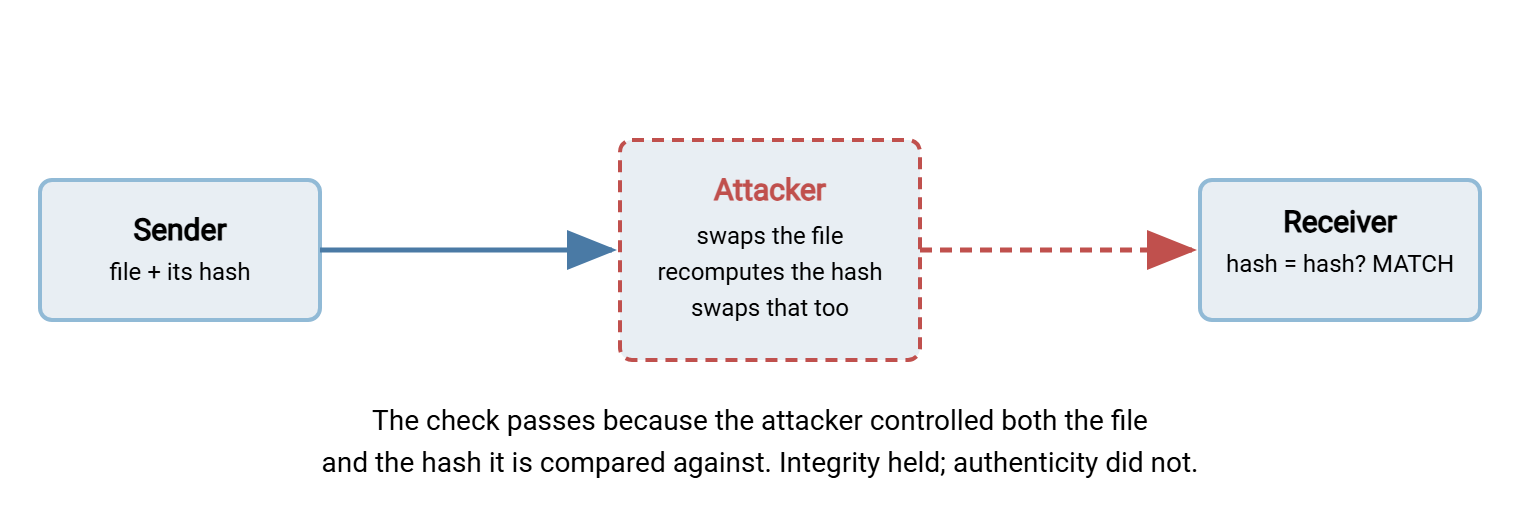
The lesson is not that hashing is broken — it works exactly as designed. The lesson is about what the hash was compared against. A hash protects the file, but nothing in a bare hash protects the hash. Whoever can alter the file on that path can alter its digest on the same path.
Remember: a hash proves the bytes match the reference. It says nothing about whether the reference is honest. If an adversary controls the channel that carries the digest, the digest is theirs to rewrite.
Why the Digest Channel Is the Weak Point
The attack works only because the digest reached you the same way the file did. Publishing a download and its checksum on the same web page, over the same connection, is the textbook version. Break the connection or the page, and you own both. Emailing a file and its hash in one message is the same mistake in a different envelope. In every case the digest inherits exactly the trust of the channel it rode in on. Against an attacker who controls that channel, that is no trust at all.
You cannot fix this by hashing harder. A stronger algorithm resists accidental collisions and makes it infeasible to forge a second file with the same digest. But it does nothing here, because the attacker is not forging a collision. They are honestly hashing their own substitute and publishing that. The problem is not the math. It is that the reference has no protected origin. To close it, the reference needs something an attacker cannot reproduce: a mark that could only have come from the genuine sender.
There is a partial defense short of that: carry the digest over a different, more trusted channel than the file. Pull the software from a fast mirror, but read its checksum from the vendor's main site over a connection you trust. Receive a file by one route and confirm its digest by a quick phone call. Splitting the channels forces an attacker to compromise both at once, which is genuinely harder. It is worth doing when signatures are not on the table — but it is fragile. It leans on the second channel truly being independent. It does not scale to many files or many partners. It still makes you decide, by hand and every time, whether to believe a given digest. A signature turns that repeated, error-prone judgment into one durable decision, which is the better engineering.
What Closes the Gap: The Signed Hash
That mark is a digital signature, and the mechanism is elegant. The sender holds a private key that only they possess, paired with a public key they distribute freely. To sign a file, the sender computes its digest and then produces a signature from that digest and their private key. Anyone with the matching public key can check that the signature genuinely corresponds to both that digest and that key. But producing a valid signature requires the private key, which the attacker does not have.
Now replay the attack. The adversary swaps the file and recomputes its digest, exactly as before. But to make your verification pass, they also need a valid signature over that new digest. They cannot generate one without the sender's private key. The best they can do is strip the signature or attach a broken one, and either way your verification fails and the tampering is caught. The private key they do not hold is the whole difference. The diagram below shows it.
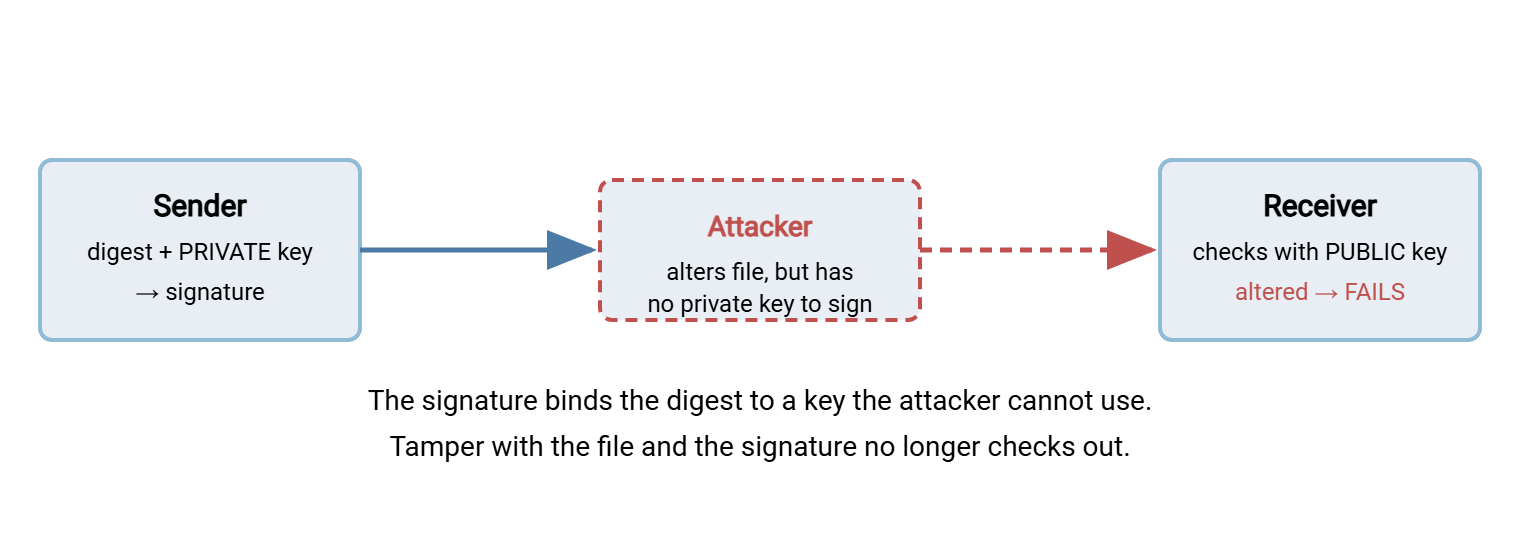
A signature does not replace the hash — it protects it. Under the hood, a signature is essentially a hash with authenticity welded on. You still hash the file, but now the digest is sealed by a key rather than published in the open. That is why people call it a signed hash, and why everything you learned about hashing carries straight over.
The Signed-Hash Bridge, in Commands
You can see the bridge most clearly on a manifest, which lets one signature vouch for a whole batch. The sender signs the manifest; the receiver verifies the signature, then trusts the manifest to verify the files. Using OpenPGP tooling, the sender produces a detached signature over the SHA256SUMS file:
# Sender: sign the manifest that lists every file's digest
$ gpg --detach-sign --armor SHA256SUMS
# produces SHA256SUMS.asc alongside it
The receiver, holding the sender's public key from an earlier trusted exchange, verifies in two steps — authenticity first, then integrity:
# 1. Authenticity: did this manifest really come from the sender, unaltered?
$ gpg --verify SHA256SUMS.asc SHA256SUMS
gpg: Good signature from "Partner Corp <ops@partner.example>"

# 2. Integrity: do the files match the now-trusted manifest?
$ sha256sum -c SHA256SUMS
sales-jan.csv: OK
sales-feb.csv: OK
Read the order carefully, because it is the entire idea. Step 1 proves the manifest is genuine and unmodified — that is authenticity, and it is what the signature buys. Step 2 proves the files match the manifest — that is integrity, the hashing you already know. The signature anchors the trust; the hashes spend it across every file. One signed manifest authenticates the whole delivery. We glossed over the mechanics here: generating keys, exchanging public keys safely, and what "Good signature" really certifies. They are the subject of our Digital Signatures and Non-Repudiation series, which this article hands you off to.
Trust Has to Be Anchored Somewhere
It is tempting to think a signature conjures trust out of nothing. It does not — it relocates trust to a better place. To verify a signature you must hold the sender's genuine public key. You have to have obtained that key through some trustworthy path. The key could be handed to you in person, exchanged during a secure onboarding, or vouched for by a certificate authority you already trust. If an attacker could hand you a fake public key as easily as a fake hash, you would be no better off. So the trust does not disappear; it moves.
But it moves somewhere far more manageable. Instead of taking a fresh leap of faith about a digest on every single transfer, you make one careful trust decision about a key, once. From then on every file that key signs is automatically verifiable with no further judgment. You have traded an endless series of per-file gambles for a single, deliberate, auditable step. That is the true payoff of signatures. It is exactly why key management — how you obtain, store, rotate, and retire those keys — is the beating heart of the discipline. Key management earns a whole series of its own in Digital Signatures and Non-Repudiation.
When Integrity Is Enough, and When You Need Authenticity
Signatures are not free — they mean key management, trust decisions, and more moving parts. The honest question is when a bare hash suffices and when it does not. It comes down to one thing: could the party who controls the file also control the reference, and would they want to?
| Situation | Threat you face | What you need |
|---|---|---|
| Verifying your own backup restored intact | Accidental corruption | Hash alone |
| Confirming a file didn't change on your trusted internal store | Accidental corruption, bit rot | Hash alone |
| Downloading software over an untrusted network | Swapped file + swapped hash | Signature |
| Receiving a partner file that triggers payments | Fraud, impersonation, dispute | Signature |
| Proving who sent what, months later | Denial, non-repudiation | Signature + retained evidence |
The pattern is clear. Your threat may be an accident — corruption, truncation, bit rot — and you may trust the source of the reference. In that case, a hash is the right tool and a signature is overkill. Your threat may be an adversary who could alter the file and its reference together. Or you may later need to prove origin in a dispute. In either case, integrity is necessary but not sufficient, and you need the authenticity a signature provides. Most real estates run both: hashing everywhere as the workhorse, signatures on the flows where the far side is untrusted or the stakes are high.
One More Thing a Signature Doesn't Buy
Authenticity proves origin and integrity together — this file came from this sender, unaltered. It does not prove the file is safe. A signed file is genuinely from its sender, but if that sender's own systems were compromised, they may have signed something malicious in good faith. A valid signature answers "who sent this and did it change?" — not "is this file harmless?" That second question belongs to malware scanning, which inspects content regardless of who signed it. It is covered in our Malware Scanning in File Flows series. Integrity, authenticity, and safety are three separate guarantees; each needs its own control, and a mature pipeline layers all three.
Keeping the three straight is worth the effort. It is easy to let one stand in for another and feel more protected than you are. A green checksum tempts you to assume the file is both genuine and safe; a good signature tempts you to skip the scan. Name the guarantee you actually have in front of you — bytes unchanged, origin proven, content inspected. You will see at a glance which of the three you are still missing on any given flow.
The Version to Tell a Colleague
Integrity asks whether the bytes changed; authenticity asks who vouches for them. A hash answers only the first, and only if you already trust the reference you compare against. Because hashing is public, an attacker who can alter the file can recompute and republish its digest. So a bare hash passed over a channel the attacker controls proves nothing against them. A digital signature fixes this by sealing the digest with a private key the attacker lacks — a signed hash. Use plain hashing against accidents and trusted sources; add a signature whenever the far side could be hostile or the stakes invite fraud.
That makes this the doorway out of integrity and into authenticity. Continue with our Digital Signatures and Non-Repudiation series for the how. Revisit checksum files and manifests to see the manifest you would sign. For the workhorse habit underneath it all, verifying a transfer end to end remains where most of your day-to-day protection comes from.
Frequently Asked Questions
If the hash matched, how could the file still be the wrong one?
Can't I just use a stronger hash algorithm to stop tampering?
What exactly does a digital signature add over a hash?
Do I need to sign every file individually?
Does a valid signature mean the file is safe to open?
When is a plain hash genuinely enough?
From the Sysax team: we build secure file transfer software for Windows. Sysax Multi Server is an FTP, FTPS, SFTP, and HTTPS server. Sysax FTP Automation handles scheduled, scripted transfers. Free trials are on the download page.