
Datestamp Formats That Sort Correctly
Open a folder of daily extracts, sort by name, and look for the newest file. If the date went into the name the right way, the newest file is at the bottom, under every older file. It will be at the bottom in every directory listing, every FTP client, every backup tool, and every script that sorts names alphabetically. That holds on every system, forever. No database, no metadata, no parsing. Put the date in the wrong way and the same listing becomes a shuffle. Files from different months are interleaved, and "newest" is meaningless. Every script that needs order is forced to do real date parsing before it can do anything else. The files are all there. They have been dealt like cards.
The difference between the two outcomes is not effort. Both formats take the same number of characters to write. The difference is purely which order the parts of the date appear in. Once you see why, you will never arrange a datestamp any other way. This article, part of our Naming & Datestamps series, explains the mechanics precisely. It then deals with two honest complications: what to do about time, and the deceptively hard question of which day a file actually belongs to. As throughout this series, example names use pattern tokens — YYYYMMDD stands where an eight-digit date would appear in production. That keeps the examples evergreen.
How Alphabetical Sorting Actually Works
One piece of machinery explains why one date format sorts and another scrambles: how a computer decides which of two names comes first. The rule is character-by-character comparison, left to right. The computer compares the first character of each name; if they differ, the comparison is over and the name with the smaller character sorts first. Only if they are equal does it move on to the second character, and so on until it finds the first difference. The computer is not thinking, which is what makes it reliable.
Two consequences follow immediately. First, the leftmost characters dominate completely. A difference in position one outweighs any difference in position ten — the later characters are never even examined. Second, the comparison knows nothing about meaning. It does not know that 03 is a month or that 28 is a day. It only knows that the character 0 sorts before 1, which sorts before 2, and so on. Digits sort in numeric order character by character, which is exactly what we will exploit. But that only works if every number is written with the same number of digits. The string 9 sorts after 10 alphabetically, because the comparison sees 9 versus 1 in the first position and stops there. Zero-padding — writing 09 — is what makes digit strings sort like numbers.
The design question for a sortable datestamp is therefore narrow: in what order should the parts of a date appear? Comparing characters left to right should give the same answer as comparing dates on a calendar.
Big-Endian Dates: Most Significant Part First
The answer is to put the most significant part — the part that changes slowest and matters most — on the left. Proceed to the least significant part on the right: year, then month, then day. This arrangement is called big-endian, "big end first." You already use big-endian notation every day without thinking about it: ordinary numbers are written big-endian. In the number for "one hundred twenty-three" the hundreds digit comes first, which is precisely why longer-lived comparisons work digit by digit from the left.
Applied to dates, big-endian gives the YYYYMMDD family: four-digit year, two-digit zero-padded month, two-digit zero-padded day, in that order. Now walk through what alphabetical comparison does to two such stamps. It compares the year digits first — so files from an earlier year always sort before files from a later one. The comparison never reaches the month unless the years are equal. If the years match, it compares months; if the months match, it compares days. That is exactly the procedure a human uses to compare two calendar dates. Big-endian order makes the dumb character comparison and the smart calendar comparison give identical answers, every time, with no date logic anywhere. No date logic is the best kind of date logic.
The diagram below shows the same four daily files named two ways. On the left, big-endian stamps (the year token held constant) produce a listing whose alphabetical order is the timeline. On the right, the same four days in day-first order interleave months as soon as the listing is sorted.
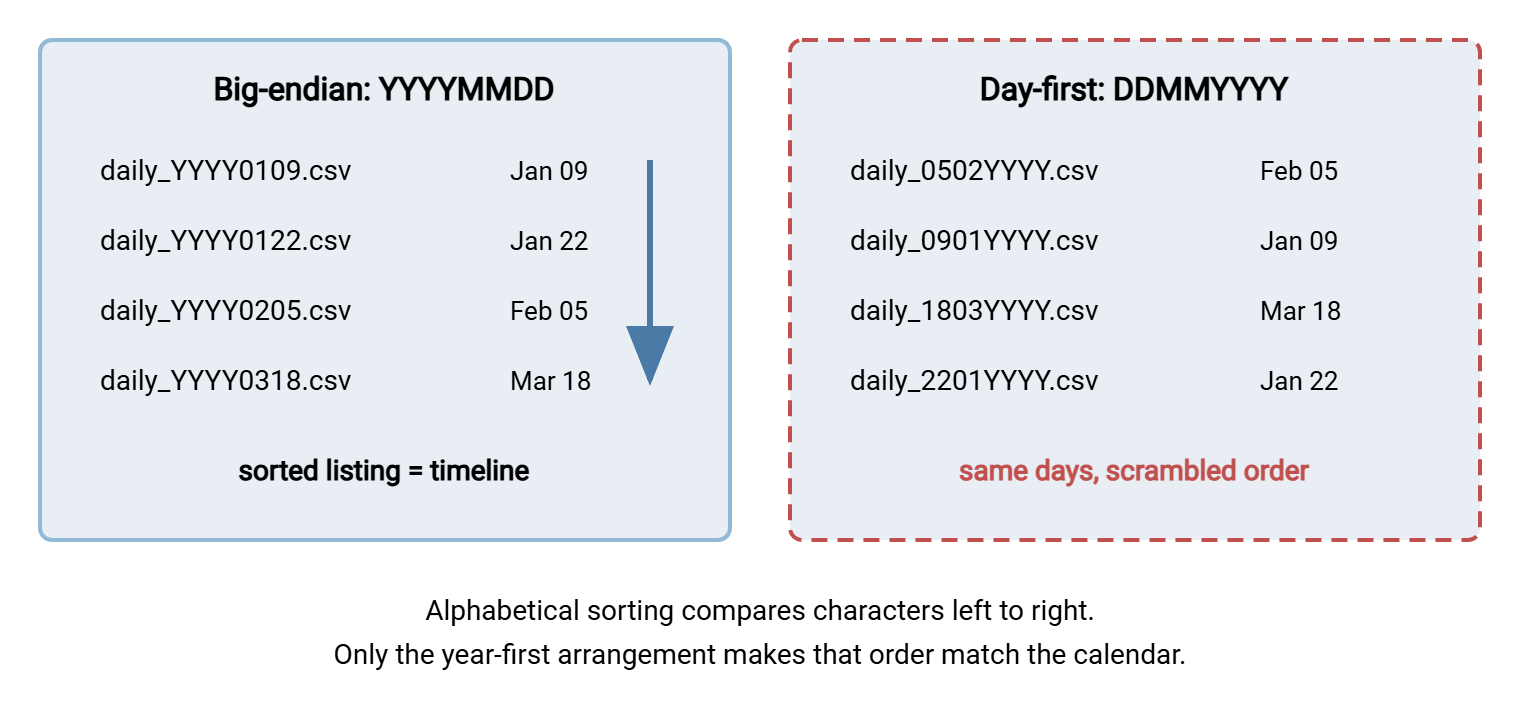
The zero-padding is not optional decoration. Without it, month and day fields have variable width, and the character comparison drifts out of alignment. A single-digit day in one name lines up against a month digit in another, and order collapses. Every field in a sortable stamp is fixed width: four digits of year, two of month, two of day, always. The same rule extends to sequence numbers, which is a story of its own told in sequence numbers and collision avoidance. The leading zero does more work than any other character in the name.
Why the Other Formats Scramble
Each popular alternative fails for a reason you should be able to explain, because you will meet all of them in inherited flows and partner feeds. Some of them will have been yours.
- Day-first (DDMMYYYY). The leftmost — and therefore dominant — characters are the day of the month, the least significant part of the date. Sorting groups files by day-of-month across all months and years: every file from the fifth of any month clusters together. The listing above shows the damage with only four files; with a year of daily files it is chaos.
- Month-first (MMDDYYYY). It is slightly less scrambled, still wrong: the year — most significant — is last. So sorting groups all files from a given month across every year. The month-end files from many different years sit side by side, and the true newest file is somewhere in the middle of the listing. Month-first stamps also collide confusingly with day-first stamps:
0403is a different date in each convention, and nothing in the name tells you which was meant. - Text month names (DDMONYYYY, like
04MAR). Human-friendly, sort-hostile. Month names sort alphabetically, not calendrically: APR before FEB, JUN before MAR. A listing stamped this way orders the year as April, August, December... — an order no calendar recognizes. - Two-digit years. They sort within a century and betray you across one, and they are ambiguous to every parser that meets them cold. The two saved characters buy nothing worth having.
- No year at all (MMDD). Works until the calendar rolls over. A file stamped in December (
1203) sorts after one stamped the following January (0107). So the "newest file" logic silently picks a year-old file every January. The rollover is the acid test of any datestamp. If the format survives December-to-January with order intact, it is big-endian with a full year. If not, it is a latent incident scheduled for the first week of January.
Bluewater Bank's version of the day-first failure was small and instructive. A partner's daily statement arrived stamped day-first, and the bank's loader worked through the folder in listing order. The loader kept the last name it had processed as a high-water mark. For a month this was fine, because inside one month the day is the only part that changes. On the second of the next month the listing put the old month's twelfth, and its thirtieth, after the new month's second. So the loader decided the new file was already behind it and loaded nothing. A freshness check caught the empty run before lunch. The loader now parses the stamp into a real date, and the partner moved to YYYYMMDD at its next release.
Remember: a datestamp sorts correctly only if the parts appear in order of significance — year, month, day, hour, minute, second. Every field must also be zero-padded to fixed width, with a full four-digit year. Every deviation breaks either the ordering or the rollover.
Adding Time: The YYYYMMDD_HHMMSS Family
When a flow produces more than one file per day, the stamp often grows a time component. The same logic extends without modification. Hours are more significant than minutes, minutes than seconds, so the big-endian order is HHMMSS. Two rules keep it sortable. Use the 24-hour clock — with a 12-hour clock, the character comparison puts early afternoon before late morning. An AM/PM letter cannot rescue it. And zero-pad everything: 08, not 8.
Then there is the separator question. Within a field group, use no separators at all: YYYYMMDD, not YYYY_MM_DD, which spends two characters and creates two extra fields for parsers to count. Between the date and time groups, a single underscore earns its place. The name backup_YYYYMMDD_HHMMSS.zip is legible at a glance where a fourteen-digit run is not. The underscore gives split-based parsers a clean boundary. The hyphenated form YYYY-MM-DD — the notation standardized as ISO 8601 — sorts just as correctly and reads even better. So it is a fine choice too; keep whichever you pick consistent across the flow. One separator is banned outright: the colon. Clock time is written HH:MM:SS everywhere else in computing, but the colon is an illegal character in Windows file names. So a name built with it will be rejected or mangled on the first Windows hop. The full inventory of characters that do and do not survive is in safe characters across platforms.
Here is the family at a glance, in token form:
sales_YYYYMMDD.csv              one file per day
backup_YYYYMMDD_HHMMSS.zip      several per day, second precision
extract_YYYY-MM-DD.csv          ISO-style, equally sortable
log_YYYYMMDD.txt                daily log, ready for age-based cleanup

never:
report_DDMMYYYY.csv             day-first: scrambles
report_MMDD.csv                 no year: breaks at the January rollover
report_HH:MM.csv                colon: illegal on Windows
The Which-Day-Is-It Problem
Formatting cannot solve the next complication. A datestamp is a claim — "this file belongs to day X" — and that claim depends on whose clock you read. Clocks differ by time zone, and near midnight they disagree about what day it is. A file generated at 23:30 local time on the last day of the month carries next month's date if the stamping script happens to read UTC. UTC is Coordinated Universal Time, the global reference clock that ignores time zones and daylight-saving changes. A monthly report lands in the wrong month; a "yesterday's file" check finds nothing; nobody changed any code.
The root of the confusion is that a datestamp in a name is used to mean two genuinely different things, and each has a right answer:
- The event stamp: "this file was created at this moment." This is a technical timestamp, and for it, UTC is the better clock. UTC is the same everywhere, so files stamped by servers in different regions still sort into one true timeline. It never repeats an hour — local clocks do, once a year, when daylight-saving time ends. At that point, local-time stamps from the repeated hour can collide or sort out of order.
- The data stamp: "this file covers business day X." Here the calendar day is a business concept — the trading day, the store day, the billing day. It should be computed from the business's own definition of a day, usually a named local time zone, regardless of where the generating server sits. Stamping a daily sales file with UTC is simply wrong if the business closes its books on local midnight; the file would change identity depending on server location.
The trap is not choosing badly — both clocks are legitimate — it is choosing implicitly. A script that calls the system's default "give me today's date" function inherits whatever time zone the server happens to be configured with. That changes when the job moves to a new machine, a cloud region, or a rebuilt VM. The fix costs one line: request the clock explicitly. In a shell script, date -u asks for UTC; in PowerShell and Python, the date-formatting calls accept an explicit UTC or time-zone argument. Then write the decision into the naming convention document — "stamps are UTC" or "stamps are the business day in the warehouse's local zone." That way, producers and consumers agree forever. Designing that document is covered in designing a naming convention. We learned this the slow way, when a job moved to a rebuilt VM and began stamping tomorrow.
Gotcha worth an alert: jobs that run near midnight in any zone are the ones that surface clock disagreements. A nightly export scheduled at 00:05 local can stamp yesterday or today depending on one server setting. If a flow must run near midnight, test what stamp it produces, and consider moving the schedule a safe distance from the boundary.
Where the Stamp Goes in the Name
Placement is less critical than format, but it is a real design decision with visible consequences, because sorting is dominated by whatever comes first in the name.
- Flow first, stamp second —
sales_YYYYMMDD.csv. The listing groups by flow, then by date within each flow: all the sales files together in date order, then all the stock files. This is the right default for a folder that carries several flows. It means a glob likesales_*selects one flow's whole history in chronological order. - Stamp first —
YYYYMMDD_sales.csv. The listing interleaves all flows day by day: everything that happened on one day sits together. Useful in archive folders where the dominant question is "show me that day," less useful in working folders where scripts select by flow. - Stamp at the very end, after the extension — never. Names like
sales.csv.YYYYMMDDhide the file type from every tool that reads extensions, and Windows in particular will misidentify the file. The extension is the last field, always.
Whichever placement you choose, keep the stamp at a fixed position in the field structure — always the third underscore-separated field, for instance. Scripts that extract the date can then split on the delimiter and take a known field instead of hunting for eight digits. This is simpler and stricter. The techniques are the subject of parsing file names reliably.
Formats Parsers Love — and the Strings That Generate Them
A good datestamp is not just sortable; it is trivially machine-readable: fixed width, digits only, one unambiguous meaning per position. Those properties come free with YYYYMMDD, and every mainstream scripting environment can generate it with a single format string. The same format string that generates a stamp also validates and parses it later — write it once in the convention document and reuse it everywhere.
| Environment | Date only | Date and time | Force UTC |
|---|---|---|---|
| bash / shell | date +%Y%m%d |
date +%Y%m%d_%H%M%S |
add -u |
| PowerShell | Get-Date -Format yyyyMMdd |
Get-Date -Format yyyyMMdd_HHmmss |
(Get-Date).ToUniversalTime() first |
| Python | strftime("%Y%m%d") |
strftime("%Y%m%d_%H%M%S") |
datetime.now(timezone.utc) |
| ISO hyphenated | date +%F → YYYY-MM-DD |
avoid %T in names (colons) |
add -u |
Note the PowerShell casing: in .NET format strings, MM means month and mm means minutes. So yyyyMMdd is correct and yyyymmdd silently produces year-minute-day — a stamp that looks plausible and is quietly wrong. It is the kind of bug that survives review because the output is eight digits either way; the parser article's validation habits are what catch it. I have shipped that one myself, and the stamps looked lovely in the listing.
Sortable, parseable stamps pay off well beyond your own scripts. Age-based cleanup can decide a file's fate from its name instead of trusting filesystem timestamps that reset on every copy. That is the approach our guide to automated purge policies recommends, and the one age-based cleanup jobs builds on. Scheduled transfer tools benefit the same way. In Sysax FTP Automation, wizard-built upload, download, backup, mirror, and synchronize tasks all work against folders of files. When those files carry big-endian stamps, the folders they maintain stay browsable timelines rather than shuffled heaps. And on the server side, Sysax Multi Server writes the name of every transferred file to its activity logs — file or database. So a datestamped name means one log search on the stamp retrieves exactly one day's traffic for a flow.
A Datestamp Standard in Four Rules
Everything in this article compresses into four rules you can adopt verbatim:
- Big-endian, always: year, month, day, then hour, minute, second — most significant first, so alphabetical order is chronological order.
- Fixed width, always: four-digit year, everything else zero-padded to two digits, 24-hour clock.
- Safe separators only: nothing inside a field group, an underscore (or the ISO hyphens) between groups, never a colon.
- One clock, chosen out loud: UTC for event stamps, the defined business day for data stamps — written into the convention, never inherited from server settings.
With the date field settled, the next question is what happens when two files share a day — the subject of sequence numbers, uniqueness, and collision avoidance. Then designing a naming convention shows where the stamp sits among the other fields, and parsing names in scripts closes the loop on the consuming side. The stamp is one field — but it is the field that turns a folder into a timeline. Written the other way, it turns the timeline back into a deck of cards.
Frequently Asked Questions
Why does YYYYMMDD sort correctly when other date formats don't?
Is YYYY-MM-DD with hyphens as good as YYYYMMDD?
Should file datestamps use UTC or local time?
Why is zero-padding so important?
Can I rely on the file's modified timestamp instead of a stamp in the name?
What about stamping with epoch seconds instead of a date?
From the Sysax team: we build secure file transfer software for Windows. Sysax Multi Server is an FTP, FTPS, SFTP, and HTTPS server. Sysax FTP Automation handles scheduled, scripted transfers. Free trials are on the download page.