
Designing a File Naming Convention for Your Flows
Three files sit side by side on one transfer server: SalesExtract-YYYYMMDD.CSV, sales_extract.csv, and SE_YYYYMMDD_final2.csv. They are the same feed. Most environments already have a naming convention in this sense. Nobody wrote it, nobody agreed to it, and it lives in the muscle memory of whoever set up each flow. That is how a single server ends up hosting three private conventions, three parsing rules, and three sets of assumptions. Every new script must reverse-engineer all three. Folklore conventions work right up until the person who remembers them leaves, or the flow that violates them arrives. Nothing named final2 has ever been final.
A real convention is different in kind, not just in tidiness: it is a short written standard — one page. Producers can follow it, consumers can validate against it, and newcomers can read it instead of guessing. This article, the design chapter of our Naming & Datestamps series, walks through every decision such a standard has to make. That includes which fields the name encodes, in what order, separated how, stamped against which clock, and kept unique by what. Since conventions live for years, it includes how the standard itself is versioned and rolled out over flows that already exist. The article ends with a complete template document you can copy and fill in. As throughout the series, examples use pattern tokens — YYYYMMDD where an eight-digit date would appear — so everything here is paste-safe.
Start With the Questions the Name Must Answer
Design goes wrong when it starts from aesthetics — what looks tidy — instead of from the name's actual readers. List them first. For a typical transfer flow, the readers of a file name include the routing script deciding where the file goes. They include the watch folder pattern deciding whether to pick it up, the dedup check asking "seen before?", and the purge job asking "how old?" They include the log search during an incident and the partner's operator confirming what they sent. There is also the half-asleep admin skimming a listing at 2 a.m. Each reader arrives with a question, and the union of those questions is your field list:
- What is this? — the kind of data inside (orders, invoices, inventory).
- Where did it come from? — the producing system, site, or partner.
- Which day (or moment) does it belong to? — the datestamp.
- Which one of today's is it? — the sequence or uniqueness field.
- How should tools open it? — the extension.
- Sometimes: is this production or test? — an environment marker, which earns its place the first time a test file lands in a production loader.
One question is deliberately not on the list: "what state is this file in?" Processing state — arrived, validated, loaded — changes over time, and a name should never change after creation. Every rename breaks the trail of logs, ledgers, and references pointing at the old name. State lives in which folder the file sits in, or in marker files beside it. The mechanics of in-flight suffixes like .tmp and atomic renames belong to our partial-file safety series. They operate deliberately outside the convention's final-name pattern. Two more exclusions: free text ("final", "new", "fixed" — meaningless in a month and poison to parsers), and anything sensitive. Names leak — into logs, notification emails, tickets, and screenshots — so customer identifiers or anything personal stays inside the file. Our guide to recognizing personal data makes that boundary precise.
The Fields, One by One
The standard field set below carries the format decisions that make each field machine-friendly. Most flows need four or five of these; very few need more. The ones that need more usually need a database.
| Field | Answers | Format rule | Example token |
|---|---|---|---|
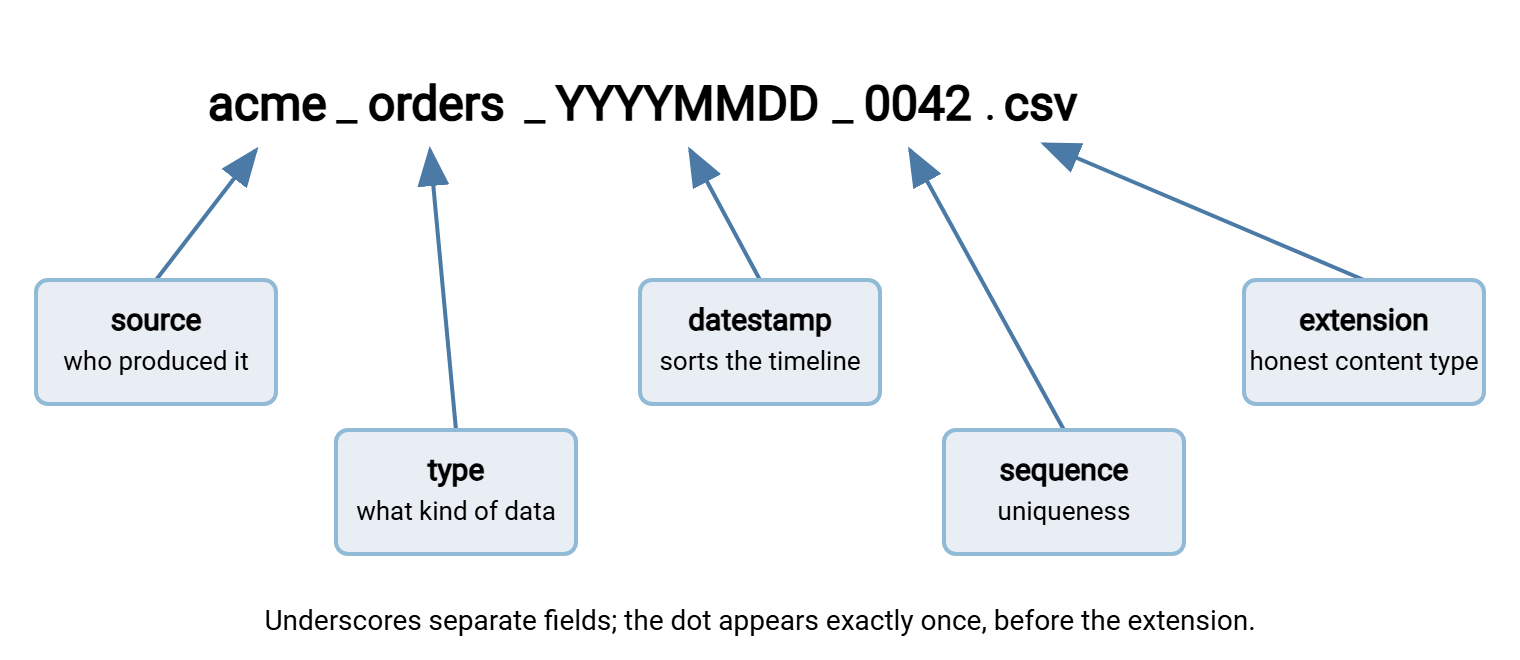
| Source | Who produced it | Short lowercase code from a registered list | acme |
| Type | What kind of data | Short lowercase code, registered list | orders |
| Datestamp | Which day / moment | Big-endian, fixed width, declared clock | YYYYMMDD |
| Sequence | Which one of the day's files | Zero-padded fixed width | 0042 |
| Environment (optional) | Production or test | Fixed short values only (e.g. prod, test) |
test |
| Extension | How to open it | One dot, lowercase, matches actual content | .csv |
The phrase registered list matters more than it looks. Source and type codes are only useful if acme is always spelled acme — never acmecorp, never ACME. So the convention document keeps the official list of valid codes. Adding a new one is a small deliberate act, not a typo. I have seen one partner code spelled four ways in a single folder, each spelling with its own script. That list is also what validation scripts check against, turning "unknown source code" into a catchable error. The datestamp's format and clock rules are the subject of datestamp formats that sort. The sequence field's width and uniqueness source come from sequence numbers and collision avoidance. The convention document does not re-argue those decisions — it records the outcome.
The diagram below shows the assembled anatomy: each field, what it answers, and the two characters — underscore and dot — doing structural work.
Field Order: Sorting Is a Design Decision
Alphabetical sorting is dominated by whatever comes first in the name, so field order decides how listings group. Choose it from the question your teams ask most. The default that serves most flows: most stable field first, most variable last — source, type, datestamp, sequence. A folder sorted this way groups by partner, then by feed, then chronologically within each feed. The glob acme_orders_* selects one feed's entire history in date order, which is exactly what reprocessing and audit tasks want. The alternative — stamp first — turns a folder into a day-by-day interleave of all flows. It is the right choice for archive folders where "show me everything from that day" is the dominant question. Either is defensible; mixing them across flows is not, because every consumer then needs per-flow logic. Pick one ordering per folder population and record the reason in the document. Folders do not remember why; documents do.
Seen as listings, the two orderings answer different questions at a glance:
flow-first: grouped by feed          stamp-first: grouped by day
acme_orders_YYYYMMDD_0001.csv        YYYYMMDD_acme_orders_0001.csv
acme_orders_YYYYMMDD_0002.csv        YYYYMMDD_acme_stock_0001.csv
acme_stock_YYYYMMDD_0001.csv         YYYYMMDD_globex_orders_0001.csv
globex_orders_YYYYMMDD_0001.csv      (everything for one day together)
One structural rule regardless of order: the field count is fixed. Optional fields that appear sometimes give parsers a moving target — field three is the stamp in one file and the environment marker in another. If a field is optional in principle (environment), make it mandatory in practice with a default value. Or confine that field to specific flows whose pattern is declared separately. An optional field is present exactly when the parser assumed otherwise.
Names and Folders Share the Work
A convention is designed against a folder layout, because the path and the name carry information together and can trade jobs. A structure like /inbound/acme/orders/ already states the source and type; inside it, a name of just YYYYMMDD_0042.csv would be unambiguous. So why repeat the fields in the name? Because files do not stay in their folders. They get moved to archives, quarantined to error folders, attached to tickets, and copied to a laptop for inspection. They are named in log lines and notification emails. At every one of those moments, a name that carries its own identity still means something. Meanwhile, YYYYMMDD_0042.csv stripped of its path means nothing. Here is the robust division of labor. Folders express workflow state and access boundaries — inbox, working, archive, error, and the permission lines drawn around each. They do that while the name carries the file's full identity. Redundancy between path and name is not waste; it is what lets a file be picked up anywhere, by anyone, and still be understood. It also enables a cheap safety check. A validator can confirm that a file's source field matches the partner folder it arrived in, catching misdrops the moment they happen. Files travel; paths stay home.
Choosing Delimiters
The delimiter question has a short answer — use underscores between fields and a single dot before the extension. The reasoning is worth internalizing, because it is really a rule about parsing. A delimiter works only if it never appears inside a field value. Then "split the name on underscores" always yields the same number of parts, and each part is one field. That is the one-line parse that parsing names in scripts builds on. Let a single field value contain the delimiter (acme_corp as a source code) and every consumer inherits an off-by-one field shuffle. No amount of cleverness fully repairs it.
The real decision is a pair: pick the separator, then pick what word-breaks inside a field look like. The common scheme is underscore as separator, hyphen inside values (acme-eu_orders_YYYYMMDD_0042.csv); the reverse works equally well. Both characters are in the conservative set that survives every platform — the full safety argument is in safe characters. The dot is deliberately excluded from both roles: it appears exactly once, before the extension. That way, "everything after the last dot" and "everything after the only dot" are the same string. Camel case, the no-delimiter alternative (AcmeOrders), fails both machines and the case-insensitivity of Windows; it has no place in pipeline names. It reads like a name and splits like a wall.
The Convention Document, Complete
Everything so far becomes real in a one-page document. Here is a complete template — copy it, replace the tokens and codes, delete what a flow does not need:
FILE NAMING CONVENTION — inbound partner feeds
Convention version: 2        Owner: transfer-team        Status: current

PATTERN
  <source>_<type>_<date>_<seq>.<ext>
  Example (tokens): acme_orders_YYYYMMDD_0042.csv

FIELDS
  source  lowercase code, 3-8 chars, from the registered source list
          current codes: acme | globex | initech
  type    lowercase code from the registered type list
          current codes: orders | invoices | stock
  date    YYYYMMDD, big-endian, zero-padded
          clock: the partner's business day (declared per partner
          in the onboarding sheet), NOT the transfer time
  seq     4 digits, zero-padded, starts 0001, resets daily,
          assigned by the producer; gaps allowed, repeats never
  ext     csv (data) | zip (bundles); must match actual content

CHARACTER RULES
  allowed: a-z 0-9 _ - .   lowercase only; starts with a letter;
  one dot; no spaces; name length under 100 characters
  validation regex:
  ^[a-z][a-z0-9-]*_[a-z]+_[0-9]{8}_[0-9]{4}\.(csv|zip)$

DELIMITERS
  _ separates fields and never appears inside a value
  - allowed inside a value (e.g. acme-eu)

COLLISIONS
  receiver never overwrites: duplicate names are quarantined to
  /error and alerted. corrections are new files: _r01, _r02 suffix.

NONCONFORMING NAMES
  moved to /error, logged with reason, alerted. never renamed,
  never guessed, never processed.

CHANGE LOG
  v2  seq widened from 3 to 4 digits (volume growth)
  v1  initial convention
Two details in the template deserve a word. The regex makes the convention executable — it is the exact rule intake validation applies, so the document and the enforcement can never drift apart. And the change log is not ceremony; it is what turns "why is this file three digits?" from archaeology into a lookup.
Remember: a convention that is not written down is a rumor, and a convention that is written down but not validated at intake is a wish. The document plus the regex at the front door — together they are the standard.
Versioning the Convention Itself
Conventions change — a sequence field widens, a new type code arrives, an environment marker becomes necessary. Treat the convention like the small piece of infrastructure it is. Give the document a version number and a change log, as in the template. Give it the same upkeep as any other document that scripts depend on (keeping documentation current covers the habit). Prefer additive changes — a new type code extends the registered list without touching the pattern, costing consumers nothing. Prefer those over structural changes that alter the pattern itself, which every parser must follow. When a structural change is unavoidable, plan a transition window. Consumers are updated first to accept both old and new patterns. Producers switch at an announced boundary. The old pattern is retired only after the last producer has moved and the window has drained. Do not encode the convention version in every file name. The pattern itself identifies the version to any parser that knows both. A version field spends name-length on a question the change log answers better.
The template's own change log shows the distinction in miniature. Widening the sequence field from three digits to four is structural. The validation regex changes, so every consumer must accept [0-9]{3,4} for the window. The width itself becomes the version marker — a parser that sees three digits knows it is reading a v1 name. Adding a new type code, by contrast, is additive: the pattern is untouched, and the registered list grows by one line. Only the consumers that route by type need to learn what the new code means. Learn to sort proposed changes into those two buckets — and to prefer the additive bucket whenever a design choice allows it. That is most of what keeps a convention stable for years. I have yet to regret choosing the additive bucket.
Rolling It Out Without Breaking Flows
A new convention meets an old estate. The rollout is where good designs die, so a gentle sequence matters (the general discipline is in change rollout and rollback; this is the naming-specific version):
- Inventory what exists. List every flow and its current de facto pattern — often the first time anyone has seen them side by side. Server logs make this concrete. A server like Sysax Multi Server records every transferred file's name in its activity logs, written to file and optionally to a database. So a scan over recent activity yields the true list of patterns in the wild, including the flows nobody remembered.
- Adopt at a boundary, not retroactively. New files follow the convention from an agreed switchover moment. Existing files keep their names. A mass rename of history breaks every reference to the old names — dedup ledgers, archive indexes, log trails. It turns processed files back into apparently new ones, the reprocessing hazard our duplicate detection series warns about. If old files must be normalized, do it as a deliberate migration with its own mapping table, not as a side effect.
- Update consumers before producers. Consumers accept both patterns during the window; producers then switch without a moment of breakage. The reverse order guarantees an outage.
- Tell the partners. External producers need the convention sheet, a lead time, and a test exchange. Naming is a standard line item in trading partner onboarding. An emailed page of examples prevents a quarter of onboarding friction.
- Hunt the hidden consumers. Somewhere a forgotten script globs the old pattern. The automation inventory practices in our automation ladder series exist for exactly this moment. The cheap safety net is to keep old-pattern acceptance in place, logging a warning on every hit, until the warnings go quiet.
Meridian Parts ran the rollout in the wrong order once, and only once. The supplier feed's producer moved to the new pattern on a Monday morning, because the change was small and the producer's owner was free. The consumer that globbed the old pattern was booked for Wednesday. For two days the loader matched nothing, did nothing, and reported success. A stock report with empty columns caught it on the Tuesday afternoon, and the two days of files were reprocessed by the evening. The rollout checklist now has step three underlined, and the transition window is timed from the last consumer, not the first producer.
Where the moving parts are tool-managed, the convention slots straight in. In Sysax FTP Automation, the wizard-built tasks — upload, download, backup, mirror, synchronize, and folder monitoring — operate on the folders your flows live in. A written convention means the files those tasks handle are predictable by design. When the tool sends an email notification about a transfer, a convention-formed name makes the message legible at a glance. The name acme_orders_YYYYMMDD_0042.csv tells the reader who, what, and which day before they open a single log.
The Convention Is a Contract — Treat It Like One
The through-line of this article: a naming convention is not a style preference, it is the interface specification for every file your automation touches. Specify the fields from the questions readers actually ask, and order them for the sort you want. Separate them with a delimiter that never lies. Write the whole thing on one page with a regex that enforces it. Version the page, and roll it out consumers-first with the old estate left in peace. None of it is difficult, and all of it compounds — every script gets simpler, every log gets more searchable, every incident gets shorter. And nothing in the folder is called final2.
To finish the series, parsing file names reliably in scripts builds the consuming side of this contract in bash, PowerShell, and Python. It includes the reject path the template mandates. And if you are still deciding the datestamp's clock or the sequence's source, datestamp formats and sequence numbers hold those decisions.
Frequently Asked Questions
How many fields should a file name have?
Should the file name include a version number?
What about files that don't fit the convention, like ad-hoc one-offs?
Do I have to rename all our existing files to match?
Who should own the naming convention?
From the Sysax team: we build secure file transfer software for Windows. Sysax Multi Server is an FTP, FTPS, SFTP, and HTTPS server. Sysax FTP Automation handles scheduled, scripted transfers. Free trials are on the download page.