
Transfer vs Sync vs Share: Three Ways to Move a File, and When Each Is Wrong
"Just get the file to them." Five words, with a choice folded inside them that most people never make on purpose. You can transfer the file: deliver a copy, once, and be done. You can sync it: keep two places continuously matching. Or you can share it: keep one copy and let everyone touch the same one. All three end with someone able to open the file, which is why they get mistaken for interchangeable. They are not. They differ in what happens after the copy, what happens when two people change things, what happens when the network dies, and what you can prove afterward.
Most file transfer messes an administrator inherits are model mismatches. Examples are a sync tool doing delivery, a shared drive stretched across a WAN, a one-shot transfer feeding a process that needed a living mirror. This article defines the three models sharply and compares them where they differ (conflicts, offline behavior, auditability). Then it maps ten everyday workflows to the right one. It is part of our File Transfer Fundamentals series. It pairs naturally with push vs pull, which chooses a flow's direction once you have chosen its model. The industry uses "sync" for at least three different things. This article uses it for one promise, and says what the promise is.
Three Models, One Question: What Happens After the Copy?
The cleanest way to separate the models is to ask what the system owes you after the file is available at the far end.
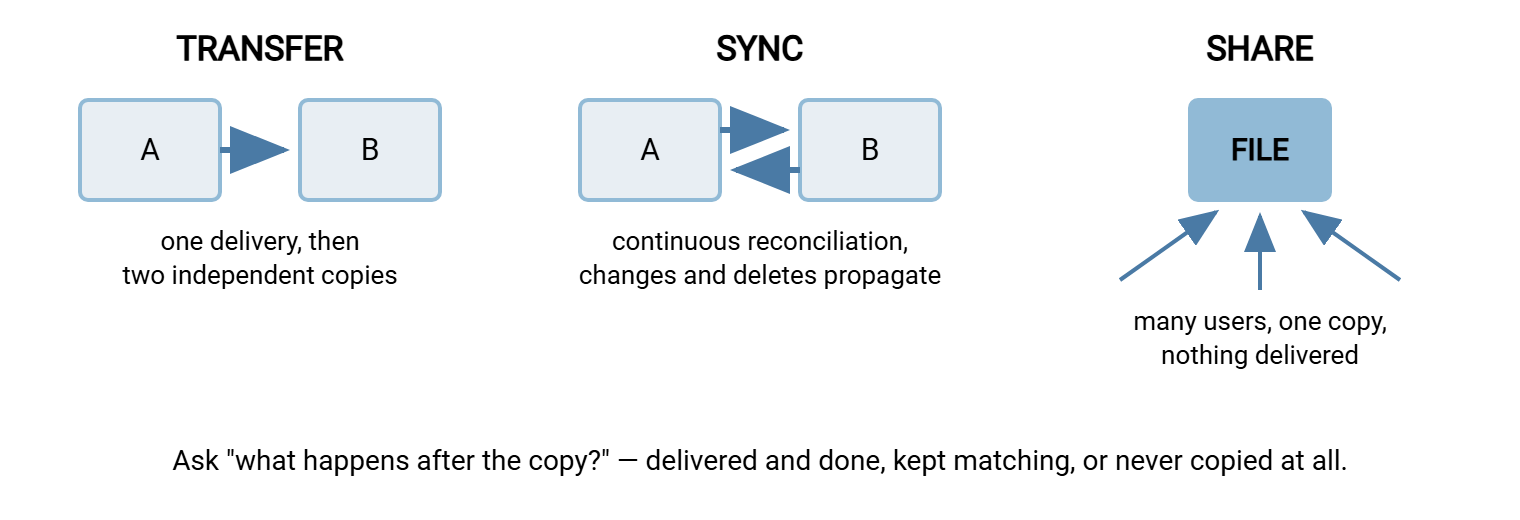
- Transfer is one-shot delivery. A copy of the file crosses to the destination as a discrete event with a beginning and an end. Afterward there are two independent files; if either side changes theirs, nothing anywhere cares. The system's obligation ended at delivery.
- Sync (synchronization) is an ongoing promise: two locations will be made to match, and kept matching, as files change. Copies exist on both sides, but they are not independent — the sync engine continuously reconciles them, propagating new files, changed files, and (dangerously) deletions.
- Share is the absence of copies. One file lives in one place — a file server, a network share. Everyone opens, edits, and saves that single instance over the network. Nothing is delivered anywhere; access is granted instead.
The diagram below shows the three shapes side by side: delivered copy, mirrored copies, and one accessed original.
Transfer: Deliver and Done
Transfer is the model every protocol in this library ultimately serves: FTP, SFTP, FTPS, HTTPS uploads — mechanisms for a discrete delivery. That delivery is traced step by step in how a file transfer actually works.
Its defining virtues come from being an event. A transfer has a start, an end, a success or a failure — so it can be scheduled, retried, logged, counted, and alerted on. "Did the invoice batch reach the partner last night?" is a question with a yes/no answer and a log line to prove it. Because the delivered copy is independent, the receiver can process, rename, move, or delete it without consulting anyone. That independence is exactly what B2B exchange, batch processing, and system-to-system feeds need: the handoff is clean, and each side owns its copy.
Where transfer is wrong: when the real requirement is that the destination stay current. A one-shot delivery is a snapshot; it goes stale the moment the source changes. If someone asks for "the latest price file, always," a transfer gives them "the price file as of last Tuesday" and a false sense of freshness. Repeated scheduled transfers can approximate currency. But the moment you find yourself transferring the same growing folder every hour and worrying about what changed, you have reinvented sync, badly.
Sync: Two Places, One Truth
Sync's promise is convergence: run the engine and location B ends up matching location A. Two flavors matter, and confusing them causes real damage:
- One-way sync (mirroring): A is the master, B is the mirror. Changes at A propagate to B; changes made directly at B get overwritten or deleted. Perfect for publishing (staging to production), distribution, and warm standby copies.
- Two-way sync: changes on either side propagate to the other. This is what consumer file-sync products do — and it introduces the conflict. This is the situation where the same file changed in both places between sync runs, and the engine cannot know which version is right. Engines resolve conflicts by rule ("newest wins") or by punting ("conflicted copy" files); either way, a human decision got automated or deferred, not eliminated.
The second thing to respect about sync is delete propagation. A true mirror must delete at B what disappeared from A — otherwise B accumulates ghosts. But that same behavior turns an accident into a distributed accident: empty the master folder by mistake and the sync dutifully empties every replica. Mature sync tooling has safeguards (deletion limits, dry runs). The delta-transfer techniques and their guardrails are the subject of our rsync and delta transfer series. Nothing distributes a mistake as efficiently as a well-configured mirror.
Acme's warm-standby document store at a second site was described in every runbook as "the sync." It was a nightly scheduled copy that added new and changed files and deleted nothing. It had run that way, without complaint, for two years. A disaster-recovery drill brought the difference to light. The standby held every file head office had ever created, including superseded contracts and price lists that had been withdrawn on purpose. A restore from it would have quietly resurrected all of them. Nothing had failed; the copy had done exactly what it was told. The replacement is a real one-way mirror with a deletion limit and lag monitoring. The runbook now says what the job does rather than what someone once hoped it did.
Sync is wrong as a delivery mechanism to another organization. You rarely want continuous, automatic propagation across a trust boundary — you want deliberate, logged handoffs. Sync is also wrong as a feed into batch processing. A sync engine updates files in place, whenever they change. So a job that reads the mirrored folder mid-sync can catch a file half-updated, or a folder half-reconciled. Batch processes want completed deliveries with clear "this file is done" signals, which is transfer territory, with the atomicity patterns from our reliability article.
Share: One Copy, Many Hands
A share moves no files at all. A file server — a Windows share, a mapped drive — holds the single copy, and everyone's application opens it across the network. For collaboration inside an office LAN, this model is unbeatable. Everyone sees the same thing instantly, and there is nothing to reconcile because there is only one file. Concurrent access is arbitrated by locks — the mechanism by which the file server lets one writer exclude others ("file in use").
Its weaknesses are the mirror image of its strengths:
- Distance. Share protocols assume LAN speeds and chatter heavily — many small round trips per file operation. Over a VPN or WAN, every round trip costs tens of milliseconds and the mapped drive crawls. Our network shares vs file transfer series quantifies this.
- Offline means broken. There is no local copy, so no network means no file — the application freezes or errors.
- No handoff. Because nothing is delivered, there is no natural "the file is ready for you" event. There is no completion to log, no clean boundary between my copy and yours. Processes built on "watch the shared folder and grab what appears" inherit every half-written-file race the share cannot prevent.
- The trust boundary. Exposing a file share to an external partner effectively invites their machines into your filesystem semantics — vastly more surface than a transfer endpoint. Partners get transfer servers, not shares.
A note on the browser-based document platforms most offices now also use: from the user's chair they feel like shares — one document, several people editing. Under the hood they are usually sync engines with clever merging on top. That is why they inherit sync's vocabulary (offline copies, "conflicting edits" banners) the moment connectivity gets patchy. For deciding where a workflow belongs, treat them as shares for co-editing purposes and remember the sync machinery underneath when their failure modes surface. The banner that says "conflicting edits" is the sync engine clearing its throat.
The Models Side by Side
The differences compress into a table worth keeping:
| Question | Transfer | Sync | Share |
|---|---|---|---|
| How many copies exist? | Two, independent after delivery | Two or more, kept matching | One |
| Completion signal? | Yes — per-file success/failure | Weak — convergence, not events | None — access, not delivery |
| Conflict risk? | None (copies diverge by design) | Yes, in two-way sync | Prevented by locking |
| Network down — what happens? | Job fails visibly; retry later | Falls behind quietly; catches up | Files unreachable immediately |
| Audit story? | Strong — who sent what, where, when | Engine logs churn, not intent | Access auditing off by default |
| Best at | Handoffs, batches, partner exchange | Mirrors, publishing, standby copies | Live collaboration on a LAN |
Where the Differences Bite: Conflicts, Deletes, and Offline
Three rows of that table deserve a closer look, because they are where mismatched models hurt.
Conflicts. Only two-way sync manufactures conflicts, because only two-way sync lets the same file be edited independently in two places and then promises to reconcile. Transfer sidesteps the problem (copies are allowed to diverge), and shares prevent it (one copy, locks). If a workflow keeps producing "conflicted copy" files, that is the model talking. In that case, either the two sides should stop both editing (make it one-way), or they genuinely need one shared copy.
Deletes. In transfer, deleting your copy affects nobody. In a share, deleting the file affects everybody, once. In sync, a deletion replicates — which is the only one of the three that can turn a single mistake into an organization-wide one automatically. Any sync design should answer, in writing: what happens when a file disappears from the master, and what limits exist on mass deletion? If the answer is "it replicates," write that down too, in larger letters.
Offline behavior. When the network fails: a transfer job fails loudly at a moment in time, visible, alertable, retryable. A sync engine goes quiet and drifts out of date, invisible unless something monitors sync lag. That is how businesses discover their "mirror" was a snapshot from last week. A share just breaks in the user's face. Loud, quiet, and immediate: pick the failure mode you can operate.
Remember: sync's failure mode is silence. A transfer that fails screams once; a sync that fails just stops mentioning things, and both replicas keep looking plausible. If a business process depends on a mirror being current, monitor the sync's lag and last-success time — not merely that the engine is running.
The Audit Question
Sooner or later someone — an auditor, a security reviewer, a lawyer — asks: prove this file went to that party, and show who accessed it. The three models leave very different trails.
Transfer leaves the best one. Each delivery is a discrete, attributable event: this account, from this address, sent this file, at this time, success. A transfer server that logs sessions and operations gives you evidence as a side effect of normal operation. Sysax Multi Server keeps such an activity log. This evidence, as much as security, is why regulated exchanges (see our AS2 and B2B exchange series, where receipts make delivery proof contractual) are built on transfer.
Sync logs what the engine did — "updated 214 files" — which proves churn, not intent, and rarely attributes changes to a person. Shares are weakest by default: file-access auditing on general-purpose file servers is off unless deliberately enabled, and enabling it broadly is noisy. None of this makes sync or shares wrong; it means when evidence matters, route the flow through the model that produces evidence naturally. I once offered an auditor "updated 214 files" as evidence. We both learned something that day.
Ten Everyday Workflows, Mapped
Here is the decision table in practice — ten workflows every admin recognizes, and the model each one actually wants:
- Nightly invoice batch to a trading partner — Transfer. Discrete handoff across a trust boundary, with logs. Scheduled push, per push vs pull.
- Finance team co-editing this quarter's budget workbook — Share. One copy, locks, same office. Anything else breeds conflicting versions.
- Publishing a website from staging to production — One-way sync. Mirror the approved tree; changes made directly on production get corrected by design.
- Application exports a data file that another system imports — Transfer. The importer needs a completed, stable file and a "ready" signal — delivery semantics, not a folder that mutates.
- A laptop user needing project files on the road — Two-way sync. Offline access is the requirement, and that means a local copy reconciled later — accept the conflict handling that comes with it.
- Sending a 5 GB video to an outside agency, once — Transfer. One delivery, confirmation, done. Not an email attachment — our email attachment series explains why that fails.
- Keeping a warm-standby copy of critical documents at a second site — One-way sync, with delete safeguards and lag monitoring.
- Branch offices submitting daily sales files to head office — Transfer. Many-to-one collection onto one server, one account per branch, absence alarms.
- A team drive of templates and reference documents in one office — Share. Live access, single truth, LAN speeds.
- Distributing a price list to dozens of resellers every morning — Transfer. Publish to a server they pull from, or push to each; either way you want per-recipient delivery records, not a sync fan-out you cannot attribute.
Two patterns fall out of the list. Anything that crosses an organizational boundary wants transfer — for the trust surface and the evidence. Anything built on co-editing wants a share (or a document platform playing that role); anything built on offline access wants sync. The models blur only when a workflow's requirements genuinely blur. Then it is better to split the workflow than to stretch one model past its semantics. A model stretched past its semantics does not snap. It sags, for years.
Distilled into a cheat sheet you can paste into a design note:
Ask: what happens AFTER the copy?
  delivered once; copies then live separate lives   -> TRANSFER
  two or more places kept matching automatically    -> SYNC (one-way
                                                       unless both sides edit)
  one copy; everyone opens the same file            -> SHARE
Sanity checks:
  crosses an organizational boundary?   prefer TRANSFER (small surface, logs)
  needs offline access?                 requires SYNC (local copy, reconcile)
  live co-editing?                      requires SHARE (locks, one truth)
  needs per-delivery evidence?          TRANSFER (discrete, logged events)
When the Wrong Model Sneaks In
Model mismatches announce themselves with recognizable symptoms. Worth learning to read:
- A sync tool used as a delivery mechanism. Symptom: the receiving process occasionally ingests half-updated files, or processes a file that then changes again. Fix: make the handoff a real transfer with completion semantics. A scheduled job in a tool like Sysax FTP Automation delivers each file as a discrete, retryable, logged event. Its folder monitoring can fire that delivery the moment an export lands.
- A shared drive stretched over the WAN. Symptom: "the S: drive is slow at the branch," files that open in seconds locally taking minutes remotely. Fix: keep shares local; move inter-site movement to sync (for mirrors) or transfer (for handoffs). The tradeoffs live in the shares vs transfers series.
- Scheduled transfers imitating sync. Symptom: an hourly job re-copies an entire growing folder, transfers balloon, and nobody is sure which files changed. Fix: admit it is a mirror and use a delta-aware sync method, or narrow the job to genuinely new files.
- A share doing a batch handoff. Symptom: "the job grabbed the file while Excel still had it open." Fix: replace watch-the-share with a transfer into the consumer's inbox, using the temp-name-then-rename discipline from the reliability article.
Choose the Model First, the Tool Second
The order of decisions matters. First comes the model (what happens after the copy: delivered, mirrored, or accessed?). Then comes the direction (who initiates), then the protocol and product. Teams that pick a tool first end up bending its model to fit every problem. That is exactly how sync engines become delivery pipelines and shares become WAN transports. The tool never objects. Tools are agreeable that way.
To place these decisions across everything your organization already runs, the next article in this series — the transfer census — walks through inventorying your flows. Recording each one's model is one of the census's columns. And for the model this whole library centers on, how a file transfer actually works supplies the mechanics beneath every delivery.
Frequently Asked Questions
Is sync just a transfer that runs repeatedly?
What exactly is a sync conflict?
Why not just give the partner access to our file share?
Which model is safest against accidental deletion?
Can one workflow need more than one model?
Do consumer cloud drives count as sync or share?
From the Sysax team: we build secure file transfer software for Windows. Sysax Multi Server is an FTP, FTPS, SFTP, and HTTPS server. Sysax FTP Automation handles scheduled, scripted transfers. Free trials are on the download page.