
Keeping Transfer Documentation Current
The wiki page says the orders export runs on mft01 at two. It did, once. Since the page was written, a partner changed a folder and the job moved to a new host during patching. A second flow was disabled "for now" and never re-enabled. The administrator who did all three meant to update the page and got paged before they could. Nobody noticed, because nobody reads documentation until the night they need it. That is the night they discover it describes the estate as it was last spring. The page is not lying, exactly. It is loyal to a version of the estate that no longer exists.
The gap between what the documentation says and what is actually running is drift. The accumulated pile of things you know you should have written down and have not is documentation debt. Like technical debt, it charges interest, paid in longer outages and slower handovers. Neither is a moral failing. Both are what happens when keeping documents true depends on remembering, and remembering does not alert when it fails. This article replaces remembering with mechanisms. These include documentation as a step in every change, a review calendar, and scripts that detect drift automatically. Others are a named owner for the documentation itself and a clean way to retire records.
This article is part of our Flow Documentation series and assumes the artifacts from the earlier articles exist. These are the inventory from the transfer inventory, the contact sheet, the dependency table, and the runbooks. We continue with Meridian Parts, our fictional distributor with about forty flows.
What "Current" Actually Means
"Up to date" is too vague to act on. Define current as three testable conditions. First, every active row in the inventory has been confirmed true by a person within its review window — a month for Tier 1, longer for the rest. Second, everything that is actually scheduled or has an account on a transfer host appears in the inventory. Everything in the inventory as active is actually running. Third, every runbook has been tried by someone other than its author within the last year. Each condition can be measured, which means each can be a number on a page, and numbers that are on a page get fixed.
Documentation rots in four ways, and each mechanism below targets one. Changes made without a matching document change — the biggest source. People leaving with their knowledge unwritten. Silent drift, where the estate changes with no ticket at all: a job disabled by hand, a task copied to a new server, a script edited in place. And the perfection trap, where a team stops maintaining documentation because it is "not finished," as if a row with two gaps were less useful than no row.
Documentation as Part of Every Change
The most effective rule is also the shortest: no change ticket that touches a flow closes until its documentation is updated. Not "a follow-up ticket is raised" — updated, in the same ticket, by the same person, before the ticket is marked done. I have raised the follow-up ticket. I have never closed one. The change is not finished until the record matches the estate. If your change process has a checklist, the line reads: "Inventory row, flow record, runbook, and dependency table updated, or confirmed unaffected."
This works better than any review cadence because it happens at the moment the knowledge is fresh. The person who has it is already at the keyboard. The transfer policy that requires documentation in the first place — see enforcing and updating the policy — is where the rule is written. The change process is where it bites. The same change should have been tested somewhere safe first. The testing and staging series covers that, with change rollout and rollback as the step just before this one. The documentation update is the last step of the same ticket.
The technique that makes the rule nearly free is docs-as-code. In plain words, keep the documentation as text files in the same repository as the scripts and job definitions. Change them the same way. A flow record is a Markdown file next to the script that runs the flow. When you edit the script to change a destination path, you edit the record in the same commit. The reviewer who approves the script sees the record change too — or notices its absence. History is automatic: every version of every record, who changed it, when, and why. There is no separate "update the wiki" step to forget, because the documentation lives where the change is being made. At Meridian the repository has a folder per flow — flows/FLOW-0007/ — containing the script, the task definition exported as XML, the record, and the runbook. A change to any of them is a change to the folder, and the folder is reviewed as a unit.
Not every team can move all documentation into a repository; business owners will not learn version control to confirm a purpose line. Keep the technical half — record, runbook, dependency rows, job definitions — as code, and generate the shared spreadsheet or wiki table from it for everyone else. Humans edit the master copy; only scripts write the derived ones. An edit to a derived copy is a note to yourself, and a short-lived one.
The Review Cadence Calendar
Change-driven updates catch what is planned. A cadence catches what was missed and what changed without a ticket. The calendar below is Meridian's; the intervals are a starting point, not a law. The principle is that review effort follows criticality. A Tier 1 row is confirmed monthly in a two-minute glance, while a Tier 3 report bundle is fine at twice a year.
| What is reviewed | How often | Who | Also triggered by |
|---|---|---|---|
| Drift check: inventory vs. scheduled jobs and server accounts | Weekly, automated | Script; findings to the documentation custodian | Any new host or server build |
| Tier 1 inventory rows and runbooks | Monthly | Custodian of each flow | Any incident on the flow |
| Tier 2 rows and runbooks | Quarterly | Custodian of each flow | Any incident on the flow |
| Tier 3 rows | Twice a year | Documentation custodian, in one sitting | Drift finding |
| Ownership columns and internal contacts | Quarterly, plus monthly leavers script | Each business owner confirms their rows | Any leaver or role change |
| External contacts | Yearly | Partner manager, by email to each partner | Any partner reorganization |
| Shared-credential count and dependency table | Quarterly | Documentation custodian | Any key or certificate rotation |
| Runbook stranger test (one flow at a time) | Every Tier 1 flow once a year, rotating monthly | Backup owner, never the author | New backup owner assigned |
| Retired rows: still retired, nothing resurrected | Yearly | Documentation custodian | Drift finding |
Two design choices matter more than the intervals. The "also triggered by" column ties reviews to events, so the quarterly review is a safety net rather than the main mechanism. And the reviews are small: confirming a Tier 1 row means opening it, comparing it with the task and the last log line, and updating last_reviewed. Ten flows at two minutes each is twenty minutes a month. A review that takes an afternoon gets postponed until it takes a week; we learned that the slow way.
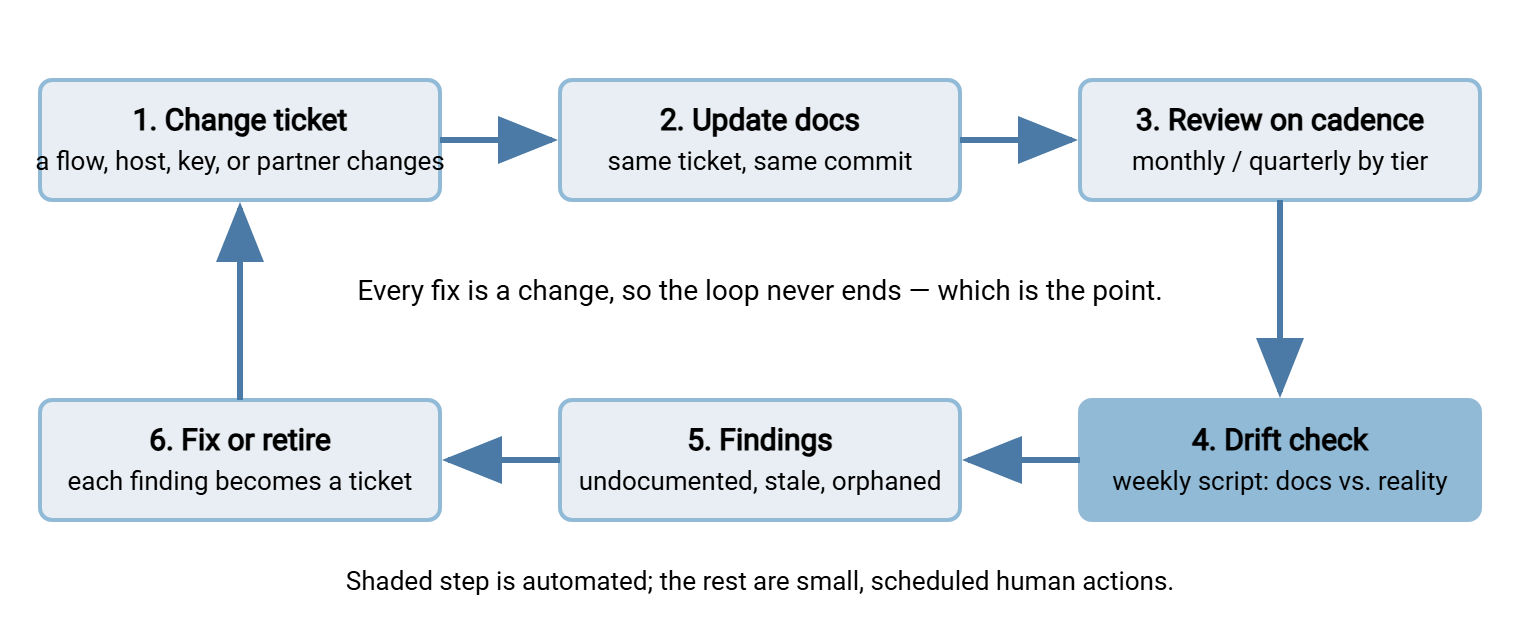
The diagram below shows the whole cycle as a loop. A change updates the documentation in the same ticket. The cadence reviews what changes missed. The automated drift check compares documents with reality. Its findings are fixed or the record is retired. The fix is itself a change, which starts the loop again.
Automated Drift Detection
The reviews above rely on people noticing. The drift check does not. It asks the machines the same question the seed script asked when the inventory was first built — what is actually scheduled here? — and compares the answer with the inventory. Three lists come out: documented as active but not running, running but not documented, and accounts on the server that no row claims. Each line is a finding, and each finding becomes a small ticket. The script has no judgment, which on a Monday morning is a feature.
On a Windows host, the comparison keys on the task name recorded in each row's job_ref. Meridian keeps all its transfer tasks in one Task Scheduler folder, \Meridian\, and names them after the flow ID, so the script is short:
# drift-check.ps1 — run weekly on each transfer host; mail the output to the doc custodian
$me  = $env:COMPUTERNAME
$inv = Import-Csv .\transfer-inventory.csv | Where-Object { $_.job_ref -like "$me`:*" }

# job_ref looks like "mft01: Task Scheduler \Meridian\FLOW-0007-orders-acme"
$documented = $inv | Where-Object { $_.status -eq 'active' } |
              ForEach-Object { ($_.job_ref -split '\\')[-1] }
$tasks      = Get-ScheduledTask -TaskPath '\Meridian\'
$live       = $tasks | Where-Object { $_.State -ne 'Disabled' } | Select-Object -ExpandProperty TaskName

Compare-Object -ReferenceObject @($documented) -DifferenceObject @($live) | ForEach-Object {
    if ($_.SideIndicator -eq '<=') { "DOCUMENTED ACTIVE, NOT RUNNING : $($_.InputObject)" }
    else                           { "RUNNING, NOT DOCUMENTED       : $($_.InputObject)" }
}

# Rows marked retired whose task still exists and is enabled
$retired = $inv | Where-Object { $_.status -eq 'retired' } | ForEach-Object { ($_.job_ref -split '\\')[-1] }
$live | Where-Object { $retired -contains $_ } | ForEach-Object { "RETIRED IN DOCS, STILL ENABLED : $_" }
Compare-Object reports a left arrow for items only in the reference list (the documentation). It reports a right arrow for items only in the difference list (the scheduler). So the two branches translate the arrows into findings a human can act on. The last block catches the opposite failure: a flow retired on paper whose task somebody forgot to disable. Retired on paper is a status the task does not read.
Bluewater Bank's first weekly drift run reported four tasks running that no row claimed and two rows active that no scheduler had heard of. The four were the same two flows, copied to a new host during a server refresh and never removed from the old one. So both hosts had been sending the same statements bundle for a fortnight. The receiving team had been deleting one copy by hand. The two phantom rows were the old host's entries. One ticket closed all six lines, and each row's job_ref now names exactly one host. The script has run every Monday since and mostly reports nothing, which is what it is for.
On Linux hosts, cron has no task names, so the convention is to end every cron line with a comment naming the flow. The shell ignores everything after the #, and the drift check greps for it:
# in /etc/cron.d/meridian-flows
0 2 * * *   xfer  /opt/flows/FLOW-0031/run.sh   # FLOW-0031 scanner uploads

# drift-check.sh — IDs in cron vs. IDs documented as active on this host
grep -rhoE 'FLOW-[0-9]{4}' /etc/crontab /etc/cron.d /var/spool/cron 2>/dev/null | sort -u > live-ids.txt
# documented-ids.txt: exported from the inventory, active rows for this host, one ID per line
sort -u documented-ids.txt | comm -3 - live-ids.txt
#   left column  = documented but not in cron
#   right column = in cron but not documented
User crontabs live under /var/spool/cron on some distributions and /var/spool/cron/crontabs on others; adjust the path. If the host uses systemd timers, name the timer units after the flow ID and grep systemctl list-timers --all the same way.
The third list — accounts nobody documented — comes from the server side. Every inbound flow lands on an account. So the set of accounts that have logged in recently should match the set of credential_ref values on active inbound rows. If your server logs to a database, as Sysax Multi Server can alongside its file logs, you can query the live list. Query for the distinct account names with a login in the last ninety days. Compare that list with the inventory the same way. Accounts that logged in and have no row are undocumented flows. Accounts with a row that have not logged in for ninety days are candidates for retirement — or for a partner who silently stopped sending. That is its own kind of finding. The account-side hunt is in finding stale and orphaned accounts. Centralizing those logs, per centralizing logs, makes the query one place instead of five.
Remember: the drift check is not a judgment on anyone. Every estate drifts. The point is that drift is found by a script on Monday morning, not by the on-call administrator at three on Sunday.
Refreshing the Generated Half of the Inventory
Some inventory columns are opinions only a person can supply — purpose, criticality, owners. Others are facts the machines already know — the task name, the schedule as configured, the last run time, the last result. Treat the two halves differently. Human columns are edited by humans and never overwritten by scripts. Machine columns are refreshed by a script on the same weekly run as the drift check, so they are never stale by more than a week. On Windows, the facts come from the task information:
# job-facts.ps1 — machine-known facts per task, merged into the inventory by job name
Get-ScheduledTask -TaskPath '\Meridian\' | ForEach-Object {
    $i = $_ | Get-ScheduledTaskInfo
    [pscustomobject]@{
        job_name    = $_.TaskName
        state       = $_.State
        last_run    = $i.LastRunTime
        last_result = $i.LastTaskResult     # 0 means the last run succeeded
        next_run    = $i.NextRunTime
    }
} | Export-Csv -NoTypeInformation .\job-facts.csv
Keep these in a separate file joined to the inventory by task name, rather than writing them into the master inventory. That way, a script error cannot damage the human-edited columns. A row whose last_run is three weeks old on a "daily" flow is a finding of a different kind. The flow is not failing. It is not running at all, which is the quietest failure there is. The hygiene of the scheduled jobs themselves — misfires, missed runs after reboots — is its own subject, in scheduled job hygiene.
Who Owns the Documentation
Every flow has a custodian; the documentation as a whole needs one too. The documentation custodian is not the person who writes everything — that would recreate the single point of knowledge the series exists to remove. They are the person who makes sure the mechanisms run. The weekly drift output is read and turned into tickets, and the monthly Tier 1 reviews happen. The leavers script is scheduled, and the calendar is followed. The role takes a few hours a month. It is named in the inventory's own header, with a backup, exactly like a flow.
Three numbers make the role concrete. The first is the percentage of active rows reviewed within their window. The second is the number of drift findings open for more than thirty days. The third is the number of Tier 1 runbooks untested for more than a year. Report them monthly. When they are good, the report is one line; when they are bad, it is the case for the time to fix them. The same numbers double as audit evidence. An auditor who asks "how do you know this list is complete?" is answered by a drift check with a date on it. That is the sort of thing continuous compliance monitoring is built from.
One habit spreads the work without meetings: documentation is part of the on-call handover. Whoever finishes an on-call week reviews the rows for any flow that alerted during it. They add runbook rows for anything new and hand over with the documentation as true as the estate. The incident itself is the trigger, and the person with the fresh memory is the one holding the pen.
Retiring Records
A record's life runs planned → active → suspended → retired, and never further. Retirement is a change like any other, with a ticket and a checklist. A flow that is half-retired — task disabled, account still open, partner still sending — is the ancestor of most mystery files. The checklist:
- Confirm with the business owner, in writing, that the flow is no longer needed, and record the ticket number in the row.
- Disable the job; do not delete it yet. Keep the script and configuration in the repository under the flow's folder, marked retired.
- Remove the flow from monitoring, so its absence does not alert, and from the dependency table, checking first that nothing downstream still expects its file.
- Disable the partner account or key if this was the last flow using it — check the shared-credential count — and tell the partner, following partner offboarding.
- Set
status: retiredwith the date and the reason in the record's notes. Leave every other column as it was: a retired row is history, and history is evidence. - After a quiet period — three months is common — delete the disabled job and any leftover folders, and note that too.
Retired rows stay in the inventory forever, filtered out of the default view. They answer the questions that arrive a year later — "what was FLOW-0019, and why did we stop sending it?" They are part of what makes the inventory the kind of record auditors trust, as described in evidence auditors accept. Deleting a row saves nothing and erases the only account of a decision.
Retirement discipline is also what stops the estate re-sprawling: a flow retired properly leaves no orphaned account to reuse and no forgotten task to copy. The wider habits are in preventing re-sprawl; an inventory with a clean retirement process is the core of them.
Wrapping Up
Documentation stays current when nobody has to remember to keep it current. Tie every update to the change ticket that caused it. Keep the technical documents as code beside the scripts so the update is part of the same commit. Run a small review calendar where effort follows criticality. Let a weekly script find the drift between the inventory and the schedulers, the cron files, and the server's login records. Turn each finding into a ticket. Give the documentation itself a custodian with three numbers to report. And retire records with a checklist, never with a delete key. The page that says where the orders export runs will be right, on purpose.
The proof that all of this worked is a colleague running a flow from the documents alone, which is passing the hit-by-a-bus test. The runbooks the calendar keeps testing are built in runbooks per flow. The ownership reviews the calendar schedules are described in flow ownership and contacts.
Frequently Asked Questions
What does "docs as code" mean in practice?
How often should the inventory be reviewed?
What is drift, exactly?
Who should own the documentation?
Can I delete the row for a retired flow?
From the Sysax team: we build secure file transfer software for Windows. Sysax Multi Server is an FTP, FTPS, SFTP, and HTTPS server. Sysax FTP Automation handles scheduled, scripted transfers. Free trials are on the download page.