
Discovering Every Transfer Server, Script, and Task
"That one has been off for a year." It had not. It was listening on port 21. You find that out during discovery or during an incident, and there is no third option. Consolidation lives or dies at discovery. You cannot merge what you have not found or retire what you cannot name. You cannot design a target until you know the full shape of what it must absorb. The endpoints you miss are precisely the ones that break the program. They include the quarterly job that runs once and stops, or the branch appliance nobody thinks of as a server. They include the partner still uploading to an address you retired in your head months ago. Discovery is not a preliminary to consolidation. It is the foundation, and everything downstream is only as good as the register this sweep produces.
This article is the sweep itself: a source-by-source method that surfaces every transfer server, script, and scheduled task you operate. It lands each finding in a single sprawl register. This is the second article in our Sprawl Consolidation series, following how sprawl happens. The techniques deliberately overlap with our protocol-retirement discovery in finding all your FTP. But where that sweep hunts one protocol, this one hunts all transfer capability regardless of protocol. It adds sources that only matter when the target is the estate itself: DNS, spend records, and the org chart. Read that article for the FTP-specific depth; read this one for the wider net. The net needs to be wide; sprawl lives in the gaps between narrow ones.
Ground Rules: This Is a Self-Audit
Everything here examines infrastructure your organization owns and you are responsible for. That framing is not a formality — it keeps the sweep clean, safe, and defensible:
- Get written authorization before scanning. Even on your own network, active scanning belongs on a ticket. Tell whoever owns change control and security monitoring first, name the ranges and the window, and get the nod in writing. Port scans light up intrusion detection. "That spike was my authorized sprawl audit, ticket attached" is a conversation to have before the pager goes off, not after.
- Scope to ranges you are authorized to audit. Scan only the address space your organization owns and you have been cleared to examine. Never probe a partner's network, a cloud tenant that is not yours, or a shared-hosting neighbor. Partner-facing flows are discovered from your side, from your logs and your rules, never by touching theirs.
- Mind business hours and fragile devices. Aggressive scanning can disturb old embedded equipment — controllers, instruments, appliances. Run heavy scans in a maintenance window, throttle speed on segments with industrial or lab gear, and keep the fleet owner reachable.
The Discovery Funnel
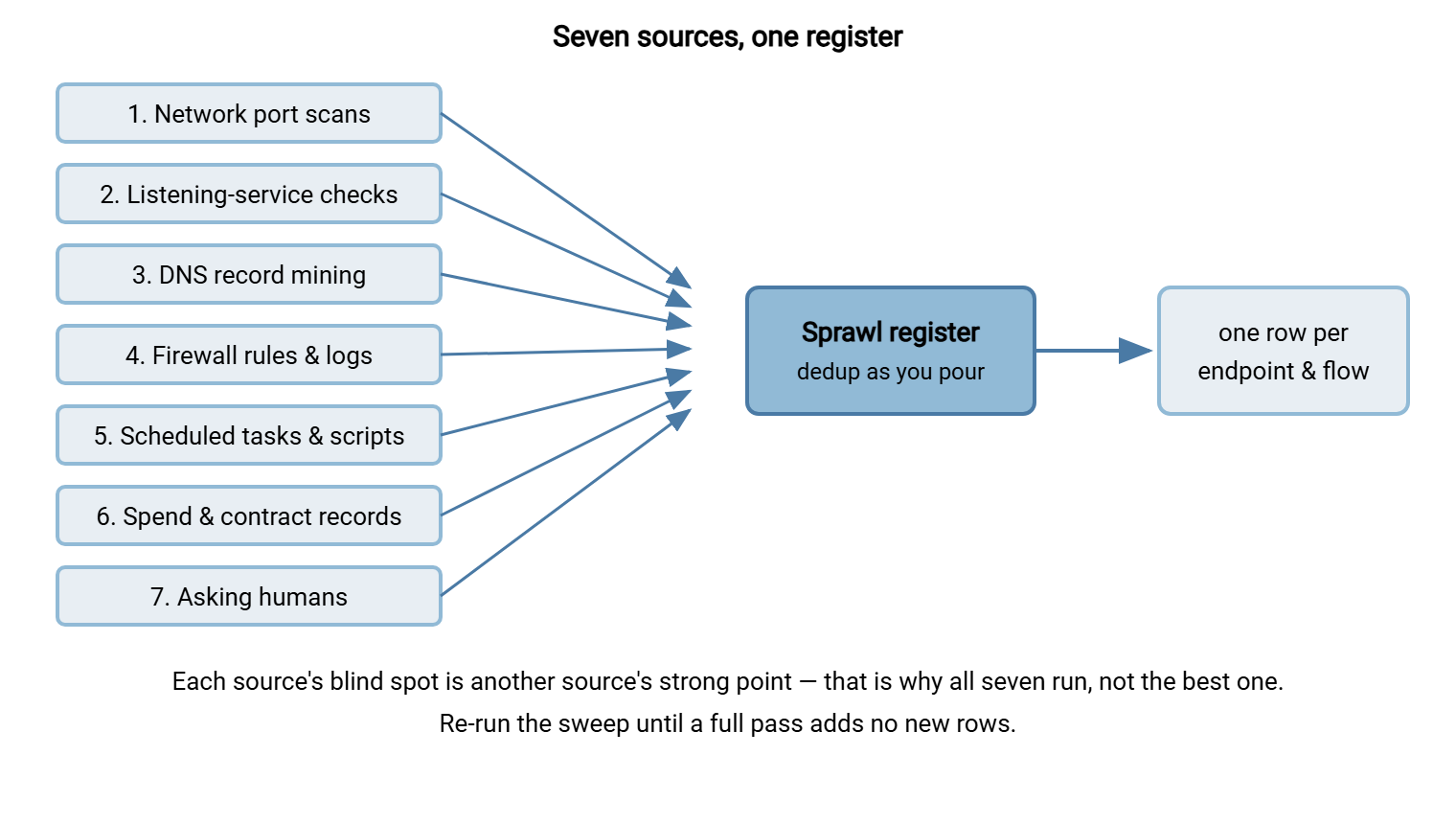
No single source finds everything. Each has a characteristic blind spot the others cover. A scan misses the host firewalled against your scanner. Firewall logs miss two machines talking on the same segment. The task sweep misses the flow living inside an application's own config. So run every source and pour all of them into one register, deduplicating as you go. That is the shape of the whole sweep:
Source 1: Scan Your Own Network for Listeners
A port scan asks every address in a range "are you listening?" — the fastest way to find transfer servers, including ones nobody remembers. Scan the transfer-relevant ports across every subnet you own, from a host with reach into each:
# Transfer-relevant ports across your subnets (adjust ranges to yours):
#   21 FTP control | 990 implicit FTPS | 22 SSH/SFTP | 989 FTPS data
#   80/443 HTTP(S) upload endpoints | 445 SMB | 2049 NFS
nmap -p 21,22,80,443,445,989,990,2049 --open 10.10.0.0/16 -oA sprawl-sweep

# Add service + version detection to confirm what actually answers:
nmap -p 21,22,990 --open -sV 10.10.0.0/16 -oA sprawl-sweep-detail
Two reading notes. First, a listener on port 22 is SSH, which usually means SFTP is available too. That is a transfer capability even on a box you think of as "just a Linux server." Include it: consolidation cares about every place files can move, not only dedicated servers. Second, service detection (-sV) matters more here than in a single-protocol hunt, because you are cataloging protocol mix per host. The same host offering FTP and SFTP is one endpoint with two doors. Count doors, not buildings.
Source 2: Listening-Service Checks From Inside
The scan has honest blind spots. A host firewall that admits only specific sources hides a listener. A service bound to an internal-only interface is invisible from your scanning host. Complement the outside view with an inside check on every server you can log into. This is also how you attribute a listener to the process behind it:
# Windows: what is listening on transfer ports, and which PID owns it?
netstat -ano | findstr /r ":21 :22 :990 :445 "
Get-NetTCPConnection -State Listen |
  Where-Object LocalPort -in 21,22,80,443,445,989,990,2049 |
  Select-Object LocalPort, OwningProcess

# Windows: transfer-ish services installed on this host
Get-Service | Where-Object {$_.DisplayName -match "ftp|sftp|ssh|transfer|file"}

# Linux: listeners plus the owning process on each
ss -ltnp | grep -E ':(21|22|80|443|445|989|990|2049)\b'
For every confirmed listener, pull the account list and recent activity. This is where an endpoint's own logs become discovery gold. A server with per-session logging tells you which accounts connect and when. It converts "a server exists" into "these accounts, this rhythm, this last-seen date" — the exact fields triage needs. A consolidated platform makes this trivial going forward. A server such as Sysax Multi Server logs every session to file and to a database. So once flows land there the usage evidence for the next review is a query, not another sweep. During discovery you are reading whatever logs each sprawled server happens to keep — and their unevenness is itself a finding worth recording. Some servers keep a diary; some keep nothing and look innocent.
Source 3: Mine DNS for Named Endpoints
DNS is an underused and distinctive discovery source, because it finds endpoints by their names rather than their addresses — and names carry intent. A host called ftp-legacy-03 or files-acme announces its purpose, its age, and often its owner in one label. Two techniques:
# Pull the zone if you run your own DNS and transfers are allowed (AXFR):
dig @your-dns-server example.com AXFR | grep -Ei "ftp|sftp|file|transfer|edi|drop|upload"

# No zone transfer? Sweep likely names against your resolver:
for n in ftp sftp files transfer edi drop upload archive; do
  for i in 01 02 03 legacy old prod; do
    host "$n-$i.example.com" 2>/dev/null | grep -v "not found"
  done
done

# Reverse-DNS the ranges you scanned — names attached to live IPs:
nmap -sL 10.10.0.0/24 | grep -Ei "ftp|sftp|file|transfer|edi|drop"
Cross-reference DNS names against the scan results. There are three outcomes, all useful. A name resolving to a scanned listener confirms and labels an endpoint. A name that resolves but shows no listener is a candidate that is off, firewalled, or moved — investigate it. A live listener with no meaningful name is the anonymous box the previous article's census warned about. Also mine DNS for partner-facing hints. Names like files-partnername reveal dedicated endpoints stood up for one relationship — each a consolidation candidate and a partner conversation. A hostname is the only documentation some servers ever got.
Source 4: Firewall Rules and Traffic Logs
The firewall is the one witness to every conversation that crossed a boundary. Its rule base is a map of every path someone deliberately opened. Query both. The firewall remembers what everyone else has forgotten.
The rule base shows what is allowed. List every rule and NAT forward referencing a transfer port. A rule with zero recent hits is still a finding — a dormant flow waiting to surprise you, or a stale hole to close. Record each rule's ID now; execution will want that list when rules come out with their servers.
The traffic logs show what actually happened. Group allowed connections to transfer ports by source and destination:
# The query shape (adapt to your firewall / log platform):
#   match:    destination port in (21,22,990,445,...), action allowed
#   group by: source IP, destination IP, destination port
#   output:   connection count, first seen, last seen

# Example on iptables-style syslog (SRC=... DST=... DPT=22):
grep -E "DPT=(21|22|990) " firewall.log \
  | grep -oE "SRC=[^ ]* DST=[^ ]* DPT=[0-9]+" \
  | sort | uniq -c | sort -rn
Each distinct source-destination-port triple is a candidate flow. Outbound triples (internal source, external destination) are your scripts and devices sending to partners. This is how partner-facing flows surface without touching a partner's network. Inbound triples are outsiders reaching your servers; internal triples are east-west flows between your own systems. Look back as far as retention allows: monthly and quarterly flows are exactly what a short window misses. They are the ones that break a consolidation weeks after you thought it was done. The one thing the firewall cannot see is two machines on the same segment exchanging files. That is why the scan and task sweep run alongside it.
Meridian Parts learned the value of the look-back the cheap way. Their asset system listed ftp-legacy-03.example.com as retired, with a closed decommission ticket from the previous autumn to prove it. The firewall log disagreed: one external source, inbound on port 21, at ten past two every night, allowed every time. The ticket had stopped the service but never disabled it. A routine reboot the following month had brought it back, set to automatic, as services are. A supplier had been uploading invoices to it ever since, and nobody on either side had noticed anything wrong because nothing was wrong. The row was reopened, the supplier was called, and the asset system was no longer asked for its opinion on what was running.
Source 5: Scheduled Tasks, Scripts, and Configs
Now hunt the initiators — the automation that moves files on a schedule or a trigger. This is the largest and most tedious source, and the one that finds the quarterly job sleeping between runs. Run it on every server that automates anything, including every host you found in sources 1-4:
# Windows: export every scheduled task with full detail, then grep
schtasks /query /v /fo CSV > tasks_thishost.csv
schtasks /query /fo LIST /v | findstr /i "ftp sftp curl scp transfer"

# PowerShell: task names plus the command each actually runs
Get-ScheduledTask | ForEach-Object {
  $a = ($_.Actions | ForEach-Object { "$($_.Execute) $($_.Arguments)" }) -join " "
  if ($a -match "ftp|sftp|curl|scp|transfer|upload|push") { "$($_.TaskName) :: $a" }
}

# Windows: sweep script and config folders for transfer usage + hardcoded hosts
findstr /s /i /m "ftp:// sftp:// open sftp" C:\Scripts\* D:\Jobs\*
findstr /s /i /m "ftp sftp Host= HostName" C:\Scripts\*.bat C:\Scripts\*.cmd C:\Scripts\*.ps1

# Linux: every scheduler, then the scripts themselves
for u in $(cut -d: -f1 /etc/passwd); do crontab -l -u "$u" 2>/dev/null | sed "s/^/$u: /"; done
ls /etc/cron.d /etc/cron.*ly; cat /etc/crontab; systemctl list-timers --all
grep -rn --include="*.sh" -e "ftp://" -e "sftp " -e "curl -T" -e "scp " /opt /usr/local /home

# Stored transfer credentials on disk (each is a lead AND a cleanup item)
ls -la /home/*/.netrc /root/.netrc 2>/dev/null
dir /s /b C:\Users | findstr /i "netrc sites.ini .sftp-config"
Widen the net past scripts. Application config files carry transfer endpoints — check line-of-business apps, backup software, and integration tools. GUI transfer clients store site lists in user-profile folders; a saved site is proof a human uses that flow by hand. And do not forget schedulers that are not the OS scheduler. Transfer-automation products — such as Sysax FTP Automation — run their jobs from inside themselves, invisible to schtasks and cron. So open each such tool's own task list separately. This source is the jobs-side twin of the servers hunt. Our automation inventory and debt article develops it into a standalone discipline, including how to read a cryptic job and safely retire one nobody owns. Resist fixing anything you find: discovery and remediation are different phases, and mixing them corrupts both. Every hit becomes a register row with a disposition decided later, at triage.
Source 6: Spend and Contract Records
Follow the money and you find the servers finance is paying for that IT never provisioned. This is the source that catches the developer's cloud VM on a team card and the branch appliance bought as "equipment." It reaches endpoints no scan can. They may be off, in a cloud tenant you have not inventoried, or on a network segment you did not know to scan:
- Cloud subscription line items — VMs, managed transfer services, storage buckets with public or SFTP-fronted access. Export the billing detail and search it for compute and transfer services outside the accounts IT manages.
- Software renewals and maintenance — a recurring charge for a transfer product, an appliance's support contract, a per-endpoint certificate. Each renewal names a capability someone still pays for.
- Expense reports and purchase cards show the small recurring charges that never hit a formal budget. That is where the truly shadow endpoints hide because they were bought to avoid the provisioning queue.
Spend records are unique among the sources: they name an owner automatically, because someone approved the charge. So they find the endpoint and the accountable human in the same row. Finance, it turns out, has been running an inventory all along.
Source 7: Ask the Humans
Some flows leave no technical trace between runs — a clerk uploading a file monthly with a GUI client, a workflow that lives entirely in one person's habit. The only sensor for those is people. Send a short, blame-free note to team leads:
Subject: Quick help — what files does your team send or receive?

We are tidying up how the organization moves files, so routine
transfers become easier and better supported. So we don't disrupt
anything your team relies on, could you tell us:

  - What files do you regularly send OUT, to whom, and how?
  - What files do you regularly receive, from whom, and how?
  - Any "it just works" transfer nobody wants touched? Name it.

Nothing is in trouble — we are mapping, not judging. A one-line
reply per flow is perfect.
Phrase it as protecting their workflow, because that is exactly what it does. People volunteer the shadow flow when they trust that naming it will not get it (or them) into trouble. Veterans are a special case: institutional memory is a legitimate discovery tool. "Ask whoever has been here longest what that box in the corner does" resolves more mysteries than any scan. I have tried both, and the veteran wins every time. The broader, protocol-agnostic version of this census lives in our file flow census article, which maps flows business-first rather than machine-first.
The Sprawl Register
Every source pours into one place: the sprawl register, deduplicated as you go. Keep two linked levels, because sprawl has two units. An endpoint is a place files can land or leave — a server, appliance, or listening service. A flow is a repeating transfer with a purpose — "nightly sales export to partner Acme." One endpoint usually hosts several flows; one flow touches at least two endpoints. Track both:
SPRAWL REGISTER

--- ENDPOINTS (one row per server / appliance / listening service) ---
ID:            short handle (EP-07)
Name / DNS:    hostname(s) resolving to it; IP or cloud id
Protocols:     FTP / FTPS / SFTP / HTTPS / SMB / NFS / proprietary
Found via:     scan / netstat / dns / firewall / task / spend / human
Software:      product and role, if known
Owner:         named human accountable (or "UNKNOWN" — a finding)
Credentials:   admin access on record? where?
Logging:       what it keeps, and where
Last activity: most recent session evidence
Spend:         who pays, how much, which budget
Disposition:   keep / merge / retire / contain / TBD

--- FLOWS (one row per repeating transfer) ---
ID:            FL-31
Name:          human ("Nightly sales export to partner Acme")
Direction:     inbound / outbound / internal
Source EP:     endpoint / script / device / person initiating
Dest EP:       endpoint receiving
Files:         pattern + what they contain + sensitivity
Trigger:       schedule / event / manual
Owner:         named human accountable
Partner:       yes (who + contact) / no
Depends on:    endpoint IDs this flow requires alive
Disposition:   keep / merge / retire / contain / TBD
Two fields carry the program. Owner converts a technical artifact into an accountable conversation. No row stays ownerless for long, even if the owner starts as "IT, by default." Our flow ownership and contacts article shows how to make that field stick. Depends on prevents the classic consolidation incident: it records which endpoints a flow needs alive. So when you retire an endpoint you can query the register for everything that still points at it. The article dependency mapping for flows develops that field into a full map. Keep the register in one shared, versioned place. It is the single source of truth for every decision the rest of the program makes. A spreadsheet that already claims to be the inventory is a witness, not a record.
Remember: discovery is a loop, not a line. Run all seven sources, then run them again. The second pass always finds rows the first missed. That is because a DNS name sends you scanning a new range and a human's reply names a script you then go read. You are done with the first sweep only when a complete pass adds no new rows. Keep the commands in a runbook; you will re-run this sweep to verify the consolidation and again to prevent re-sprawl.
From Register to Triage
When the sweep goes quiet, you hold something few organizations ever have: a complete, owned, deduplicated map of every place and process that moves files. This register alone — before a single server is touched — already pays for part of the program. It answers the audit's "show us every system that transfers files" and names owners for the incident responder. It makes the case for consolidation in numbers no one can wave away.
But a register is not a plan. The next step sorts every row into keep, merge, or retire, using usage evidence, owner status, and risk. That is the subject of triaging the sprawl. That triage turns your map into a work list. Its verdicts are only as trustworthy as the evidence in the register you just built — the best possible reason to have built it thoroughly. The server that has been off for a year will be in it, listening.
Frequently Asked Questions
Do I really need authorization to scan my own network?
Why include SSH and SMB, not just FTP ports?
How is this different from the "finding all your FTP" sweep?
What if a server turns up that nobody will claim?
Should I fix insecure things as I find them?
How long does a first sweep take?
From the Sysax team: we build secure file transfer software for Windows. Sysax Multi Server is an FTP, FTPS, SFTP, and HTTPS server. Sysax FTP Automation handles scheduled, scripted transfers. Free trials are on the download page.