
Mapping Flow Dependencies: What Breaks When One Flow Fails
"Is mft01 down?" "I don't know yet. Seven flows are." One transfer server reboots for patching at two in the morning and does not come back. By six, seven alerts have fired, three business owners have emailed, and a partner has called to say their import found nothing. None of the seven alerts said "mft01 is down." Each said that its own flow had failed. That was because each flow was monitored on its own, documented on its own, and, until that morning, thought of on its own. The administrator spent the first hour discovering what the estate already knew and had never written down. Those seven flows ran on one host. Four of them shared one SSH key, and two of them fed each other. The alerts were all correct. That was the least helpful thing about them.
A dependency is anything a flow needs in order to succeed that is not the flow itself. Examples are a file that must exist first, a system that must be up, or a key that must be valid. Others are a partner that must have published or a window that must not have closed. When flow A must finish before flow B can start, A is upstream of B and B is downstream of A. The words come from rivers, and the picture is right: trouble flows downhill, and it does not stop to ask whose flow it is. Mapping dependencies means writing them down so that "what breaks if this fails?" has an answer before it is asked.
This article builds the map for our running example, Meridian Parts and its forty-odd flows. You will see the four kinds of dependency and a dependency table you can copy. You will learn how to turn the table into a simple diagram and how to read the diagram for blast radius. You will also see how to find the hidden dependencies — shared keys and certificates. These do not look like dependencies until they expire. This article is part of our Flow Documentation series and extends the dependencies column of the transfer inventory.
Four Kinds of Dependency
There are four kinds of dependency, and the one everybody names first, the file that has to exist, is real but not the dangerous one. The other three cause more outages.
Data dependencies are the obvious kind. Meridian's nightly orders export (FLOW-0007) cannot run until the ERP system has finished its day-end close and written the orders file. The acknowledgement pull (FLOW-0008) is pointless until Acme Freight has processed the orders and written an acknowledgement. In the map these are arrows: ERP close → FLOW-0007 → FLOW-0008.
Timing dependencies are deadlines and windows. The payments file to Bluewater Bank (FLOW-0012) must land before the bank's cutoff at six in the evening. A file that arrives at five past six is processed tomorrow, which for a payroll run is a very different outcome. Some windows are on your side: the ERP is unavailable during its own batch between one and half past, so nothing may read from it then. Timing dependencies do not show up in a scheduler. The scheduler only knows when a job starts, and has no opinion on when it should have finished. The whole discipline of batch windows and cutoffs is in cutoff times and deadlines; here we only record them.
Shared components are the kind that produced the seven alerts. A host, a service account, an SSH key, a TLS certificate, a firewall rule, a network path, a partner's endpoint — each is used by several flows. When it fails, all of them fail at once. Shared components are the most under-documented dependencies because nobody thinks of "the key" as belonging to a flow. It belongs to the server. But if the key is revoked, four flows stop, and that makes it a dependency of four flows.
People and process dependencies are the ones that surprise new administrators. The bank file cannot be sent until the finance manager has approved the payment batch in the ERP. This is a human step, done by half past four on a good day. Northgate publishes its price list "each morning," which in practice means whenever their overnight job finishes. And some flows need a human to confirm before a resend. These belong on the map too, because a flow waiting on a person fails differently from one waiting on a file. Nobody gets paged for a person being late. People do not emit log lines.
The Dependency Table
The dependencies column in the inventory row holds a short summary — "up: ERP day-end close; down: FLOW-0008" — because the row must fit on one screen. The full detail goes in a dependency table: one row per dependency, not per flow, so a flow with four dependencies has four rows. The columns are the flow, what it depends on, and which of the four kinds it is. They also include what happens when the dependency fails, and how you would notice. Here is the slice of Meridian's table for the two chains drawn below.
| flow_id | depends_on | kind | if it fails | how you notice |
|---|---|---|---|---|
| FLOW-0007 | ERP day-end close (erp01), done by 01:30 | data | No orders file at 02:00; job sends nothing or yesterday's file | Source folder empty or file dated yesterday |
| FLOW-0007 | host mft01; key mft01-partners | shared | Also stops FLOW-0008, FLOW-0012, and five others | Several alerts at once, all "connection failed" |
| FLOW-0008 | FLOW-0007 delivered; Acme import at 04:30 | data + partner | Pull at 05:00 finds no acknowledgement; FLOW-0009 has nothing to load | Expected file absent at 05:00 |
| FLOW-0009 | FLOW-0008 pulled; ERP import window 06:00–06:30 | data + timing | ERP shows orders as unconfirmed; customer service cannot answer delivery queries | Import log shows zero rows |
| FLOW-0012 | FLOW-0011 approved-payments export; finance approval by 16:30 | data + people | No payments file to send; suppliers paid a day late | Source folder empty at 17:30 |
| FLOW-0012 | Bluewater cutoff 18:00 | timing | File processed next banking day | Only from the bank's confirmation — no local symptom |
The last column is the one that turns documentation into operations. "How you notice" is the seed of a monitoring check. If the answer is "expected file absent at 05:00," that is a freshness check waiting to be configured. This is described in freshness checks for expected files. If the answer is "no local symptom," as with the bank cutoff, you have found a dependency you cannot monitor from your side. You must cover that dependency with a deadline alarm instead. The question is not "did it fail?" but "has it succeeded yet, and it is now ten to six?"
From Table to Diagram
The table is complete but hard to read at a glance. A diagram makes the shape obvious — which flows are in a chain, which share a component, where the deadlines sit. Drawing one is easier than it sounds, because the table already contains everything needed.
Use three rules. Every flow and every external system is a box. Every data dependency is a solid arrow from upstream to downstream — from the thing that must happen first to the thing that waits for it. Every shared component is a box drawn differently (shaded, or at the edge) with dashed lines to each flow that uses it. Every timing dependency is a dashed box at the point in the chain where the deadline bites. Write the time each flow runs inside its box, so a reader can follow the clock left to right. The diagram below applies those rules to the six rows above.
The diagram shows two chains at Meridian. The upper chain runs from the ERP day-end close through the orders export, the acknowledgement pull, and the confirmations import back into the ERP. The lower chain runs from the ERP through the approved-payments export to the bank file and its six o'clock cutoff. A shaded bar across the top marks the shared host and key that three of the flows depend on.
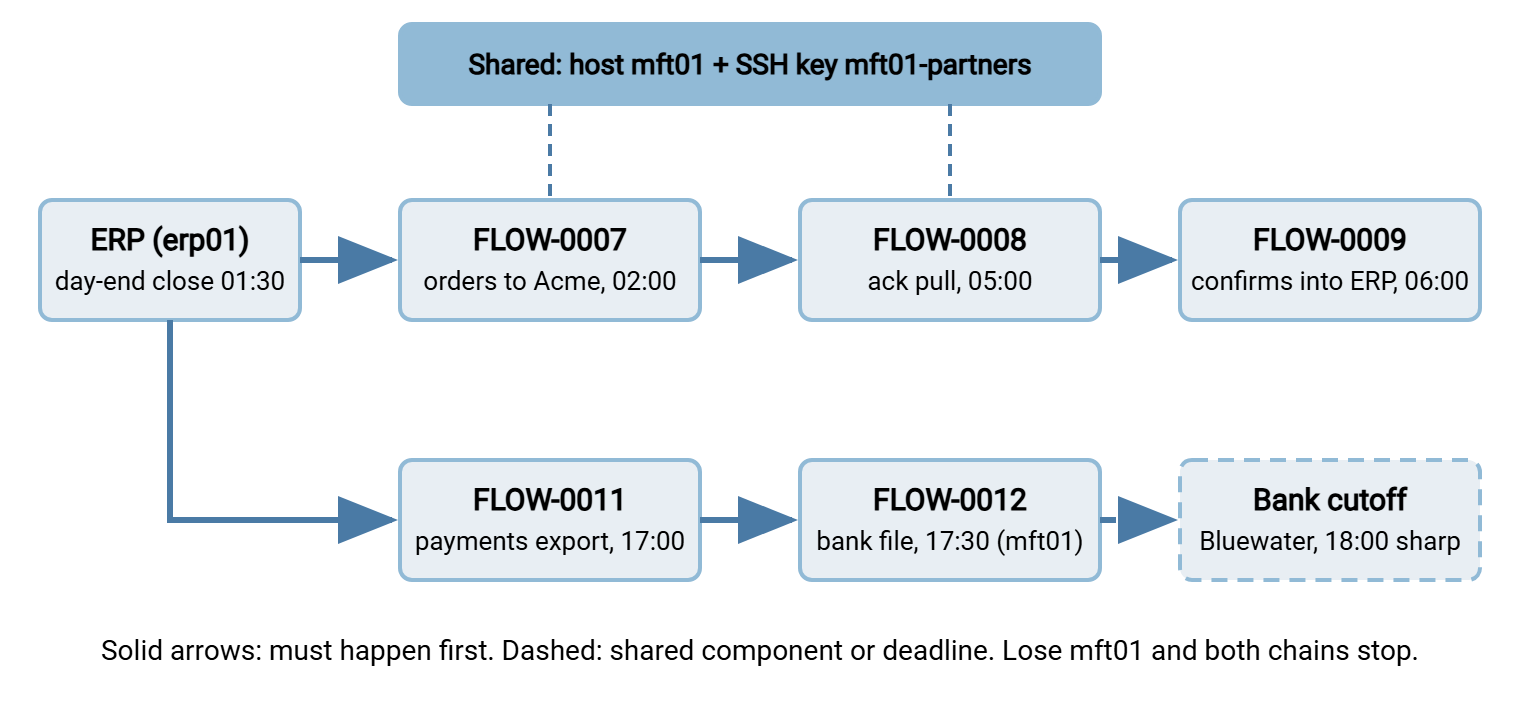
You can draw this on a whiteboard in ten minutes, and for a first pass you should. For the version that lives in the documentation, most teams use a text-based diagram tool. It accepts lines like FLOW-0007 --> FLOW-0008 and renders the boxes and arrows for you. The reason is that the text can be generated from the table and kept in version control next to it. A few lines of script produce the input from the dependency table:
# deps-to-diagram.ps1 — emit "A --> B" lines from the dependency table
# Expects columns: flow_id, depends_on, kind  (depends_on holds a flow ID or a component name)
Import-Csv .\dependency-table.csv | ForEach-Object {
    $style = if ($_.kind -eq 'data') { '-->' } else { '-.->' }   # dashed for shared/timing/people
    '"{0}" {1} "{2}"' -f $_.depends_on, $style, $_.flow_id
} | Sort-Object -Unique | Set-Content .\dependency-diagram.txt
Regenerate the picture whenever the table changes, and never edit the picture by hand. A hand-edited diagram is the second copy of the truth that the inventory article warned against. It is always the prettier copy, which is how it wins.
Reading the Map for Blast Radius
The blast radius of a failure is everything it takes down with it. On the map, you find it by putting a finger on the thing that failed and following every arrow and dashed line away from it. Three readings of the Meridian map show why this is worth the drawing time.
Acme's server is unreachable at two in the morning. FLOW-0007 fails. Follow the arrow: FLOW-0008 at five will find no acknowledgement, because Acme never received the orders. Follow again: FLOW-0009 at six loads nothing, and the ERP shows every order as unconfirmed when customer service arrives at eight. One failure, three alerts, one business impact. The runbook for FLOW-0008 should say "if FLOW-0007 failed tonight, this is expected; fix 0007 first." That saves the on-call administrator from investigating a symptom.
The finance manager is off sick and nobody approves the payment batch. No arrow fails, no alert fires, and FLOW-0012 at half past five sends nothing because there is nothing to send. Only the dashed cutoff box tells you the clock is running. This is why people dependencies go on the map: the fix is a phone call by four, not a restart at six.
mft01 is down. Follow the dashed lines from the shared bar: FLOW-0007, FLOW-0008, and FLOW-0012 all stop, and so do the five others not drawn here. This is the seven-alerts morning. The map shows that the right first action is to restore the host. If it cannot be restored quickly, run the Tier 1 flows from the standby by hand. The map also shows why that host is the strongest candidate for redundancy. The options are in the high availability series. The restore order for a real disaster comes straight from this map, as the disaster recovery series explains.
The longest chain of arrows with the tightest deadline at the end is the critical path: the sequence where any delay becomes a missed deadline. For the upper chain it is ERP close → 0007 → Acme import → 0008 → 0009 → ERP import window, with about four and a half hours of total slack. Knowing the slack tells you how long you can spend fixing before you must escalate. The method for finding critical paths across a whole batch night is in batch dependency mapping. This article's map is the transfer-flow slice of that larger picture. The two should agree. The first time you compare them, they will not.
Remember: a flow's alert tells you a symptom. The map tells you the cause and the consequences. When several alerts fire together, look for the shared component before you look at any single flow.
Hidden Dependencies: Keys, Certificates, and Dates
Shared components hide in plain sight because they are recorded as properties of a server, not of a flow. The inventory makes them findable, because every flow row names its credential in credential_ref. Count how many rows share each reference, and you have a list of shared credentials sorted by blast radius:
# shared-credentials.ps1 — which credential references are used by more than one active flow?
Import-Csv .\transfer-inventory.csv |
  Where-Object { $_.status -eq 'active' } |
  Group-Object credential_ref |
  Where-Object { $_.Count -gt 1 } |
  Sort-Object Count -Descending |
  ForEach-Object { '{0,3} flows  {1}  ({2})' -f $_.Count, $_.Name, (($_.Group.flow_id) -join ', ') }
At Meridian the top line reads "8 flows — vault: mft01-partners." Eight flows depend on one key; if it is rotated carelessly or revoked by a partner, eight things stop. I have run that count on estates where the top line was a number nobody wanted to say aloud. That single number justifies two follow-ups. Rotate the key on a schedule with the downstream flows listed in the change ticket. Also consider splitting it so that one partner's key change cannot affect another's. The inventory-driven approach to rotation is in key rotation and inventory.
Certificates are the same pattern with a date attached. An FTPS or HTTPS flow depends on a certificate that will expire on a known day. The expiry is a timing dependency you can see months ahead and still, famously, miss. Add every certificate and key with an expiry as a row in the dependency table, kind "shared". Put the expiry date in the "if it fails" column. Make sure something watches the date — see certificate expiry monitoring, and the server-side view in certificate and key expiry watch. Partner-side expiries count too. When Acme's host key changes, every flow that talks to Acme depends on someone updating the known-hosts entry. The runbook should say so.
Two more hidden kinds are worth a sweep. Firewall rules: a flow to a partner depends on an allow rule that a network change can silently remove. So record the rule's identifier in the dependency table. And the automation tool itself: one task may run several steps in sequence — export, encrypt, send, confirm. A scripted task in Sysax FTP Automation can do this. In that case, the steps are a dependency chain inside a single flow. The runbook should list them in order so a stranger knows which step failed and what has already happened.
Where the Dependencies Are Recorded
Three places, each with a different level of detail. The inventory row's dependencies column holds the one-line summary: immediate upstream, immediate downstream. The dependency table holds every dependency with its kind, consequence, and symptom, and is the source the diagram is generated from. The per-flow runbook, built in runbooks per flow, turns dependencies into instructions. One is "before restarting, check that the upstream file exists and is dated today." Another is "after fixing, tell the owners of FLOW-0008 and FLOW-0009 that their flows will run late." The runbook is where the map becomes a checklist.
Dependencies also define what to test. A shared component may change — a new host, a rotated key, a moved firewall rule. In that case, the set of flows to test afterwards is exactly the set of dashed lines from that component. Run those tests somewhere safe before the real thing, as the testing and staging series describes. Use the dependency table as the test list (regression testing transfer jobs shows what each test should prove). That way, nothing is forgotten because it "isn't really a transfer change." In my experience, the changes that break transfers are rarely filed as transfer changes.
Keeping the Map Honest
Dependency maps drift the moment they are drawn. A developer adds a second step to the ERP export; a partner moves their cutoff; a new flow quietly starts reading the same folder as an old one. Three habits limit the drift. First, every change ticket that touches a flow asks "does this add, remove, or move a dependency?" and updates the table before closing. Second, every incident review asks "was the blast radius what the map predicted?" When it was not, the map was wrong. Fixing it is part of that review. Third, once a quarter, re-run the shared-credentials count and compare it with the shared rows in the table. A credential that gained a flow since the last count is a dependency nobody recorded. The general machinery for keeping documentation true is in keeping transfer documentation current.
Northgate Retail's map survived its first incident review by about ten minutes. A rotated key had stopped the five flows the map said it would, and a sixth. The sixth was a store-returns feed that had gone live the month before. It had borrowed the same key because it was there. Nobody had recorded it, because a borrowed key does not feel like a dependency until it is gone. The review added the row, split the key, and put one question on the change template: which credential does this flow use? The next rotation stopped exactly the flows the map said it would, which is the nicest thing a map can do.
A map that has been wrong once and corrected is worth more than one that has never been tested. The first outage after you draw it will show you a dependency you missed; add it, and the next outage will be shorter.
Wrapping Up
Every flow depends on data upstream, on windows and cutoffs, on shared hosts and keys and rules, and on people. Write each dependency as a row — flow, dependency, kind, consequence, symptom. Generate a diagram from the rows. Read the diagram for blast radius whenever more than one alert fires. Count how many flows share each credential, because that number is the size of the outage waiting behind it. Then feed the map into the runbooks, the test lists, and the restore order, and correct it after every incident that proves it wrong. Next time the seven alerts fire, the first thing you read is the map.
The runbooks that turn this map into night-time instructions are in runbooks per flow. The owners who must be told when an upstream flow fails come from flow ownership and contacts. And the wider batch-night version of this map is in batch dependency mapping.
Frequently Asked Questions
What is the difference between upstream and downstream?
Do I really need a diagram, or is the table enough?
How do I find shared credentials I did not know about?
Should partner-side things like their cutoff time go on my map?
How much detail is too much?
From the Sysax team: we build secure file transfer software for Windows. Sysax Multi Server is an FTP, FTPS, SFTP, and HTTPS server. Sysax FTP Automation handles scheduled, scripted transfers. Free trials are on the download page.